2D Mesh Cell-Size Sensitivity for Sediment Transport - Second Case: Weise Flume
Model: Weise 2D (Weise_2D, HEC's 2D Sediment Transport example suite, plan "Weise")
This is the second case for the 2D sediment mesh-sensitivity workflow. The primary case
(examples/230_mesh_sensitivity_analysis.ipynb) studied the Chippewa River reach (US Customary
units, ~200 ft cells). This notebook applies the same workflow and the same library reader
(HdfResultsSediment) to a deliberately contrasting model:
- Controlled physical flume (16.5 m x 1.0 m), SI units (metres), base cell ~0.1 m.
- Wu transport function, 20 grain classes, 2D erosion enabled, 1-hour event.
Running the identical analysis on a metric, sub-meter flume validates that the mesh-regeneration
workflow and the HdfResultsSediment reader are unit-system agnostic, and gives an independent
second data point on how mesh resolution shapes mobile-bed results.
See notebook 230 for the full discussion of mesh-regeneration limitations (structures with connections on spacing-controlled breaklines failing when cell size changes). Like Chippewa, Weise is structure-free and breakline-free, so cell size is the only variable.
Setup
USE_LOCAL_SOURCE = True

import sys
from pathlib import Path
if USE_LOCAL_SOURCE:
    local_path = str(Path.cwd().parent)
    if local_path not in sys.path:
        sys.path.insert(0, local_path)
    print(f"LOCAL SOURCE MODE: {local_path}/ras_commander")

import time
import numpy as np
import pandas as pd
import matplotlib.pyplot as plt
import h5py

from ras_commander import init_ras_project, RasExamples, RasPlan, RasCmdr
from ras_commander.geom.GeomMesh import GeomMesh
from ras_commander.hdf import HdfResultsPlan, HdfResultsSediment

import ras_commander
print(f"Loaded: {ras_commander.__file__}")
LOCAL SOURCE MODE: G:\GH\ras-commander/ras_commander


Loaded: G:\GH\ras-commander\ras_commander\__init__.py
Parameters
PROJECT_NAME  = "Weise_2D"
RAS_VERSION   = "7.0"
TEMPLATE_PLAN = "01"           # "Weise" sediment plan (mobile bed, Wu transport)
MESH_NAME     = "2DArea"
SUFFIX        = "232_weise_meshsens"

# SI units (metres). As-built base spacing ~0.1 m (2,703 interior cells over a 16.5 x 1.0 m flume).
BASE_CELL_SIZE = 0.1           # m
# Fine (0.025 m) up to 2 x base (0.2 m).
CELL_SIZES = [0.2, 0.1, 0.05, 0.025]   # m (coarse -> fine)

# Mobile-bed runtime grows with cell count and Courant sub-stepping; the finest mesh
# (0.025 m, ~21k cells) projects to tens of minutes even over the 1-hour window, so it is gated.
# Raise this to execute the 0.025 m mesh.
EXECUTE_CELL_BUDGET = 8000     # cells

NUM_CORES = 2

print(f"Cell sizes (m): {CELL_SIZES}")
print(f"Execute cell budget: {EXECUTE_CELL_BUDGET:,} cells")
Cell sizes (m): [0.2, 0.1, 0.05, 0.025]
Execute cell budget: 8,000 cells
Extract and Inspect
project_folder = RasExamples.extract_project(PROJECT_NAME, suffix=SUFFIX)
ras = init_ras_project(project_folder, RAS_VERSION)

print("Plans:")
print(ras.plan_df[['plan_number', 'Plan Title', 'Geom File', 'unsteady_number']].to_string(index=False))
template_geom = ras.plan_df.loc[ras.plan_df['plan_number'] == TEMPLATE_PLAN, 'Geom File'].values[0]
geom_path = Path(ras.geom_df.loc[ras.geom_df['geom_number'] == template_geom, 'full_path'].values[0])
gtxt = geom_path.read_text(errors='replace')
ptxt = (geom_path.parent / f"{ras.project_name}.p{TEMPLATE_PLAN}").read_text(errors='replace')

print(f"\nTemplate plan {TEMPLATE_PLAN} -> geometry g{template_geom}")
print("Run Sediment :", '-1 (ON)' if 'Run Sediment=-1' in ptxt else 'OFF')
print("2D areas     :", gtxt.count('Storage Area Is2D=-1'))
print("Sim window   :", [l.split('=')[1] for l in ptxt.splitlines() if l.startswith('Simulation Date=')])
print("Structures (Connection/Culvert/Gate):",
      gtxt.count('Connection='), gtxt.count('Culvert='), gtxt.count('Gate Name='))
print("Breaklines   :", len(GeomMesh.get_breakline_names(geom_path)))
2026-06-03 06:55:19 - ras_commander.RasExamples - INFO - Successfully extracted project 'Weise_2D' to G:\GH\ras-commander\examples\example_projects\Weise_2D_232_weise_meshsens


2026-06-03 06:55:19 - ras_commander.RasUtils - INFO - Discovered HEC-RAS 7.0 at C:\Program Files (x86)\HEC\HEC-RAS\7.0\Ras.exe via filesystem (x86)


2026-06-03 06:55:19 - ras_commander.RasUtils - INFO - Discovered HEC-RAS 6.7 Beta 5 at C:\Program Files (x86)\HEC\HEC-RAS\6.7 Beta 5\Ras.exe via filesystem (x86)


2026-06-03 06:55:19 - ras_commander.RasUtils - INFO - Discovered HEC-RAS 6.5 at C:\Program Files (x86)\HEC\HEC-RAS\6.5\Ras.exe via filesystem (x86)


2026-06-03 06:55:19 - ras_commander.RasUtils - INFO - Discovered HEC-RAS 6.3.1 at C:\Program Files (x86)\HEC\HEC-RAS\6.3.1\Ras.exe via filesystem (x86)


2026-06-03 06:55:19 - ras_commander.RasUtils - INFO - Discovered HEC-RAS 6.2 at C:\Program Files (x86)\HEC\HEC-RAS\6.2\Ras.exe via filesystem (x86)


2026-06-03 06:55:19 - ras_commander.RasUtils - INFO - Discovered HEC-RAS 6.1 at C:\Program Files (x86)\HEC\HEC-RAS\6.1\Ras.exe via filesystem (x86)


2026-06-03 06:55:19 - ras_commander.RasUtils - INFO - Discovered HEC-RAS 6.0 at C:\Program Files (x86)\HEC\HEC-RAS\6.0\Ras.exe via filesystem (x86)


2026-06-03 06:55:19 - ras_commander.RasUtils - INFO - Discovered HEC-RAS 5.0.7 at C:\Program Files (x86)\HEC\HEC-RAS\5.0.7\Ras.exe via filesystem (x86)


2026-06-03 06:55:19 - ras_commander.RasUtils - INFO - Discovered HEC-RAS 5.0.6 at C:\Program Files (x86)\HEC\HEC-RAS\5.0.6\Ras.exe via filesystem (x86)


2026-06-03 06:55:19 - ras_commander.RasUtils - INFO - Discovered HEC-RAS 5.0.5 at C:\Program Files (x86)\HEC\HEC-RAS\5.0.5\Ras.exe via filesystem (x86)


2026-06-03 06:55:19 - ras_commander.RasUtils - INFO - Discovered HEC-RAS 5.0.4 at C:\Program Files (x86)\HEC\HEC-RAS\5.0.4\Ras.exe via filesystem (x86)


2026-06-03 06:55:19 - ras_commander.RasUtils - INFO - Discovered HEC-RAS 5.0.3 at C:\Program Files (x86)\HEC\HEC-RAS\5.0.3\Ras.exe via filesystem (x86)


2026-06-03 06:55:19 - ras_commander.RasUtils - INFO - Discovered HEC-RAS 5.0.1 at C:\Program Files (x86)\HEC\HEC-RAS\5.0.1\Ras.exe via filesystem (x86)


2026-06-03 06:55:19 - ras_commander.RasUtils - INFO - Discovered HEC-RAS 5.0 at C:\Program Files (x86)\HEC\HEC-RAS\5.0\Ras.exe via filesystem (x86)


2026-06-03 06:55:19 - ras_commander.RasUtils - INFO - Discovered HEC-RAS 4.1.0 at C:\Program Files (x86)\HEC\HEC-RAS\4.1.0\Ras.exe via filesystem (x86)


2026-06-03 06:55:19 - ras_commander.RasUtils - INFO - Discovered HEC-RAS 4.0 at C:\Program Files (x86)\HEC\HEC-RAS\4.0\Ras.exe via filesystem (x86)


2026-06-03 06:55:19 - ras_commander.RasUtils - INFO - Discovered HEC-RAS 6.6 at C:\Program Files (x86)\HEC\HEC-RAS\6.6\Ras.exe via filesystem (x86)


2026-06-03 06:55:19 - ras_commander.RasUtils - INFO - Discovered 17 installed HEC-RAS version(s)


2026-06-03 06:55:19 - ras_commander.RasPrj - INFO - HEC-RAS 7.0 found via version discovery: C:\Program Files (x86)\HEC\HEC-RAS\7.0\Ras.exe


2026-06-03 06:55:19 - ras_commander.RasMap - INFO - Successfully parsed RASMapper file: G:\GH\ras-commander\examples\example_projects\Weise_2D_232_weise_meshsens\Weise.rasmap


2026-06-03 06:55:19 - ras_commander.RasPrj - WARNING - Could not resolve project CRS for G:\GH\ras-commander\examples\example_projects\Weise_2D_232_weise_meshsens


2026-06-03 06:55:19 - ras_commander.RasPrj - INFO - ras-commander v0.97.0 | An open-source project of CLB Engineering Corporation (https://clbengineering.com/) | Docs: https://ras-commander.readthedocs.io | GitHub: https://github.com/gpt-cmdr/ras-commander


2026-06-03 06:55:19 - ras_commander.RasPrj - INFO - Project initialized: Weise | Folder: G:\GH\ras-commander\examples\example_projects\Weise_2D_232_weise_meshsens


2026-06-03 06:55:19 - ras_commander.RasPrj - INFO - Using HEC-RAS executable: C:\Program Files (x86)\HEC\HEC-RAS\7.0\Ras.exe


2026-06-03 06:55:19 - ras_commander.RasPrj - INFO -
═══════════════════════════════════════════════════════════════════════
ras-commander | HEC-RAS Automation Library
Docs: https://gpt-cmdr.github.io/ras-commander/
Repo: https://github.com/gpt-cmdr/ras-commander
═══════════════════════════════════════════════════════════════════════

PROJECT DATAFRAMES (single source of truth — use these, not file globbing):
  ras.plan_df        Plans, HDF paths, geometry/flow associations
  ras.geom_df        Geometry files and HDF preprocessor paths
  ras.flow_df        Steady flow files
  ras.unsteady_df    Unsteady flow files and configurations
  ras.boundaries_df  Boundary conditions (type, name, location)
  ras.results_df     Lightweight HDF results summaries
  ras.rasmap_df      RASMapper layers, terrain, land cover paths

KEY APIS (static classes — call directly, never instantiate):
  Execution:    RasCmdr.compute_plan() / compute_parallel() / compute_test_mode()
  Plan Files:   RasPlan.clone_plan() / clone_geom() / set_geom()
  Unsteady:     RasUnsteady — IC/BC management, gate openings, precipitation
  Geometry:     GeomCrossSection, GeomBridge, GeomStorage, GeomLateral, GeomMesh
  HDF Results:  HdfResultsPlan.get_wse() / get_compute_messages()
                HdfResultsMesh.get_mesh_max_ws() / get_mesh_cells_timeseries()
                HdfMesh.get_mesh_cell_points()
  QA/QC:        RasCheck.run_check() / RasFixit (geometry repair)
  DSS:          RasDss.get_timeseries() / check_pathname()
  USGS:         UsgsGaugeSpatial, GaugeMatcher, RasUsgsBoundaryGeneration
  Precipitation: StormGenerator, Atlas14Storm, PrecipAorc, Atlas14Variance
  Terrain:      RasTerrain.create_terrain_hdf() / RasTerrainMod

MULTI-PROJECT: Pass ras_object= to all API calls when using local RasPrj instances.

EXAMPLES: 100+ notebooks in examples/ (100s=execution, 200s=geometry, 300s=unsteady,
  400s=HDF results, 500s=remote, 800s=QA/QC, 900s=data integration).
  Review relevant notebooks before assembling new workflows.

PLATFORM: Most HEC-RAS operations require Windows. Linux/Wine support for
  headless execution, data access, geometry modification, and preprocessing
  is available via RasProcess (HEC-RAS 6.6+). See ras_commander/RasProcess.py.
  Remote distributed execution: ras_commander/remote/ (PsExec, Docker, SSH, cloud).
═══════════════════════════════════════════════════════════════════════


Plans:
plan_number Plan Title Geom File unsteady_number
         01      Weise        08              01

Template plan 01 -> geometry g08
Run Sediment : -1 (ON)
2D areas     : 1
Sim window   : ['08Dec2016,0000,08Dec2016,0100']
Structures (Connection/Culvert/Gate): 0 0 0
Breaklines   : 0
Regenerate Meshes Across Cell Sizes
Clone the geometry and regenerate the mesh at each cell size (0.025 m fine -> 0.2 m = 2x base). No structures or breaklines, so regeneration is unconstrained.
mesh_rows = []
for cs in CELL_SIZES:
    new_geom = RasPlan.clone_geom(template_geom, ras_object=ras)
    gpath = Path(ras.geom_df.loc[ras.geom_df['geom_number'] == new_geom, 'full_path'].values[0])
    try:
        mr = GeomMesh.generate(geom_number=gpath, mesh_name=MESH_NAME, cell_size=cs,
                               max_iterations=8, ras_object=ras)
        status, gcells, gfaces = mr.status, mr.cell_count, mr.face_count
    except Exception as e:
        status, gcells, gfaces = f"ERROR: {e}", np.nan, np.nan
    will_run = np.isfinite(gcells) and gcells <= EXECUTE_CELL_BUDGET
    mesh_rows.append({"cell_size": cs, "geom": new_geom, "geom_path": gpath,
                      "gen_cells": gcells, "gen_faces": gfaces, "will_run": will_run})
    print(f"  {cs:>6.3f} m -> g{new_geom}  cells={gcells}  faces={gfaces}  "
          f"{'RUN' if will_run else 'gated'}")
mesh_df = pd.DataFrame(mesh_rows)
2026-06-03 06:55:19 - ras_commander.RasUtils - INFO - File cloned from G:\GH\ras-commander\examples\example_projects\Weise_2D_232_weise_meshsens\Weise.g08 to G:\GH\ras-commander\examples\example_projects\Weise_2D_232_weise_meshsens\Weise.g01


2026-06-03 06:55:19 - ras_commander.RasUtils - INFO - File cloned from G:\GH\ras-commander\examples\example_projects\Weise_2D_232_weise_meshsens\Weise.g08.hdf to G:\GH\ras-commander\examples\example_projects\Weise_2D_232_weise_meshsens\Weise.g01.hdf


2026-06-03 06:55:19 - ras_commander.RasUtils - INFO - Project file updated with new Geom entry: 01


2026-06-03 06:55:19 - ras_commander.RasMap - INFO - Successfully parsed RASMapper file: G:\GH\ras-commander\examples\example_projects\Weise_2D_232_weise_meshsens\Weise.rasmap


2026-06-03 06:55:19 - ras_commander.RasPrj - WARNING - Could not resolve project CRS for G:\GH\ras-commander\examples\example_projects\Weise_2D_232_weise_meshsens


2026-06-03 06:55:22 - ras_commander.geom.GeomMesh - INFO - Synced cell size 0.2 → HDF Spacing dx/dy


2026-06-03 06:55:22 - ras_commander.geom.GeomMesh - INFO - [2DArea] 9-point perimeter from .NET


2026-06-03 06:55:23 - ras_commander.geom.GeomMesh - INFO - Seeds via .NET RegenerateMeshPoints: 320 (0 breaklines incl 0 struct, 1 perimeters)


2026-06-03 06:55:23 - ras_commander.geom.GeomMesh - INFO - [2DArea] 320 seeds via .NET RegenerateMeshPoints


2026-06-03 06:55:23 - ras_commander.geom.GeomMesh - INFO - Text seeds patched → 320 points in Weise.g01


2026-06-03 06:55:23 - ras_commander.geom.GeomMesh - INFO - [2DArea] Mesh complete: 320 cells, 730 faces in 1 iteration(s)


2026-06-03 06:55:23 - ras_commander.RasUtils - INFO - File cloned from G:\GH\ras-commander\examples\example_projects\Weise_2D_232_weise_meshsens\Weise.g08 to G:\GH\ras-commander\examples\example_projects\Weise_2D_232_weise_meshsens\Weise.g02


2026-06-03 06:55:23 - ras_commander.RasUtils - INFO - File cloned from G:\GH\ras-commander\examples\example_projects\Weise_2D_232_weise_meshsens\Weise.g08.hdf to G:\GH\ras-commander\examples\example_projects\Weise_2D_232_weise_meshsens\Weise.g02.hdf


2026-06-03 06:55:23 - ras_commander.RasUtils - INFO - Project file updated with new Geom entry: 02


2026-06-03 06:55:23 - ras_commander.RasMap - INFO - Successfully parsed RASMapper file: G:\GH\ras-commander\examples\example_projects\Weise_2D_232_weise_meshsens\Weise.rasmap


2026-06-03 06:55:23 - ras_commander.RasPrj - WARNING - Could not resolve project CRS for G:\GH\ras-commander\examples\example_projects\Weise_2D_232_weise_meshsens


2026-06-03 06:55:23 - ras_commander.geom.GeomMesh - INFO - Synced cell size 0.1 → HDF Spacing dx/dy


2026-06-03 06:55:23 - ras_commander.geom.GeomMesh - INFO - [2DArea] 9-point perimeter from .NET


   0.200 m -> g01  cells=320  faces=730  RUN


2026-06-03 06:55:24 - ras_commander.geom.GeomMesh - INFO - Seeds via .NET RegenerateMeshPoints: 1348 (0 breaklines incl 0 struct, 1 perimeters)


2026-06-03 06:55:24 - ras_commander.geom.GeomMesh - INFO - [2DArea] 1348 seeds via .NET RegenerateMeshPoints


2026-06-03 06:55:24 - ras_commander.geom.GeomMesh - INFO - Text seeds patched → 1348 points in Weise.g02


2026-06-03 06:55:24 - ras_commander.geom.GeomMesh - INFO - [2DArea] Mesh complete: 1348 cells, 2876 faces in 1 iteration(s)


2026-06-03 06:55:24 - ras_commander.RasUtils - INFO - File cloned from G:\GH\ras-commander\examples\example_projects\Weise_2D_232_weise_meshsens\Weise.g08 to G:\GH\ras-commander\examples\example_projects\Weise_2D_232_weise_meshsens\Weise.g03


2026-06-03 06:55:24 - ras_commander.RasUtils - INFO - File cloned from G:\GH\ras-commander\examples\example_projects\Weise_2D_232_weise_meshsens\Weise.g08.hdf to G:\GH\ras-commander\examples\example_projects\Weise_2D_232_weise_meshsens\Weise.g03.hdf


2026-06-03 06:55:24 - ras_commander.RasUtils - INFO - Project file updated with new Geom entry: 03


2026-06-03 06:55:24 - ras_commander.RasMap - INFO - Successfully parsed RASMapper file: G:\GH\ras-commander\examples\example_projects\Weise_2D_232_weise_meshsens\Weise.rasmap


2026-06-03 06:55:24 - ras_commander.RasPrj - WARNING - Could not resolve project CRS for G:\GH\ras-commander\examples\example_projects\Weise_2D_232_weise_meshsens


2026-06-03 06:55:24 - ras_commander.geom.GeomMesh - INFO - Synced cell size 0.05 → HDF Spacing dx/dy


2026-06-03 06:55:24 - ras_commander.geom.GeomMesh - INFO - [2DArea] 9-point perimeter from .NET


   0.100 m -> g02  cells=1348  faces=2876  RUN


2026-06-03 06:55:24 - ras_commander.geom.GeomMesh - INFO - Seeds via .NET RegenerateMeshPoints: 5406 (0 breaklines incl 0 struct, 1 perimeters)


2026-06-03 06:55:24 - ras_commander.geom.GeomMesh - INFO - [2DArea] 5406 seeds via .NET RegenerateMeshPoints


2026-06-03 06:55:25 - ras_commander.geom.GeomMesh - INFO - Text seeds patched → 5406 points in Weise.g03


2026-06-03 06:55:25 - ras_commander.geom.GeomMesh - INFO - [2DArea] Mesh complete: 5406 cells, 11172 faces in 1 iteration(s)


2026-06-03 06:55:25 - ras_commander.RasUtils - INFO - File cloned from G:\GH\ras-commander\examples\example_projects\Weise_2D_232_weise_meshsens\Weise.g08 to G:\GH\ras-commander\examples\example_projects\Weise_2D_232_weise_meshsens\Weise.g04


2026-06-03 06:55:25 - ras_commander.RasUtils - INFO - File cloned from G:\GH\ras-commander\examples\example_projects\Weise_2D_232_weise_meshsens\Weise.g08.hdf to G:\GH\ras-commander\examples\example_projects\Weise_2D_232_weise_meshsens\Weise.g04.hdf


2026-06-03 06:55:25 - ras_commander.RasUtils - INFO - Project file updated with new Geom entry: 04


2026-06-03 06:55:25 - ras_commander.RasMap - INFO - Successfully parsed RASMapper file: G:\GH\ras-commander\examples\example_projects\Weise_2D_232_weise_meshsens\Weise.rasmap


2026-06-03 06:55:25 - ras_commander.RasPrj - WARNING - Could not resolve project CRS for G:\GH\ras-commander\examples\example_projects\Weise_2D_232_weise_meshsens


2026-06-03 06:55:25 - ras_commander.geom.GeomMesh - INFO - Synced cell size 0.025 → HDF Spacing dx/dy


   0.050 m -> g03  cells=5406  faces=11172  RUN


2026-06-03 06:55:25 - ras_commander.geom.GeomMesh - INFO - [2DArea] 9-point perimeter from .NET


2026-06-03 06:55:26 - ras_commander.geom.GeomMesh - INFO - Seeds via .NET RegenerateMeshPoints: 21643 (0 breaklines incl 0 struct, 1 perimeters)


2026-06-03 06:55:26 - ras_commander.geom.GeomMesh - INFO - [2DArea] 21643 seeds via .NET RegenerateMeshPoints


2026-06-03 06:55:27 - ras_commander.geom.GeomMesh - INFO - Text seeds patched → 21643 points in Weise.g04


2026-06-03 06:55:27 - ras_commander.geom.GeomMesh - INFO - [2DArea] Mesh complete: 21643 cells, 44002 faces in 1 iteration(s)


   0.025 m -> g04  cells=21643  faces=44002  gated
Execute (constant native 1-hour window)
The plan's native simulation window (1 hour) is held constant across all meshes, so result
differences across meshes reflect cell-size resolution rather than changes in the flow forcing (numerical-scheme and time-step effects also vary with resolution). We also use
RasPlan.set_sediment_output_variables() to request active-layer gradation output
(d50/d10/d90) on each cloned plan -- the stock Weise plan omits it, so without this the
Cell Active Layer Percentile Diameters datasets would not be written.
def solver_solution(hdf_path):
    with h5py.File(hdf_path, 'r') as f:
        s = f.get('Results/Unsteady/Summary')
        return s.attrs.get('Solution', b'').decode() if s is not None else 'No Summary'

mesh_df['plan'] = None; mesh_df['hdf'] = None; mesh_df['solver'] = None; mesh_df['runtime_s'] = np.nan

for idx, row in mesh_df.iterrows():
    cs = row.cell_size
    if not row.will_run:
        mesh_df.at[idx, 'solver'] = 'GATED (not run)'
        print(f"  {cs:.3f} m: gated"); continue
    plan = RasPlan.clone_plan(TEMPLATE_PLAN, new_plan_shortid=f"m{str(cs).replace('.','p')}",
                              geometry=row.geom, ras_object=ras)
    # The stock Weise plan outputs at Sediment Output Level 3 and does NOT request
    # active-layer gradation. Enable it via the API so D50/D10/D90 are written.
    RasPlan.set_sediment_output_variables(
        plan, ["2D Cell d50 Active", "2D Cell d10 Active", "2D Cell d90 Active"],
        output_level=6, ras_object=ras)
    t0 = time.time()
    RasCmdr.compute_plan(plan, clear_geompre=True, num_cores=NUM_CORES, ras_object=ras)
    dt = time.time() - t0
    hdf = ras.plan_df.loc[ras.plan_df['plan_number'] == plan, 'HDF_Results_Path'].values[0]
    sol = solver_solution(hdf) if hdf and Path(hdf).exists() else 'No HDF'
    mesh_df.at[idx, 'plan'] = plan; mesh_df.at[idx, 'hdf'] = hdf
    mesh_df.at[idx, 'solver'] = sol; mesh_df.at[idx, 'runtime_s'] = dt
    print(f"  {cs:.3f} m: p{plan}  {sol}  ({dt:.0f}s)")
2026-06-03 06:55:27 - ras_commander.RasUtils - INFO - File cloned from G:\GH\ras-commander\examples\example_projects\Weise_2D_232_weise_meshsens\Weise.p01 to G:\GH\ras-commander\examples\example_projects\Weise_2D_232_weise_meshsens\Weise.p02


2026-06-03 06:55:27 - ras_commander.RasUtils - INFO - Successfully updated file: G:\GH\ras-commander\examples\example_projects\Weise_2D_232_weise_meshsens\Weise.p02


2026-06-03 06:55:27 - ras_commander.RasUtils - INFO - Project file updated with new Plan entry: 02


2026-06-03 06:55:27 - ras_commander.RasMap - INFO - Successfully parsed RASMapper file: G:\GH\ras-commander\examples\example_projects\Weise_2D_232_weise_meshsens\Weise.rasmap


2026-06-03 06:55:27 - ras_commander.RasPrj - WARNING - Could not resolve project CRS for G:\GH\ras-commander\examples\example_projects\Weise_2D_232_weise_meshsens


2026-06-03 06:55:27 - ras_commander.RasPlan - INFO - Updated Geom File in plan file to g01 for plan 02


2026-06-03 06:55:27 - ras_commander.RasPlan - INFO - Geometry for plan 02 set to 01


2026-06-03 06:55:27 - ras_commander.RasPlan - INFO - Set 3 sediment output variable(s) in G:\GH\ras-commander\examples\example_projects\Weise_2D_232_weise_meshsens\Weise.p02


2026-06-03 06:55:27 - ras_commander.RasCmdr - INFO - Using ras_object with project folder: G:\GH\ras-commander\examples\example_projects\Weise_2D_232_weise_meshsens


2026-06-03 06:55:27 - ras_commander.geom.GeomPreprocessor - INFO - Clearing geometry preprocessor file for single plan: G:\GH\ras-commander\examples\example_projects\Weise_2D_232_weise_meshsens\Weise.p02


2026-06-03 06:55:27 - ras_commander.geom.GeomPreprocessor - INFO - Cleared 4 geometry-preprocessor path(s) from Weise.g01.hdf


2026-06-03 06:55:27 - ras_commander.RasCmdr - INFO - Cleared geometry preprocessor files for plan: 02


2026-06-03 06:55:27 - ras_commander.RasUtils - INFO - Successfully updated file: G:\GH\ras-commander\examples\example_projects\Weise_2D_232_weise_meshsens\Weise.p02


2026-06-03 06:55:27 - ras_commander.RasCmdr - INFO - Set number of cores to 2 for plan: 02


2026-06-03 06:55:27 - ras_commander.RasCmdr - INFO - Running HEC-RAS from the Command Line:


2026-06-03 06:55:27 - ras_commander.RasCmdr - INFO - Running command: "C:\Program Files (x86)\HEC\HEC-RAS\7.0\Ras.exe" -c "G:\GH\ras-commander\examples\example_projects\Weise_2D_232_weise_meshsens\Weise.prj" "G:\GH\ras-commander\examples\example_projects\Weise_2D_232_weise_meshsens\Weise.p02"


2026-06-03 06:55:27 - ras_commander.RasDialogWatchdog - INFO - DialogWatchdog started — polling every 1.5s for RAS dialog windows


2026-06-03 06:56:09 - ras_commander.RasCmdr - INFO - HEC-RAS execution completed for plan: 02


2026-06-03 06:56:09 - ras_commander.RasCmdr - INFO - Total run time for plan 02: 42.14 seconds


2026-06-03 06:56:09 - ras_commander.RasDialogWatchdog - INFO - DialogWatchdog stopped — no dialogs encountered


2026-06-03 06:56:09 - ras_commander.RasUtils - INFO - File cloned from G:\GH\ras-commander\examples\example_projects\Weise_2D_232_weise_meshsens\Weise.p01 to G:\GH\ras-commander\examples\example_projects\Weise_2D_232_weise_meshsens\Weise.p03


2026-06-03 06:56:10 - ras_commander.RasUtils - INFO - Successfully updated file: G:\GH\ras-commander\examples\example_projects\Weise_2D_232_weise_meshsens\Weise.p03


2026-06-03 06:56:10 - ras_commander.RasUtils - INFO - Project file updated with new Plan entry: 03


2026-06-03 06:56:10 - ras_commander.RasMap - INFO - Successfully parsed RASMapper file: G:\GH\ras-commander\examples\example_projects\Weise_2D_232_weise_meshsens\Weise.rasmap


2026-06-03 06:56:10 - ras_commander.RasPrj - WARNING - Could not resolve project CRS for G:\GH\ras-commander\examples\example_projects\Weise_2D_232_weise_meshsens


  0.200 m: p02  Unsteady Finished Successfully  (42s)


2026-06-03 06:56:10 - ras_commander.RasPlan - INFO - Updated Geom File in plan file to g02 for plan 03


2026-06-03 06:56:10 - ras_commander.RasPlan - INFO - Geometry for plan 03 set to 02


2026-06-03 06:56:10 - ras_commander.RasPlan - INFO - Set 3 sediment output variable(s) in G:\GH\ras-commander\examples\example_projects\Weise_2D_232_weise_meshsens\Weise.p03


2026-06-03 06:56:10 - ras_commander.RasCmdr - INFO - Using ras_object with project folder: G:\GH\ras-commander\examples\example_projects\Weise_2D_232_weise_meshsens


2026-06-03 06:56:10 - ras_commander.geom.GeomPreprocessor - INFO - Clearing geometry preprocessor file for single plan: G:\GH\ras-commander\examples\example_projects\Weise_2D_232_weise_meshsens\Weise.p03


2026-06-03 06:56:10 - ras_commander.geom.GeomPreprocessor - INFO - Cleared 4 geometry-preprocessor path(s) from Weise.g02.hdf


2026-06-03 06:56:10 - ras_commander.RasCmdr - INFO - Cleared geometry preprocessor files for plan: 03


2026-06-03 06:56:10 - ras_commander.RasUtils - INFO - Successfully updated file: G:\GH\ras-commander\examples\example_projects\Weise_2D_232_weise_meshsens\Weise.p03


2026-06-03 06:56:10 - ras_commander.RasCmdr - INFO - Set number of cores to 2 for plan: 03


2026-06-03 06:56:10 - ras_commander.RasCmdr - INFO - Running HEC-RAS from the Command Line:


2026-06-03 06:56:10 - ras_commander.RasCmdr - INFO - Running command: "C:\Program Files (x86)\HEC\HEC-RAS\7.0\Ras.exe" -c "G:\GH\ras-commander\examples\example_projects\Weise_2D_232_weise_meshsens\Weise.prj" "G:\GH\ras-commander\examples\example_projects\Weise_2D_232_weise_meshsens\Weise.p03"


2026-06-03 06:56:10 - ras_commander.RasDialogWatchdog - INFO - DialogWatchdog started — polling every 1.5s for RAS dialog windows


2026-06-03 06:58:17 - ras_commander.RasCmdr - INFO - HEC-RAS execution completed for plan: 03


2026-06-03 06:58:17 - ras_commander.RasCmdr - INFO - Total run time for plan 03: 127.09 seconds


2026-06-03 06:58:17 - ras_commander.RasDialogWatchdog - INFO - DialogWatchdog stopped — no dialogs encountered


2026-06-03 06:58:17 - ras_commander.RasUtils - INFO - File cloned from G:\GH\ras-commander\examples\example_projects\Weise_2D_232_weise_meshsens\Weise.p01 to G:\GH\ras-commander\examples\example_projects\Weise_2D_232_weise_meshsens\Weise.p04


2026-06-03 06:58:17 - ras_commander.RasUtils - INFO - Successfully updated file: G:\GH\ras-commander\examples\example_projects\Weise_2D_232_weise_meshsens\Weise.p04


2026-06-03 06:58:17 - ras_commander.RasUtils - INFO - Project file updated with new Plan entry: 04


2026-06-03 06:58:17 - ras_commander.RasMap - INFO - Successfully parsed RASMapper file: G:\GH\ras-commander\examples\example_projects\Weise_2D_232_weise_meshsens\Weise.rasmap


2026-06-03 06:58:17 - ras_commander.RasPrj - WARNING - Could not resolve project CRS for G:\GH\ras-commander\examples\example_projects\Weise_2D_232_weise_meshsens


  0.100 m: p03  Unsteady Finished Successfully  (127s)


2026-06-03 06:58:17 - ras_commander.RasPlan - INFO - Updated Geom File in plan file to g03 for plan 04


2026-06-03 06:58:17 - ras_commander.RasPlan - INFO - Geometry for plan 04 set to 03


2026-06-03 06:58:17 - ras_commander.RasPlan - INFO - Set 3 sediment output variable(s) in G:\GH\ras-commander\examples\example_projects\Weise_2D_232_weise_meshsens\Weise.p04


2026-06-03 06:58:17 - ras_commander.RasCmdr - INFO - Using ras_object with project folder: G:\GH\ras-commander\examples\example_projects\Weise_2D_232_weise_meshsens


2026-06-03 06:58:17 - ras_commander.geom.GeomPreprocessor - INFO - Clearing geometry preprocessor file for single plan: G:\GH\ras-commander\examples\example_projects\Weise_2D_232_weise_meshsens\Weise.p04


2026-06-03 06:58:17 - ras_commander.geom.GeomPreprocessor - INFO - Cleared 4 geometry-preprocessor path(s) from Weise.g03.hdf


2026-06-03 06:58:17 - ras_commander.RasCmdr - INFO - Cleared geometry preprocessor files for plan: 04


2026-06-03 06:58:17 - ras_commander.RasUtils - INFO - Successfully updated file: G:\GH\ras-commander\examples\example_projects\Weise_2D_232_weise_meshsens\Weise.p04


2026-06-03 06:58:18 - ras_commander.RasCmdr - INFO - Set number of cores to 2 for plan: 04


2026-06-03 06:58:18 - ras_commander.RasCmdr - INFO - Running HEC-RAS from the Command Line:


2026-06-03 06:58:18 - ras_commander.RasCmdr - INFO - Running command: "C:\Program Files (x86)\HEC\HEC-RAS\7.0\Ras.exe" -c "G:\GH\ras-commander\examples\example_projects\Weise_2D_232_weise_meshsens\Weise.prj" "G:\GH\ras-commander\examples\example_projects\Weise_2D_232_weise_meshsens\Weise.p04"


2026-06-03 06:58:18 - ras_commander.RasDialogWatchdog - INFO - DialogWatchdog started — polling every 1.5s for RAS dialog windows


2026-06-03 07:11:56 - ras_commander.RasCmdr - INFO - HEC-RAS execution completed for plan: 04


2026-06-03 07:11:56 - ras_commander.RasCmdr - INFO - Total run time for plan 04: 818.54 seconds


2026-06-03 07:11:56 - ras_commander.RasDialogWatchdog - INFO - DialogWatchdog stopped — no dialogs encountered


  0.050 m: p04  Unsteady Finished Successfully  (819s)
  0.025 m: gated
Sediment Metrics vs. Cell Size
Same HdfResultsSediment reader as notebook 230. Because Weise is SI, the reader reports
length_unit='m' and native volumes in m^3 (no acre-ft conversion). The stock Weise plan
outputs at Sediment Output Level 3 and does not request active-layer gradation, so D50 would
be absent. We enabled it above with RasPlan.set_sediment_output_variables(...), so Mean D50
populates here -- demonstrating both the reader and the plan-authoring helper.
records = []
for _, row in mesh_df.iterrows():
    rec = {"Cell Size (m)": row.cell_size,
           "Gen Cells": int(row.gen_cells) if np.isfinite(row.gen_cells) else None,
           "Solver": row.get('solver', 'GATED (not run)'),
           "Runtime (s)": round(row.runtime_s, 1) if pd.notna(row.get('runtime_s')) else None}
    hdf = row.get('hdf')
    if isinstance(hdf, str) and Path(hdf).exists() and "Finished Successfully" in str(row.get('solver', '')):
        vol = HdfResultsSediment.get_bed_change_volumes(hdf)
        if not vol.empty:
            v = vol.iloc[0]
            rec["Unit"]                  = v["length_unit"]
            rec["Cells (computed)"]      = int(v["n_cells"])
            rec["Net Bed Vol (m^3)"]     = round(v["net_bed_volume"], 4)
            rec["Erosion Vol (m^3)"]     = round(v["erosion_volume"], 4)
            rec["Deposition Vol (m^3)"]  = round(v["deposition_volume"], 4)
            rec["Max Scour (m)"]         = round(v["max_scour"], 4)
            rec["Max Deposition (m)"]    = round(v["max_deposition"], 4)
            # Active-layer gradation (D50) is only written when the plan requests it
            # as a sediment output variable. The Weise plan does not, so this is optional.
            try:
                d50 = HdfResultsSediment.get_active_layer_grain_class(hdf, "D50")
                wet = d50["surface_area"] > 0
                rec["Mean D50 (mm)"]     = round(float(d50.loc[wet, "d50_mm"].mean()), 3)
            except ValueError:
                rec["Mean D50 (mm)"]     = None
    records.append(rec)

summary_df = pd.DataFrame(records).sort_values("Cell Size (m)", ascending=False)
display(summary_df)
csv_path = Path(project_folder) / "weise_sediment_mesh_sensitivity_summary.csv"
summary_df.to_csv(csv_path, index=False)
print(f"Saved: {csv_path}")
2026-06-03 07:11:57 - ras_commander.hdf.HdfBase - CRITICAL - No valid projection found. Checked:
1. HDF file projection attribute: G:\GH\ras-commander\examples\example_projects\Weise_2D_232_weise_meshsens\Weise.p02.hdf
2. No RASMapper projection file found
To fix this:
1. Open RASMapper
2. Click Map > Set Projection
3. Select an appropriate projection file or coordinate system
4. Save the RASMapper project


2026-06-03 07:11:57 - ras_commander.hdf.HdfBase - CRITICAL - No valid projection found. Checked:
1. HDF file projection attribute: G:\GH\ras-commander\examples\example_projects\Weise_2D_232_weise_meshsens\Weise.p02.hdf
2. No RASMapper projection file found
To fix this:
1. Open RASMapper
2. Click Map > Set Projection
3. Select an appropriate projection file or coordinate system
4. Save the RASMapper project


2026-06-03 07:11:57 - ras_commander.hdf.HdfBase - CRITICAL - No valid projection found. Checked:
1. HDF file projection attribute: G:\GH\ras-commander\examples\example_projects\Weise_2D_232_weise_meshsens\Weise.p03.hdf
2. No RASMapper projection file found
To fix this:
1. Open RASMapper
2. Click Map > Set Projection
3. Select an appropriate projection file or coordinate system
4. Save the RASMapper project


2026-06-03 07:11:57 - ras_commander.hdf.HdfBase - CRITICAL - No valid projection found. Checked:
1. HDF file projection attribute: G:\GH\ras-commander\examples\example_projects\Weise_2D_232_weise_meshsens\Weise.p03.hdf
2. No RASMapper projection file found
To fix this:
1. Open RASMapper
2. Click Map > Set Projection
3. Select an appropriate projection file or coordinate system
4. Save the RASMapper project


2026-06-03 07:11:57 - ras_commander.hdf.HdfBase - CRITICAL - No valid projection found. Checked:
1. HDF file projection attribute: G:\GH\ras-commander\examples\example_projects\Weise_2D_232_weise_meshsens\Weise.p04.hdf
2. No RASMapper projection file found
To fix this:
1. Open RASMapper
2. Click Map > Set Projection
3. Select an appropriate projection file or coordinate system
4. Save the RASMapper project


2026-06-03 07:11:57 - ras_commander.hdf.HdfBase - CRITICAL - No valid projection found. Checked:
1. HDF file projection attribute: G:\GH\ras-commander\examples\example_projects\Weise_2D_232_weise_meshsens\Weise.p04.hdf
2. No RASMapper projection file found
To fix this:
1. Open RASMapper
2. Click Map > Set Projection
3. Select an appropriate projection file or coordinate system
4. Save the RASMapper project
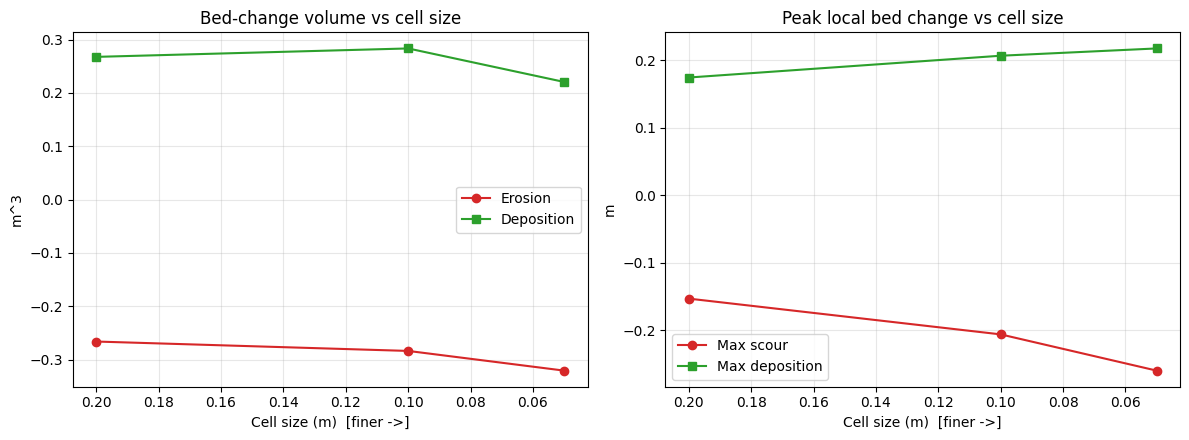
| Cell Size (m) | Gen Cells | Solver | Runtime (s) | Unit | Cells (computed) | Net Bed Vol (m^3) | Erosion Vol (m^3) | Deposition Vol (m^3) | Max Scour (m) | Max Deposition (m) | Mean D50 (mm) | |
|---|---|---|---|---|---|---|---|---|---|---|---|---|
| 0 | 0.200 | 320 | Unsteady Finished Successfully | 42.4 | m | 320.0 | 0.0014 | -0.2661 | 0.2675 | -0.1534 | 0.1743 | 5.279 |
| 1 | 0.100 | 1348 | Unsteady Finished Successfully | 127.3 | m | 1350.0 | -0.0004 | -0.2837 | 0.2833 | -0.2064 | 0.2066 | 5.283 |
| 2 | 0.050 | 5406 | Unsteady Finished Successfully | 819.2 | m | 5406.0 | -0.1001 | -0.3206 | 0.2205 | -0.2601 | 0.2174 | 5.264 |
| 3 | 0.025 | 21643 | GATED (not run) | NaN | NaN | NaN | NaN | NaN | NaN | NaN | NaN | NaN |
Saved: G:\GH\ras-commander\examples\example_projects\Weise_2D_232_weise_meshsens\weise_sediment_mesh_sensitivity_summary.csv
Convergence and Spatial Bed Change
run = summary_df[summary_df["Solver"].astype(str).str.contains("Finished Successfully")].copy()
run = run.sort_values("Cell Size (m)")
if len(run) >= 2:
    fig, axes = plt.subplots(1, 2, figsize=(12, 4.5))
    axes[0].plot(run["Cell Size (m)"], run["Erosion Vol (m^3)"], 'o-', color="#d62728", label="Erosion")
    axes[0].plot(run["Cell Size (m)"], run["Deposition Vol (m^3)"], 's-', color="#2ca02c", label="Deposition")
    axes[0].set_title("Bed-change volume vs cell size"); axes[0].set_ylabel("m^3"); axes[0].legend()
    axes[1].plot(run["Cell Size (m)"], run["Max Scour (m)"], 'o-', color="#d62728", label="Max scour")
    axes[1].plot(run["Cell Size (m)"], run["Max Deposition (m)"], 's-', color="#2ca02c", label="Max deposition")
    axes[1].set_title("Peak local bed change vs cell size"); axes[1].set_ylabel("m"); axes[1].legend()
    for ax in axes:
        ax.invert_xaxis(); ax.set_xlabel("Cell size (m)  [finer ->]"); ax.grid(alpha=0.3)
    plt.tight_layout(); plt.show()
else:
    print("Need >=2 successful runs to plot convergence.")
def bedchange_panel(ax, gdf, title, vmax):
    m = gdf["surface_area"] > 0
    sca = ax.scatter(gdf.geometry.x[m], gdf.geometry.y[m], c=gdf["bed_change"][m],
                     cmap="RdBu_r", vmin=-vmax, vmax=vmax, s=8)
    ax.set_title(title); ax.set_aspect('equal'); ax.set_xticks([]); ax.set_yticks([])
    return sca

ok = mesh_df[mesh_df['solver'].astype(str).str.contains("Finished Successfully", na=False)]
if len(ok) >= 2:
    crow, frow = ok.iloc[0], ok.iloc[-1]
    gdf_c = HdfResultsSediment.get_cell_bed_change(crow.hdf)
    gdf_f = HdfResultsSediment.get_cell_bed_change(frow.hdf)
    shared = max(np.nanpercentile(np.abs(g.loc[g["surface_area"] > 0, "bed_change"]), 98)
                 for g in (gdf_c, gdf_f)) or 0.01
    # flume is long and thin (16.5 x 1.0 m) -> stack panels vertically
    fig, axes = plt.subplots(2, 1, figsize=(13, 6))
    bedchange_panel(axes[0], gdf_c, f"{crow.cell_size:.3f} m", shared)
    sca = bedchange_panel(axes[1], gdf_f, f"{frow.cell_size:.3f} m", shared)
    fig.colorbar(sca, ax=axes, shrink=0.8,
                 label="Bed change (m)  (blue = scour, red = deposition)")
    fig.suptitle(f"Final bed change on a shared scale (+/- {shared:.3f} m): coarse vs fine")
    plt.show()
else:
    print("Need >=2 successful runs for spatial comparison.")
2026-06-03 07:11:57 - ras_commander.hdf.HdfBase - CRITICAL - No valid projection found. Checked:
1. HDF file projection attribute: G:\GH\ras-commander\examples\example_projects\Weise_2D_232_weise_meshsens\Weise.p02.hdf
2. No RASMapper projection file found
To fix this:
1. Open RASMapper
2. Click Map > Set Projection
3. Select an appropriate projection file or coordinate system
4. Save the RASMapper project


2026-06-03 07:11:57 - ras_commander.hdf.HdfBase - CRITICAL - No valid projection found. Checked:
1. HDF file projection attribute: G:\GH\ras-commander\examples\example_projects\Weise_2D_232_weise_meshsens\Weise.p04.hdf
2. No RASMapper projection file found
To fix this:
1. Open RASMapper
2. Click Map > Set Projection
3. Select an appropriate projection file or coordinate system
4. Save the RASMapper project
Conclusion
Applying the notebook-230 workflow to the Weise metric flume validates that the approach and the
HdfResultsSediment reader are unit-system agnostic: the reader auto-detects SI and returns
native m^3 / m results. As with Chippewa, mesh refinement sharpens local scour/deposition while the
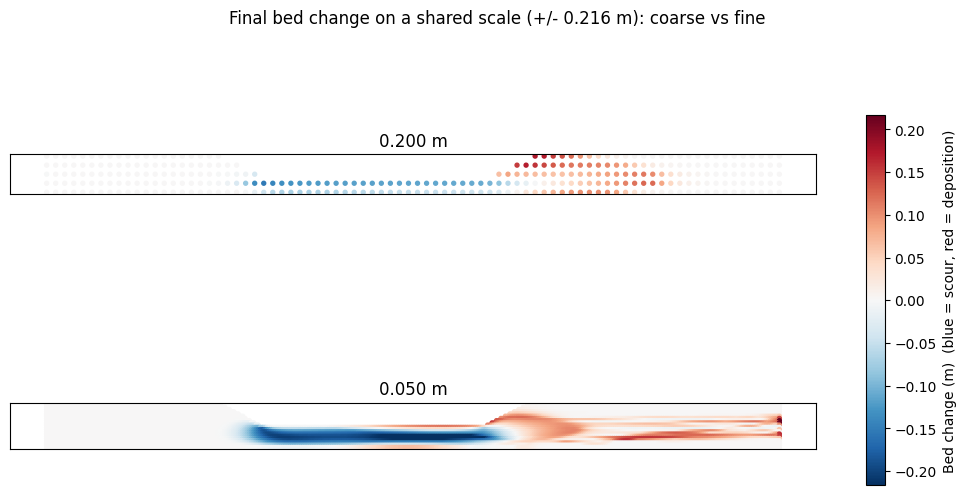
structure-free, breakline-free geometry lets mesh regeneration run cleanly across the full range.
Together, notebooks 230 (US Customary river reach) and 232 (SI flume) give two independent, contrasting confirmations of the central point: 2D mesh cell size is a first-order control on mobile-bed results, not a neutral numerical knob.
Analysis performed with ras-commander by CLB Engineering Corporation.