414 - Depth-Varying Manning's n for HEC-RAS 2D Models
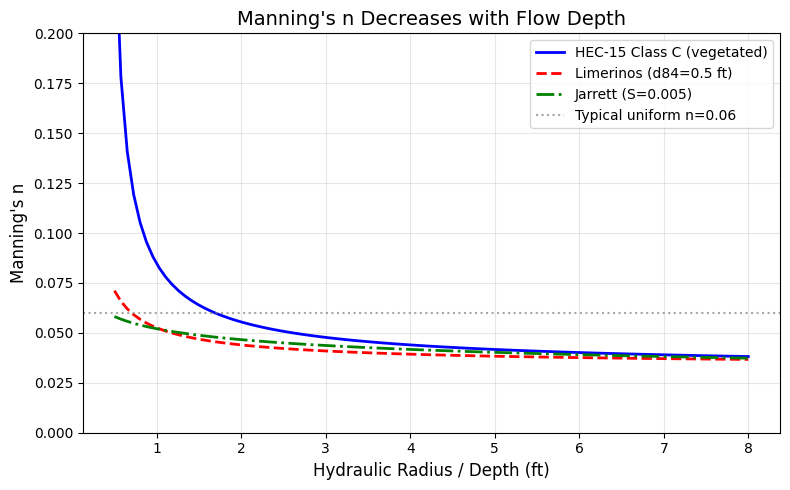
Manning's roughness coefficient varies with flow depth — this is well-established in hydraulic literature (Chow 1959, HEC-15, Limerinos 1970, Jarrett 1984) and is a frequent topic in HEC-RAS community discussions because many 2D models still start from uniform roughness values.
This notebook demonstrates a complete ras-commander workflow for applying
depth-varying Manning's n to HEC-RAS 2D face property tables:
- Literature grounding — formulas that relate n to hydraulic radius
- Windows preprocessing — generate solver-ready
.tmp.hdfface tables - Direct
.tmp.hdfedit — apply and extend depth-varying Manning's n before the solver starts - Linux RasUnsteady execution — run the pure solver without regenerating face tables
- Engineering result review — compare baseline and modified WSE/depth maps
- Polygon mask API — demonstrate selective channel-only application using calibration regions or computed channel polygons
- Channel polygon strategies — calibration regions, fluvial/pluvial classification, bank lines, and external GIS sources such as NFHL
Key insight: HEC-RAS 2D face property tables store Manning's n as a function
of elevation for each cell face. By modifying and extending the preprocessed
.tmp.hdf tables with a depth-varying formula, the Linux solver can consume the
edited tables directly rather than rebuilding them from the geometry settings.
API methods demonstrated:
| Method | Purpose |
|---|---|
GeomStorage.get_2d_flow_area_settings() |
Read the original uniform Manning's n from .g## |
RasPreprocess.preprocess_plan() |
Generate .tmp.hdf, .b##, and .x## files on Windows |
RasCmdr.compute_plan_linux() |
Run native Linux RasUnsteady against the edited .tmp.hdf |
HdfMesh.get_mesh_face_property_tables() |
Read face-level n from geometry, .tmp.hdf, or output HDF |
HdfMesh.set_face_mannings_n_values() |
Replace n column with custom depth-varying function |
HdfMesh.extend_face_property_tables() |
Extend tables to higher elevations |
HdfMesh.get_face_ids_in_polygon() |
Spatial filter: faces within a polygon |
HdfMesh.get_face_ids_in_calibration_region() |
Filter by named calibration region |
HdfMesh.pin_property_tables() |
Set Pinned attribute on mesh group |
HdfFluvialPluvial.generate_fluvial_pluvial_polygons() |
Channel delineation |
HdfXsec.get_river_bank_lines() |
Bank line extraction for channel polygon |
Workflow Overview
flowchart LR
    A[Extract Baseline<br/>and Modified Copies] --> B[Read Existing<br/>Manning's n]
    B --> C[Preprocess Baseline<br/>on Windows]
    C --> D[Run Baseline<br/>Linux Solver]
    D --> E[Preprocess Modified<br/>on Windows]
    E --> F[Edit Modified<br/>.tmp.hdf Tables]
    F --> G[Extend + Pin<br/>Face Tables]
    G --> H[Run Modified<br/>Linux Solver]
    H --> I[Verify Output HDF<br/>Tables Persist]
    I --> J[Compare WSE + Depth<br/>Baseline vs Modified]
    J --> K[Demonstrate Polygon<br/>Mask API]
The important handoff is between E and H: the Windows preprocessor
creates a solver-ready .tmp.hdf, ras-commander edits that exact file, and
the Linux RasUnsteady binary reads it without calling the Windows table
builder that would otherwise regenerate uniform face-property tables.
Literature: Why Manning's n Varies with Depth
Manning's n is not a constant — it varies with the ratio of flow depth to roughness element size (relative roughness R/k_s). At shallow depths, roughness elements dominate the water column and form drag is high. At greater depths, skin friction dominates and effective roughness decreases.
"If the depth of flow is shallow in relation to the size of the roughness elements, the n value can be large, and the n value decreases with increasing depth." — Chow, V.T., 1959. Open-Channel Hydraulics
Key Formulas
HEC-15 Vegetal Retardance (FHWA, HEC-15 3rd Ed. 2005):
$$n = \frac{R^{1/6}}{X + 19.97 \cdot \log(R^{1.4} \cdot S^{0.4})}$$
where X is a retardance class coefficient (A=15.8 through E=37.7).
Limerinos (1970) (USGS WSP 1898-B) — gravel-bed rivers:
$$n = \frac{0.0926 \cdot R^{1/6}}{1.16 + 2.0 \cdot \log_{10}(R/d_{84})}$$
Jarrett (1984) — high-gradient streams (S > 0.002):
$$n = 0.39 \cdot S^{0.38} \cdot R^{-0.16}$$
All three formulas show that n decreases as hydraulic radius R (a proxy for depth) increases relative to roughness element size.
import numpy as np
import matplotlib.pyplot as plt

# --- Plot Manning's n vs depth for three formulas ---
depths = np.linspace(0.5, 8.0, 100)  # ft
S = 0.005   # slope
d84 = 0.5   # ft (gravel bed)

# HEC-15 Class C (moderate retardance)
X_C = 30.2
n_hec15 = depths**(1/6) / (X_C + 19.97 * np.log10(depths**1.4 * S**0.4))
n_hec15 = np.clip(n_hec15, 0.01, 0.3)

# Limerinos (1970)
n_lim = (0.0926 * depths**(1/6)) / (1.16 + 2.0 * np.log10(depths / d84))
n_lim = np.clip(n_lim, 0.01, 0.3)

# Jarrett (1984)
n_jar = 0.39 * S**0.38 * depths**(-0.16)
n_jar = np.clip(n_jar, 0.01, 0.3)

fig, ax = plt.subplots(figsize=(8, 5))
ax.plot(depths, n_hec15, 'b-', linewidth=2, label='HEC-15 Class C (vegetated)')
ax.plot(depths, n_lim, 'r--', linewidth=2, label=f'Limerinos (d84={d84} ft)')
ax.plot(depths, n_jar, 'g-.', linewidth=2, label=f'Jarrett (S={S})')
ax.axhline(y=0.06, color='gray', linestyle=':', alpha=0.7, label='Typical uniform n=0.06')
ax.set_xlabel('Hydraulic Radius / Depth (ft)', fontsize=12)
ax.set_ylabel("Manning's n", fontsize=12)
ax.set_title("Manning's n Decreases with Flow Depth", fontsize=14)
ax.legend(fontsize=10)
ax.set_ylim(0, 0.20)
ax.grid(True, alpha=0.3)
fig.tight_layout()
plt.show()
from pathlib import Path
import sys
import logging
import contextlib
import io
import numpy as np
import pandas as pd
import matplotlib.pyplot as plt

# nbconvert starts kernels from the notebook directory. Walk upward to the repo root
# so this example uses the active checkout rather than an installed package.
for candidate in [Path.cwd(), *Path.cwd().parents]:
    if (candidate / "ras_commander" / "__init__.py").exists() and (candidate / "examples").exists():
        REPO_ROOT = candidate.resolve()
        break
else:
    raise RuntimeError("Could not locate ras-commander repository root")

repo_root_str = str(REPO_ROOT)
if sys.path[0] != repo_root_str:
    if repo_root_str in sys.path:
        sys.path.remove(repo_root_str)
    sys.path.insert(0, repo_root_str)

from ras_commander import (
    init_ras_project, RasCmdr, RasExamples, RasPreprocess, ras,
    get_logger
)
from ras_commander.geom import GeomLandCover, GeomStorage
from ras_commander.hdf import (
    HdfMesh, HdfResultsMesh,
    HdfFluvialPluvial, HdfLandCover, HdfXsec,
)

# Keep the notebook readable; terminal logs capture detailed ras-commander traces.
logging.getLogger("ras_commander").setLevel(logging.WARNING)
for logger_name in list(logging.root.manager.loggerDict):
    if logger_name.startswith("ras_commander"):
        logging.getLogger(logger_name).setLevel(logging.WARNING)
logging.getLogger("ras_commander.hdf.HdfResultsPlan").setLevel(logging.ERROR)

logger = get_logger(__name__)

def read_linux_compute_log(project_path, plan_number):
    """Read the RasUnsteady log written by RasCmdr.compute_plan_linux()."""
    log_path = Path(project_path) / f"compute_linux_{str(plan_number).zfill(2)}.log"
    assert log_path.exists(), f"Missing Linux compute log: {log_path}"
    return log_path.read_text(errors="replace")


def blocking_compute_errors(messages):
    """Return compute-log lines that represent blocking hydraulic errors."""
    if not messages:
        return []
    return [
        line for line in messages.splitlines()
        if "ERROR" in line.upper()
        and "VOLUME ACCOUNTING" not in line.upper()
        and "WSEL ERROR" not in line.upper()
        and "ITERATIONS" not in line.upper()
    ]


print(f"Using ras_commander from: {Path(sys.modules['ras_commander'].__file__).parent}")
Using ras_commander from: G:\GH\ras-commander\ras_commander
Configuration
PROJECT_NAME = "Muncie"
RAS_VERSION = "7.0.1"
PLAN_NUMBER = "04"          # Muncie plan using g04 with a Manning's n calibration region
MESH_NAME = "2D Interior Area"
GEOM_NUMBER = "04"
CALIBRATION_GEOM_NUMBER = "04"
CALIBRATION_REGION_NAME = "Flat Area"
RAS_LINUX_EXE_DIR = "/mnt/c/Program Files (x86)/HEC/HEC-RAS/7.0.1/Linux/Linux"

WORK_DIR = REPO_ROOT / "working" / "414_depth_varying_mannings_n"
PROJECT_DIR = WORK_DIR / "example_projects"
PROJECT_DIR.mkdir(parents=True, exist_ok=True)

# Depth-varying n parameters (exponential decay toward asymptote)
N_ASYMPTOTE = 0.045   # Deep-flow Manning's n
DEPTH_HALF = 1.0      # Depth at which n decays to about 37% of excess above asymptote
EXTENSION_HEIGHT = 5.0
ELEVATION_STEP = 0.5
Step 1: Extract Baseline and Modified Projects
We extract two independent copies of Muncie so the baseline stays pristine.
baseline_path = RasExamples.extract_project(
    PROJECT_NAME, output_path=PROJECT_DIR, suffix="414_baseline"
)
modified_path = RasExamples.extract_project(
    PROJECT_NAME, output_path=PROJECT_DIR, suffix="414_modified"
)

print(f"Baseline: {baseline_path.relative_to(REPO_ROOT)}")
print(f"Modified: {modified_path.relative_to(REPO_ROOT)}")

baseline_ras = init_ras_project(baseline_path, RAS_VERSION, ras_object="new")
plan_row = baseline_ras.plan_df[baseline_ras.plan_df['plan_number'] == PLAN_NUMBER].iloc[0]
print(f"\nPlan {PLAN_NUMBER}: {plan_row['Plan Title']}")
print(f"Geometry: g{str(plan_row['geometry_number']).zfill(2)}")
Baseline: working\414_depth_varying_mannings_n\example_projects\Muncie_414_baseline
Modified: working\414_depth_varying_mannings_n\example_projects\Muncie_414_modified

Plan 04: Unsteady Run with 2D 50ft User n Value R
Geometry: g04
Step 2: Read Current Manning's n Settings
Muncie uses a uniform Manning's n (0.06) for the entire 2D flow area. The land cover table exists but is inactive because Spatially Varied Manning's on Faces is disabled.
baseline_geom = baseline_path / f"{baseline_ras.project_name}.g{GEOM_NUMBER}"

settings = GeomStorage.get_2d_flow_area_settings(baseline_geom)
area_row = settings[settings['name'] == MESH_NAME].iloc[0]
original_n = area_row['mannings_n']
spatially_varied = area_row.get('spatially_varied_mann_on_faces', False)

print(f"2D Flow Area: '{MESH_NAME}'")
print(f"  Uniform Manning's n: {original_n}")
print(f"  Spatially varied: {spatially_varied}")

original_mannings = GeomLandCover.get_base_mannings_n(baseline_geom)
print(f"\nLand cover table ({len(original_mannings)} classes):")
print(original_mannings.to_string(index=False))
2D Flow Area: '2D Interior Area'
  Uniform Manning's n: 0.06
  Spatially varied: False

Land cover table (6 classes):
Table Number            Land Cover Name  Base Mannings n Value
           6                   building                 100.00
           6 medium density residential                   0.08
           6                 open space                   0.04
           6                       park                   0.06
           6                      trees                   0.12
           6                      urban                   0.10
Step 3: Run Baseline Model
The baseline project is computed first with the original uniform Manning's n. The geometry preprocessor generates the reference face property tables, and the plan HDF stores the maximum water surface elevations used for comparison.
baseline_ras = init_ras_project(baseline_path, RAS_VERSION, ras_object="new")
print("Preprocessing baseline model on Windows...")
baseline_preprocess = RasPreprocess.preprocess_plan(
    PLAN_NUMBER,
    ras_object=baseline_ras,
    max_wait=300,
    clear_existing=True,
)
assert baseline_preprocess.success, baseline_preprocess.error
assert baseline_preprocess.tmp_hdf_path and Path(baseline_preprocess.tmp_hdf_path).exists()
print(f"Baseline tmp HDF: {Path(baseline_preprocess.tmp_hdf_path).name}")

print("Running baseline model with native Linux RasUnsteady...")
baseline_result = RasCmdr.compute_plan_linux(
    PLAN_NUMBER,
    ras_exe_dir=RAS_LINUX_EXE_DIR,
    ras_object=baseline_ras,
    timeout_sec=7200,
    num_cores=2,
    retry=False,
)
assert baseline_result.success, "Baseline Linux solver run failed"
baseline_ras = init_ras_project(baseline_path, RAS_VERSION, ras_object="new")

base_hdf_path = Path(baseline_ras.plan_df.loc[
    baseline_ras.plan_df['plan_number'] == PLAN_NUMBER, 'HDF_Results_Path'
].iloc[0])
messages = read_linux_compute_log(baseline_path, PLAN_NUMBER)
lines_out = messages.splitlines()
errors = blocking_compute_errors(messages)
print(f"Baseline Linux compute log: {len(lines_out)} lines, {len(errors)} blocking errors")
assert not errors, "Baseline compute produced blocking errors"
assert "Finished Unsteady Flow Simulation" in messages, "Baseline Linux solver did not report completion"

baseline_geom_hdf = baseline_path / f"{baseline_ras.project_name}.g{GEOM_NUMBER}.hdf"
base_tables = HdfMesh.get_mesh_face_property_tables(base_hdf_path)
base_df = base_tables[MESH_NAME]
n_col = "Manning's n"

print(f"\nBaseline output face tables: {base_df['Face ID'].nunique()} faces, {len(base_df)} rows")
print(f"Baseline mean n: {base_df[n_col].mean():.4f}")
assert base_df['Face ID'].nunique() > 0, "Expected face property tables"
Preprocessing baseline model on Windows...


Baseline tmp HDF: Muncie.p04.tmp.hdf
Running baseline model with native Linux RasUnsteady...


Baseline Linux compute log: 21190 lines, 0 blocking errors


Baseline output face tables: 11164 faces, 47055 rows
Baseline mean n: 0.0600
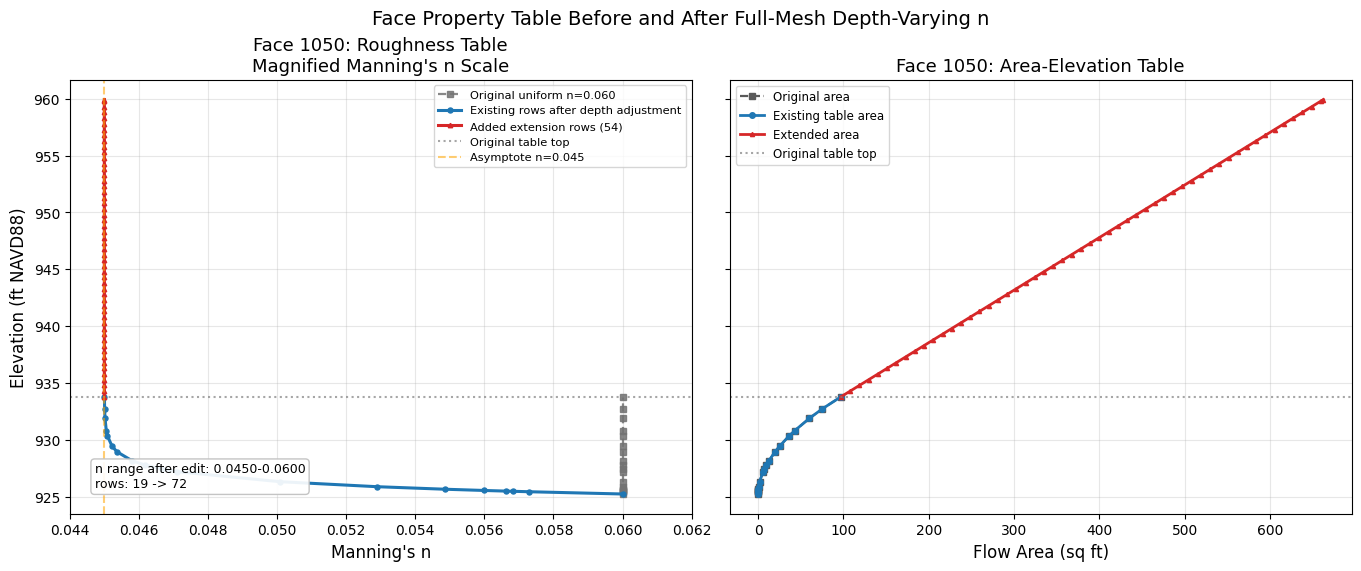
Step 4: Apply Depth-Varying Manning's n to the Modified .tmp.hdf
The modified project is preprocessed on Windows only to create the solver-ready
.tmp.hdf. The geometry HDF and plan/output HDF are not edited. All depth-varying
roughness changes are applied directly to the .tmp.hdf that the Linux solver
will consume.
def vegetal_retardance(elevation, depth, current_n):
    """Exponential decay: n decreases from current_n toward N_ASYMPTOTE with depth."""
    if depth <= 0:
        return current_n
    return N_ASYMPTOTE + (current_n - N_ASYMPTOTE) * np.exp(-depth / DEPTH_HALF)


def extend_n_func(depth, base_n):
    """Manning's n for extension rows using the same exponential decay."""
    if depth <= 0:
        return base_n
    return N_ASYMPTOTE + (base_n - N_ASYMPTOTE) * np.exp(-depth / DEPTH_HALF)

modified_ras = init_ras_project(modified_path, RAS_VERSION, ras_object="new")
print("Preprocessing modified model on Windows to create .tmp.hdf...")
modified_preprocess = RasPreprocess.preprocess_plan(
    PLAN_NUMBER,
    ras_object=modified_ras,
    max_wait=300,
    clear_existing=True,
)
assert modified_preprocess.success, modified_preprocess.error
modified_tmp_hdf = Path(modified_preprocess.tmp_hdf_path)
assert modified_tmp_hdf.exists(), f"Missing modified tmp HDF: {modified_tmp_hdf}"
print(f"Modified tmp HDF: {modified_tmp_hdf.name}")

pre_tables = HdfMesh.get_mesh_face_property_tables(modified_tmp_hdf)
pre_df = pre_tables[MESH_NAME]

# Use a stable representative face for the engineering table plots.
sample_face = 1050
if sample_face not in set(pre_df['Face ID']):
    sample_face = int(pre_df['Face ID'].iloc[len(pre_df) // 2])
pre_sample = pre_df[pre_df['Face ID'] == sample_face].copy()
assert not pre_sample.empty, f"Face {sample_face} missing"

set_count = HdfMesh.set_face_mannings_n_values(
    hdf_path=modified_tmp_hdf,
    mesh_name=MESH_NAME,
    mannings_n_func=vegetal_retardance,
    face_ids=None,
    pin_tables=False,
)
expected_faces = pre_df['Face ID'].nunique()
print(f"Applied depth-varying n to {set_count} faces in .tmp.hdf")
assert set_count == expected_faces, "Expected all .tmp.hdf faces to be modified"

after_set_tables = HdfMesh.get_mesh_face_property_tables(modified_tmp_hdf)
after_set_df = after_set_tables[MESH_NAME]
after_set_sample = after_set_df[after_set_df['Face ID'] == sample_face].copy()
assert after_set_sample[n_col].iloc[-1] < pre_sample[n_col].iloc[-1], "n should decrease with depth"

max_elev = pre_df['Elevation'].max()
target_elev = max_elev + EXTENSION_HEIGHT
rows_added = HdfMesh.extend_face_property_tables(
    hdf_path=modified_tmp_hdf,
    mesh_name=MESH_NAME,
    extension_elevation=target_elev,
    mannings_n_func=extend_n_func,
    elevation_step=ELEVATION_STEP,
    face_ids=None,
    pin_tables=True,
)
print(
    f"Extended {len(rows_added)} .tmp.hdf faces, "
    f"total rows added: {sum(rows_added.values())}"
)
assert rows_added, "Expected extension rows to be added"

ext_tables = HdfMesh.get_mesh_face_property_tables(modified_tmp_hdf)
ext_df = ext_tables[MESH_NAME]
ext_sample = ext_df[ext_df['Face ID'] == sample_face].copy()

print(f"Face {sample_face}: {len(pre_sample)} rows -> {len(ext_sample)} rows")
print(f"Elevation range: {ext_sample['Elevation'].min():.2f} - {ext_sample['Elevation'].max():.2f} ft")
print(f"n at base: {ext_sample[n_col].iloc[0]:.4f}")
print(f"n at top:  {ext_sample[n_col].iloc[-1]:.4f}")
assert len(ext_sample) > len(pre_sample), "Sample face should have extension rows"
assert ext_sample['Elevation'].max() >= target_elev - ELEVATION_STEP - 0.01
assert ext_df[n_col].round(6).nunique() > 1, ".tmp.hdf n values should not be uniform"
assert ext_df[n_col].min() < original_n - 0.001, ".tmp.hdf should contain depth-varying n values"
Preprocessing modified model on Windows to create .tmp.hdf...


Modified tmp HDF: Muncie.p04.tmp.hdf


Applied depth-varying n to 11164 faces in .tmp.hdf


Extended 11164 .tmp.hdf faces, total rows added: 440633


Face 1050: 19 rows -> 72 rows
Elevation range: 925.24 - 959.93 ft
n at base: 0.0600
n at top:  0.0450
# --- Figure: Before vs After depth-varying n and table extension ---
fig, axes = plt.subplots(1, 2, figsize=(13.5, 5.6), sharey=True, constrained_layout=True)

orig_max_elev = pre_sample['Elevation'].max()
set_portion = ext_sample[ext_sample['Elevation'] <= orig_max_elev + 0.01]
ext_portion = ext_sample[ext_sample['Elevation'] > orig_max_elev - 0.01]
roughness_xlim = (
    min(float(ext_sample[n_col].min()), N_ASYMPTOTE) - 0.001,
    max(float(original_n), float(ext_sample[n_col].max())) + 0.002,
)

ax = axes[0]
ax.plot(pre_sample[n_col], pre_sample['Elevation'], color='0.45', linestyle='--', marker='s',
        markersize=4, label=f'Original uniform n={original_n:.3f}', linewidth=1.6, alpha=0.85)
ax.plot(set_portion[n_col], set_portion['Elevation'], color='#1f77b4', marker='o',
        markersize=3.6, label='Existing rows after depth adjustment', linewidth=2.2)
ax.plot(ext_portion[n_col], ext_portion['Elevation'], color='#d62728', marker='^',
        markersize=3.2, label=f'Added extension rows ({len(ext_portion)})', linewidth=2.2)
ax.axhline(y=orig_max_elev, color='gray', linestyle=':', alpha=0.7,
           label='Original table top')
ax.axvline(x=N_ASYMPTOTE, color='orange', linestyle='--', alpha=0.55,
           label=f'Asymptote n={N_ASYMPTOTE:.3f}')
ax.set_xlim(*roughness_xlim)
ax.set_xlabel("Manning's n", fontsize=12)
ax.set_ylabel('Elevation (ft NAVD88)', fontsize=12)
ax.set_title(f"Face {sample_face}: Roughness Table\nMagnified Manning's n Scale", fontsize=13)
ax.text(
    0.04, 0.06,
    f"n range after edit: {ext_sample[n_col].min():.4f}-{ext_sample[n_col].max():.4f}\n"
    f"rows: {len(pre_sample)} -> {len(ext_sample)}",
    transform=ax.transAxes,
    fontsize=9,
    bbox=dict(boxstyle='round,pad=0.3', facecolor='white', edgecolor='0.75', alpha=0.92),
)
ax.legend(fontsize=8.2, loc='upper right')
ax.grid(True, alpha=0.3)

ax = axes[1]
ax.plot(pre_sample['Area'], pre_sample['Elevation'], color='0.35', linestyle='--', marker='s',
        markersize=4, label='Original area', linewidth=1.6)
ax.plot(set_portion['Area'], set_portion['Elevation'], color='#1f77b4', marker='o',
        markersize=4, label='Existing table area', linewidth=2)
ax.plot(ext_portion['Area'], ext_portion['Elevation'], color='#d62728', marker='^',
        markersize=3, label='Extended area', linewidth=2)
ax.axhline(y=orig_max_elev, color='gray', linestyle=':', alpha=0.7,
           label='Original table top')
ax.set_xlabel('Flow Area (sq ft)', fontsize=12)
ax.set_title(f'Face {sample_face}: Area-Elevation Table', fontsize=13)
ax.legend(fontsize=8.5, loc='upper left')
ax.grid(True, alpha=0.3)

fig.suptitle('Face Property Table Before and After Full-Mesh Depth-Varying n', fontsize=14)
plt.show()
Step 7: Run the Modified Linux Solver from the Edited .tmp.hdf
The Windows solver rebuilds face-property tables at startup, so this notebook does
not call compute_plan() after the HDF edits. The modified .tmp.hdf is passed
directly to the Linux RasUnsteady binary through RasCmdr.compute_plan_linux().
modified_ras = init_ras_project(modified_path, RAS_VERSION, ras_object="new")
pre_solver_tmp_df = HdfMesh.get_mesh_face_property_tables(modified_tmp_hdf)[MESH_NAME]
pre_solver_sample = pre_solver_tmp_df[pre_solver_tmp_df['Face ID'] == sample_face].copy()
assert len(pre_solver_sample) == len(ext_sample), "Pre-solver .tmp.hdf should contain extended rows"
assert pre_solver_sample['Elevation'].max() >= target_elev - ELEVATION_STEP - 0.01
assert pre_solver_sample[n_col].min() < original_n - 0.001, "Pre-solver .tmp.hdf should contain depth-varying n"

print("Running modified model with native Linux RasUnsteady from the edited .tmp.hdf...")
modified_result = RasCmdr.compute_plan_linux(
    PLAN_NUMBER,
    ras_exe_dir=RAS_LINUX_EXE_DIR,
    ras_object=modified_ras,
    timeout_sec=7200,
    num_cores=2,
    retry=False,
)
assert modified_result.success, "Modified Linux solver run failed"
modified_ras = init_ras_project(modified_path, RAS_VERSION, ras_object="new")
mod_hdf_path = Path(modified_ras.plan_df.loc[
    modified_ras.plan_df['plan_number'] == PLAN_NUMBER, 'HDF_Results_Path'
].iloc[0])

modified_messages = read_linux_compute_log(modified_path, PLAN_NUMBER)
modified_errors = blocking_compute_errors(modified_messages)
print(f"Modified Linux compute log: {len(modified_messages.splitlines()) if modified_messages else 0} lines, "
      f"{len(modified_errors)} blocking errors")
assert not modified_errors, "Modified compute produced blocking errors"
assert "Finished Unsteady Flow Simulation" in modified_messages, "Modified Linux solver did not report completion"
print("Modified Linux solver run completed without blocking compute errors")
Running modified model with native Linux RasUnsteady from the edited .tmp.hdf...


Modified Linux compute log: 21718 lines, 0 blocking errors
Modified Linux solver run completed without blocking compute errors
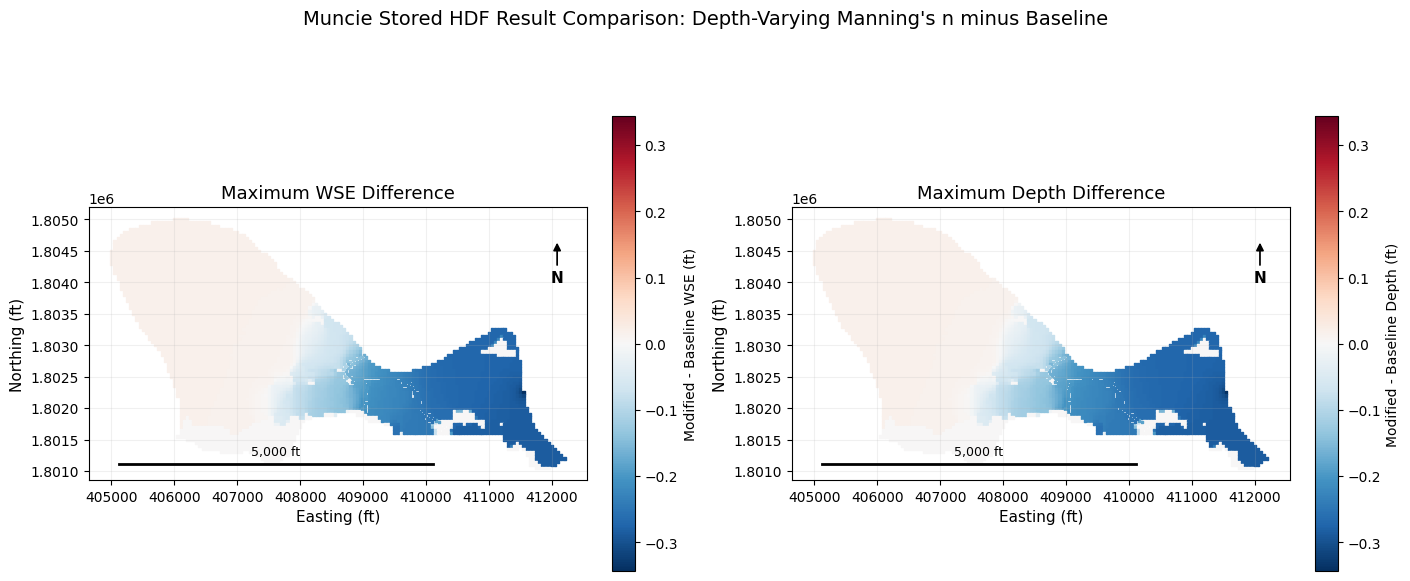
Step 8: Verify Output HDF Tables Persist and Compare Results
After the Linux solver completes, the .tmp.hdf has been renamed to the plan
output HDF. The assertions below confirm the depth-varying/extended face-property
tables were not reverted to uniform 0.06, then compare baseline and modified
maximum water-surface elevation and depth products.
from matplotlib.colors import TwoSlopeNorm

# Step 8 proof: the solver-facing output HDF still contains the edited tables.
post_run_tables = HdfMesh.get_mesh_face_property_tables(mod_hdf_path)
post_run_df = post_run_tables[MESH_NAME]
post_run_sample = post_run_df[post_run_df['Face ID'] == sample_face].copy()

assert len(post_run_sample) == len(ext_sample), "Output HDF should preserve extended face table rows"
assert post_run_sample['Elevation'].max() >= target_elev - ELEVATION_STEP - 0.01
np.testing.assert_allclose(
    post_run_sample[n_col].to_numpy(),
    ext_sample[n_col].to_numpy(),
    rtol=1e-5,
    atol=1e-6,
)
assert post_run_df[n_col].round(6).nunique() > 1, "Output HDF n values should not be uniform"
assert post_run_df[n_col].min() < original_n - 0.001, "Output HDF should contain depth-varying n values"
print(
    "Output HDF face tables persisted: "
    f"{post_run_df['Face ID'].nunique():,} faces, {len(post_run_df):,} rows, "
    f"n range {post_run_df[n_col].min():.4f}-{post_run_df[n_col].max():.4f}"
)

base_wse_gdf = HdfResultsMesh.get_mesh_max_ws(base_hdf_path)
mod_wse_gdf = HdfResultsMesh.get_mesh_max_ws(mod_hdf_path)

wse_col = next(
    c for c in base_wse_gdf.columns
    if c == 'maximum_water_surface' or 'water_surface' in c.lower() or 'water surface' in c.lower()
)
topology = HdfMesh.get_mesh_sloped_topology(base_hdf_path, MESH_NAME)
assert topology and 'cell_min_elev' in topology, 'Expected mesh cell terrain elevations in the plan HDF'
ground_df = pd.DataFrame({
    'cell_id': np.arange(len(topology['cell_min_elev'])),
    'cell_min_elev': topology['cell_min_elev'].astype(float),
})

base_wse = base_wse_gdf[base_wse_gdf['mesh_name'] == MESH_NAME][['cell_id', wse_col, 'geometry']].copy()
mod_wse = mod_wse_gdf[mod_wse_gdf['mesh_name'] == MESH_NAME][['cell_id', wse_col]].copy()

map_df = (
    base_wse
    .rename(columns={wse_col: 'baseline_wse'})
    .merge(mod_wse.rename(columns={wse_col: 'modified_wse'}), on='cell_id')
    .merge(ground_df, on='cell_id')
)
map_df['baseline_depth'] = (map_df['baseline_wse'] - map_df['cell_min_elev']).clip(lower=0)
map_df['modified_depth'] = (map_df['modified_wse'] - map_df['cell_min_elev']).clip(lower=0)
map_df['delta_wse'] = map_df['modified_wse'] - map_df['baseline_wse']
map_df['delta_depth'] = map_df['modified_depth'] - map_df['baseline_depth']
valid = (
    np.isfinite(map_df['delta_wse'])
    & np.isfinite(map_df['delta_depth'])
    & (map_df['baseline_wse'] > -100)
    & (map_df['modified_wse'] > -100)
)
map_df = map_df[valid].copy()

print(f"Wet cells compared: {len(map_df)}")
print(f"Mean delta WSE:     {map_df['delta_wse'].mean():+.4f} ft")
print(f"Max delta WSE:      {map_df['delta_wse'].max():+.4f} ft")
print(f"Min delta WSE:      {map_df['delta_wse'].min():+.4f} ft")
print(f"Mean delta depth:   {map_df['delta_depth'].mean():+.4f} ft")

n_changed = int((map_df['delta_wse'].abs() > 0.001).sum())
print(f"Cells with |delta WSE| > 0.001 ft: {n_changed}/{len(map_df)} ({100*n_changed/max(len(map_df),1):.1f}%)")
assert n_changed > 0, "Expected WSE changes from depth-varying Manning's n"

wse_abs = max(abs(float(map_df['delta_wse'].min())), abs(float(map_df['delta_wse'].max())), 0.01)
depth_abs = max(abs(float(map_df['delta_depth'].min())), abs(float(map_df['delta_depth'].max())), 0.01)

fig, axes = plt.subplots(1, 2, figsize=(14, 6.5), constrained_layout=True)
for ax, column, title, label, abs_range in [
    (axes[0], 'delta_wse', 'Maximum WSE Difference', 'Modified - Baseline WSE (ft)', wse_abs),
    (axes[1], 'delta_depth', 'Maximum Depth Difference', 'Modified - Baseline Depth (ft)', depth_abs),
]:
    map_df.plot(
        column=column,
        ax=ax,
        cmap='RdBu_r',
        marker='s',
        markersize=2.6,
        legend=True,
        norm=TwoSlopeNorm(vcenter=0, vmin=-abs_range, vmax=abs_range),
        legend_kwds={'label': label, 'shrink': 0.74},
    )
    ax.set_title(title, fontsize=13)
    ax.set_xlabel('Easting (ft)', fontsize=11)
    ax.set_ylabel('Northing (ft)', fontsize=11)
    ax.set_aspect('equal')
    ax.grid(True, alpha=0.18)
    ax.annotate('N', xy=(0.94, 0.88), xytext=(0.94, 0.74),
                xycoords='axes fraction', textcoords='axes fraction',
                ha='center', va='center', fontsize=11, fontweight='bold',
                arrowprops=dict(arrowstyle='-|>', color='black', lw=1.25))
    xmin, xmax = ax.get_xlim()
    ymin, ymax = ax.get_ylim()
    scale_len = 5000
    x0 = xmin + 0.06 * (xmax - xmin)
    y0 = ymin + 0.06 * (ymax - ymin)
    ax.plot([x0, x0 + scale_len], [y0, y0], color='black', linewidth=2)
    ax.text(x0 + scale_len / 2, y0 + 0.02 * (ymax - ymin), f'{scale_len:,.0f} ft',
            ha='center', va='bottom', fontsize=9)

fig.suptitle("Muncie Stored HDF Result Comparison: Depth-Varying Manning\'s n minus Baseline", fontsize=14)
plt.show()
Output HDF face tables persisted: 11,164 faces, 487,688 rows, n range 0.0450-0.0600


Wet cells compared: 5391
Mean delta WSE:     -0.0669 ft
Max delta WSE:      +0.0166 ft
Min delta WSE:      -0.3434 ft
Mean delta depth:   -0.0669 ft
Cells with |delta WSE| > 0.001 ft: 4890/5391 (90.7%)
Step 9: Polygon Mask API — Selective Face Application
The primary example applied depth-varying n to the entire mesh. In production
calibration, you may want to apply depth-varying n only to channel faces and
leave overbank roughness unchanged. HdfMesh.extend_face_property_tables() and
set_face_mannings_n_values() accept optional polygon or region_name
parameters for this spatial filtering.
Precedence: face_ids > region_name > polygon > None (all faces)
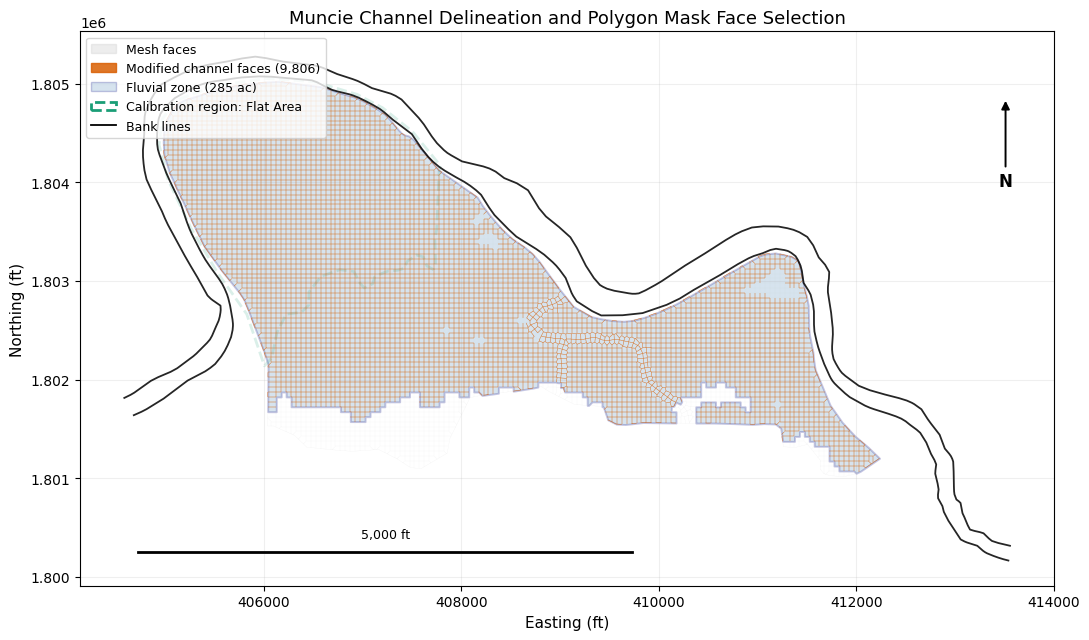
Channel Polygon Strategies
There are several ways to identify which faces are "in the channel":
- Calibration Regions (recommended) — draw a region in RASMapper GUI,
reference by name via
get_face_ids_in_calibration_region() - Fluvial/Pluvial Classification — use
HdfFluvialPluvialto identify fluvial cells from simulation results, then extract the fluvial polygon - Bank Lines — use
HdfXsec.get_river_bank_lines()from the geometry HDF to construct a channel polygon between left and right banks - External regulatory or GIS polygons — NFHL floodways, surveyed channel polygons, or locally maintained calibration regions
We demonstrate the first three strategies below using the Muncie model.
# --- Strategy A: RASMapper Manning's n calibration region ---
calibration_geom_hdf = baseline_path / f"{baseline_ras.project_name}.g{CALIBRATION_GEOM_NUMBER}.hdf"
calibration_regions = HdfLandCover.get_mannings_region_polygons(calibration_geom_hdf)
assert not calibration_regions.empty, "Expected Muncie g04 to include a RASMapper calibration region"

region_names = calibration_regions['Name'].tolist()
assert CALIBRATION_REGION_NAME in region_names, f"Expected {CALIBRATION_REGION_NAME!r}; available: {region_names}"
calibration_polygon = calibration_regions.loc[
    calibration_regions['Name'] == CALIBRATION_REGION_NAME, 'geometry'
].iloc[0]
calibration_face_ids = HdfMesh.get_face_ids_in_calibration_region(
    calibration_geom_hdf, MESH_NAME, CALIBRATION_REGION_NAME, method='midpoint'
)
print(f"Calibration region '{CALIBRATION_REGION_NAME}': {len(calibration_face_ids)} faces")
assert calibration_face_ids, "Calibration region should select mesh faces"

# --- Strategy B: Fluvial/Pluvial Classification ---
# Run the baseline model first (already done above), then classify cells.
print("Generating fluvial/pluvial classification...")
with contextlib.redirect_stderr(io.StringIO()):
    fp_gdf = HdfFluvialPluvial.generate_fluvial_pluvial_polygons(base_hdf_path)
assert not fp_gdf.empty, "Expected fluvial/pluvial polygons"

print("\nClassification results:")
for _, row in fp_gdf.iterrows():
    area_acres = row.geometry.area / 43560
    print(f"  {row['classification']}: {area_acres:.1f} acres")

# Extract the fluvial polygon (river corridor)
fluvial_mask = fp_gdf[fp_gdf['classification'] == 'fluvial']
assert not fluvial_mask.empty, "Expected a fluvial polygon for Muncie"
fluvial_polygon = fluvial_mask.geometry.iloc[0]
fluvial_acres = fluvial_polygon.area / 43560
print(f"\nFluvial polygon: {fluvial_acres:.0f} acres")
Calibration region 'Flat Area': 3913 faces
Generating fluvial/pluvial classification...


Classification results:
  fluvial: 285.3 acres
  pluvial: 29.5 acres

Fluvial polygon: 285 acres
# --- Strategy C: Bank Lines from 1D Geometry ---
bank_lines = HdfXsec.get_river_bank_lines(baseline_geom_hdf)
assert bank_lines is not None and not bank_lines.empty, "Expected bank lines in Muncie geometry"
print(f"Bank lines found: {len(bank_lines)} lines")
for _, row in bank_lines.iterrows():
    length_ft = row.geometry.length
    print(f"  {row.get('Name', 'bank')}: {length_ft:,.0f} ft ({length_ft/5280:.2f} mi)")

# --- Get face IDs within the fluvial polygon ---
faces_gdf = HdfMesh.get_mesh_cell_faces(baseline_geom_hdf)
faces_gdf = faces_gdf[faces_gdf['mesh_name'] == MESH_NAME].copy()

channel_face_ids = HdfMesh.get_face_ids_in_polygon(
    baseline_geom_hdf, MESH_NAME, fluvial_polygon, method='midpoint'
)
total_faces = base_df['Face ID'].nunique()
print(f"\nChannel faces (fluvial polygon): {len(channel_face_ids)} / {total_faces} "
      f"({100*len(channel_face_ids)/total_faces:.1f}%)")
assert 0 < len(channel_face_ids) < total_faces, "Channel polygon should select a subset of faces"
Bank lines found: 2 lines
  bank: 15,511 ft (2.94 mi)
  bank: 15,830 ft (3.00 mi)


Channel faces (fluvial polygon): 9806 / 11164 (87.8%)
# --- Figure: Channel polygon, calibration region, and modified face locations ---
import matplotlib.patches as mpatches
from matplotlib.collections import PatchCollection
from matplotlib.patches import Polygon as MplPolygon
from shapely.geometry import Polygon, MultiPolygon

fig, ax = plt.subplots(figsize=(11, 7))

def polygon_patches(geom):
    geoms = list(geom.geoms) if isinstance(geom, MultiPolygon) else [geom]
    patches = []
    for part in geoms:
        if isinstance(part, Polygon):
            coords = np.array(part.exterior.coords)
            patches.append(MplPolygon(coords[:, :2], closed=True))
    return patches

# Base mesh context and modified faces.
faces_gdf.plot(ax=ax, color='0.80', linewidth=0.15, alpha=0.35, label='Mesh faces')
channel_faces_gdf = faces_gdf[faces_gdf['face_id'].isin(channel_face_ids)]
channel_faces_gdf.plot(ax=ax, color='#d95f02', linewidth=0.35, alpha=0.85, label='Modified channel faces')

fluvial_patches = polygon_patches(fluvial_polygon)
ax.add_collection(PatchCollection(
    fluvial_patches, alpha=0.22, facecolor='steelblue', edgecolor='navy', linewidth=1.4,
))

calibration_patches = polygon_patches(calibration_polygon)
ax.add_collection(PatchCollection(
    calibration_patches, alpha=0.16, facecolor='none', edgecolor='#1b9e77',
    linewidth=2.0, linestyle='--',
))

for _, row in bank_lines.iterrows():
    coords = np.array(row.geometry.coords)
    ax.plot(coords[:, 0], coords[:, 1], color='black', linewidth=1.3, alpha=0.85)

legend_elements = [
    mpatches.Patch(facecolor='0.80', edgecolor='0.80', alpha=0.35, label='Mesh faces'),
    mpatches.Patch(facecolor='#d95f02', edgecolor='#d95f02', alpha=0.85,
                   label=f'Modified channel faces ({len(channel_face_ids):,})'),
    mpatches.Patch(facecolor='steelblue', edgecolor='navy', alpha=0.22,
                   label=f'Fluvial zone ({fluvial_acres:.0f} ac)'),
    mpatches.Patch(facecolor='none', edgecolor='#1b9e77', linestyle='--', linewidth=2,
                   label=f'Calibration region: {CALIBRATION_REGION_NAME}'),
]
from matplotlib.lines import Line2D
legend_elements.append(Line2D([0], [0], color='black', linewidth=1.3, label='Bank lines'))
ax.legend(handles=legend_elements, fontsize=9, loc='upper left')

ax.set_xlabel('Easting (ft)', fontsize=11)
ax.set_ylabel('Northing (ft)', fontsize=11)
ax.set_title('Muncie Channel Delineation and Polygon Mask Face Selection', fontsize=13)
ax.set_aspect('equal')
ax.grid(True, alpha=0.2)

# North arrow and 5,000 ft scale bar.
ax.annotate('N', xy=(0.95, 0.88), xytext=(0.95, 0.73),
            xycoords='axes fraction', textcoords='axes fraction',
            ha='center', va='center', fontsize=12, fontweight='bold',
            arrowprops=dict(arrowstyle='-|>', color='black', lw=1.4))
xmin, xmax = ax.get_xlim()
ymin, ymax = ax.get_ylim()
scale_len = 5000
x0 = xmin + 0.06 * (xmax - xmin)
y0 = ymin + 0.06 * (ymax - ymin)
ax.plot([x0, x0 + scale_len], [y0, y0], color='black', linewidth=2)
ax.text(x0 + scale_len / 2, y0 + 0.02 * (ymax - ymin), f'{scale_len:,.0f} ft',
        ha='center', va='bottom', fontsize=9)

fig.tight_layout()
plt.show()
Step 10: Apply Depth-Varying n to Channel Faces Only
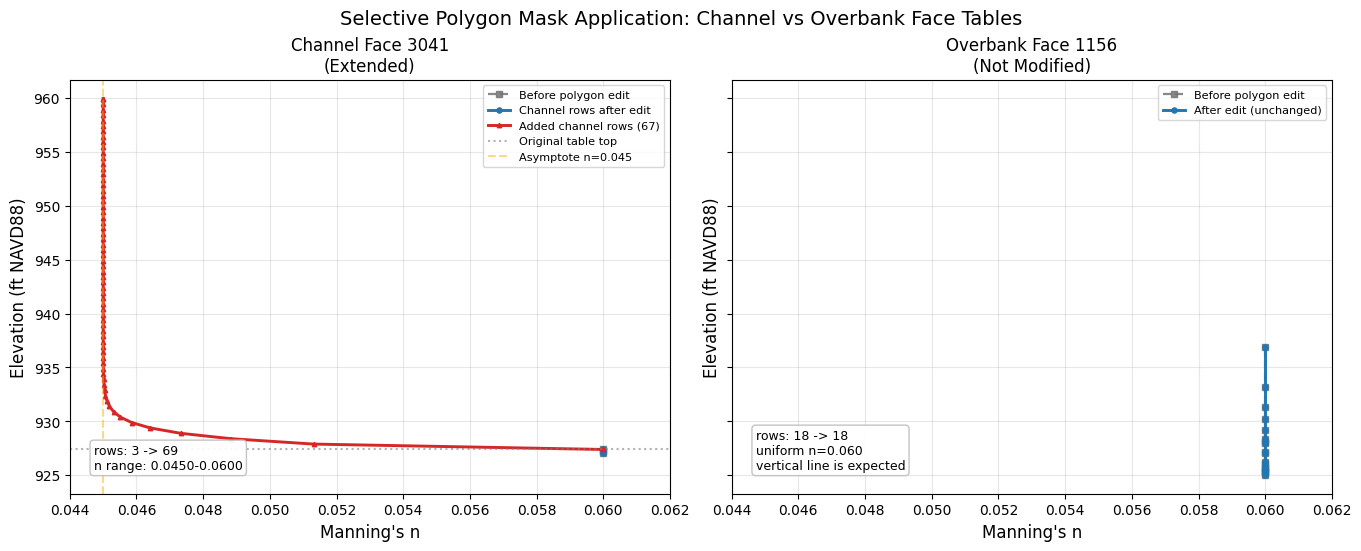
This secondary example demonstrates the polygon mask API on a fresh project copy: face property tables are extended with depth-varying Manning's n only for channel faces identified by the fluvial polygon. Overbank faces retain their original uniform roughness.
This uses the polygon parameter on extend_face_property_tables():
# Re-extract a fresh modified project for the selective demo.
selective_path = RasExamples.extract_project(
    PROJECT_NAME, output_path=PROJECT_DIR, suffix="414_selective"
)
selective_ras = init_ras_project(selective_path, RAS_VERSION, ras_object="new")

# Preprocess only; then edit the selective .tmp.hdf without running the solver.
print("Preprocessing selective model to create a fresh .tmp.hdf...")
selective_preprocess = RasPreprocess.preprocess_plan(
    PLAN_NUMBER,
    ras_object=selective_ras,
    max_wait=300,
    clear_existing=True,
)
assert selective_preprocess.success, selective_preprocess.error
selective_tmp_hdf = Path(selective_preprocess.tmp_hdf_path)
assert selective_tmp_hdf.exists(), f"Missing selective tmp HDF: {selective_tmp_hdf}"

# Read original tables for comparison.
before_tables = HdfMesh.get_mesh_face_property_tables(selective_tmp_hdf)
before_df = before_tables[MESH_NAME]

# Extend ONLY channel faces with depth-varying n.
rows_added = HdfMesh.extend_face_property_tables(
    hdf_path=selective_tmp_hdf,
    mesh_name=MESH_NAME,
    extension_elevation=target_elev,
    mannings_n_func=extend_n_func,
    elevation_step=0.5,
    polygon=fluvial_polygon,   # Spatial filter from the polygon mask API.
    pin_tables=True,
)

print(f"\nExtended {len(rows_added)} channel faces (of {before_df['Face ID'].nunique()} total)")
print(f"Total rows added: {sum(rows_added.values())}")
assert rows_added, "Expected channel faces to be extended"
assert set(rows_added).issubset(set(channel_face_ids)), "Extended faces should come from polygon mask"

# Read back to verify.
after_selective = HdfMesh.get_mesh_face_property_tables(selective_tmp_hdf)
after_sel_df = after_selective[MESH_NAME]

# Compare row counts: channel faces should have more rows, overbank unchanged.
channel_set = set(rows_added.keys())
overbank_set = set(before_df['Face ID'].unique()) - channel_set
assert overbank_set, "Expected overbank faces to remain unmodified"

# Pick representative channel/overbank faces with the richest available tables.
channel_face_example = int(pd.Series(rows_added).sort_values(ascending=False).index[0])
overbank_counts = before_df[before_df['Face ID'].isin(overbank_set)].groupby('Face ID').size()
overbank_face_example = int(overbank_counts.sort_values(ascending=False).index[0])

ch_before = before_df[before_df['Face ID'] == channel_face_example]
ch_after = after_sel_df[after_sel_df['Face ID'] == channel_face_example]
print(f"\nChannel face {channel_face_example}: {len(ch_before)} -> {len(ch_after)} rows")
assert len(ch_after) > len(ch_before), "Channel face should be extended"

ob_before = before_df[before_df['Face ID'] == overbank_face_example]
ob_after = after_sel_df[after_sel_df['Face ID'] == overbank_face_example]
print(f"Overbank face {overbank_face_example}: {len(ob_before)} -> {len(ob_after)} rows (unchanged)")
assert len(ob_after) == len(ob_before), "Overbank face should remain unchanged"
assert np.allclose(ob_after[n_col].to_numpy(), ob_before[n_col].to_numpy())
Preprocessing selective model to create a fresh .tmp.hdf...


Extended 9806 channel faces (of 11164 total)
Total rows added: 407361


Channel face 3041: 3 -> 69 rows
Overbank face 1156: 18 -> 18 rows (unchanged)
# --- Figure: Channel face (extended) vs Overbank face (unchanged) ---
fig, axes = plt.subplots(1, 2, figsize=(13.5, 5.4), sharey=True, constrained_layout=True)
selective_xlim = (
    min(float(ch_after[n_col].min()), float(ob_after[n_col].min()), N_ASYMPTOTE) - 0.001,
    max(float(ch_after[n_col].max()), float(ob_after[n_col].max()), original_n) + 0.002,
)

# Channel face: extended with depth-varying n.
ax = axes[0]
ch_orig_max = ch_before['Elevation'].max()
ch_orig = ch_after[ch_after['Elevation'] <= ch_orig_max + 0.01]
ch_ext = ch_after[ch_after['Elevation'] > ch_orig_max - 0.01]

ax.plot(ch_before[n_col], ch_before['Elevation'], color='0.45', linestyle='--', marker='s',
        markersize=4, label='Before polygon edit', linewidth=1.6, alpha=0.85)
ax.plot(ch_orig[n_col], ch_orig['Elevation'], color='#1f77b4', marker='o', markersize=3.7,
        label='Channel rows after edit', linewidth=2.1)
ax.plot(ch_ext[n_col], ch_ext['Elevation'], color='#d62728', marker='^', markersize=3.2,
        label=f'Added channel rows ({len(ch_ext)})', linewidth=2.1)
ax.axhline(y=ch_orig_max, color='gray', linestyle=':', alpha=0.6, label='Original table top')
ax.axvline(x=N_ASYMPTOTE, color='orange', linestyle='--', alpha=0.45, label=f'Asymptote n={N_ASYMPTOTE:.3f}')
ax.set_xlim(*selective_xlim)
ax.set_xlabel("Manning's n", fontsize=12)
ax.set_ylabel('Elevation (ft NAVD88)', fontsize=12)
ax.set_title(f'Channel Face {channel_face_example}\n(Extended)', fontsize=12)
ax.text(
    0.04, 0.06,
    f"rows: {len(ch_before)} -> {len(ch_after)}\n"
    f"n range: {ch_after[n_col].min():.4f}-{ch_after[n_col].max():.4f}",
    transform=ax.transAxes,
    fontsize=9,
    bbox=dict(boxstyle='round,pad=0.3', facecolor='white', edgecolor='0.75', alpha=0.92),
)
ax.legend(fontsize=8.1, loc='upper right')
ax.grid(True, alpha=0.3)

# Overbank face: unchanged.
ax = axes[1]
ob_data = ob_after
ax.plot(ob_before[n_col], ob_before['Elevation'], color='0.45', linestyle='--', marker='s',
        markersize=4, label='Before polygon edit', linewidth=1.6, alpha=0.85)
ax.plot(ob_data[n_col], ob_data['Elevation'], color='#1f77b4', marker='o', markersize=3.7,
        label='After edit (unchanged)', linewidth=2.1)
ax.set_xlim(*selective_xlim)
ax.set_xlabel("Manning's n", fontsize=12)
ax.set_ylabel('Elevation (ft NAVD88)', fontsize=12)
ax.set_title(f'Overbank Face {overbank_face_example}\n(Not Modified)', fontsize=12)
ax.text(
    0.04, 0.06,
    f"rows: {len(ob_before)} -> {len(ob_after)}\n"
    f"uniform n={ob_after[n_col].iloc[0]:.3f}\n"
    "vertical line is expected",
    transform=ax.transAxes,
    fontsize=9,
    bbox=dict(boxstyle='round,pad=0.3', facecolor='white', edgecolor='0.75', alpha=0.92),
)
ax.legend(fontsize=8.1, loc='upper right')
ax.grid(True, alpha=0.3)

fig.suptitle('Selective Polygon Mask Application: Channel vs Overbank Face Tables', fontsize=14)
plt.show()
Summary
This notebook demonstrated a complete workflow for depth-varying Manning's n in HEC-RAS 2D models:
What We Showed
- Literature basis: Manning's n decreases with flow depth — established by HEC-15, Limerinos (1970), Jarrett (1984), and Chow (1959)
- Baseline model: Ran the original Muncie plan with uniform Manning's n as the comparison condition
- Two-phase solver workflow: Used
RasPreprocess.preprocess_plan()on Windows, edited the returned.tmp.hdf, and ranRasCmdr.compute_plan_linux()with HEC-RAS 7.0 LinuxRasUnsteady - Depth-varying n: Applied an exponential decay formula to every face
property table using
HdfMesh.set_face_mannings_n_values() - Table extension: Extended face tables above terrain elevation using
HdfMesh.extend_face_property_tables()with depth-varying Manning's n - Solver persistence proof: Re-read the output plan HDF after Linux compute to confirm the depth-varying tables persisted
- Stored result comparison: Reviewed Maximum WSE and Maximum Depth differences from HEC-RAS HDF result products
- Selective application: Used
polygonandregion_nameworkflows to identify channel/calibration faces while preserving overbank roughness - Channel delineation: Demonstrated calibration regions, fluvial/pluvial classification, and bank line extraction as channel polygon sources
Key Architecture Points
| Workflow | Method |
|---|---|
| Generate solver input tables | RasPreprocess.preprocess_plan() |
| Direct solver HDF n modification | HdfMesh.set_face_mannings_n_values(tmp_hdf, ...) |
| Extend tables higher | HdfMesh.extend_face_property_tables(tmp_hdf, ...) |
| Consume edited tables | RasCmdr.compute_plan_linux() with the edited .tmp.hdf |
| Protect from RASMapper edits | HdfMesh.pin_property_tables() |
| Spatial filtering | polygon=, region_name=, or face_ids= parameters |
| Channel identification | Calibration regions, fluvial/pluvial, bank lines, NFHL/GIS polygons |
Adapting for Your Project
ras = init_ras_project("/path/to/your/project", "7.0")
result = RasPreprocess.preprocess_plan("01", ras_object=ras)
tmp_hdf = result.tmp_hdf_path

HdfMesh.extend_face_property_tables(
    hdf_path=tmp_hdf,
    mesh_name="Your 2D Area",
    extension_elevation=960.0,
    mannings_n_func=my_n_func,
    region_name="Channel",
    pin_tables=True,
)

RasCmdr.compute_plan_linux(
    "01",
    ras_exe_dir="/mnt/c/Program Files (x86)/HEC/HEC-RAS/7.0/Linux",
    ras_object=ras,
)
References
- Chow, V.T., 1959. Open-Channel Hydraulics. McGraw-Hill.
- FHWA, 2005. Design of Roadside Channels with Flexible Linings (HEC-15). FHWA-NHI-05-114.
- Limerinos, J.T., 1970. USGS Water-Supply Paper 1898-B.
- Jarrett, R.D., 1984. J. Hydraulic Engineering, ASCE, 110(11): 1519-1539.
- HEC-RAS Technical Reference — Energy Loss Coefficients
- HEC-RAS 2D — Face Property Tables