Floodplain Mapping via RasProcess CLI
This notebook demonstrates floodplain mapping using RasProcess.exe to generate: - Maximum Water Surface Elevation (WSE) rasters - Maximum Depth rasters - Inundation boundary polygons
from computed HEC-RAS plans using the BaldEagleCrkMulti2D example project.
Comparison with Other Methods
| Method | Speed | Reliability | Cloud-Compatible | GUI Required | Recommendation |
|---|---|---|---|---|---|
| RasProcess CLI (this notebook) | Fastest (8-10 sec) | Excellent | No | No | Recommended (Windows) |
| GUI Automation (notebook 600) | Slow (60+ sec) | Fragile | No | Yes | Last Resort |
Prerequisites
- HEC-RAS 6.x installed (provides RasProcess.exe)
- Windows operating system
- Required packages:
ras-commander,rasterio,geopandas,shapely
# =============================================================================
# DEVELOPMENT MODE TOGGLE
# =============================================================================
USE_LOCAL_SOURCE = True  # <-- Set to True to use local ras-commander source

if USE_LOCAL_SOURCE:
    import sys
    from pathlib import Path
    local_path = str(Path.cwd().parent)
    if local_path not in sys.path:
        sys.path.insert(0, local_path)
    print(f"LOCAL SOURCE MODE: Loading from {local_path}/ras_commander")
else:
    print("PIP PACKAGE MODE: Loading installed ras-commander")

# Import ras-commander
from ras_commander import (
    RasProcess, RasMap, RasCmdr, RasExamples,
    init_ras_project, ras
)

# Additional imports
import numpy as np
import pandas as pd
import geopandas as gpd
import rasterio
from rasterio.features import shapes
from rasterio.plot import show
from shapely.geometry import shape
from shapely.ops import unary_union
from pathlib import Path
import matplotlib.pyplot as plt

# Verify which version loaded
import ras_commander
print(f"Loaded: {ras_commander.__file__}")
LOCAL SOURCE MODE: Loading from <workspace>/ras_commander


Loaded: <workspace>\ras_commander\__init__.py
Parameters
# =============================================================================
# PARAMETERS
# =============================================================================

# Example project configuration
PROJECT_NAME = "BaldEagleCrkMulti2D"
RAS_VERSION = "7.0"
PLAN = "06"  # Dam break plan

# Profile to map ("Max", "Min", or specific timestamp)
PROFILE = "Max"

# Depth threshold for inundation boundary (feet)
DEPTH_THRESHOLD = 0.1

print(f"Project: {PROJECT_NAME}")
print(f"Plan: {PLAN}, Profile: {PROFILE}")
print(f"Depth threshold: {DEPTH_THRESHOLD} ft")
Project: BaldEagleCrkMulti2D
Plan: 06, Profile: Max
Depth threshold: 0.1 ft
Step 1: Extract Example Project and Initialize
# Extract example project (uses suffix to avoid conflicts with other notebooks)
project_path = RasExamples.extract_project(PROJECT_NAME, suffix="601")

# Initialize project
init_ras_project(project_path, RAS_VERSION)

# Output folder for floodplain maps
OUTPUT_BASE = project_path / "FloodplainMaps"

print(f"Project Name: {ras.project_name}")
print(f"Project Folder: {ras.project_folder}")
print(f"Output folder: {OUTPUT_BASE}")
print(f"\nPlans in project:")
print(ras.plan_df[['plan_number', 'Plan Title']].to_string())
2026-06-11 17:24:16 - ras_commander.RasExamples - INFO - Successfully extracted project 'BaldEagleCrkMulti2D' to <workspace>\examples\example_projects\BaldEagleCrkMulti2D_601


2026-06-11 17:24:16 - ras_commander.RasUtils - INFO - Discovered HEC-RAS 7.0 at <hec_ras_install>\7.0\Ras.exe via filesystem (x86)


2026-06-11 17:24:16 - ras_commander.RasUtils - INFO - Discovered HEC-RAS 6.7 Beta 5 at <hec_ras_install>\6.7 Beta 5\Ras.exe via filesystem (x86)


2026-06-11 17:24:16 - ras_commander.RasUtils - INFO - Discovered HEC-RAS 6.6 at <hec_ras_install>\6.6\Ras.exe via filesystem (x86)


2026-06-11 17:24:16 - ras_commander.RasUtils - INFO - Discovered HEC-RAS 6.5 at <hec_ras_install>\6.5\Ras.exe via filesystem (x86)


2026-06-11 17:24:16 - ras_commander.RasUtils - INFO - Discovered HEC-RAS 6.4.1 at <hec_ras_install>\6.4.1\Ras.exe via filesystem (x86)


2026-06-11 17:24:16 - ras_commander.RasUtils - INFO - Discovered HEC-RAS 6.3.1 at <hec_ras_install>\6.3.1\Ras.exe via filesystem (x86)


2026-06-11 17:24:16 - ras_commander.RasUtils - INFO - Discovered HEC-RAS 6.3 at <hec_ras_install>\6.3\Ras.exe via filesystem (x86)


2026-06-11 17:24:16 - ras_commander.RasUtils - INFO - Discovered HEC-RAS 6.2 at <hec_ras_install>\6.2\Ras.exe via filesystem (x86)


2026-06-11 17:24:16 - ras_commander.RasUtils - INFO - Discovered HEC-RAS 6.1 at <hec_ras_install>\6.1\Ras.exe via filesystem (x86)


2026-06-11 17:24:16 - ras_commander.RasUtils - INFO - Discovered HEC-RAS 6.0 at <hec_ras_install>\6.0\Ras.exe via filesystem (x86)


2026-06-11 17:24:16 - ras_commander.RasUtils - INFO - Discovered HEC-RAS 5.0.7 at <hec_ras_install>\5.0.7\Ras.exe via filesystem (x86)


2026-06-11 17:24:16 - ras_commander.RasUtils - INFO - Discovered HEC-RAS 5.0.6 at <hec_ras_install>\5.0.6\Ras.exe via filesystem (x86)


2026-06-11 17:24:16 - ras_commander.RasUtils - INFO - Discovered HEC-RAS 5.0.3 at <hec_ras_install>\5.0.3\Ras.exe via filesystem (x86)


2026-06-11 17:24:16 - ras_commander.RasUtils - INFO - Discovered HEC-RAS 4.1.0 at <hec_ras_install>\4.1.0\Ras.exe via filesystem (x86)


2026-06-11 17:24:16 - ras_commander.RasUtils - INFO - Discovered HEC-RAS 4.0 at <hec_ras_install>\4.0\Ras.exe via filesystem (x86)


2026-06-11 17:24:16 - ras_commander.RasUtils - INFO - Discovered HEC-RAS 6.7 Beta 4a at <hec_ras_install>\6.7 Beta 4a\Ras.exe via filesystem (x86)


2026-06-11 17:24:16 - ras_commander.RasUtils - INFO - Discovered 16 installed HEC-RAS version(s)


2026-06-11 17:24:16 - ras_commander.RasPrj - INFO - HEC-RAS 7.0 found via version discovery: <hec_ras_install>\7.0\Ras.exe


2026-06-11 17:24:16 - ras_commander.RasMap - INFO - Successfully parsed RASMapper file: <workspace>\examples\example_projects\BaldEagleCrkMulti2D_601\BaldEagleDamBrk.rasmap


2026-06-11 17:24:16 - ras_commander.RasPrj - INFO - ras-commander v0.98.0 | An open-source project of CLB Engineering Corporation (https://clbengineering.com/) | Docs: https://rascommander.info | GitHub: https://github.com/gpt-cmdr/ras-commander


2026-06-11 17:24:16 - ras_commander.RasPrj - INFO - Project initialized: BaldEagleDamBrk | Folder: <workspace>\examples\example_projects\BaldEagleCrkMulti2D_601


2026-06-11 17:24:16 - ras_commander.RasPrj - INFO - Using HEC-RAS executable: <hec_ras_install>\7.0\Ras.exe


2026-06-11 17:24:16 - ras_commander.RasPrj - INFO -
═══════════════════════════════════════════════════════════════════════
ras-commander | HEC-RAS Automation Library
Docs: https://rascommander.info/
Repo: https://github.com/gpt-cmdr/ras-commander
═══════════════════════════════════════════════════════════════════════

PROJECT DATAFRAMES (single source of truth — use these, not file globbing):
  ras.plan_df        Plans, HDF paths, geometry/flow associations
  ras.geom_df        Geometry files and HDF preprocessor paths
  ras.flow_df        Steady flow files
  ras.unsteady_df    Unsteady flow files and configurations
  ras.boundaries_df  Boundary conditions (type, name, location)
  ras.results_df     Lightweight HDF results summaries
  ras.rasmap_df      RASMapper layers, terrain, land cover paths

KEY APIS (static classes — call directly, never instantiate):
  Execution:    RasCmdr.compute_plan() / compute_parallel() / compute_test_mode()
  Plan Files:   RasPlan.clone_plan() / clone_geom() / set_geom()
  Unsteady:     RasUnsteady — IC/BC management, gate openings, precipitation
  Geometry:     GeomCrossSection, GeomBridge, GeomStorage, GeomLateral, GeomMesh
  HDF Results:  HdfResultsPlan.get_wse() / get_compute_messages()
                HdfResultsMesh.get_mesh_max_ws() / get_mesh_cells_timeseries()
                HdfMesh.get_mesh_cell_points()
  QA/QC:        RasCheck.run_check() / RasFixit (geometry repair)
  DSS:          RasDss.get_timeseries() / check_pathname()
  USGS:         UsgsGaugeSpatial, GaugeMatcher, RasUsgsBoundaryGeneration
  Precipitation: StormGenerator, Atlas14Storm, PrecipAorc, Atlas14Variance
  Terrain:      RasTerrain.create_terrain_hdf() / RasTerrainMod

MULTI-PROJECT: Pass ras_object= to all API calls when using local RasPrj instances.

EXAMPLES: 100+ notebooks in examples/ (100s=execution, 200s=geometry, 300s=unsteady,
  400s=HDF results, 500s=remote, 800s=QA/QC, 900s=data integration).
  Review relevant notebooks before assembling new workflows.

PLATFORM: Most HEC-RAS operations require Windows. Linux/Wine support for
  headless execution, data access, geometry modification, and preprocessing
  is available via RasProcess (HEC-RAS 6.6+). See ras_commander/RasProcess.py.
  Remote distributed execution: ras_commander/remote/ (PsExec, Docker, SSH, cloud).
═══════════════════════════════════════════════════════════════════════


Project Name: BaldEagleDamBrk
Project Folder: <workspace>\examples\example_projects\BaldEagleCrkMulti2D_601
Output folder: <workspace>\examples\example_projects\BaldEagleCrkMulti2D_601\FloodplainMaps

Plans in project:
   plan_number                               Plan Title
0           13                  PMF with Multi 2D Areas
1           15              1d-2D Dambreak Refined Grid
2           17                          2D to 1D No Dam
3           18                             2D to 2D Run
4           19                   SA to 2D Dam Break Run
5           03  Single 2D Area - Internal Dam Structure
6           04  SA to 2D Area Conn - 2D Levee Structure
7           02                 SA to Detailed 2D Breach
8           01             SA to Detailed 2D Breach FEQ
9           05          Single 2D area with Bridges FEQ
10          06            Gridded Precip - Infiltration
Step 2: Compute Plan (if needed)
RasProcess needs computed HDF results to generate maps. Compute the plan if it hasn't been run yet.
# Check if plan has HDF results, compute if needed
hdf_path = ras.project_folder / f"{ras.project_name}.p{PLAN}.hdf"

if not hdf_path.exists():
    print(f"Computing plan {PLAN}...")
    RasCmdr.compute_plan(PLAN, num_cores=2)
    print(f"Plan {PLAN} complete.")
else:
    print(f"Plan {PLAN} already computed ({hdf_path.stat().st_size / (1024*1024):.1f} MB)")
2026-06-11 17:24:16 - ras_commander.RasCmdr - INFO - Using ras_object with project folder: <workspace>\examples\example_projects\BaldEagleCrkMulti2D_601


2026-06-11 17:24:16 - ras_commander.RasUtils - INFO - Successfully updated file: <workspace>\examples\example_projects\BaldEagleCrkMulti2D_601\BaldEagleDamBrk.p06


Computing plan 06...


2026-06-11 17:24:17 - ras_commander.RasCmdr - INFO - Set number of cores to 2 for plan: 06


2026-06-11 17:24:17 - ras_commander.RasCmdr - INFO - Running HEC-RAS from the Command Line:


2026-06-11 17:24:17 - ras_commander.RasCmdr - INFO - Running command: "<hec_ras_install>\7.0\Ras.exe" -c "<workspace>\examples\example_projects\BaldEagleCrkMulti2D_601\BaldEagleDamBrk.prj" "<workspace>\examples\example_projects\BaldEagleCrkMulti2D_601\BaldEagleDamBrk.p06"


2026-06-11 17:24:17 - ras_commander.RasDialogWatchdog - INFO - DialogWatchdog started — polling every 1.5s for RAS dialog windows


2026-06-11 17:29:53 - ras_commander.RasCmdr - INFO - HEC-RAS execution completed for plan: 06


2026-06-11 17:29:53 - ras_commander.RasCmdr - INFO - Total run time for plan 06: 335.97 seconds


2026-06-11 17:29:53 - ras_commander.RasDialogWatchdog - INFO - DialogWatchdog stopped — no dialogs encountered


Plan 06 complete.
Step 3: Check .rasmap Compatibility
# Check and upgrade .rasmap if needed for RasProcess compatibility
result = RasMap.ensure_rasmap_compatible(auto_upgrade=True)

print(f"Status: {result['status']}")
print(f"Message: {result['message']}")
print(f"Version: {result['version']}")

if result['status'] == 'manual_needed':
    print("\nManual intervention required:")
    print("1. Open project in HEC-RAS")
    print("2. Click 'GIS Tools' > 'RAS Mapper'")
    print("3. Wait for RASMapper to open (this upgrades .rasmap)")
    print("4. Close RASMapper and HEC-RAS")
    print("5. Re-run this notebook")
else:
    print("\n.rasmap file is ready for stored map generation")
2026-06-11 17:29:53 - ras_commander.RasMap - INFO - .rasmap file is already compatible (version 2.0.0)


Status: ready
Message: Already compatible (version 2.0.0)
Version: 2.0.0

.rasmap file is ready for stored map generation
Step 4: Identify Plans with HDF Results
# Find all plans that have computed HDF results
plans_with_hdf = []

for _, row in ras.plan_df.iterrows():
    plan_num = row['plan_number']
    plan_hdf = ras.project_folder / f"{ras.project_name}.p{plan_num}.hdf"

    if plan_hdf.exists():
        plans_with_hdf.append({
            'plan_number': plan_num,
            'Plan Title': row.get('Plan Title', f'Plan {plan_num}'),
            'hdf_path': plan_hdf,
            'hdf_size_mb': plan_hdf.stat().st_size / (1024 * 1024)
        })

print(f"Found {len(plans_with_hdf)} plans with HDF results:\n")
for p in plans_with_hdf:
    print(f"  Plan {p['plan_number']}: {p['Plan Title']} ({p['hdf_size_mb']:.1f} MB)")
Found 1 plans with HDF results:

  Plan 06: Gridded Precip - Infiltration (577.2 MB)
Step 5: Generate Max WSE and Depth Rasters
This uses RasProcess.store_maps() to generate stored maps via the HEC-RAS command line interface. The StoreAllMaps command writes output to <project_folder>/<Plan ShortID>/.
# Create output folder
OUTPUT_BASE.mkdir(parents=True, exist_ok=True)

# Track results
all_results = {}
failed_plans = []

print(f"Generating Max WSE and Depth rasters for {len(plans_with_hdf)} plans...")
print("=" * 70)

for i, plan_info in enumerate(plans_with_hdf):
    plan_num = plan_info['plan_number']
    plan_title = plan_info['Plan Title']

    print(f"\n[{i+1}/{len(plans_with_hdf)}] Processing Plan {plan_num}: {plan_title}")

    try:
        results = RasProcess.store_maps(
            plan_number=plan_num,
            profile=PROFILE,
            wse=True,
            depth=True,
            velocity=False,
            fix_georef=True,
            ras_version=RAS_VERSION,
            timeout=1800
        )

        all_results[plan_num] = results

        wse_count = len(results.get('wse', []))
        depth_count = len(results.get('depth', []))
        print(f"    Generated: {wse_count} WSE, {depth_count} Depth rasters")

    except Exception as e:
        print(f"    ERROR: {e}")
        failed_plans.append({'plan': plan_num, 'error': str(e)})

print("\n" + "=" * 70)
print(f"Completed: {len(all_results)} plans processed successfully")
if failed_plans:
    print(f"Failed: {len(failed_plans)} plans")
    for fp in failed_plans:
        print(f"  - Plan {fp['plan']}: {fp['error']}")
2026-06-11 17:29:53 - ras_commander.RasProcess - INFO - Created plan layer 'Grid Precip Infiltration' in rasmap for BaldEagleDamBrk.p06.hdf


2026-06-11 17:29:53 - ras_commander.RasProcess - INFO - Running StoreAllMaps for plan 06 (mode=sloping)...


2026-06-11 17:29:53 - ras_commander._native_helper - INFO - Staged RasStoreMapHelper.exe to <user_home>\AppData\Local\ras-commander\bin\RasStoreMapHelper-0.98.0-d1a79dadb9b4-65df91cb1511\RasStoreMapHelper.exe


2026-06-11 17:29:53 - ras_commander._native_helper - INFO - Using staged RasStoreMapHelper runtime at <user_home>\AppData\Local\ras-commander\bin\RasStoreMapHelper-0.98.0-d1a79dadb9b4-65df91cb1511\RasStoreMapHelper.exe because the packaged helper has no sibling GDAL directory.


Generating Max WSE and Depth rasters for 1 plans...
======================================================================

[1/1] Processing Plan 06: Gridded Precip - Infiltration


2026-06-11 17:30:00 - ras_commander.RasProcess - INFO - Generated 1 wse TIF(s)


2026-06-11 17:30:00 - ras_commander.RasProcess - INFO - Generated 1 depth TIF(s)


2026-06-11 17:30:01 - ras_commander.RasProcess - INFO - Fixed georeferencing: <workspace>\examples\example_projects\BaldEagleCrkMulti2D_601\Grid Precip Infiltration\WSE (Max).Terrain50.dtm_20ft.tif


2026-06-11 17:30:02 - ras_commander.RasProcess - INFO - Fixed georeferencing: <workspace>\examples\example_projects\BaldEagleCrkMulti2D_601\Grid Precip Infiltration\Depth (Max).Terrain50.dtm_20ft.tif


    Generated: 1 WSE, 1 Depth rasters

======================================================================
Completed: 1 plans processed successfully
Step 6: Generate Inundation Boundary Polygons
Convert depth rasters to polygons representing the inundation boundary.
def depth_raster_to_polygon(depth_tif_path: Path, depth_threshold: float = 0.1) -> gpd.GeoDataFrame:
    """
    Convert a depth raster to inundation boundary polygon(s).

    Args:
        depth_tif_path: Path to depth raster TIF file
        depth_threshold: Minimum depth to consider as inundated (feet)

    Returns:
        GeoDataFrame with inundation boundary polygon(s)
    """
    with rasterio.open(depth_tif_path) as src:
        depth_data = src.read(1)
        transform = src.transform
        crs = src.crs
        nodata = src.nodata

        # Create binary mask: 1 = inundated (depth > threshold), 0 = dry
        if nodata is not None:
            inundated_mask = (depth_data > depth_threshold) & (depth_data != nodata)
        else:
            inundated_mask = depth_data > depth_threshold

        inundated_mask = inundated_mask.astype(np.uint8)

        # Extract polygon shapes from binary mask
        polygon_shapes = list(shapes(
            inundated_mask,
            mask=inundated_mask == 1,
            transform=transform
        ))

        if not polygon_shapes:
            return gpd.GeoDataFrame(columns=['geometry'], crs=crs)

        # Convert to shapely geometries
        geometries = [shape(geom) for geom, value in polygon_shapes if value == 1]

        if not geometries:
            return gpd.GeoDataFrame(columns=['geometry'], crs=crs)

        # Merge all polygons into a single multipolygon
        merged = unary_union(geometries)

        return gpd.GeoDataFrame({'geometry': [merged]}, crs=crs)


print("Function defined: depth_raster_to_polygon()")
Function defined: depth_raster_to_polygon()
# Generate inundation boundary polygons for all plans with depth rasters
inundation_polygons = {}

print(f"Generating inundation boundary polygons (depth > {DEPTH_THRESHOLD} ft)...")
print("=" * 70)

for plan_num, results in all_results.items():
    depth_files = results.get('depth', [])

    if not depth_files:
        print(f"Plan {plan_num}: No depth rasters found, skipping")
        continue

    for depth_tif in depth_files:
        print(f"\nProcessing Plan {plan_num}: {depth_tif.name}")

        try:
            gdf = depth_raster_to_polygon(depth_tif, DEPTH_THRESHOLD)

            if gdf.empty:
                print(f"    No inundation areas found (all depths < {DEPTH_THRESHOLD} ft)")
                continue

            # Calculate area
            area_sq_ft = gdf.geometry.area.sum()
            area_acres = area_sq_ft / 43560

            # Save to shapefile
            output_shp = OUTPUT_BASE / f"Inundation_Boundary_Plan_{plan_num}.shp"
            gdf['plan'] = plan_num
            gdf['area_sqft'] = area_sq_ft
            gdf['area_acres'] = area_acres
            gdf.to_file(output_shp)

            inundation_polygons[plan_num] = {
                'shapefile': output_shp,
                'gdf': gdf,
                'area_acres': area_acres
            }

            print(f"    Inundation area: {area_acres:,.1f} acres")
            print(f"    Saved to: {output_shp.name}")

        except Exception as e:
            print(f"    ERROR: {e}")

print("\n" + "=" * 70)
print(f"Generated {len(inundation_polygons)} inundation boundary polygons")
Generating inundation boundary polygons (depth > 0.1 ft)...
======================================================================

Processing Plan 06: Depth (Max).Terrain50.dtm_20ft.tif


2026-06-11 17:30:02 - rasterio._env - WARNING - CPLE_AppDefined in DeprecationWarning: 'Memory' driver is deprecated since GDAL 3.11. Use 'MEM' onwards. Further messages of this type will be suppressed.


2026-06-11 17:30:04 - pyogrio._io - INFO - Created 1 records


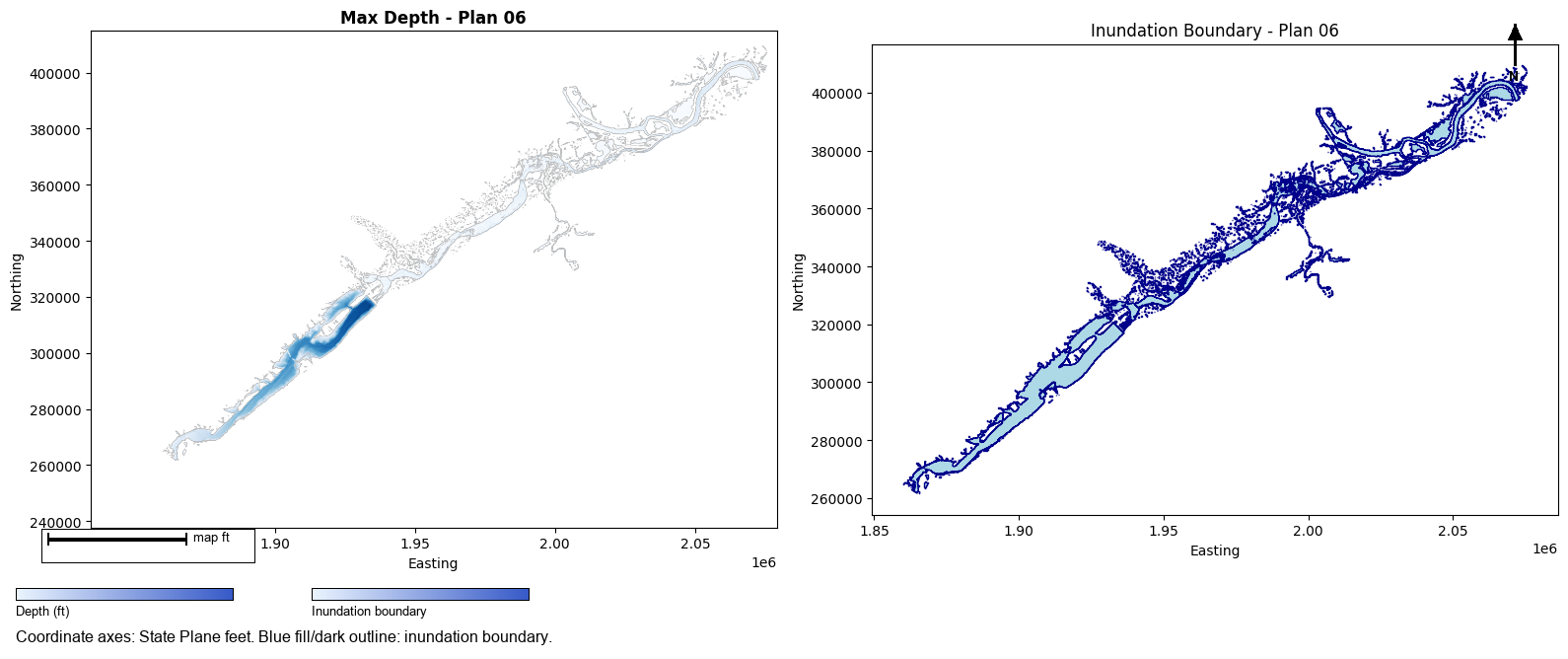
    Inundation area: 31,558.5 acres
    Saved to: Inundation_Boundary_Plan_06.shp

======================================================================
Generated 1 inundation boundary polygons
Step 7: Summary Report
# Summary of all generated outputs
print("\n" + "=" * 70)
print("FLOODPLAIN MAPPING SUMMARY")
print("=" * 70)
print(f"\nProject: {ras.project_name}")
print(f"Profile: {PROFILE}")
print(f"Total plans processed: {len(all_results)}")
print(f"\n{'Plan':<6} {'WSE':<10} {'Depth':<10} {'Inundation Area (acres)':<25}")
print("-" * 55)

for plan_num, results in sorted(all_results.items()):
    wse_count = len(results.get('wse', []))
    depth_count = len(results.get('depth', []))

    if plan_num in inundation_polygons:
        area = f"{inundation_polygons[plan_num]['area_acres']:,.1f}"
    else:
        area = "N/A"

    print(f"{plan_num:<6} {wse_count:<10} {depth_count:<10} {area:<25}")

print("\n" + "=" * 70)
print(f"\nOutput files located in: {OUTPUT_BASE}")
======================================================================
FLOODPLAIN MAPPING SUMMARY
======================================================================

Project: BaldEagleDamBrk
Profile: Max
Total plans processed: 1

Plan   WSE        Depth      Inundation Area (acres)
-------------------------------------------------------
06     1          1          31,558.5

======================================================================

Output files located in: <workspace>\examples\example_projects\BaldEagleCrkMulti2D_601\FloodplainMaps
Step 8: Visualize Results
# Visualize a sample depth raster and inundation boundary
sample_plan = list(all_results.keys())[0] if all_results else None

if sample_plan and 'depth' in all_results[sample_plan] and all_results[sample_plan]['depth']:
    depth_tif = all_results[sample_plan]['depth'][0]

    fig, axes = plt.subplots(1, 2, figsize=(16, 8))

    # Plot depth raster
    with rasterio.open(depth_tif) as src:
        show(src, ax=axes[0], cmap='Blues', title=f'Max Depth - Plan {sample_plan}')
    axes[0].set_xlabel('Easting')
    axes[0].set_ylabel('Northing')

    # Plot inundation boundary
    if sample_plan in inundation_polygons:
        gdf = inundation_polygons[sample_plan]['gdf']
        gdf.plot(ax=axes[1], facecolor='lightblue', edgecolor='darkblue', linewidth=1)
        axes[1].set_title(f'Inundation Boundary - Plan {sample_plan}')
        axes[1].set_xlabel('Easting')
        axes[1].set_ylabel('Northing')
        axes[1].set_aspect('equal')

    plt.tight_layout()
    plt.show()
else:
    print("No results available for visualization")
Optional: Export All Inundation Boundaries to GeoPackage
# Combine all inundation boundaries into a single GeoPackage
if inundation_polygons:
    all_gdfs = []

    for plan_num, data in inundation_polygons.items():
        gdf = data['gdf'].copy()
        gdf['plan_number'] = plan_num
        all_gdfs.append(gdf)

    combined_gdf = gpd.GeoDataFrame(pd.concat(all_gdfs, ignore_index=True))

    output_gpkg = OUTPUT_BASE / "all_inundation_boundaries.gpkg"
    combined_gdf.to_file(output_gpkg, driver='GPKG')

    print(f"Combined inundation boundaries saved to: {output_gpkg}")
    print(f"Total plans: {len(inundation_polygons)}")
else:
    print("No inundation polygons to export")
2026-06-11 17:30:11 - pyogrio._io - INFO - Created 1 records


Combined inundation boundaries saved to: <workspace>\examples\example_projects\BaldEagleCrkMulti2D_601\FloodplainMaps\all_inundation_boundaries.gpkg
Total plans: 1
Technical Notes
RasProcess.exe
RasProcess.exe is an undocumented CLI tool bundled with HEC-RAS 6.x that enables headless map generation. Key commands:
- StoreAllMaps: Generates all configured stored maps
- StoreMap: Generates a single map type
Inundation Boundary Generation
The inundation boundary is created by:
1. Reading the depth raster
2. Creating a binary mask where depth > threshold
3. Converting the mask to polygon features using rasterio.features.shapes
4. Merging all polygons into a single boundary using shapely.ops.unary_union
Performance
- RasProcess is the fastest method for generating maps (8-10 seconds per plan)
- Polygon conversion adds ~1-2 seconds per depth raster
- For large projects with many plans, consider running in batches