Version Benchmarking and Core Scaling (HEC-RAS 6.0, 6.3.1, 6.6, 7.0)
Overview
This notebook benchmarks the same 2D plan across four HEC-RAS versions and an explicit set of processor core counts. The goal is to separate:
- Version effects: improvements from
6.0 -> 6.3.1 -> 6.6 -> 7.0at the same core count - Scaling effects: how each version responds as cores increase
Why benchmark 7.0 this way?
HEC-RAS 7.0 was released on April 17, 2026. The official 7.0 release notes highlight:
- a new Intel IFX compiler for the compute engines
- CPU affinity / p-core awareness carried forward from the 6.7 beta line
- additional solver and stability work
Those changes should be most visible on Intel systems, but only if we hold the model, plan, and core count constant.
Benchmark Strategy
This notebook runs one sweep:
- for each version in
VERSIONS_TO_TEST - for each explicit core count in
CORE_COUNTS - execute the same plan in a version-isolated workspace
- read timing from
results_dfwith aResultsSummaryfallback
From that single results table we derive:
- fixed-core version comparison
- per-version core-scaling curves
- speedup and efficiency
- volume-error consistency checks
Default and Optional Models
- Default:
BaldEagleCrkMulti2DPlan02 - official example
- geometry
g01 - about 89,879 2D cells
- best portable cross-version choice found locally
- Optional local heavy case: North Galveston Bay eBFE Plan
01 - about 567,987 2D cells
- useful stretch case
- current packaged artifacts are 6.6-era, so treat it as exploratory rather than canonical
References
from pathlib import Path
import os
import platform
import shutil
import time

import h5py
import matplotlib.pyplot as plt
import pandas as pd
import psutil

try:
    import cpuinfo
except ImportError:
    cpuinfo = None

from ras_commander import (
    RasCmdr,
    RasExamples,
    RasGeo,
    RasPlan,
    RasUtils,
    init_ras_project,
)
from ras_commander.results import ResultsSummary

import ras_commander

print(f"ras-commander: {ras_commander.__version__}")
ras-commander: 0.98.0
Parameters
Configure the benchmark scope here. The defaults are tuned for a clean cross-version comparison using the official Bald Eagle 2D example.
# =============================================================================
# BENCHMARK PARAMETERS
# =============================================================================
RUN_BENCHMARK_SWEEP = os.environ.get("RAS_COMMANDER_RUN_BENCHMARK_SWEEP", "").lower() in {"1", "true", "yes"}
SKIP_BENCHMARK_SWEEP = not RUN_BENCHMARK_SWEEP  # Set env var to run the full sweep (takes 2+ hours)

RUN_LABEL = time.strftime("%Y%m%d_%H%M%S")

VERSIONS_TO_TEST = ["6.0", "6.3.1", "6.6", "7.0"]

# Shared eBFE workspace used by optional local eBFE benchmark cases.
# Override RAS_COMMANDER_EBFE_ROOT to use a different local cache.
EBFE_WORKSPACE = Path(os.environ.get("RAS_COMMANDER_EBFE_ROOT", r"H:\Testing\eBFE Model Organization"))
ORGANIZED_ROOT = EBFE_WORKSPACE / "Organized"

MODEL_LIBRARY = {
    "bald_eagle_plan02": {
        "label": "Bald Eagle Creek - Plan 02 (official example)",
        "source_type": "local_or_extract",
        "project_path": Path("examples/example_projects/BaldEagleCrkMulti2D"),
        "fallback_project_name": "BaldEagleCrkMulti2D",
        "fallback_suffix": "701_benchmark_source",
        "plan_number": "02",
        "expected_mesh_cells": 89879,
        "expected_runtime_note": "~19 minutes in archived repo results",
        "notes": (
            "Best portable cross-version case found locally. "
            "Plan 02 uses geometry g01 and stays within the classic 2D example set."
        ),
    },
    "north_galveston_ebfe_p01": {
        "label": "North Galveston Bay eBFE - Plan 01 (local heavy case)",
        "source_type": "local_path",
        "project_path": ORGANIZED_ROOT / "NorthGalvestonBay_12040203" / "RAS Model",
        "plan_number": "01",
        "expected_mesh_cells": 567987,
        "expected_runtime_note": "~14.5 minutes from stored 6.6 HDF in repo",
        "notes": (
            "Large local stretch case. The packaged artifacts currently report "
            "6.6-era results, so use it for exploratory scaling rather than "
            "the canonical cross-version example."
        ),
    },
}

MODEL_KEY = "bald_eagle_plan02"
model_config = MODEL_LIBRARY[MODEL_KEY]

physical_cores = psutil.cpu_count(logical=False) or 1
CORE_COUNTS = [c for c in [1, 2, 4, 8] if c <= physical_cores]
if not CORE_COUNTS:
    CORE_COUNTS = [1]

FIXED_CORE_COMPARISON = 4 if 4 in CORE_COUNTS else CORE_COUNTS[-1]
REPEATS = 1

# Rebuild the per-version working folders if you want a completely fresh rerun.
REBUILD_VERSION_WORKSPACES = False

# Recompute even if prior results exist in the per-version workspace.
FORCE_RERUN = True

# Include geometry preprocessing in the total-runtime benchmark.
CLEAR_GEOMPRE_EACH_RUN = True

BENCHMARK_ROOT = Path("working/benchmark_notebooks/701_version_benchmarking")

# Optional explicit overrides. Leave empty to use RasUtils.discover_ras_versions().
RAS_EXE_BY_VERSION = {
    # "7.0": Path(r"C:\Program Files (x86)\HEC\HEC-RAS\7.0\Ras.exe"),
}

if FIXED_CORE_COMPARISON not in CORE_COUNTS:
    raise ValueError("FIXED_CORE_COMPARISON must be included in CORE_COUNTS")
Candidate Models and System Context
This cell documents the model-selection tradeoffs and confirms the installed HEC-RAS executables before any compute runs start.
installed_versions = RasUtils.discover_ras_versions()
resolved_versions = {version: Path(path) for version, path in installed_versions.items()}

for version, exe_path in RAS_EXE_BY_VERSION.items():
    resolved_versions[version] = Path(exe_path)

missing_versions = [version for version in VERSIONS_TO_TEST if version not in resolved_versions]
if missing_versions:
    raise ValueError(
        "Missing requested HEC-RAS versions: "
        + ", ".join(missing_versions)
        + ". Install them or populate RAS_EXE_BY_VERSION."
    )

cpu_brand = (
    cpuinfo.get_cpu_info().get("brand_raw")
    if cpuinfo is not None
    else (platform.processor() or "Unknown CPU")
)

hardware_df = pd.DataFrame(
    [
        {"item": "CPU", "value": cpu_brand},
        {"item": "OS", "value": f"{platform.system()} {platform.release()}"},
        {"item": "Physical cores", "value": physical_cores},
        {"item": "Logical cores", "value": psutil.cpu_count(logical=True)},
        {"item": "Selected model", "value": model_config["label"]},
        {"item": "Selected plan", "value": model_config["plan_number"]},
        {"item": "Core counts", "value": CORE_COUNTS},
        {"item": "Fixed-core comparison", "value": FIXED_CORE_COMPARISON},
    ]
)
display(hardware_df)

candidate_df = pd.DataFrame(
    [
        {
            "model_key": "bald_eagle_plan02",
            "kind": "official example",
            "mesh_cells": 89879,
            "runtime_note": "~19 minutes in archived repo results",
            "status": "recommended default",
            "why": "Cleanest cross-version benchmark in the repo",
        },
        {
            "model_key": "north_galveston_ebfe_p01",
            "kind": "local eBFE",
            "mesh_cells": 567987,
            "runtime_note": "~14.5 minutes from stored 6.6 HDF",
            "status": "optional heavy case",
            "why": "Best local large-model scaling case, but not a clean 6.2-era eBFE baseline",
        },
        {
            "model_key": "spring_creek_p01",
            "kind": "local eBFE",
            "mesh_cells": "large 2D",
            "runtime_note": "30-60 minutes per notebook guidance",
            "status": "not recommended here",
            "why": "Version 5.0.7 and too slow for a compact version notebook",
        },
        {
            "model_key": "upper_guadalupe_cascade",
            "kind": "local eBFE",
            "mesh_cells": "multi-model cascade",
            "runtime_note": "2-6 hours per model",
            "status": "not recommended here",
            "why": "Too large for an example-notebook benchmark sweep",
        },
    ]
)
display(candidate_df)

installed_df = pd.DataFrame(
    {
        "version": VERSIONS_TO_TEST,
        "ras_exe": [str(resolved_versions[version]) for version in VERSIONS_TO_TEST],
    }
)
display(installed_df)
2026-06-11 18:13:50 - ras_commander.RasUtils - INFO - Discovered HEC-RAS 7.0 at <hec-ras-install>\7.0\Ras.exe via filesystem (x86)


2026-06-11 18:13:50 - ras_commander.RasUtils - INFO - Discovered HEC-RAS 6.7 Beta 5 at <hec-ras-install>\6.7 Beta 5\Ras.exe via filesystem (x86)


2026-06-11 18:13:50 - ras_commander.RasUtils - INFO - Discovered HEC-RAS 6.6 at <hec-ras-install>\6.6\Ras.exe via filesystem (x86)


2026-06-11 18:13:50 - ras_commander.RasUtils - INFO - Discovered HEC-RAS 6.5 at <hec-ras-install>\6.5\Ras.exe via filesystem (x86)


2026-06-11 18:13:50 - ras_commander.RasUtils - INFO - Discovered HEC-RAS 6.4.1 at <hec-ras-install>\6.4.1\Ras.exe via filesystem (x86)


2026-06-11 18:13:50 - ras_commander.RasUtils - INFO - Discovered HEC-RAS 6.3.1 at <hec-ras-install>\6.3.1\Ras.exe via filesystem (x86)


2026-06-11 18:13:50 - ras_commander.RasUtils - INFO - Discovered HEC-RAS 6.3 at <hec-ras-install>\6.3\Ras.exe via filesystem (x86)


2026-06-11 18:13:50 - ras_commander.RasUtils - INFO - Discovered HEC-RAS 6.2 at <hec-ras-install>\6.2\Ras.exe via filesystem (x86)


2026-06-11 18:13:50 - ras_commander.RasUtils - INFO - Discovered HEC-RAS 6.1 at <hec-ras-install>\6.1\Ras.exe via filesystem (x86)


2026-06-11 18:13:50 - ras_commander.RasUtils - INFO - Discovered HEC-RAS 6.0 at <hec-ras-install>\6.0\Ras.exe via filesystem (x86)


2026-06-11 18:13:50 - ras_commander.RasUtils - INFO - Discovered HEC-RAS 5.0.7 at <hec-ras-install>\5.0.7\Ras.exe via filesystem (x86)


2026-06-11 18:13:50 - ras_commander.RasUtils - INFO - Discovered HEC-RAS 5.0.6 at <hec-ras-install>\5.0.6\Ras.exe via filesystem (x86)


2026-06-11 18:13:50 - ras_commander.RasUtils - INFO - Discovered HEC-RAS 5.0.3 at <hec-ras-install>\5.0.3\Ras.exe via filesystem (x86)


2026-06-11 18:13:50 - ras_commander.RasUtils - INFO - Discovered HEC-RAS 4.1.0 at <hec-ras-install>\4.1.0\Ras.exe via filesystem (x86)


2026-06-11 18:13:50 - ras_commander.RasUtils - INFO - Discovered HEC-RAS 4.0 at <hec-ras-install>\4.0\Ras.exe via filesystem (x86)


2026-06-11 18:13:50 - ras_commander.RasUtils - INFO - Discovered HEC-RAS 6.7 Beta 4a at <hec-ras-install>\6.7 Beta 4a\Ras.exe via filesystem (x86)


2026-06-11 18:13:50 - ras_commander.RasUtils - INFO - Discovered 16 installed HEC-RAS version(s)
| item | value | |
|---|---|---|
| 0 | CPU | Intel64 Family 6 Model 167 Stepping 1, Genuine... |
| 1 | OS | Windows 11 |
| 2 | Physical cores | 6 |
| 3 | Logical cores | 6 |
| 4 | Selected model | Bald Eagle Creek - Plan 02 (official example) |
| 5 | Selected plan | 02 |
| 6 | Core counts | [1, 2, 4] |
| 7 | Fixed-core comparison | 4 |
| model_key | kind | mesh_cells | runtime_note | status | why | |
|---|---|---|---|---|---|---|
| 0 | bald_eagle_plan02 | official example | 89879 | ~19 minutes in archived repo results | recommended default | Cleanest cross-version benchmark in the repo |
| 1 | north_galveston_ebfe_p01 | local eBFE | 567987 | ~14.5 minutes from stored 6.6 HDF | optional heavy case | Best local large-model scaling case, but not a... |
| 2 | spring_creek_p01 | local eBFE | large 2D | 30-60 minutes per notebook guidance | not recommended here | Version 5.0.7 and too slow for a compact versi... |
| 3 | upper_guadalupe_cascade | local eBFE | multi-model cascade | 2-6 hours per model | not recommended here | Too large for an example-notebook benchmark sweep |
| version | ras_exe | |
|---|---|---|
| 0 | 6.0 | |
| 1 | 6.3.1 | |
| 2 | 6.6 | |
| 3 | 7.0 |
Benchmark Helpers
The helpers below keep each HEC-RAS version in its own working folder so a newer release does not rewrite the project files used by an older release.
def resolve_ras_exe(version: str) -> Path:
    return resolved_versions[version]


def resolve_source_project(config: dict) -> Path:
    source_type = config["source_type"]

    if source_type == "local_path":
        project_path = Path(config["project_path"])
        if not project_path.exists():
            raise FileNotFoundError(f"Local benchmark project not found: {project_path}")
        return project_path

    if source_type == "local_or_extract":
        project_path = Path(config["project_path"])
        if project_path.exists():
            return project_path

        extracted = RasExamples.extract_project(
            config["fallback_project_name"],
            suffix=config["fallback_suffix"],
        )
        return Path(extracted)

    raise ValueError(f"Unsupported source_type: {source_type}")


def version_workspace(version: str) -> Path:
    safe_version = version.replace(".", "_")
    return BENCHMARK_ROOT / MODEL_KEY / f"version_{safe_version}"


def prepare_version_workspace(source_project: Path, version: str) -> Path:
    workspace = version_workspace(version)
    if REBUILD_VERSION_WORKSPACES and workspace.exists():
        shutil.rmtree(workspace)

    if not workspace.exists():
        workspace.parent.mkdir(parents=True, exist_ok=True)
        shutil.copytree(source_project, workspace)

    return workspace


def plan_row_for(ras_obj, plan_number: str) -> pd.Series:
    plan_number = str(plan_number).zfill(2)
    matches = ras_obj.plan_df.loc[
        ras_obj.plan_df["plan_number"].astype(str).str.zfill(2) == plan_number
    ]
    if matches.empty:
        raise KeyError(f"Plan {plan_number} not found in {ras_obj.project_name}")
    return matches.iloc[0]


def geometry_hdf_path_from_plan_row(plan_row: pd.Series) -> Path | None:
    geom_path = plan_row.get("Geom Path")
    if pd.isna(geom_path) or not geom_path:
        return None

    geom_path = Path(geom_path)
    if geom_path.suffix.lower() == ".hdf":
        return geom_path

    return geom_path.with_name(geom_path.name + ".hdf")


def count_mesh_cells(project_folder: Path, plan_number: str, inspector_version: str) -> int | None:
    ras_obj = init_ras_project(project_folder, resolve_ras_exe(inspector_version))
    plan_row = plan_row_for(ras_obj, plan_number)
    geom_hdf_path = geometry_hdf_path_from_plan_row(plan_row)

    if geom_hdf_path is None or not geom_hdf_path.exists():
        return None

    total_cells = 0
    with h5py.File(geom_hdf_path, "r") as hdf:
        if "Geometry/2D Flow Areas" not in hdf:
            return None

        for _, obj in hdf["Geometry/2D Flow Areas"].items():
            if isinstance(obj, h5py.Group) and "Cells Center Coordinate" in obj:
                total_cells += obj["Cells Center Coordinate"].shape[0]

    return total_cells or None


def extract_runtime_metrics(ras_obj, plan_number: str) -> dict:
    plan_number = str(plan_number).zfill(2)
    ras_obj.update_results_df([plan_number])

    matches = ras_obj.results_df.loc[
        ras_obj.results_df["plan_number"].astype(str).str.zfill(2) == plan_number
    ]
    if matches.empty:
        raise KeyError(f"Plan {plan_number} missing from results_df")

    row = matches.iloc[0]
    runtime_complete = row.get("runtime_complete_process_hours")
    runtime_unsteady = row.get("runtime_unsteady_compute_hours")
    runtime_source = row.get("runtime_source")
    volume_error = row.get("vol_error_percent")
    completed = bool(row.get("completed", False))
    has_errors = bool(row.get("has_errors", False))
    has_warnings = bool(row.get("has_warnings", False))

    plan_hdf_path = row.get("plan_hdf_path")
    if pd.isna(plan_hdf_path) or not plan_hdf_path:
        try:
            plan_hdf_path = RasPlan.get_results_path(plan_number, ras_object=ras_obj)
        except Exception:
            plan_hdf_path = None

    if (
        (pd.isna(runtime_complete) or pd.isna(runtime_unsteady) or runtime_source in [None, "", float("nan")])
        and plan_hdf_path is not None
    ):
        plan_meta = {
            "plan_number": plan_number,
            "plan_title": row.get("plan_title", row.get("Plan Title", plan_number)),
            "flow_type": row.get("flow_type", "Unsteady"),
            "Program Version": row.get("program_version", "unknown"),
        }
        summary = ResultsSummary.summarize_plan(Path(plan_hdf_path), plan_meta)
        runtime_complete = summary.get("runtime_complete_process_hours", runtime_complete)
        runtime_unsteady = summary.get("runtime_unsteady_compute_hours", runtime_unsteady)
        runtime_source = summary.get("runtime_source", runtime_source)
        volume_error = summary.get("vol_error_percent", volume_error)
        completed = summary.get("completed", completed)
        has_errors = summary.get("has_errors", has_errors)
        has_warnings = summary.get("has_warnings", has_warnings)

    return {
        "runtime_complete_process_hours": runtime_complete,
        "runtime_unsteady_compute_hours": runtime_unsteady,
        "runtime_source": runtime_source,
        "vol_error_percent": volume_error,
        "completed": completed,
        "has_errors": has_errors,
        "has_warnings": has_warnings,
        "plan_hdf_path": str(plan_hdf_path) if plan_hdf_path else None,
    }


def run_benchmark_case(version: str, cores: int, source_project: Path, repeat_index: int = 1) -> dict:
    workspace = prepare_version_workspace(source_project, version)
    ras_obj = init_ras_project(workspace, resolve_ras_exe(version))
    plan_number = str(model_config["plan_number"]).zfill(2)
    plan_row = plan_row_for(ras_obj, plan_number)

    plan_path = RasPlan.get_plan_path(plan_number, ras_object=ras_obj)
    if CLEAR_GEOMPRE_EACH_RUN:
        RasGeo.clear_geompre_files(plan_path, ras_object=ras_obj)

    RasPlan.set_num_cores(plan_number, int(cores), ras_object=ras_obj)
    RasPlan.update_run_flags(plan_number, {"Run HTab": 1}, ras_object=ras_obj)

    start = time.perf_counter()
    success = RasCmdr.compute_plan(
        plan_number,
        ras_object=ras_obj,
        force_rerun=FORCE_RERUN,
    )
    wall_clock_hours = (time.perf_counter() - start) / 3600.0

    metrics = extract_runtime_metrics(ras_obj, plan_number)
    metrics.update(
        {
            "model_key": MODEL_KEY,
            "model_label": model_config["label"],
            "source_project": str(source_project),
            "workspace": str(workspace),
            "version": version,
            "cores": int(cores),
            "repeat": int(repeat_index),
            "success_return": bool(success),
            "plan_number": plan_number,
            "plan_title": plan_row.get("Plan Title"),
            "short_identifier": plan_row.get("Short Identifier"),
            "geometry_number": str(plan_row.get("geometry_number")).zfill(2),
            "geom_file": str(plan_row.get("Geom File")).zfill(2),
            "flow_file": str(plan_row.get("Flow File")).zfill(2),
            "wall_clock_hours": wall_clock_hours,
            "wall_clock_seconds": wall_clock_hours * 3600.0,
        }
    )
    return metrics
Run the Benchmark Sweep
The same sweep supplies both outputs we care about:
- fixed-core version comparison at
FIXED_CORE_COMPARISON - per-version scaling curves across
CORE_COUNTS
if not SKIP_BENCHMARK_SWEEP:
    source_project = resolve_source_project(model_config)
    mesh_cells = count_mesh_cells(source_project, model_config["plan_number"], VERSIONS_TO_TEST[-1])

    output_dir = BENCHMARK_ROOT / "outputs" / f"{MODEL_KEY}_{RUN_LABEL}"
    output_dir.mkdir(parents=True, exist_ok=True)

    print(f"Selected model: {model_config['label']}")
    print(f"Source project: {source_project}")
    print(f"Plan: {model_config['plan_number']}")
    print(f"Mesh cells: {mesh_cells:,}" if mesh_cells is not None else "Mesh cells: unavailable")
    print(f"Versions: {VERSIONS_TO_TEST}")
    print(f"Core counts: {CORE_COUNTS}")
    print(f"Output folder: {output_dir}")

    benchmark_rows = []

    for version in VERSIONS_TO_TEST:
        print("")
        print("=" * 80)
        print(f"Version {version} -> {resolve_ras_exe(version)}")
        print("=" * 80)

        for cores in CORE_COUNTS:
            for repeat in range(1, REPEATS + 1):
                print(f"Running version={version}, cores={cores}, repeat={repeat}")
                try:
                    result = run_benchmark_case(version, cores, source_project, repeat)
                    result["mesh_cells"] = mesh_cells
                    result["error_message"] = None
                except Exception as exc:
                    result = {
                        "model_key": MODEL_KEY,
                        "model_label": model_config["label"],
                        "source_project": str(source_project),
                        "workspace": str(version_workspace(version)),
                        "version": version,
                        "cores": int(cores),
                        "repeat": int(repeat),
                        "success_return": False,
                        "plan_number": str(model_config["plan_number"]).zfill(2),
                        "plan_title": None,
                        "short_identifier": None,
                        "geometry_number": None,
                        "geom_file": None,
                        "flow_file": None,
                        "runtime_complete_process_hours": None,
                        "runtime_unsteady_compute_hours": None,
                        "runtime_source": None,
                        "vol_error_percent": None,
                        "completed": False,
                        "has_errors": True,
                        "has_warnings": False,
                        "plan_hdf_path": None,
                        "wall_clock_hours": None,
                        "wall_clock_seconds": None,
                        "mesh_cells": mesh_cells,
                        "error_message": str(exc),
                    }
                    print(f"  FAILED: {exc}")

                benchmark_rows.append(result)

    benchmark_df = (
        pd.DataFrame(benchmark_rows)
        .sort_values(["version", "cores", "repeat"], kind="stable")
        .reset_index(drop=True)
    )

    benchmark_df["execution_time_s"] = benchmark_df["runtime_complete_process_hours"] * 3600.0
    benchmark_df["unsteady_time_s"] = benchmark_df["runtime_unsteady_compute_hours"] * 3600.0
    benchmark_df["overhead_s"] = benchmark_df["execution_time_s"] - benchmark_df["unsteady_time_s"]

    benchmark_csv = output_dir / "benchmark_results.csv"
    benchmark_df.to_csv(benchmark_csv, index=False)
    print(f"Saved raw benchmark results to: {benchmark_csv}")

    display(
        benchmark_df[
            [
                "version",
                "cores",
                "repeat",
                "completed",
                "has_errors",
                "has_warnings",
                "execution_time_s",
                "unsteady_time_s",
                "vol_error_percent",
                "error_message",
            ]
        ]
    )

else:
    print("Skipping benchmark sweep (SKIP_BENCHMARK_SWEEP=True). Set to False for full benchmark.")
    benchmark_df = pd.DataFrame()
    output_dir = BENCHMARK_ROOT / "outputs" / f"{MODEL_KEY}_{RUN_LABEL}"
    output_dir.mkdir(parents=True, exist_ok=True)
    mesh_cells = None
2026-06-11 18:13:51 - ras_commander.RasExamples - INFO - Successfully extracted project 'BaldEagleCrkMulti2D' to <workspace-root>\examples\example_projects\BaldEagleCrkMulti2D_701_benchmark_source


2026-06-11 18:13:52 - ras_commander.RasMap - INFO - Successfully parsed RASMapper file: <workspace-root>\examples\example_projects\BaldEagleCrkMulti2D_701_benchmark_source\BaldEagleDamBrk.rasmap


2026-06-11 18:13:52 - ras_commander.RasPrj - INFO - ras-commander v0.98.0 | An open-source project of CLB Engineering Corporation (https://clbengineering.com/) | Docs: https://rascommander.info | GitHub: https://github.com/gpt-cmdr/ras-commander


2026-06-11 18:13:52 - ras_commander.RasPrj - INFO - Project initialized: BaldEagleDamBrk | Folder: <workspace-root>\examples\example_projects\BaldEagleCrkMulti2D_701_benchmark_source


2026-06-11 18:13:52 - ras_commander.RasPrj - INFO - Using HEC-RAS executable: <hec-ras-install>\7.0\Ras.exe


2026-06-11 18:13:52 - ras_commander.RasPrj - INFO -
═══════════════════════════════════════════════════════════════════════
ras-commander | HEC-RAS Automation Library
Docs: https://rascommander.info/
Repo: https://github.com/gpt-cmdr/ras-commander
═══════════════════════════════════════════════════════════════════════

PROJECT DATAFRAMES (single source of truth — use these, not file globbing):
  ras.plan_df        Plans, HDF paths, geometry/flow associations
  ras.geom_df        Geometry files and HDF preprocessor paths
  ras.flow_df        Steady flow files
  ras.unsteady_df    Unsteady flow files and configurations
  ras.boundaries_df  Boundary conditions (type, name, location)
  ras.results_df     Lightweight HDF results summaries
  ras.rasmap_df      RASMapper layers, terrain, land cover paths

KEY APIS (static classes — call directly, never instantiate):
  Execution:    RasCmdr.compute_plan() / compute_parallel() / compute_test_mode()
  Plan Files:   RasPlan.clone_plan() / clone_geom() / set_geom()
  Unsteady:     RasUnsteady — IC/BC management, gate openings, precipitation
  Geometry:     GeomCrossSection, GeomBridge, GeomStorage, GeomLateral, GeomMesh
  HDF Results:  HdfResultsPlan.get_wse() / get_compute_messages()
                HdfResultsMesh.get_mesh_max_ws() / get_mesh_cells_timeseries()
                HdfMesh.get_mesh_cell_points()
  QA/QC:        RasCheck.run_check() / RasFixit (geometry repair)
  DSS:          RasDss.get_timeseries() / check_pathname()
  USGS:         UsgsGaugeSpatial, GaugeMatcher, RasUsgsBoundaryGeneration
  Precipitation: StormGenerator, Atlas14Storm, PrecipAorc, Atlas14Variance
  Terrain:      RasTerrain.create_terrain_hdf() / RasTerrainMod

MULTI-PROJECT: Pass ras_object= to all API calls when using local RasPrj instances.

EXAMPLES: 100+ notebooks in examples/ (100s=execution, 200s=geometry, 300s=unsteady,
  400s=HDF results, 500s=remote, 800s=QA/QC, 900s=data integration).
  Review relevant notebooks before assembling new workflows.

PLATFORM: Most HEC-RAS operations require Windows. Linux/Wine support for
  headless execution, data access, geometry modification, and preprocessing
  is available via RasProcess (HEC-RAS 6.6+). See ras_commander/RasProcess.py.
  Remote distributed execution: ras_commander/remote/ (PsExec, Docker, SSH, cloud).
═══════════════════════════════════════════════════════════════════════


Selected model: Bald Eagle Creek - Plan 02 (official example)
Source project: <workspace-root>\examples\example_projects\BaldEagleCrkMulti2D_701_benchmark_source
Plan: 02
Mesh cells: 89,879
Versions: ['6.0', '6.3.1', '6.6', '7.0']
Core counts: [1, 2, 4]
Output folder: working\benchmark_notebooks\701_version_benchmarking\outputs\bald_eagle_plan02_20260611_181350

================================================================================
Version 6.0 -> <hec-ras-install>\6.0\Ras.exe
================================================================================
Running version=6.0, cores=1, repeat=1


2026-06-11 18:13:52 - ras_commander.RasMap - INFO - Successfully parsed RASMapper file: <workspace-root>\examples\working\benchmark_notebooks\701_version_benchmarking\bald_eagle_plan02\version_6_0\BaldEagleDamBrk.rasmap


2026-06-11 18:13:52 - ras_commander.RasPrj - INFO - ras-commander v0.98.0 | An open-source project of CLB Engineering Corporation (https://clbengineering.com/) | Docs: https://rascommander.info | GitHub: https://github.com/gpt-cmdr/ras-commander


2026-06-11 18:13:52 - ras_commander.RasPrj - INFO - Project initialized: BaldEagleDamBrk | Folder: <workspace-root>\examples\working\benchmark_notebooks\701_version_benchmarking\bald_eagle_plan02\version_6_0


2026-06-11 18:13:52 - ras_commander.RasPrj - INFO - Using HEC-RAS executable: <hec-ras-install>\6.0\Ras.exe


2026-06-11 18:13:52 - ras_commander.RasPrj - INFO -
═══════════════════════════════════════════════════════════════════════
ras-commander | HEC-RAS Automation Library
Docs: https://rascommander.info/
Repo: https://github.com/gpt-cmdr/ras-commander
═══════════════════════════════════════════════════════════════════════

PROJECT DATAFRAMES (single source of truth — use these, not file globbing):
  ras.plan_df        Plans, HDF paths, geometry/flow associations
  ras.geom_df        Geometry files and HDF preprocessor paths
  ras.flow_df        Steady flow files
  ras.unsteady_df    Unsteady flow files and configurations
  ras.boundaries_df  Boundary conditions (type, name, location)
  ras.results_df     Lightweight HDF results summaries
  ras.rasmap_df      RASMapper layers, terrain, land cover paths

KEY APIS (static classes — call directly, never instantiate):
  Execution:    RasCmdr.compute_plan() / compute_parallel() / compute_test_mode()
  Plan Files:   RasPlan.clone_plan() / clone_geom() / set_geom()
  Unsteady:     RasUnsteady — IC/BC management, gate openings, precipitation
  Geometry:     GeomCrossSection, GeomBridge, GeomStorage, GeomLateral, GeomMesh
  HDF Results:  HdfResultsPlan.get_wse() / get_compute_messages()
                HdfResultsMesh.get_mesh_max_ws() / get_mesh_cells_timeseries()
                HdfMesh.get_mesh_cell_points()
  QA/QC:        RasCheck.run_check() / RasFixit (geometry repair)
  DSS:          RasDss.get_timeseries() / check_pathname()
  USGS:         UsgsGaugeSpatial, GaugeMatcher, RasUsgsBoundaryGeneration
  Precipitation: StormGenerator, Atlas14Storm, PrecipAorc, Atlas14Variance
  Terrain:      RasTerrain.create_terrain_hdf() / RasTerrainMod

MULTI-PROJECT: Pass ras_object= to all API calls when using local RasPrj instances.

EXAMPLES: 100+ notebooks in examples/ (100s=execution, 200s=geometry, 300s=unsteady,
  400s=HDF results, 500s=remote, 800s=QA/QC, 900s=data integration).
  Review relevant notebooks before assembling new workflows.

PLATFORM: Most HEC-RAS operations require Windows. Linux/Wine support for
  headless execution, data access, geometry modification, and preprocessing
  is available via RasProcess (HEC-RAS 6.6+). See ras_commander/RasProcess.py.
  Remote distributed execution: ras_commander/remote/ (PsExec, Docker, SSH, cloud).
═══════════════════════════════════════════════════════════════════════


2026-06-11 18:13:52 - ras_commander.geom.GeomPreprocessor - INFO - Clearing geometry preprocessor file for single plan: <workspace-root>\examples\working\benchmark_notebooks\701_version_benchmarking\bald_eagle_plan02\version_6_0\BaldEagleDamBrk.p02


2026-06-11 18:13:53 - ras_commander.RasUtils - INFO - Successfully updated file: <workspace-root>\examples\working\benchmark_notebooks\701_version_benchmarking\bald_eagle_plan02\version_6_0\BaldEagleDamBrk.p02


2026-06-11 18:13:53 - ras_commander.RasPlan - INFO - Successfully updated run flags in plan file: <workspace-root>\examples\working\benchmark_notebooks\701_version_benchmarking\bald_eagle_plan02\version_6_0\BaldEagleDamBrk.p02 (flags modified: 1)


2026-06-11 18:13:53 - ras_commander.RasCmdr - INFO - Using ras_object with project folder: <workspace-root>\examples\working\benchmark_notebooks\701_version_benchmarking\bald_eagle_plan02\version_6_0


2026-06-11 18:13:53 - ras_commander.RasCmdr - INFO - Running HEC-RAS from the Command Line:


2026-06-11 18:13:53 - ras_commander.RasCmdr - INFO - Running command: "<hec-ras-install>\6.0\Ras.exe" -c "<workspace-root>\examples\working\benchmark_notebooks\701_version_benchmarking\bald_eagle_plan02\version_6_0\BaldEagleDamBrk.prj" "<workspace-root>\examples\working\benchmark_notebooks\701_version_benchmarking\bald_eagle_plan02\version_6_0\BaldEagleDamBrk.p02"


2026-06-11 18:13:53 - ras_commander.RasDialogWatchdog - INFO - DialogWatchdog started — polling every 1.5s for RAS dialog windows


2026-06-11 18:56:44 - ras_commander.RasCmdr - INFO - HEC-RAS execution completed for plan: 02


2026-06-11 18:56:44 - ras_commander.RasCmdr - INFO - Total run time for plan 02: 2571.38 seconds


2026-06-11 18:56:44 - ras_commander.RasDialogWatchdog - INFO - DialogWatchdog stopped — no dialogs encountered


Running version=6.0, cores=2, repeat=1


2026-06-11 18:56:45 - ras_commander.RasMap - INFO - Successfully parsed RASMapper file: <workspace-root>\examples\working\benchmark_notebooks\701_version_benchmarking\bald_eagle_plan02\version_6_0\BaldEagleDamBrk.rasmap


2026-06-11 18:56:45 - ras_commander.RasPrj - INFO - ras-commander v0.98.0 | An open-source project of CLB Engineering Corporation (https://clbengineering.com/) | Docs: https://rascommander.info | GitHub: https://github.com/gpt-cmdr/ras-commander


2026-06-11 18:56:45 - ras_commander.RasPrj - INFO - Project initialized: BaldEagleDamBrk | Folder: <workspace-root>\examples\working\benchmark_notebooks\701_version_benchmarking\bald_eagle_plan02\version_6_0


2026-06-11 18:56:45 - ras_commander.RasPrj - INFO - Using HEC-RAS executable: <hec-ras-install>\6.0\Ras.exe


2026-06-11 18:56:45 - ras_commander.RasPrj - INFO -
═══════════════════════════════════════════════════════════════════════
ras-commander | HEC-RAS Automation Library
Docs: https://rascommander.info/
Repo: https://github.com/gpt-cmdr/ras-commander
═══════════════════════════════════════════════════════════════════════

PROJECT DATAFRAMES (single source of truth — use these, not file globbing):
  ras.plan_df        Plans, HDF paths, geometry/flow associations
  ras.geom_df        Geometry files and HDF preprocessor paths
  ras.flow_df        Steady flow files
  ras.unsteady_df    Unsteady flow files and configurations
  ras.boundaries_df  Boundary conditions (type, name, location)
  ras.results_df     Lightweight HDF results summaries
  ras.rasmap_df      RASMapper layers, terrain, land cover paths

KEY APIS (static classes — call directly, never instantiate):
  Execution:    RasCmdr.compute_plan() / compute_parallel() / compute_test_mode()
  Plan Files:   RasPlan.clone_plan() / clone_geom() / set_geom()
  Unsteady:     RasUnsteady — IC/BC management, gate openings, precipitation
  Geometry:     GeomCrossSection, GeomBridge, GeomStorage, GeomLateral, GeomMesh
  HDF Results:  HdfResultsPlan.get_wse() / get_compute_messages()
                HdfResultsMesh.get_mesh_max_ws() / get_mesh_cells_timeseries()
                HdfMesh.get_mesh_cell_points()
  QA/QC:        RasCheck.run_check() / RasFixit (geometry repair)
  DSS:          RasDss.get_timeseries() / check_pathname()
  USGS:         UsgsGaugeSpatial, GaugeMatcher, RasUsgsBoundaryGeneration
  Precipitation: StormGenerator, Atlas14Storm, PrecipAorc, Atlas14Variance
  Terrain:      RasTerrain.create_terrain_hdf() / RasTerrainMod

MULTI-PROJECT: Pass ras_object= to all API calls when using local RasPrj instances.

EXAMPLES: 100+ notebooks in examples/ (100s=execution, 200s=geometry, 300s=unsteady,
  400s=HDF results, 500s=remote, 800s=QA/QC, 900s=data integration).
  Review relevant notebooks before assembling new workflows.

PLATFORM: Most HEC-RAS operations require Windows. Linux/Wine support for
  headless execution, data access, geometry modification, and preprocessing
  is available via RasProcess (HEC-RAS 6.6+). See ras_commander/RasProcess.py.
  Remote distributed execution: ras_commander/remote/ (PsExec, Docker, SSH, cloud).
═══════════════════════════════════════════════════════════════════════


2026-06-11 18:56:45 - ras_commander.geom.GeomPreprocessor - INFO - Clearing geometry preprocessor file for single plan: <workspace-root>\examples\working\benchmark_notebooks\701_version_benchmarking\bald_eagle_plan02\version_6_0\BaldEagleDamBrk.p02


2026-06-11 18:56:45 - ras_commander.RasUtils - INFO - Successfully updated file: <workspace-root>\examples\working\benchmark_notebooks\701_version_benchmarking\bald_eagle_plan02\version_6_0\BaldEagleDamBrk.p02


2026-06-11 18:56:45 - ras_commander.RasPlan - INFO - Successfully updated run flags in plan file: <workspace-root>\examples\working\benchmark_notebooks\701_version_benchmarking\bald_eagle_plan02\version_6_0\BaldEagleDamBrk.p02 (flags modified: 1)


2026-06-11 18:56:45 - ras_commander.RasCmdr - INFO - Using ras_object with project folder: <workspace-root>\examples\working\benchmark_notebooks\701_version_benchmarking\bald_eagle_plan02\version_6_0


2026-06-11 18:56:45 - ras_commander.RasCmdr - INFO - Running HEC-RAS from the Command Line:


2026-06-11 18:56:45 - ras_commander.RasCmdr - INFO - Running command: "<hec-ras-install>\6.0\Ras.exe" -c "<workspace-root>\examples\working\benchmark_notebooks\701_version_benchmarking\bald_eagle_plan02\version_6_0\BaldEagleDamBrk.prj" "<workspace-root>\examples\working\benchmark_notebooks\701_version_benchmarking\bald_eagle_plan02\version_6_0\BaldEagleDamBrk.p02"


2026-06-11 18:56:45 - ras_commander.RasDialogWatchdog - INFO - DialogWatchdog started — polling every 1.5s for RAS dialog windows


2026-06-11 19:19:07 - ras_commander.RasCmdr - INFO - HEC-RAS execution completed for plan: 02


2026-06-11 19:19:07 - ras_commander.RasCmdr - INFO - Total run time for plan 02: 1341.16 seconds


2026-06-11 19:19:07 - ras_commander.RasDialogWatchdog - INFO - DialogWatchdog stopped — no dialogs encountered


Running version=6.0, cores=4, repeat=1


2026-06-11 19:19:07 - ras_commander.RasMap - INFO - Successfully parsed RASMapper file: <workspace-root>\examples\working\benchmark_notebooks\701_version_benchmarking\bald_eagle_plan02\version_6_0\BaldEagleDamBrk.rasmap


2026-06-11 19:19:07 - ras_commander.RasPrj - INFO - ras-commander v0.98.0 | An open-source project of CLB Engineering Corporation (https://clbengineering.com/) | Docs: https://rascommander.info | GitHub: https://github.com/gpt-cmdr/ras-commander


2026-06-11 19:19:07 - ras_commander.RasPrj - INFO - Project initialized: BaldEagleDamBrk | Folder: <workspace-root>\examples\working\benchmark_notebooks\701_version_benchmarking\bald_eagle_plan02\version_6_0


2026-06-11 19:19:07 - ras_commander.RasPrj - INFO - Using HEC-RAS executable: <hec-ras-install>\6.0\Ras.exe


2026-06-11 19:19:07 - ras_commander.RasPrj - INFO -
═══════════════════════════════════════════════════════════════════════
ras-commander | HEC-RAS Automation Library
Docs: https://rascommander.info/
Repo: https://github.com/gpt-cmdr/ras-commander
═══════════════════════════════════════════════════════════════════════

PROJECT DATAFRAMES (single source of truth — use these, not file globbing):
  ras.plan_df        Plans, HDF paths, geometry/flow associations
  ras.geom_df        Geometry files and HDF preprocessor paths
  ras.flow_df        Steady flow files
  ras.unsteady_df    Unsteady flow files and configurations
  ras.boundaries_df  Boundary conditions (type, name, location)
  ras.results_df     Lightweight HDF results summaries
  ras.rasmap_df      RASMapper layers, terrain, land cover paths

KEY APIS (static classes — call directly, never instantiate):
  Execution:    RasCmdr.compute_plan() / compute_parallel() / compute_test_mode()
  Plan Files:   RasPlan.clone_plan() / clone_geom() / set_geom()
  Unsteady:     RasUnsteady — IC/BC management, gate openings, precipitation
  Geometry:     GeomCrossSection, GeomBridge, GeomStorage, GeomLateral, GeomMesh
  HDF Results:  HdfResultsPlan.get_wse() / get_compute_messages()
                HdfResultsMesh.get_mesh_max_ws() / get_mesh_cells_timeseries()
                HdfMesh.get_mesh_cell_points()
  QA/QC:        RasCheck.run_check() / RasFixit (geometry repair)
  DSS:          RasDss.get_timeseries() / check_pathname()
  USGS:         UsgsGaugeSpatial, GaugeMatcher, RasUsgsBoundaryGeneration
  Precipitation: StormGenerator, Atlas14Storm, PrecipAorc, Atlas14Variance
  Terrain:      RasTerrain.create_terrain_hdf() / RasTerrainMod

MULTI-PROJECT: Pass ras_object= to all API calls when using local RasPrj instances.

EXAMPLES: 100+ notebooks in examples/ (100s=execution, 200s=geometry, 300s=unsteady,
  400s=HDF results, 500s=remote, 800s=QA/QC, 900s=data integration).
  Review relevant notebooks before assembling new workflows.

PLATFORM: Most HEC-RAS operations require Windows. Linux/Wine support for
  headless execution, data access, geometry modification, and preprocessing
  is available via RasProcess (HEC-RAS 6.6+). See ras_commander/RasProcess.py.
  Remote distributed execution: ras_commander/remote/ (PsExec, Docker, SSH, cloud).
═══════════════════════════════════════════════════════════════════════


2026-06-11 19:19:07 - ras_commander.geom.GeomPreprocessor - INFO - Clearing geometry preprocessor file for single plan: <workspace-root>\examples\working\benchmark_notebooks\701_version_benchmarking\bald_eagle_plan02\version_6_0\BaldEagleDamBrk.p02


2026-06-11 19:19:07 - ras_commander.RasUtils - INFO - Successfully updated file: <workspace-root>\examples\working\benchmark_notebooks\701_version_benchmarking\bald_eagle_plan02\version_6_0\BaldEagleDamBrk.p02


2026-06-11 19:19:08 - ras_commander.RasPlan - INFO - Successfully updated run flags in plan file: <workspace-root>\examples\working\benchmark_notebooks\701_version_benchmarking\bald_eagle_plan02\version_6_0\BaldEagleDamBrk.p02 (flags modified: 1)


2026-06-11 19:19:08 - ras_commander.RasCmdr - INFO - Using ras_object with project folder: <workspace-root>\examples\working\benchmark_notebooks\701_version_benchmarking\bald_eagle_plan02\version_6_0


2026-06-11 19:19:08 - ras_commander.RasCmdr - INFO - Running HEC-RAS from the Command Line:


2026-06-11 19:19:08 - ras_commander.RasCmdr - INFO - Running command: "<hec-ras-install>\6.0\Ras.exe" -c "<workspace-root>\examples\working\benchmark_notebooks\701_version_benchmarking\bald_eagle_plan02\version_6_0\BaldEagleDamBrk.prj" "<workspace-root>\examples\working\benchmark_notebooks\701_version_benchmarking\bald_eagle_plan02\version_6_0\BaldEagleDamBrk.p02"


2026-06-11 19:19:08 - ras_commander.RasDialogWatchdog - INFO - DialogWatchdog started — polling every 1.5s for RAS dialog windows


2026-06-11 19:36:12 - ras_commander.RasCmdr - INFO - HEC-RAS execution completed for plan: 02


2026-06-11 19:36:12 - ras_commander.RasCmdr - INFO - Total run time for plan 02: 1024.73 seconds


2026-06-11 19:36:12 - ras_commander.RasDialogWatchdog - INFO - DialogWatchdog stopped — no dialogs encountered


================================================================================
Version 6.3.1 -> <hec-ras-install>\6.3.1\Ras.exe
================================================================================
Running version=6.3.1, cores=1, repeat=1


2026-06-11 19:36:13 - ras_commander.RasMap - INFO - Successfully parsed RASMapper file: <workspace-root>\examples\working\benchmark_notebooks\701_version_benchmarking\bald_eagle_plan02\version_6_3_1\BaldEagleDamBrk.rasmap


2026-06-11 19:36:13 - ras_commander.RasPrj - INFO - ras-commander v0.98.0 | An open-source project of CLB Engineering Corporation (https://clbengineering.com/) | Docs: https://rascommander.info | GitHub: https://github.com/gpt-cmdr/ras-commander


2026-06-11 19:36:13 - ras_commander.RasPrj - INFO - Project initialized: BaldEagleDamBrk | Folder: <workspace-root>\examples\working\benchmark_notebooks\701_version_benchmarking\bald_eagle_plan02\version_6_3_1


2026-06-11 19:36:13 - ras_commander.RasPrj - INFO - Using HEC-RAS executable: <hec-ras-install>\6.3.1\Ras.exe


2026-06-11 19:36:13 - ras_commander.RasPrj - INFO -
═══════════════════════════════════════════════════════════════════════
ras-commander | HEC-RAS Automation Library
Docs: https://rascommander.info/
Repo: https://github.com/gpt-cmdr/ras-commander
═══════════════════════════════════════════════════════════════════════

PROJECT DATAFRAMES (single source of truth — use these, not file globbing):
  ras.plan_df        Plans, HDF paths, geometry/flow associations
  ras.geom_df        Geometry files and HDF preprocessor paths
  ras.flow_df        Steady flow files
  ras.unsteady_df    Unsteady flow files and configurations
  ras.boundaries_df  Boundary conditions (type, name, location)
  ras.results_df     Lightweight HDF results summaries
  ras.rasmap_df      RASMapper layers, terrain, land cover paths

KEY APIS (static classes — call directly, never instantiate):
  Execution:    RasCmdr.compute_plan() / compute_parallel() / compute_test_mode()
  Plan Files:   RasPlan.clone_plan() / clone_geom() / set_geom()
  Unsteady:     RasUnsteady — IC/BC management, gate openings, precipitation
  Geometry:     GeomCrossSection, GeomBridge, GeomStorage, GeomLateral, GeomMesh
  HDF Results:  HdfResultsPlan.get_wse() / get_compute_messages()
                HdfResultsMesh.get_mesh_max_ws() / get_mesh_cells_timeseries()
                HdfMesh.get_mesh_cell_points()
  QA/QC:        RasCheck.run_check() / RasFixit (geometry repair)
  DSS:          RasDss.get_timeseries() / check_pathname()
  USGS:         UsgsGaugeSpatial, GaugeMatcher, RasUsgsBoundaryGeneration
  Precipitation: StormGenerator, Atlas14Storm, PrecipAorc, Atlas14Variance
  Terrain:      RasTerrain.create_terrain_hdf() / RasTerrainMod

MULTI-PROJECT: Pass ras_object= to all API calls when using local RasPrj instances.

EXAMPLES: 100+ notebooks in examples/ (100s=execution, 200s=geometry, 300s=unsteady,
  400s=HDF results, 500s=remote, 800s=QA/QC, 900s=data integration).
  Review relevant notebooks before assembling new workflows.

PLATFORM: Most HEC-RAS operations require Windows. Linux/Wine support for
  headless execution, data access, geometry modification, and preprocessing
  is available via RasProcess (HEC-RAS 6.6+). See ras_commander/RasProcess.py.
  Remote distributed execution: ras_commander/remote/ (PsExec, Docker, SSH, cloud).
═══════════════════════════════════════════════════════════════════════


2026-06-11 19:36:13 - ras_commander.geom.GeomPreprocessor - INFO - Clearing geometry preprocessor file for single plan: <workspace-root>\examples\working\benchmark_notebooks\701_version_benchmarking\bald_eagle_plan02\version_6_3_1\BaldEagleDamBrk.p02


2026-06-11 19:36:14 - ras_commander.RasUtils - INFO - Successfully updated file: <workspace-root>\examples\working\benchmark_notebooks\701_version_benchmarking\bald_eagle_plan02\version_6_3_1\BaldEagleDamBrk.p02


2026-06-11 19:36:14 - ras_commander.RasPlan - INFO - Successfully updated run flags in plan file: <workspace-root>\examples\working\benchmark_notebooks\701_version_benchmarking\bald_eagle_plan02\version_6_3_1\BaldEagleDamBrk.p02 (flags modified: 1)


2026-06-11 19:36:14 - ras_commander.RasCmdr - INFO - Using ras_object with project folder: <workspace-root>\examples\working\benchmark_notebooks\701_version_benchmarking\bald_eagle_plan02\version_6_3_1


2026-06-11 19:36:14 - ras_commander.RasCmdr - INFO - Running HEC-RAS from the Command Line:


2026-06-11 19:36:14 - ras_commander.RasCmdr - INFO - Running command: "<hec-ras-install>\6.3.1\Ras.exe" -c "<workspace-root>\examples\working\benchmark_notebooks\701_version_benchmarking\bald_eagle_plan02\version_6_3_1\BaldEagleDamBrk.prj" "<workspace-root>\examples\working\benchmark_notebooks\701_version_benchmarking\bald_eagle_plan02\version_6_3_1\BaldEagleDamBrk.p02"


2026-06-11 19:36:14 - ras_commander.RasDialogWatchdog - INFO - DialogWatchdog started — polling every 1.5s for RAS dialog windows


2026-06-11 20:07:30 - ras_commander.RasCmdr - INFO - HEC-RAS execution completed for plan: 02


2026-06-11 20:07:30 - ras_commander.RasCmdr - INFO - Total run time for plan 02: 1876.28 seconds


2026-06-11 20:07:30 - ras_commander.RasDialogWatchdog - INFO - DialogWatchdog stopped — no dialogs encountered


Running version=6.3.1, cores=2, repeat=1


2026-06-11 20:07:31 - ras_commander.RasMap - INFO - Successfully parsed RASMapper file: <workspace-root>\examples\working\benchmark_notebooks\701_version_benchmarking\bald_eagle_plan02\version_6_3_1\BaldEagleDamBrk.rasmap


2026-06-11 20:07:31 - ras_commander.RasPrj - INFO - ras-commander v0.98.0 | An open-source project of CLB Engineering Corporation (https://clbengineering.com/) | Docs: https://rascommander.info | GitHub: https://github.com/gpt-cmdr/ras-commander


2026-06-11 20:07:31 - ras_commander.RasPrj - INFO - Project initialized: BaldEagleDamBrk | Folder: <workspace-root>\examples\working\benchmark_notebooks\701_version_benchmarking\bald_eagle_plan02\version_6_3_1


2026-06-11 20:07:31 - ras_commander.RasPrj - INFO - Using HEC-RAS executable: <hec-ras-install>\6.3.1\Ras.exe


2026-06-11 20:07:31 - ras_commander.RasPrj - INFO -
═══════════════════════════════════════════════════════════════════════
ras-commander | HEC-RAS Automation Library
Docs: https://rascommander.info/
Repo: https://github.com/gpt-cmdr/ras-commander
═══════════════════════════════════════════════════════════════════════

PROJECT DATAFRAMES (single source of truth — use these, not file globbing):
  ras.plan_df        Plans, HDF paths, geometry/flow associations
  ras.geom_df        Geometry files and HDF preprocessor paths
  ras.flow_df        Steady flow files
  ras.unsteady_df    Unsteady flow files and configurations
  ras.boundaries_df  Boundary conditions (type, name, location)
  ras.results_df     Lightweight HDF results summaries
  ras.rasmap_df      RASMapper layers, terrain, land cover paths

KEY APIS (static classes — call directly, never instantiate):
  Execution:    RasCmdr.compute_plan() / compute_parallel() / compute_test_mode()
  Plan Files:   RasPlan.clone_plan() / clone_geom() / set_geom()
  Unsteady:     RasUnsteady — IC/BC management, gate openings, precipitation
  Geometry:     GeomCrossSection, GeomBridge, GeomStorage, GeomLateral, GeomMesh
  HDF Results:  HdfResultsPlan.get_wse() / get_compute_messages()
                HdfResultsMesh.get_mesh_max_ws() / get_mesh_cells_timeseries()
                HdfMesh.get_mesh_cell_points()
  QA/QC:        RasCheck.run_check() / RasFixit (geometry repair)
  DSS:          RasDss.get_timeseries() / check_pathname()
  USGS:         UsgsGaugeSpatial, GaugeMatcher, RasUsgsBoundaryGeneration
  Precipitation: StormGenerator, Atlas14Storm, PrecipAorc, Atlas14Variance
  Terrain:      RasTerrain.create_terrain_hdf() / RasTerrainMod

MULTI-PROJECT: Pass ras_object= to all API calls when using local RasPrj instances.

EXAMPLES: 100+ notebooks in examples/ (100s=execution, 200s=geometry, 300s=unsteady,
  400s=HDF results, 500s=remote, 800s=QA/QC, 900s=data integration).
  Review relevant notebooks before assembling new workflows.

PLATFORM: Most HEC-RAS operations require Windows. Linux/Wine support for
  headless execution, data access, geometry modification, and preprocessing
  is available via RasProcess (HEC-RAS 6.6+). See ras_commander/RasProcess.py.
  Remote distributed execution: ras_commander/remote/ (PsExec, Docker, SSH, cloud).
═══════════════════════════════════════════════════════════════════════


2026-06-11 20:07:31 - ras_commander.geom.GeomPreprocessor - INFO - Clearing geometry preprocessor file for single plan: <workspace-root>\examples\working\benchmark_notebooks\701_version_benchmarking\bald_eagle_plan02\version_6_3_1\BaldEagleDamBrk.p02


2026-06-11 20:07:31 - ras_commander.RasUtils - INFO - Successfully updated file: <workspace-root>\examples\working\benchmark_notebooks\701_version_benchmarking\bald_eagle_plan02\version_6_3_1\BaldEagleDamBrk.p02


2026-06-11 20:07:31 - ras_commander.RasPlan - INFO - Successfully updated run flags in plan file: <workspace-root>\examples\working\benchmark_notebooks\701_version_benchmarking\bald_eagle_plan02\version_6_3_1\BaldEagleDamBrk.p02 (flags modified: 1)


2026-06-11 20:07:31 - ras_commander.RasCmdr - INFO - Using ras_object with project folder: <workspace-root>\examples\working\benchmark_notebooks\701_version_benchmarking\bald_eagle_plan02\version_6_3_1


2026-06-11 20:07:31 - ras_commander.RasCmdr - INFO - Running HEC-RAS from the Command Line:


2026-06-11 20:07:31 - ras_commander.RasCmdr - INFO - Running command: "<hec-ras-install>\6.3.1\Ras.exe" -c "<workspace-root>\examples\working\benchmark_notebooks\701_version_benchmarking\bald_eagle_plan02\version_6_3_1\BaldEagleDamBrk.prj" "<workspace-root>\examples\working\benchmark_notebooks\701_version_benchmarking\bald_eagle_plan02\version_6_3_1\BaldEagleDamBrk.p02"


2026-06-11 20:07:31 - ras_commander.RasDialogWatchdog - INFO - DialogWatchdog started — polling every 1.5s for RAS dialog windows


2026-06-11 20:24:57 - ras_commander.RasCmdr - INFO - HEC-RAS execution completed for plan: 02


2026-06-11 20:24:57 - ras_commander.RasCmdr - INFO - Total run time for plan 02: 1045.40 seconds


2026-06-11 20:24:57 - ras_commander.RasDialogWatchdog - INFO - DialogWatchdog stopped — no dialogs encountered


Running version=6.3.1, cores=4, repeat=1


2026-06-11 20:24:57 - ras_commander.RasMap - INFO - Successfully parsed RASMapper file: <workspace-root>\examples\working\benchmark_notebooks\701_version_benchmarking\bald_eagle_plan02\version_6_3_1\BaldEagleDamBrk.rasmap


2026-06-11 20:24:57 - ras_commander.RasPrj - INFO - ras-commander v0.98.0 | An open-source project of CLB Engineering Corporation (https://clbengineering.com/) | Docs: https://rascommander.info | GitHub: https://github.com/gpt-cmdr/ras-commander


2026-06-11 20:24:57 - ras_commander.RasPrj - INFO - Project initialized: BaldEagleDamBrk | Folder: <workspace-root>\examples\working\benchmark_notebooks\701_version_benchmarking\bald_eagle_plan02\version_6_3_1


2026-06-11 20:24:57 - ras_commander.RasPrj - INFO - Using HEC-RAS executable: <hec-ras-install>\6.3.1\Ras.exe


2026-06-11 20:24:57 - ras_commander.RasPrj - INFO -
═══════════════════════════════════════════════════════════════════════
ras-commander | HEC-RAS Automation Library
Docs: https://rascommander.info/
Repo: https://github.com/gpt-cmdr/ras-commander
═══════════════════════════════════════════════════════════════════════

PROJECT DATAFRAMES (single source of truth — use these, not file globbing):
  ras.plan_df        Plans, HDF paths, geometry/flow associations
  ras.geom_df        Geometry files and HDF preprocessor paths
  ras.flow_df        Steady flow files
  ras.unsteady_df    Unsteady flow files and configurations
  ras.boundaries_df  Boundary conditions (type, name, location)
  ras.results_df     Lightweight HDF results summaries
  ras.rasmap_df      RASMapper layers, terrain, land cover paths

KEY APIS (static classes — call directly, never instantiate):
  Execution:    RasCmdr.compute_plan() / compute_parallel() / compute_test_mode()
  Plan Files:   RasPlan.clone_plan() / clone_geom() / set_geom()
  Unsteady:     RasUnsteady — IC/BC management, gate openings, precipitation
  Geometry:     GeomCrossSection, GeomBridge, GeomStorage, GeomLateral, GeomMesh
  HDF Results:  HdfResultsPlan.get_wse() / get_compute_messages()
                HdfResultsMesh.get_mesh_max_ws() / get_mesh_cells_timeseries()
                HdfMesh.get_mesh_cell_points()
  QA/QC:        RasCheck.run_check() / RasFixit (geometry repair)
  DSS:          RasDss.get_timeseries() / check_pathname()
  USGS:         UsgsGaugeSpatial, GaugeMatcher, RasUsgsBoundaryGeneration
  Precipitation: StormGenerator, Atlas14Storm, PrecipAorc, Atlas14Variance
  Terrain:      RasTerrain.create_terrain_hdf() / RasTerrainMod

MULTI-PROJECT: Pass ras_object= to all API calls when using local RasPrj instances.

EXAMPLES: 100+ notebooks in examples/ (100s=execution, 200s=geometry, 300s=unsteady,
  400s=HDF results, 500s=remote, 800s=QA/QC, 900s=data integration).
  Review relevant notebooks before assembling new workflows.

PLATFORM: Most HEC-RAS operations require Windows. Linux/Wine support for
  headless execution, data access, geometry modification, and preprocessing
  is available via RasProcess (HEC-RAS 6.6+). See ras_commander/RasProcess.py.
  Remote distributed execution: ras_commander/remote/ (PsExec, Docker, SSH, cloud).
═══════════════════════════════════════════════════════════════════════


2026-06-11 20:24:57 - ras_commander.geom.GeomPreprocessor - INFO - Clearing geometry preprocessor file for single plan: <workspace-root>\examples\working\benchmark_notebooks\701_version_benchmarking\bald_eagle_plan02\version_6_3_1\BaldEagleDamBrk.p02


2026-06-11 20:24:57 - ras_commander.RasUtils - INFO - Successfully updated file: <workspace-root>\examples\working\benchmark_notebooks\701_version_benchmarking\bald_eagle_plan02\version_6_3_1\BaldEagleDamBrk.p02


2026-06-11 20:24:58 - ras_commander.RasPlan - INFO - Successfully updated run flags in plan file: <workspace-root>\examples\working\benchmark_notebooks\701_version_benchmarking\bald_eagle_plan02\version_6_3_1\BaldEagleDamBrk.p02 (flags modified: 1)


2026-06-11 20:24:58 - ras_commander.RasCmdr - INFO - Using ras_object with project folder: <workspace-root>\examples\working\benchmark_notebooks\701_version_benchmarking\bald_eagle_plan02\version_6_3_1


2026-06-11 20:24:58 - ras_commander.RasCmdr - INFO - Running HEC-RAS from the Command Line:


2026-06-11 20:24:58 - ras_commander.RasCmdr - INFO - Running command: "<hec-ras-install>\6.3.1\Ras.exe" -c "<workspace-root>\examples\working\benchmark_notebooks\701_version_benchmarking\bald_eagle_plan02\version_6_3_1\BaldEagleDamBrk.prj" "<workspace-root>\examples\working\benchmark_notebooks\701_version_benchmarking\bald_eagle_plan02\version_6_3_1\BaldEagleDamBrk.p02"


2026-06-11 20:24:58 - ras_commander.RasDialogWatchdog - INFO - DialogWatchdog started — polling every 1.5s for RAS dialog windows


2026-06-11 20:38:34 - ras_commander.RasCmdr - INFO - HEC-RAS execution completed for plan: 02


2026-06-11 20:38:34 - ras_commander.RasCmdr - INFO - Total run time for plan 02: 816.19 seconds


2026-06-11 20:38:34 - ras_commander.RasDialogWatchdog - INFO - DialogWatchdog stopped — no dialogs encountered


================================================================================
Version 6.6 -> <hec-ras-install>\6.6\Ras.exe
================================================================================
Running version=6.6, cores=1, repeat=1


2026-06-11 20:38:35 - ras_commander.RasMap - INFO - Successfully parsed RASMapper file: <workspace-root>\examples\working\benchmark_notebooks\701_version_benchmarking\bald_eagle_plan02\version_6_6\BaldEagleDamBrk.rasmap


2026-06-11 20:38:35 - ras_commander.RasPrj - INFO - ras-commander v0.98.0 | An open-source project of CLB Engineering Corporation (https://clbengineering.com/) | Docs: https://rascommander.info | GitHub: https://github.com/gpt-cmdr/ras-commander


2026-06-11 20:38:35 - ras_commander.RasPrj - INFO - Project initialized: BaldEagleDamBrk | Folder: <workspace-root>\examples\working\benchmark_notebooks\701_version_benchmarking\bald_eagle_plan02\version_6_6


2026-06-11 20:38:35 - ras_commander.RasPrj - INFO - Using HEC-RAS executable: <hec-ras-install>\6.6\Ras.exe


2026-06-11 20:38:35 - ras_commander.RasPrj - INFO -
═══════════════════════════════════════════════════════════════════════
ras-commander | HEC-RAS Automation Library
Docs: https://rascommander.info/
Repo: https://github.com/gpt-cmdr/ras-commander
═══════════════════════════════════════════════════════════════════════

PROJECT DATAFRAMES (single source of truth — use these, not file globbing):
  ras.plan_df        Plans, HDF paths, geometry/flow associations
  ras.geom_df        Geometry files and HDF preprocessor paths
  ras.flow_df        Steady flow files
  ras.unsteady_df    Unsteady flow files and configurations
  ras.boundaries_df  Boundary conditions (type, name, location)
  ras.results_df     Lightweight HDF results summaries
  ras.rasmap_df      RASMapper layers, terrain, land cover paths

KEY APIS (static classes — call directly, never instantiate):
  Execution:    RasCmdr.compute_plan() / compute_parallel() / compute_test_mode()
  Plan Files:   RasPlan.clone_plan() / clone_geom() / set_geom()
  Unsteady:     RasUnsteady — IC/BC management, gate openings, precipitation
  Geometry:     GeomCrossSection, GeomBridge, GeomStorage, GeomLateral, GeomMesh
  HDF Results:  HdfResultsPlan.get_wse() / get_compute_messages()
                HdfResultsMesh.get_mesh_max_ws() / get_mesh_cells_timeseries()
                HdfMesh.get_mesh_cell_points()
  QA/QC:        RasCheck.run_check() / RasFixit (geometry repair)
  DSS:          RasDss.get_timeseries() / check_pathname()
  USGS:         UsgsGaugeSpatial, GaugeMatcher, RasUsgsBoundaryGeneration
  Precipitation: StormGenerator, Atlas14Storm, PrecipAorc, Atlas14Variance
  Terrain:      RasTerrain.create_terrain_hdf() / RasTerrainMod

MULTI-PROJECT: Pass ras_object= to all API calls when using local RasPrj instances.

EXAMPLES: 100+ notebooks in examples/ (100s=execution, 200s=geometry, 300s=unsteady,
  400s=HDF results, 500s=remote, 800s=QA/QC, 900s=data integration).
  Review relevant notebooks before assembling new workflows.

PLATFORM: Most HEC-RAS operations require Windows. Linux/Wine support for
  headless execution, data access, geometry modification, and preprocessing
  is available via RasProcess (HEC-RAS 6.6+). See ras_commander/RasProcess.py.
  Remote distributed execution: ras_commander/remote/ (PsExec, Docker, SSH, cloud).
═══════════════════════════════════════════════════════════════════════


2026-06-11 20:38:35 - ras_commander.geom.GeomPreprocessor - INFO - Clearing geometry preprocessor file for single plan: <workspace-root>\examples\working\benchmark_notebooks\701_version_benchmarking\bald_eagle_plan02\version_6_6\BaldEagleDamBrk.p02


2026-06-11 20:38:35 - ras_commander.RasUtils - INFO - Successfully updated file: <workspace-root>\examples\working\benchmark_notebooks\701_version_benchmarking\bald_eagle_plan02\version_6_6\BaldEagleDamBrk.p02


2026-06-11 20:38:35 - ras_commander.RasPlan - INFO - Successfully updated run flags in plan file: <workspace-root>\examples\working\benchmark_notebooks\701_version_benchmarking\bald_eagle_plan02\version_6_6\BaldEagleDamBrk.p02 (flags modified: 1)


2026-06-11 20:38:35 - ras_commander.RasCmdr - INFO - Using ras_object with project folder: <workspace-root>\examples\working\benchmark_notebooks\701_version_benchmarking\bald_eagle_plan02\version_6_6


2026-06-11 20:38:35 - ras_commander.RasCmdr - INFO - Running HEC-RAS from the Command Line:


2026-06-11 20:38:35 - ras_commander.RasCmdr - INFO - Running command: "<hec-ras-install>\6.6\Ras.exe" -c "<workspace-root>\examples\working\benchmark_notebooks\701_version_benchmarking\bald_eagle_plan02\version_6_6\BaldEagleDamBrk.prj" "<workspace-root>\examples\working\benchmark_notebooks\701_version_benchmarking\bald_eagle_plan02\version_6_6\BaldEagleDamBrk.p02"


2026-06-11 20:38:35 - ras_commander.RasDialogWatchdog - INFO - DialogWatchdog started — polling every 1.5s for RAS dialog windows


2026-06-11 21:13:48 - ras_commander.RasCmdr - INFO - HEC-RAS execution completed for plan: 02


2026-06-11 21:13:48 - ras_commander.RasCmdr - INFO - Total run time for plan 02: 2112.18 seconds


2026-06-11 21:13:48 - ras_commander.RasDialogWatchdog - INFO - DialogWatchdog stopped — no dialogs encountered


Running version=6.6, cores=2, repeat=1


2026-06-11 21:13:48 - ras_commander.RasMap - INFO - Successfully parsed RASMapper file: <workspace-root>\examples\working\benchmark_notebooks\701_version_benchmarking\bald_eagle_plan02\version_6_6\BaldEagleDamBrk.rasmap


2026-06-11 21:13:48 - ras_commander.RasPrj - INFO - ras-commander v0.98.0 | An open-source project of CLB Engineering Corporation (https://clbengineering.com/) | Docs: https://rascommander.info | GitHub: https://github.com/gpt-cmdr/ras-commander


2026-06-11 21:13:48 - ras_commander.RasPrj - INFO - Project initialized: BaldEagleDamBrk | Folder: <workspace-root>\examples\working\benchmark_notebooks\701_version_benchmarking\bald_eagle_plan02\version_6_6


2026-06-11 21:13:48 - ras_commander.RasPrj - INFO - Using HEC-RAS executable: <hec-ras-install>\6.6\Ras.exe


2026-06-11 21:13:48 - ras_commander.RasPrj - INFO -
═══════════════════════════════════════════════════════════════════════
ras-commander | HEC-RAS Automation Library
Docs: https://rascommander.info/
Repo: https://github.com/gpt-cmdr/ras-commander
═══════════════════════════════════════════════════════════════════════

PROJECT DATAFRAMES (single source of truth — use these, not file globbing):
  ras.plan_df        Plans, HDF paths, geometry/flow associations
  ras.geom_df        Geometry files and HDF preprocessor paths
  ras.flow_df        Steady flow files
  ras.unsteady_df    Unsteady flow files and configurations
  ras.boundaries_df  Boundary conditions (type, name, location)
  ras.results_df     Lightweight HDF results summaries
  ras.rasmap_df      RASMapper layers, terrain, land cover paths

KEY APIS (static classes — call directly, never instantiate):
  Execution:    RasCmdr.compute_plan() / compute_parallel() / compute_test_mode()
  Plan Files:   RasPlan.clone_plan() / clone_geom() / set_geom()
  Unsteady:     RasUnsteady — IC/BC management, gate openings, precipitation
  Geometry:     GeomCrossSection, GeomBridge, GeomStorage, GeomLateral, GeomMesh
  HDF Results:  HdfResultsPlan.get_wse() / get_compute_messages()
                HdfResultsMesh.get_mesh_max_ws() / get_mesh_cells_timeseries()
                HdfMesh.get_mesh_cell_points()
  QA/QC:        RasCheck.run_check() / RasFixit (geometry repair)
  DSS:          RasDss.get_timeseries() / check_pathname()
  USGS:         UsgsGaugeSpatial, GaugeMatcher, RasUsgsBoundaryGeneration
  Precipitation: StormGenerator, Atlas14Storm, PrecipAorc, Atlas14Variance
  Terrain:      RasTerrain.create_terrain_hdf() / RasTerrainMod

MULTI-PROJECT: Pass ras_object= to all API calls when using local RasPrj instances.

EXAMPLES: 100+ notebooks in examples/ (100s=execution, 200s=geometry, 300s=unsteady,
  400s=HDF results, 500s=remote, 800s=QA/QC, 900s=data integration).
  Review relevant notebooks before assembling new workflows.

PLATFORM: Most HEC-RAS operations require Windows. Linux/Wine support for
  headless execution, data access, geometry modification, and preprocessing
  is available via RasProcess (HEC-RAS 6.6+). See ras_commander/RasProcess.py.
  Remote distributed execution: ras_commander/remote/ (PsExec, Docker, SSH, cloud).
═══════════════════════════════════════════════════════════════════════


2026-06-11 21:13:48 - ras_commander.geom.GeomPreprocessor - INFO - Clearing geometry preprocessor file for single plan: <workspace-root>\examples\working\benchmark_notebooks\701_version_benchmarking\bald_eagle_plan02\version_6_6\BaldEagleDamBrk.p02


2026-06-11 21:13:48 - ras_commander.geom.GeomPreprocessor - WARNING - No geometry preprocessor file found for: <workspace-root>\examples\working\benchmark_notebooks\701_version_benchmarking\bald_eagle_plan02\version_6_6\BaldEagleDamBrk.p02


2026-06-11 21:13:48 - ras_commander.RasUtils - INFO - Successfully updated file: <workspace-root>\examples\working\benchmark_notebooks\701_version_benchmarking\bald_eagle_plan02\version_6_6\BaldEagleDamBrk.p02


2026-06-11 21:13:49 - ras_commander.RasPlan - INFO - Successfully updated run flags in plan file: <workspace-root>\examples\working\benchmark_notebooks\701_version_benchmarking\bald_eagle_plan02\version_6_6\BaldEagleDamBrk.p02 (flags modified: 1)


2026-06-11 21:13:49 - ras_commander.RasCmdr - INFO - Using ras_object with project folder: <workspace-root>\examples\working\benchmark_notebooks\701_version_benchmarking\bald_eagle_plan02\version_6_6


2026-06-11 21:13:49 - ras_commander.RasCmdr - INFO - Running HEC-RAS from the Command Line:


2026-06-11 21:13:49 - ras_commander.RasCmdr - INFO - Running command: "<hec-ras-install>\6.6\Ras.exe" -c "<workspace-root>\examples\working\benchmark_notebooks\701_version_benchmarking\bald_eagle_plan02\version_6_6\BaldEagleDamBrk.prj" "<workspace-root>\examples\working\benchmark_notebooks\701_version_benchmarking\bald_eagle_plan02\version_6_6\BaldEagleDamBrk.p02"


2026-06-11 21:13:49 - ras_commander.RasDialogWatchdog - INFO - DialogWatchdog started — polling every 1.5s for RAS dialog windows


2026-06-11 21:33:39 - ras_commander.RasCmdr - INFO - HEC-RAS execution completed for plan: 02


2026-06-11 21:33:39 - ras_commander.RasCmdr - INFO - Total run time for plan 02: 1189.77 seconds


2026-06-11 21:33:39 - ras_commander.RasDialogWatchdog - INFO - DialogWatchdog stopped — no dialogs encountered


Running version=6.6, cores=4, repeat=1


2026-06-11 21:33:39 - ras_commander.RasMap - INFO - Successfully parsed RASMapper file: <workspace-root>\examples\working\benchmark_notebooks\701_version_benchmarking\bald_eagle_plan02\version_6_6\BaldEagleDamBrk.rasmap


2026-06-11 21:33:39 - ras_commander.RasPrj - INFO - ras-commander v0.98.0 | An open-source project of CLB Engineering Corporation (https://clbengineering.com/) | Docs: https://rascommander.info | GitHub: https://github.com/gpt-cmdr/ras-commander


2026-06-11 21:33:39 - ras_commander.RasPrj - INFO - Project initialized: BaldEagleDamBrk | Folder: <workspace-root>\examples\working\benchmark_notebooks\701_version_benchmarking\bald_eagle_plan02\version_6_6


2026-06-11 21:33:39 - ras_commander.RasPrj - INFO - Using HEC-RAS executable: <hec-ras-install>\6.6\Ras.exe


2026-06-11 21:33:39 - ras_commander.RasPrj - INFO -
═══════════════════════════════════════════════════════════════════════
ras-commander | HEC-RAS Automation Library
Docs: https://rascommander.info/
Repo: https://github.com/gpt-cmdr/ras-commander
═══════════════════════════════════════════════════════════════════════

PROJECT DATAFRAMES (single source of truth — use these, not file globbing):
  ras.plan_df        Plans, HDF paths, geometry/flow associations
  ras.geom_df        Geometry files and HDF preprocessor paths
  ras.flow_df        Steady flow files
  ras.unsteady_df    Unsteady flow files and configurations
  ras.boundaries_df  Boundary conditions (type, name, location)
  ras.results_df     Lightweight HDF results summaries
  ras.rasmap_df      RASMapper layers, terrain, land cover paths

KEY APIS (static classes — call directly, never instantiate):
  Execution:    RasCmdr.compute_plan() / compute_parallel() / compute_test_mode()
  Plan Files:   RasPlan.clone_plan() / clone_geom() / set_geom()
  Unsteady:     RasUnsteady — IC/BC management, gate openings, precipitation
  Geometry:     GeomCrossSection, GeomBridge, GeomStorage, GeomLateral, GeomMesh
  HDF Results:  HdfResultsPlan.get_wse() / get_compute_messages()
                HdfResultsMesh.get_mesh_max_ws() / get_mesh_cells_timeseries()
                HdfMesh.get_mesh_cell_points()
  QA/QC:        RasCheck.run_check() / RasFixit (geometry repair)
  DSS:          RasDss.get_timeseries() / check_pathname()
  USGS:         UsgsGaugeSpatial, GaugeMatcher, RasUsgsBoundaryGeneration
  Precipitation: StormGenerator, Atlas14Storm, PrecipAorc, Atlas14Variance
  Terrain:      RasTerrain.create_terrain_hdf() / RasTerrainMod

MULTI-PROJECT: Pass ras_object= to all API calls when using local RasPrj instances.

EXAMPLES: 100+ notebooks in examples/ (100s=execution, 200s=geometry, 300s=unsteady,
  400s=HDF results, 500s=remote, 800s=QA/QC, 900s=data integration).
  Review relevant notebooks before assembling new workflows.

PLATFORM: Most HEC-RAS operations require Windows. Linux/Wine support for
  headless execution, data access, geometry modification, and preprocessing
  is available via RasProcess (HEC-RAS 6.6+). See ras_commander/RasProcess.py.
  Remote distributed execution: ras_commander/remote/ (PsExec, Docker, SSH, cloud).
═══════════════════════════════════════════════════════════════════════


2026-06-11 21:33:39 - ras_commander.geom.GeomPreprocessor - INFO - Clearing geometry preprocessor file for single plan: <workspace-root>\examples\working\benchmark_notebooks\701_version_benchmarking\bald_eagle_plan02\version_6_6\BaldEagleDamBrk.p02


2026-06-11 21:33:39 - ras_commander.geom.GeomPreprocessor - WARNING - No geometry preprocessor file found for: <workspace-root>\examples\working\benchmark_notebooks\701_version_benchmarking\bald_eagle_plan02\version_6_6\BaldEagleDamBrk.p02


2026-06-11 21:33:39 - ras_commander.RasUtils - INFO - Successfully updated file: <workspace-root>\examples\working\benchmark_notebooks\701_version_benchmarking\bald_eagle_plan02\version_6_6\BaldEagleDamBrk.p02


2026-06-11 21:33:40 - ras_commander.RasPlan - INFO - Successfully updated run flags in plan file: <workspace-root>\examples\working\benchmark_notebooks\701_version_benchmarking\bald_eagle_plan02\version_6_6\BaldEagleDamBrk.p02 (flags modified: 1)


2026-06-11 21:33:40 - ras_commander.RasCmdr - INFO - Using ras_object with project folder: <workspace-root>\examples\working\benchmark_notebooks\701_version_benchmarking\bald_eagle_plan02\version_6_6


2026-06-11 21:33:40 - ras_commander.RasCmdr - INFO - Running HEC-RAS from the Command Line:


2026-06-11 21:33:40 - ras_commander.RasCmdr - INFO - Running command: "<hec-ras-install>\6.6\Ras.exe" -c "<workspace-root>\examples\working\benchmark_notebooks\701_version_benchmarking\bald_eagle_plan02\version_6_6\BaldEagleDamBrk.prj" "<workspace-root>\examples\working\benchmark_notebooks\701_version_benchmarking\bald_eagle_plan02\version_6_6\BaldEagleDamBrk.p02"


2026-06-11 21:33:40 - ras_commander.RasDialogWatchdog - INFO - DialogWatchdog started — polling every 1.5s for RAS dialog windows


2026-06-11 21:49:50 - ras_commander.RasCmdr - INFO - HEC-RAS execution completed for plan: 02


2026-06-11 21:49:50 - ras_commander.RasCmdr - INFO - Total run time for plan 02: 970.38 seconds


2026-06-11 21:49:50 - ras_commander.RasDialogWatchdog - INFO - DialogWatchdog stopped — no dialogs encountered


================================================================================
Version 7.0 -> <hec-ras-install>\7.0\Ras.exe
================================================================================
Running version=7.0, cores=1, repeat=1


2026-06-11 21:49:51 - ras_commander.RasMap - INFO - Successfully parsed RASMapper file: <workspace-root>\examples\working\benchmark_notebooks\701_version_benchmarking\bald_eagle_plan02\version_7_0\BaldEagleDamBrk.rasmap


2026-06-11 21:49:51 - ras_commander.RasPrj - INFO - ras-commander v0.98.0 | An open-source project of CLB Engineering Corporation (https://clbengineering.com/) | Docs: https://rascommander.info | GitHub: https://github.com/gpt-cmdr/ras-commander


2026-06-11 21:49:51 - ras_commander.RasPrj - INFO - Project initialized: BaldEagleDamBrk | Folder: <workspace-root>\examples\working\benchmark_notebooks\701_version_benchmarking\bald_eagle_plan02\version_7_0


2026-06-11 21:49:51 - ras_commander.RasPrj - INFO - Using HEC-RAS executable: <hec-ras-install>\7.0\Ras.exe


2026-06-11 21:49:51 - ras_commander.RasPrj - INFO -
═══════════════════════════════════════════════════════════════════════
ras-commander | HEC-RAS Automation Library
Docs: https://rascommander.info/
Repo: https://github.com/gpt-cmdr/ras-commander
═══════════════════════════════════════════════════════════════════════

PROJECT DATAFRAMES (single source of truth — use these, not file globbing):
  ras.plan_df        Plans, HDF paths, geometry/flow associations
  ras.geom_df        Geometry files and HDF preprocessor paths
  ras.flow_df        Steady flow files
  ras.unsteady_df    Unsteady flow files and configurations
  ras.boundaries_df  Boundary conditions (type, name, location)
  ras.results_df     Lightweight HDF results summaries
  ras.rasmap_df      RASMapper layers, terrain, land cover paths

KEY APIS (static classes — call directly, never instantiate):
  Execution:    RasCmdr.compute_plan() / compute_parallel() / compute_test_mode()
  Plan Files:   RasPlan.clone_plan() / clone_geom() / set_geom()
  Unsteady:     RasUnsteady — IC/BC management, gate openings, precipitation
  Geometry:     GeomCrossSection, GeomBridge, GeomStorage, GeomLateral, GeomMesh
  HDF Results:  HdfResultsPlan.get_wse() / get_compute_messages()
                HdfResultsMesh.get_mesh_max_ws() / get_mesh_cells_timeseries()
                HdfMesh.get_mesh_cell_points()
  QA/QC:        RasCheck.run_check() / RasFixit (geometry repair)
  DSS:          RasDss.get_timeseries() / check_pathname()
  USGS:         UsgsGaugeSpatial, GaugeMatcher, RasUsgsBoundaryGeneration
  Precipitation: StormGenerator, Atlas14Storm, PrecipAorc, Atlas14Variance
  Terrain:      RasTerrain.create_terrain_hdf() / RasTerrainMod

MULTI-PROJECT: Pass ras_object= to all API calls when using local RasPrj instances.

EXAMPLES: 100+ notebooks in examples/ (100s=execution, 200s=geometry, 300s=unsteady,
  400s=HDF results, 500s=remote, 800s=QA/QC, 900s=data integration).
  Review relevant notebooks before assembling new workflows.

PLATFORM: Most HEC-RAS operations require Windows. Linux/Wine support for
  headless execution, data access, geometry modification, and preprocessing
  is available via RasProcess (HEC-RAS 6.6+). See ras_commander/RasProcess.py.
  Remote distributed execution: ras_commander/remote/ (PsExec, Docker, SSH, cloud).
═══════════════════════════════════════════════════════════════════════


2026-06-11 21:49:51 - ras_commander.geom.GeomPreprocessor - INFO - Clearing geometry preprocessor file for single plan: <workspace-root>\examples\working\benchmark_notebooks\701_version_benchmarking\bald_eagle_plan02\version_7_0\BaldEagleDamBrk.p02


2026-06-11 21:49:51 - ras_commander.RasUtils - INFO - Successfully updated file: <workspace-root>\examples\working\benchmark_notebooks\701_version_benchmarking\bald_eagle_plan02\version_7_0\BaldEagleDamBrk.p02


2026-06-11 21:49:51 - ras_commander.RasPlan - INFO - Successfully updated run flags in plan file: <workspace-root>\examples\working\benchmark_notebooks\701_version_benchmarking\bald_eagle_plan02\version_7_0\BaldEagleDamBrk.p02 (flags modified: 1)


2026-06-11 21:49:51 - ras_commander.RasCmdr - INFO - Using ras_object with project folder: <workspace-root>\examples\working\benchmark_notebooks\701_version_benchmarking\bald_eagle_plan02\version_7_0


2026-06-11 21:49:51 - ras_commander.RasCmdr - INFO - Running HEC-RAS from the Command Line:


2026-06-11 21:49:51 - ras_commander.RasCmdr - INFO - Running command: "<hec-ras-install>\7.0\Ras.exe" -c "<workspace-root>\examples\working\benchmark_notebooks\701_version_benchmarking\bald_eagle_plan02\version_7_0\BaldEagleDamBrk.prj" "<workspace-root>\examples\working\benchmark_notebooks\701_version_benchmarking\bald_eagle_plan02\version_7_0\BaldEagleDamBrk.p02"


2026-06-11 21:49:51 - ras_commander.RasDialogWatchdog - INFO - DialogWatchdog started — polling every 1.5s for RAS dialog windows


2026-06-11 22:53:28 - ras_commander.RasCmdr - INFO - HEC-RAS execution completed for plan: 02


2026-06-11 22:53:28 - ras_commander.RasCmdr - INFO - Total run time for plan 02: 3816.91 seconds


2026-06-11 22:53:28 - ras_commander.RasDialogWatchdog - INFO - DialogWatchdog stopped — no dialogs encountered


Running version=7.0, cores=2, repeat=1


2026-06-11 22:53:29 - ras_commander.RasMap - INFO - Successfully parsed RASMapper file: <workspace-root>\examples\working\benchmark_notebooks\701_version_benchmarking\bald_eagle_plan02\version_7_0\BaldEagleDamBrk.rasmap


2026-06-11 22:53:29 - ras_commander.RasPrj - INFO - ras-commander v0.98.0 | An open-source project of CLB Engineering Corporation (https://clbengineering.com/) | Docs: https://rascommander.info | GitHub: https://github.com/gpt-cmdr/ras-commander


2026-06-11 22:53:29 - ras_commander.RasPrj - INFO - Project initialized: BaldEagleDamBrk | Folder: <workspace-root>\examples\working\benchmark_notebooks\701_version_benchmarking\bald_eagle_plan02\version_7_0


2026-06-11 22:53:29 - ras_commander.RasPrj - INFO - Using HEC-RAS executable: <hec-ras-install>\7.0\Ras.exe


2026-06-11 22:53:29 - ras_commander.RasPrj - INFO -
═══════════════════════════════════════════════════════════════════════
ras-commander | HEC-RAS Automation Library
Docs: https://rascommander.info/
Repo: https://github.com/gpt-cmdr/ras-commander
═══════════════════════════════════════════════════════════════════════

PROJECT DATAFRAMES (single source of truth — use these, not file globbing):
  ras.plan_df        Plans, HDF paths, geometry/flow associations
  ras.geom_df        Geometry files and HDF preprocessor paths
  ras.flow_df        Steady flow files
  ras.unsteady_df    Unsteady flow files and configurations
  ras.boundaries_df  Boundary conditions (type, name, location)
  ras.results_df     Lightweight HDF results summaries
  ras.rasmap_df      RASMapper layers, terrain, land cover paths

KEY APIS (static classes — call directly, never instantiate):
  Execution:    RasCmdr.compute_plan() / compute_parallel() / compute_test_mode()
  Plan Files:   RasPlan.clone_plan() / clone_geom() / set_geom()
  Unsteady:     RasUnsteady — IC/BC management, gate openings, precipitation
  Geometry:     GeomCrossSection, GeomBridge, GeomStorage, GeomLateral, GeomMesh
  HDF Results:  HdfResultsPlan.get_wse() / get_compute_messages()
                HdfResultsMesh.get_mesh_max_ws() / get_mesh_cells_timeseries()
                HdfMesh.get_mesh_cell_points()
  QA/QC:        RasCheck.run_check() / RasFixit (geometry repair)
  DSS:          RasDss.get_timeseries() / check_pathname()
  USGS:         UsgsGaugeSpatial, GaugeMatcher, RasUsgsBoundaryGeneration
  Precipitation: StormGenerator, Atlas14Storm, PrecipAorc, Atlas14Variance
  Terrain:      RasTerrain.create_terrain_hdf() / RasTerrainMod

MULTI-PROJECT: Pass ras_object= to all API calls when using local RasPrj instances.

EXAMPLES: 100+ notebooks in examples/ (100s=execution, 200s=geometry, 300s=unsteady,
  400s=HDF results, 500s=remote, 800s=QA/QC, 900s=data integration).
  Review relevant notebooks before assembling new workflows.

PLATFORM: Most HEC-RAS operations require Windows. Linux/Wine support for
  headless execution, data access, geometry modification, and preprocessing
  is available via RasProcess (HEC-RAS 6.6+). See ras_commander/RasProcess.py.
  Remote distributed execution: ras_commander/remote/ (PsExec, Docker, SSH, cloud).
═══════════════════════════════════════════════════════════════════════


2026-06-11 22:53:29 - ras_commander.geom.GeomPreprocessor - INFO - Clearing geometry preprocessor file for single plan: <workspace-root>\examples\working\benchmark_notebooks\701_version_benchmarking\bald_eagle_plan02\version_7_0\BaldEagleDamBrk.p02


2026-06-11 22:53:29 - ras_commander.geom.GeomPreprocessor - WARNING - No geometry preprocessor file found for: <workspace-root>\examples\working\benchmark_notebooks\701_version_benchmarking\bald_eagle_plan02\version_7_0\BaldEagleDamBrk.p02


2026-06-11 22:53:29 - ras_commander.RasUtils - INFO - Successfully updated file: <workspace-root>\examples\working\benchmark_notebooks\701_version_benchmarking\bald_eagle_plan02\version_7_0\BaldEagleDamBrk.p02


2026-06-11 22:53:29 - ras_commander.RasPlan - INFO - Successfully updated run flags in plan file: <workspace-root>\examples\working\benchmark_notebooks\701_version_benchmarking\bald_eagle_plan02\version_7_0\BaldEagleDamBrk.p02 (flags modified: 1)


2026-06-11 22:53:29 - ras_commander.RasCmdr - INFO - Using ras_object with project folder: <workspace-root>\examples\working\benchmark_notebooks\701_version_benchmarking\bald_eagle_plan02\version_7_0


2026-06-11 22:53:29 - ras_commander.RasCmdr - INFO - Running HEC-RAS from the Command Line:


2026-06-11 22:53:29 - ras_commander.RasCmdr - INFO - Running command: "<hec-ras-install>\7.0\Ras.exe" -c "<workspace-root>\examples\working\benchmark_notebooks\701_version_benchmarking\bald_eagle_plan02\version_7_0\BaldEagleDamBrk.prj" "<workspace-root>\examples\working\benchmark_notebooks\701_version_benchmarking\bald_eagle_plan02\version_7_0\BaldEagleDamBrk.p02"


2026-06-11 22:53:29 - ras_commander.RasDialogWatchdog - INFO - DialogWatchdog started — polling every 1.5s for RAS dialog windows


2026-06-11 23:16:53 - ras_commander.RasCmdr - INFO - HEC-RAS execution completed for plan: 02


2026-06-11 23:16:53 - ras_commander.RasCmdr - INFO - Total run time for plan 02: 1403.76 seconds


2026-06-11 23:16:53 - ras_commander.RasDialogWatchdog - INFO - DialogWatchdog stopped — no dialogs encountered


Running version=7.0, cores=4, repeat=1


2026-06-11 23:16:54 - ras_commander.RasMap - INFO - Successfully parsed RASMapper file: <workspace-root>\examples\working\benchmark_notebooks\701_version_benchmarking\bald_eagle_plan02\version_7_0\BaldEagleDamBrk.rasmap


2026-06-11 23:16:54 - ras_commander.RasPrj - INFO - ras-commander v0.98.0 | An open-source project of CLB Engineering Corporation (https://clbengineering.com/) | Docs: https://rascommander.info | GitHub: https://github.com/gpt-cmdr/ras-commander


2026-06-11 23:16:54 - ras_commander.RasPrj - INFO - Project initialized: BaldEagleDamBrk | Folder: <workspace-root>\examples\working\benchmark_notebooks\701_version_benchmarking\bald_eagle_plan02\version_7_0


2026-06-11 23:16:54 - ras_commander.RasPrj - INFO - Using HEC-RAS executable: <hec-ras-install>\7.0\Ras.exe


2026-06-11 23:16:54 - ras_commander.RasPrj - INFO -
═══════════════════════════════════════════════════════════════════════
ras-commander | HEC-RAS Automation Library
Docs: https://rascommander.info/
Repo: https://github.com/gpt-cmdr/ras-commander
═══════════════════════════════════════════════════════════════════════

PROJECT DATAFRAMES (single source of truth — use these, not file globbing):
  ras.plan_df        Plans, HDF paths, geometry/flow associations
  ras.geom_df        Geometry files and HDF preprocessor paths
  ras.flow_df        Steady flow files
  ras.unsteady_df    Unsteady flow files and configurations
  ras.boundaries_df  Boundary conditions (type, name, location)
  ras.results_df     Lightweight HDF results summaries
  ras.rasmap_df      RASMapper layers, terrain, land cover paths

KEY APIS (static classes — call directly, never instantiate):
  Execution:    RasCmdr.compute_plan() / compute_parallel() / compute_test_mode()
  Plan Files:   RasPlan.clone_plan() / clone_geom() / set_geom()
  Unsteady:     RasUnsteady — IC/BC management, gate openings, precipitation
  Geometry:     GeomCrossSection, GeomBridge, GeomStorage, GeomLateral, GeomMesh
  HDF Results:  HdfResultsPlan.get_wse() / get_compute_messages()
                HdfResultsMesh.get_mesh_max_ws() / get_mesh_cells_timeseries()
                HdfMesh.get_mesh_cell_points()
  QA/QC:        RasCheck.run_check() / RasFixit (geometry repair)
  DSS:          RasDss.get_timeseries() / check_pathname()
  USGS:         UsgsGaugeSpatial, GaugeMatcher, RasUsgsBoundaryGeneration
  Precipitation: StormGenerator, Atlas14Storm, PrecipAorc, Atlas14Variance
  Terrain:      RasTerrain.create_terrain_hdf() / RasTerrainMod

MULTI-PROJECT: Pass ras_object= to all API calls when using local RasPrj instances.

EXAMPLES: 100+ notebooks in examples/ (100s=execution, 200s=geometry, 300s=unsteady,
  400s=HDF results, 500s=remote, 800s=QA/QC, 900s=data integration).
  Review relevant notebooks before assembling new workflows.

PLATFORM: Most HEC-RAS operations require Windows. Linux/Wine support for
  headless execution, data access, geometry modification, and preprocessing
  is available via RasProcess (HEC-RAS 6.6+). See ras_commander/RasProcess.py.
  Remote distributed execution: ras_commander/remote/ (PsExec, Docker, SSH, cloud).
═══════════════════════════════════════════════════════════════════════


2026-06-11 23:16:54 - ras_commander.geom.GeomPreprocessor - INFO - Clearing geometry preprocessor file for single plan: <workspace-root>\examples\working\benchmark_notebooks\701_version_benchmarking\bald_eagle_plan02\version_7_0\BaldEagleDamBrk.p02


2026-06-11 23:16:54 - ras_commander.geom.GeomPreprocessor - WARNING - No geometry preprocessor file found for: <workspace-root>\examples\working\benchmark_notebooks\701_version_benchmarking\bald_eagle_plan02\version_7_0\BaldEagleDamBrk.p02


2026-06-11 23:16:54 - ras_commander.RasUtils - INFO - Successfully updated file: <workspace-root>\examples\working\benchmark_notebooks\701_version_benchmarking\bald_eagle_plan02\version_7_0\BaldEagleDamBrk.p02


2026-06-11 23:16:54 - ras_commander.RasPlan - INFO - Successfully updated run flags in plan file: <workspace-root>\examples\working\benchmark_notebooks\701_version_benchmarking\bald_eagle_plan02\version_7_0\BaldEagleDamBrk.p02 (flags modified: 1)


2026-06-11 23:16:54 - ras_commander.RasCmdr - INFO - Using ras_object with project folder: <workspace-root>\examples\working\benchmark_notebooks\701_version_benchmarking\bald_eagle_plan02\version_7_0


2026-06-11 23:16:54 - ras_commander.RasCmdr - INFO - Running HEC-RAS from the Command Line:


2026-06-11 23:16:54 - ras_commander.RasCmdr - INFO - Running command: "<hec-ras-install>\7.0\Ras.exe" -c "<workspace-root>\examples\working\benchmark_notebooks\701_version_benchmarking\bald_eagle_plan02\version_7_0\BaldEagleDamBrk.prj" "<workspace-root>\examples\working\benchmark_notebooks\701_version_benchmarking\bald_eagle_plan02\version_7_0\BaldEagleDamBrk.p02"


2026-06-11 23:16:54 - ras_commander.RasDialogWatchdog - INFO - DialogWatchdog started — polling every 1.5s for RAS dialog windows


2026-06-11 23:36:48 - ras_commander.RasCmdr - INFO - HEC-RAS execution completed for plan: 02


2026-06-11 23:36:48 - ras_commander.RasCmdr - INFO - Total run time for plan 02: 1193.35 seconds


2026-06-11 23:36:48 - ras_commander.RasDialogWatchdog - INFO - DialogWatchdog stopped — no dialogs encountered


Saved raw benchmark results to: working\benchmark_notebooks\701_version_benchmarking\outputs\bald_eagle_plan02_20260611_181350\benchmark_results.csv
| version | cores | repeat | completed | has_errors | has_warnings | execution_time_s | unsteady_time_s | vol_error_percent | error_message | |
|---|---|---|---|---|---|---|---|---|---|---|
| 0 | 6.0 | 1 | 1 | True | False | False | 2566.359 | 2536.016 | 0.006358 | None |
| 1 | 6.0 | 2 | 1 | True | False | False | 1339.015 | 1332.391 | 0.006348 | None |
| 2 | 6.0 | 4 | 1 | True | False | False | 1022.655 | 1015.219 | 0.006356 | None |
| 3 | 6.3.1 | 1 | 1 | True | False | False | 1868.938 | 1840.719 | 0.006372 | None |
| 4 | 6.3.1 | 2 | 1 | True | False | False | 1040.798 | 1013.641 | 0.006368 | None |
| 5 | 6.3.1 | 4 | 1 | True | False | False | 813.642 | 811.985 | 0.006370 | None |
| 6 | 6.6 | 1 | 1 | True | False | False | 2107.047 | 2076.969 | 0.007435 | None |
| 7 | 6.6 | 2 | 1 | True | False | False | 1185.313 | 1154.938 | 0.007435 | None |
| 8 | 6.6 | 4 | 1 | True | False | False | 968.173 | 937.985 | 0.007435 | None |
| 9 | 7.0 | 1 | 1 | True | False | False | 3811.296 | 3776.453 | 0.007436 | None |
| 10 | 7.0 | 2 | 1 | True | False | False | 1398.594 | 1364.031 | 0.007436 | None |
| 11 | 7.0 | 4 | 1 | True | False | False | 1191.249 | 1156.750 | 0.007436 | None |
Verification and QA/QC
Before comparing runtimes, confirm that each case completed cleanly and that the numerical results remain acceptably consistent as versions and core counts change.
if not benchmark_df.empty:
    print("=== Completion Checks ===")
    failed_runs = benchmark_df.loc[~benchmark_df["completed"].fillna(False)]
    if failed_runs.empty:
        print("All benchmark cases completed successfully.")
    else:
        print("Some benchmark cases failed or did not report completion:")
        display(
            failed_runs[
                [
                    "version",
                    "cores",
                    "repeat",
                    "completed",
                    "has_errors",
                    "error_message",
                ]
            ]
        )

    print("\n=== Warning Checks ===")
    warning_runs = benchmark_df.loc[benchmark_df["has_warnings"].fillna(False)]
    if warning_runs.empty:
        print("No warning-bearing cases were reported in results_df.")
    else:
        display(
            warning_runs[
                [
                    "version",
                    "cores",
                    "repeat",
                    "has_warnings",
                    "execution_time_s",
                    "vol_error_percent",
                ]
            ]
        )

    print("\n=== Volume Error Consistency ===")
    volume_df = (
        benchmark_df.dropna(subset=["vol_error_percent"])
        .groupby("version", as_index=False)
        .agg(
            min_vol_error=("vol_error_percent", "min"),
            max_vol_error=("vol_error_percent", "max"),
            mean_vol_error=("vol_error_percent", "mean"),
        )
    )
    if volume_df.empty:
        print("No volume accounting values were available.")
    else:
        volume_df["range_vol_error"] = volume_df["max_vol_error"] - volume_df["min_vol_error"]
        display(volume_df)

else:
    print("No benchmark data available (sweep was skipped).")
=== Completion Checks ===
All benchmark cases completed successfully.

=== Warning Checks ===
No warning-bearing cases were reported in results_df.

=== Volume Error Consistency ===
| version | min_vol_error | max_vol_error | mean_vol_error | range_vol_error | |
|---|---|---|---|---|---|
| 0 | 6.0 | 0.006348 | 0.006358 | 0.006354 | 1.001032e-05 |
| 1 | 6.3.1 | 0.006368 | 0.006372 | 0.006370 | 4.901085e-06 |
| 2 | 6.6 | 0.007435 | 0.007435 | 0.007435 | 6.146729e-08 |
| 3 | 7.0 | 0.007436 | 0.007436 | 0.007436 | 8.242205e-08 |
Analysis and Visualization
This section aggregates repeats, then produces:
- a fixed-core version comparison
- total-time scaling curves by version
- speedup curves by version
- an efficiency plot by version
if not benchmark_df.empty:
    summary_df = (
        benchmark_df.groupby(["version", "cores"], as_index=False)
        .agg(
            execution_time_s=("execution_time_s", "mean"),
            unsteady_time_s=("unsteady_time_s", "mean"),
            overhead_s=("overhead_s", "mean"),
            wall_clock_seconds=("wall_clock_seconds", "mean"),
            vol_error_percent=("vol_error_percent", "mean"),
            completed=("completed", "all"),
            has_errors=("has_errors", "any"),
            has_warnings=("has_warnings", "any"),
            mesh_cells=("mesh_cells", "max"),
        )
        .sort_values(["version", "cores"], kind="stable")
        .reset_index(drop=True)
    )

    baseline_df = summary_df.loc[summary_df["cores"] == min(CORE_COUNTS), ["version", "execution_time_s"]]
    baseline_map = baseline_df.set_index("version")["execution_time_s"].to_dict()

    summary_df["speedup"] = summary_df.apply(
        lambda row: (
            baseline_map[row["version"]] / row["execution_time_s"]
            if pd.notna(row["execution_time_s"]) and row["version"] in baseline_map
            else None
        ),
        axis=1,
    )
    summary_df["efficiency_pct"] = (summary_df["speedup"] / summary_df["cores"]) * 100.0

    fixed_core_df = summary_df.loc[summary_df["cores"] == FIXED_CORE_COMPARISON].copy()
    if fixed_core_df.empty:
        raise ValueError(
            f"No rows found for FIXED_CORE_COMPARISON={FIXED_CORE_COMPARISON}. "
            "Adjust CORE_COUNTS or FIXED_CORE_COMPARISON."
        )

    reference_version = VERSIONS_TO_TEST[0]
    if reference_version in fixed_core_df["version"].tolist():
        reference_runtime = fixed_core_df.loc[
            fixed_core_df["version"] == reference_version, "execution_time_s"
        ].iloc[0]
    else:
        reference_runtime = fixed_core_df["execution_time_s"].iloc[0]

    fixed_core_df["relative_to_reference_pct"] = (
        fixed_core_df["execution_time_s"] / reference_runtime
    ) * 100.0

    summary_csv = output_dir / "benchmark_summary.csv"
    summary_df.to_csv(summary_csv, index=False)

    fig, axes = plt.subplots(2, 2, figsize=(15, 11))

    # Fixed-core version comparison
    ax = axes[0, 0]
    ax.bar(fixed_core_df["version"], fixed_core_df["execution_time_s"], color="steelblue", alpha=0.85)
    ax.set_title(f"Total Runtime by Version at {FIXED_CORE_COMPARISON} Cores")
    ax.set_xlabel("HEC-RAS Version")
    ax.set_ylabel("Total Runtime (seconds)")
    ax.grid(True, alpha=0.3, axis="y")

    # Fixed-core unsteady comparison
    ax = axes[0, 1]
    ax.bar(fixed_core_df["version"], fixed_core_df["unsteady_time_s"], color="seagreen", alpha=0.85)
    ax.set_title(f"Unsteady Runtime by Version at {FIXED_CORE_COMPARISON} Cores")
    ax.set_xlabel("HEC-RAS Version")
    ax.set_ylabel("Unsteady Runtime (seconds)")
    ax.grid(True, alpha=0.3, axis="y")

    # Total runtime scaling
    ax = axes[1, 0]
    for version, group in summary_df.groupby("version"):
        ax.plot(group["cores"], group["execution_time_s"], marker="o", linewidth=2, label=version)
    ax.set_title("Total Runtime Scaling by Version")
    ax.set_xlabel("Cores")
    ax.set_ylabel("Total Runtime (seconds)")
    ax.grid(True, alpha=0.3)
    ax.legend(title="Version")

    # Speedup scaling
    ax = axes[1, 1]
    ideal = sorted(CORE_COUNTS)
    ax.plot(ideal, ideal, linestyle="--", color="black", alpha=0.5, label="Ideal")
    for version, group in summary_df.groupby("version"):
        ax.plot(group["cores"], group["speedup"], marker="o", linewidth=2, label=version)
    ax.set_title("Speedup by Version")
    ax.set_xlabel("Cores")
    ax.set_ylabel(f"Speedup vs {min(CORE_COUNTS)} Core")
    ax.grid(True, alpha=0.3)
    ax.legend(title="Version")

    plt.suptitle(
        f"{model_config['label']} | Version Benchmarking and Core Scaling",
        fontsize=14,
        fontweight="bold",
    )
    plt.tight_layout()
    comparison_plot = output_dir / "version_benchmark_and_scaling.png"
    plt.savefig(comparison_plot, dpi=150, bbox_inches="tight")
    plt.show()

    plt.figure(figsize=(10, 6))
    for version, group in summary_df.groupby("version"):
        plt.plot(group["cores"], group["efficiency_pct"], marker="o", linewidth=2, label=version)
    plt.axhline(100.0, linestyle="--", color="black", alpha=0.5, label="Ideal")
    plt.axhline(70.0, linestyle=":", color="orange", alpha=0.7, label="70%")
    plt.title("Parallel Efficiency by Version")
    plt.xlabel("Cores")
    plt.ylabel("Efficiency (%)")
    plt.grid(True, alpha=0.3)
    plt.legend(title="Version")
    efficiency_plot = output_dir / "version_efficiency.png"
    plt.savefig(efficiency_plot, dpi=150, bbox_inches="tight")
    plt.show()

    print(f"Saved summary table to: {summary_csv}")
    print(f"Saved main figure to:   {comparison_plot}")
    print(f"Saved efficiency plot to: {efficiency_plot}")

    display(summary_df)
    display(fixed_core_df)

else:
    print("Skipping analysis and visualization (no benchmark data).")
    print("Set SKIP_BENCHMARK_SWEEP = False in the Parameters cell to run the full benchmark.")
    summary_df = pd.DataFrame()
    fixed_core_df = pd.DataFrame()
2026-06-11 23:36:48 - matplotlib.category - INFO - Using categorical units to plot a list of strings that are all parsable as floats or dates. If these strings should be plotted as numbers, cast to the appropriate data type before plotting.


2026-06-11 23:36:48 - matplotlib.category - INFO - Using categorical units to plot a list of strings that are all parsable as floats or dates. If these strings should be plotted as numbers, cast to the appropriate data type before plotting.


2026-06-11 23:36:48 - matplotlib.category - INFO - Using categorical units to plot a list of strings that are all parsable as floats or dates. If these strings should be plotted as numbers, cast to the appropriate data type before plotting.


2026-06-11 23:36:48 - matplotlib.category - INFO - Using categorical units to plot a list of strings that are all parsable as floats or dates. If these strings should be plotted as numbers, cast to the appropriate data type before plotting.
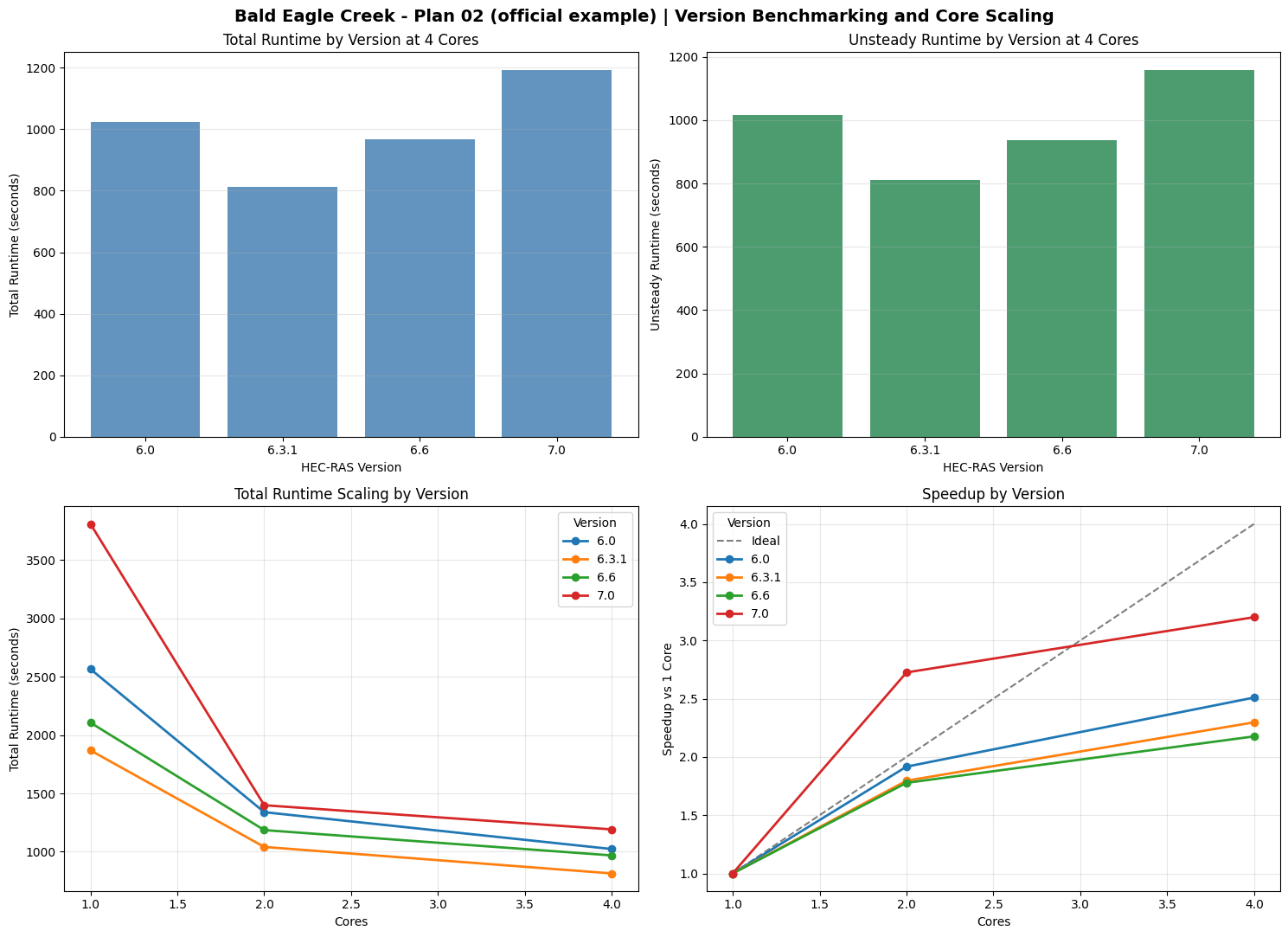
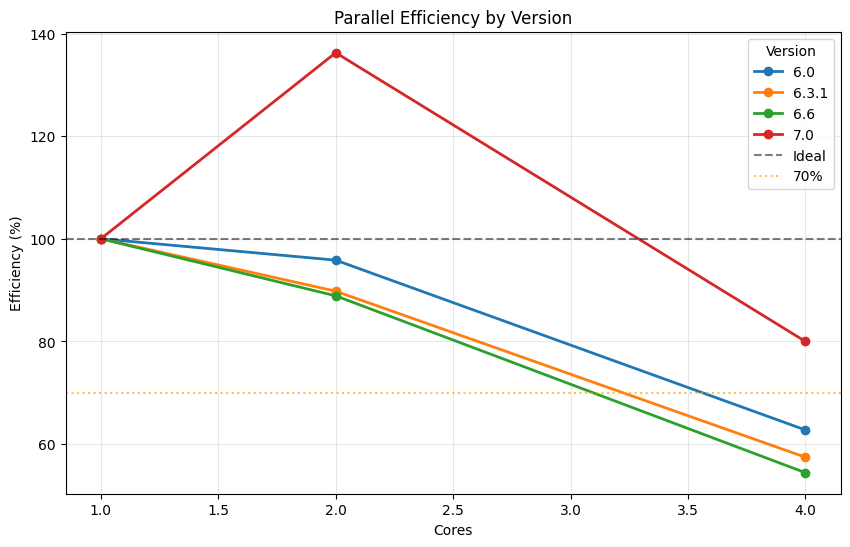
Saved summary table to: working\benchmark_notebooks\701_version_benchmarking\outputs\bald_eagle_plan02_20260611_181350\benchmark_summary.csv
Saved main figure to:   working\benchmark_notebooks\701_version_benchmarking\outputs\bald_eagle_plan02_20260611_181350\version_benchmark_and_scaling.png
Saved efficiency plot to: working\benchmark_notebooks\701_version_benchmarking\outputs\bald_eagle_plan02_20260611_181350\version_efficiency.png
| version | cores | execution_time_s | unsteady_time_s | overhead_s | wall_clock_seconds | vol_error_percent | completed | has_errors | has_warnings | mesh_cells | speedup | efficiency_pct | |
|---|---|---|---|---|---|---|---|---|---|---|---|---|---|
| 0 | 6.0 | 1 | 2566.359 | 2536.016 | 30.343 | 2571.676009 | 0.006358 | True | False | False | 89879 | 1.000000 | 100.000000 |
| 1 | 6.0 | 2 | 1339.015 | 1332.391 | 6.624 | 1341.448514 | 0.006348 | True | False | False | 89879 | 1.916602 | 95.830106 |
| 2 | 6.0 | 4 | 1022.655 | 1015.219 | 7.436 | 1025.017588 | 0.006356 | True | False | False | 89879 | 2.509506 | 62.737653 |
| 3 | 6.3.1 | 1 | 1868.938 | 1840.719 | 28.219 | 1876.564873 | 0.006372 | True | False | False | 89879 | 1.000000 | 100.000000 |
| 4 | 6.3.1 | 2 | 1040.798 | 1013.641 | 27.157 | 1045.682615 | 0.006368 | True | False | False | 89879 | 1.795678 | 89.783897 |
| 5 | 6.3.1 | 4 | 813.642 | 811.985 | 1.657 | 816.494583 | 0.006370 | True | False | False | 89879 | 2.297003 | 57.425071 |
| 6 | 6.6 | 1 | 2107.047 | 2076.969 | 30.078 | 2112.474456 | 0.007435 | True | False | False | 89879 | 1.000000 | 100.000000 |
| 7 | 6.6 | 2 | 1185.313 | 1154.938 | 30.375 | 1190.052259 | 0.007435 | True | False | False | 89879 | 1.777629 | 88.881460 |
| 8 | 6.6 | 4 | 968.173 | 937.985 | 30.188 | 970.664391 | 0.007435 | True | False | False | 89879 | 2.176312 | 54.407812 |
| 9 | 7.0 | 1 | 3811.296 | 3776.453 | 34.843 | 3817.193408 | 0.007436 | True | False | False | 89879 | 1.000000 | 100.000000 |
| 10 | 7.0 | 2 | 1398.594 | 1364.031 | 34.563 | 1404.039309 | 0.007436 | True | False | False | 89879 | 2.725091 | 136.254553 |
| 11 | 7.0 | 4 | 1191.249 | 1156.750 | 34.499 | 1193.643541 | 0.007436 | True | False | False | 89879 | 3.199412 | 79.985293 |
| version | cores | execution_time_s | unsteady_time_s | overhead_s | wall_clock_seconds | vol_error_percent | completed | has_errors | has_warnings | mesh_cells | speedup | efficiency_pct | relative_to_reference_pct | |
|---|---|---|---|---|---|---|---|---|---|---|---|---|---|---|
| 2 | 6.0 | 4 | 1022.655 | 1015.219 | 7.436 | 1025.017588 | 0.006356 | True | False | False | 89879 | 2.509506 | 62.737653 | 100.000000 |
| 5 | 6.3.1 | 4 | 813.642 | 811.985 | 1.657 | 816.494583 | 0.006370 | True | False | False | 89879 | 2.297003 | 57.425071 | 79.561729 |
| 8 | 6.6 | 4 | 968.173 | 937.985 | 30.188 | 970.664391 | 0.007435 | True | False | False | 89879 | 2.176312 | 54.407812 | 94.672495 |
| 11 | 7.0 | 4 | 1191.249 | 1156.750 | 34.499 | 1193.643541 | 0.007436 | True | False | False | 89879 | 3.199412 | 79.985293 | 116.485912 |
if not fixed_core_df.empty:
    fastest_row = fixed_core_df.sort_values("execution_time_s", kind="stable").iloc[0]

    print("=" * 90)
    print("RECOMMENDED BENCHMARK SETUP")
    print("=" * 90)
    print(f"Selected model key:   {MODEL_KEY}")
    print(f"Selected model:       {model_config['label']}")
    print(f"Plan number:          {str(model_config['plan_number']).zfill(2)}")
    print(f"Approximate cells:    {mesh_cells:,}" if mesh_cells is not None else "Approximate cells:    unavailable")
    print(f"Versions tested:      {', '.join(VERSIONS_TO_TEST)}")
    print(f"Core counts tested:   {CORE_COUNTS}")
    print(f"Fixed-core compare:   {FIXED_CORE_COMPARISON}")
    print("")
    print(f"Fastest version at {FIXED_CORE_COMPARISON} cores: {fastest_row['version']}")
    print(f"Mean total runtime:   {fastest_row['execution_time_s']:.1f} s")
    print(f"Mean unsteady time:   {fastest_row['unsteady_time_s']:.1f} s")
    print("")
    print("Practical recommendation:")
    print("- Use Bald Eagle Plan 02 as the canonical example-notebook benchmark.")
    print("- Use North Galveston only as an optional heavy local stretch case.")
    print("- On Intel hybrid CPUs, keep CORE_COUNTS to p-core counts for fair cross-version comparisons.")
    print("- Avoid 'All Available' as the comparison metric because 7.0 has newer p-core affinity behavior.")
    print("")
    print("Model note:")
    print(model_config["notes"])
    print("")
    print("Outputs written to:")
    print(f"  {output_dir}")

else:
    print("No benchmark results to summarize (sweep was skipped).")
==========================================================================================
RECOMMENDED BENCHMARK SETUP
==========================================================================================
Selected model key:   bald_eagle_plan02
Selected model:       Bald Eagle Creek - Plan 02 (official example)
Plan number:          02
Approximate cells:    89,879
Versions tested:      6.0, 6.3.1, 6.6, 7.0
Core counts tested:   [1, 2, 4]
Fixed-core compare:   4

Fastest version at 4 cores: 6.3.1
Mean total runtime:   813.6 s
Mean unsteady time:   812.0 s

Practical recommendation:
- Use Bald Eagle Plan 02 as the canonical example-notebook benchmark.
- Use North Galveston only as an optional heavy local stretch case.
- On Intel hybrid CPUs, keep CORE_COUNTS to p-core counts for fair cross-version comparisons.
- Avoid 'All Available' as the comparison metric because 7.0 has newer p-core affinity behavior.

Model note:
Best portable cross-version case found locally. Plan 02 uses geometry g01 and stays within the classic 2D example set.

Outputs written to:
  working\benchmark_notebooks\701_version_benchmarking\outputs\bald_eagle_plan02_20260611_181350