2D Geometry File Parsing
This notebook demonstrates parsing and manipulating 2D geometry elements from HEC-RAS plain text geometry files, including: - Storage Area operations (BaldEagleCrkMulti2D) - SA/2D Connection operations and dam crest profiles (BaldEagleCrkMulti2D) - Gate extraction (Davis project) - Practical dam breach workflow using both projects
Overview
This notebook demonstrates extraction of 2D geometry elements from HEC-RAS geometry files. 2D areas use computational meshes rather than cross sections.
What You'll Learn
- Extract storage areas and elevation-volume curves
- List SA/2D connections and dam crest profiles
- Pull gate configurations from a project that includes gates (Davis)
- Use multiple RasPrj objects to target specific projects
LLM Forward Approach
- Verification: Compare storage curves and connection profiles with HEC-RAS GUI
- Visual Outputs: Plot storage curves and crest profiles for quick review
- Audit Trail: Keep geometry file paths and ras_object context explicit
Reference Documentation
# =============================================================================
# DEVELOPMENT MODE TOGGLE
# =============================================================================
from pathlib import Path
import sys

USE_LOCAL_SOURCE = True  # <-- TOGGLE THIS

if USE_LOCAL_SOURCE:
    local_path = str(Path.cwd().parent)
    if local_path not in sys.path:
        sys.path.insert(0, local_path)
    print(f"LOCAL SOURCE MODE: Loading from {local_path}/ras_commander")
else:
    print("PIP PACKAGE MODE: Loading installed ras-commander")

# Import RAS Commander geometry modules
from ras_commander import (
    GeomLateral, GeomLandCover,
    HdfHydraulicTables,
    GeomStorage, HdfStruc,
    RasExamples,
    init_ras_project,
    RasCmdr,
    RasPrj
)

# Additional imports
import pandas as pd
import numpy as np
import matplotlib.pyplot as plt
from IPython import display

# Verify which version loaded
import ras_commander
print(f"Loaded: {ras_commander.__file__}")
print(f"Working directory: {Path.cwd()}")
LOCAL SOURCE MODE: Loading from G:\GH\ras-commander-pr-docs/ras_commander


Loaded: G:\GH\ras-commander-pr-docs\ras_commander\__init__.py
Working directory: G:\GH\ras-commander-pr-docs\examples
Parameters
Configure these values to customize the notebook for your project.
# =============================================================================
# PARAMETERS - Edit these to customize the notebook
# =============================================================================
from pathlib import Path

# Project Configuration
PROJECT_NAME_2D = "BaldEagleCrkMulti2D"  # 2D geometry source project
PROJECT_NAME_GATES = "Davis"             # Gate information source project
PROJECT_SUFFIX = "202"                   # Folder suffix for extracted projects
RAS_VERSION = "7.0"                      # HEC-RAS version (6.3, 6.5, 6.6, etc.)

# Geometry Settings
GEOM_NUMBER_2D = "12"      # Geometry file with SA/2D connections (BaldEagle)
GATE_GEOM_NUMBER = None    # Optional: set if you know the Davis geometry with gates
RIVER = None               # Not applicable for 2D geometry
REACH = None               # Not applicable for 2D geometry
CROSS_SECTION = None       # Not applicable for 2D geometry
Package Setup and Imports
# Extract and initialize the example projects
project_paths = RasExamples.extract_project(
    [PROJECT_NAME_2D, PROJECT_NAME_GATES],
    suffix=PROJECT_SUFFIX
)

bald_eagle_path = project_paths[0]
davis_path = project_paths[1]

# Initialize each project with its own RasPrj instance
bald_eagle_ras = RasPrj()
init_ras_project(bald_eagle_path, RAS_VERSION, ras_object=bald_eagle_ras)

print(f"Bald Eagle project initialized: {bald_eagle_ras.project_name}")
print(f"Found {len(bald_eagle_ras.geom_df)} geometry files")
print(f"Found {len(bald_eagle_ras.plan_df)} plan files")


# Initialize Davis for gate information
# (use a separate RasPrj to keep project state isolated)
davis_ras = RasPrj()
init_ras_project(davis_path, RAS_VERSION, ras_object=davis_ras)

print("")
print(f"Davis project initialized: {davis_ras.project_name}")
print(f"Found {len(davis_ras.geom_df)} geometry files")
print(f"Found {len(davis_ras.plan_df)} plan files")


def find_gate_connections(ras_object, geom_number=None):
    # Find a geometry file and connection table that includes gate definitions.
    if geom_number:
        geom_row = ras_object.geom_df.loc[
            ras_object.geom_df['geom_number'] == geom_number
        ]
        if geom_row.empty:
            raise ValueError(
                f"Geometry number {geom_number} not found in {ras_object.project_name}"
            )
        geom_file = Path(geom_row.iloc[0]["full_path"])
        connections = GeomLateral.get_connections(geom_file)
        if connections.empty or "HasGate" not in connections.columns:
            return geom_file, connections, pd.DataFrame()
        gate_connections = connections[connections['HasGate'] > 0]
        return geom_file, connections, gate_connections

    for _, row in ras_object.geom_df.iterrows():
        geom_file = Path(row["full_path"])
        connections = GeomLateral.get_connections(geom_file)
        if connections.empty or "HasGate" not in connections.columns:
            continue
        gate_connections = connections[connections['HasGate'] > 0]
        if len(gate_connections) > 0:
            return geom_file, connections, gate_connections

    return None, pd.DataFrame(), pd.DataFrame()


davis_gate_geom_file, davis_connections, davis_gate_connections = (
    find_gate_connections(davis_ras, GATE_GEOM_NUMBER)
)

if davis_gate_geom_file is not None:
    print("")
    print(f"Gate geometry identified: {davis_gate_geom_file.name}")
    print(f"Gate connections found: {len(davis_gate_connections)}")
else:
    print("")
    print("No gate connections found in Davis project")
2026-07-07 18:17:59 - ras_commander.RasExamples - INFO - Successfully extracted project 'BaldEagleCrkMulti2D' to example_projects\BaldEagleCrkMulti2D_202


2026-07-07 18:17:59 - ras_commander.RasExamples - INFO - Successfully extracted project 'Davis' to example_projects\Davis_202


2026-07-07 18:18:00 - ras_commander.RasPrj - INFO - ras-commander v0.98.2 | An open-source project of CLB Engineering Corporation (https://clbengineering.com/) | Docs: https://rascommander.info | GitHub: https://github.com/gpt-cmdr/ras-commander


2026-07-07 18:18:00 - ras_commander.RasPrj - INFO - Project initialized: BaldEagleDamBrk


2026-07-07 18:18:00 - ras_commander.RasPrj - INFO - Using HEC-RAS version 7.0


2026-07-07 18:18:00 - ras_commander.RasPrj - INFO -
═══════════════════════════════════════════════════════════════════════
ras-commander | HEC-RAS Automation Library
Docs: https://rascommander.info/
Repo: https://github.com/gpt-cmdr/ras-commander
LLM agents: https://rascommander.info/llms.txt
═══════════════════════════════════════════════════════════════════════

PROJECT DATAFRAMES (single source of truth — use these, not file globbing):
  ras_object.plan_df        Plans, HDF paths, geometry/flow associations
  ras_object.geom_df        Geometry files and HDF preprocessor paths
  ras_object.flow_df        Steady flow files
  ras_object.unsteady_df    Unsteady flow files and configurations
  ras_object.boundaries_df  Boundary conditions (type, name, location)
  ras_object.results_df     Lightweight HDF results summaries
  ras_object.rasmap_df      RASMapper layers, terrain, land cover paths

KEY APIS (static classes — call directly, never instantiate):
  Execution:    RasCmdr.compute_plan() / compute_parallel() / compute_test_mode()
  Plan Files:   RasPlan.clone_plan() / clone_geom() / set_geom()
  Unsteady:     RasUnsteady — IC/BC management, gate openings, precipitation
  Geometry:     GeomCrossSection, GeomBridge, GeomStorage, GeomLateral, GeomMesh
  HDF Results:  HdfResultsPlan.get_wse() / get_compute_messages()
                HdfResultsMesh.get_mesh_max_ws() / get_mesh_cells_timeseries()
                HdfMesh.get_mesh_cell_points()
  QA/QC:        RasCheck.run_check() / RasFixit (geometry repair)
  DSS:          RasDss.get_timeseries() / check_pathname()
  USGS:         UsgsGaugeSpatial, GaugeMatcher, RasUsgsBoundaryGeneration
  Precipitation: StormGenerator, Atlas14Storm, PrecipAorc, Atlas14Variance
  Terrain:      RasTerrain.create_terrain_hdf() / RasTerrainMod

MULTI-PROJECT: Pass ras_object= to all API calls when using local RasPrj instances.

EXAMPLES: 100+ notebooks in examples/ (100s=execution, 200s=geometry, 300s=unsteady,
  400s=HDF results, 500s=remote, 800s=QA/QC, 900s=data integration).
  Review relevant notebooks before assembling new workflows.

PLATFORM: Most HEC-RAS operations require Windows. Linux/Wine support for
  headless execution, data access, geometry modification, and preprocessing
  is available via RasProcess (HEC-RAS 6.6+). See ras_commander/RasProcess.py.
  Remote distributed execution: ras_commander/remote/ (PsExec, Docker, SSH, cloud).
═══════════════════════════════════════════════════════════════════════


2026-07-07 18:18:00 - ras_commander.RasPrj - INFO - ras-commander v0.98.2 | An open-source project of CLB Engineering Corporation (https://clbengineering.com/) | Docs: https://rascommander.info | GitHub: https://github.com/gpt-cmdr/ras-commander


2026-07-07 18:18:00 - ras_commander.RasPrj - INFO - Project initialized: DavisStormSystem


2026-07-07 18:18:00 - ras_commander.RasPrj - INFO - Using HEC-RAS version 7.0


2026-07-07 18:18:00 - ras_commander.RasPrj - INFO -
═══════════════════════════════════════════════════════════════════════
ras-commander | HEC-RAS Automation Library
Docs: https://rascommander.info/
Repo: https://github.com/gpt-cmdr/ras-commander
LLM agents: https://rascommander.info/llms.txt
═══════════════════════════════════════════════════════════════════════

PROJECT DATAFRAMES (single source of truth — use these, not file globbing):
  ras_object.plan_df        Plans, HDF paths, geometry/flow associations
  ras_object.geom_df        Geometry files and HDF preprocessor paths
  ras_object.flow_df        Steady flow files
  ras_object.unsteady_df    Unsteady flow files and configurations
  ras_object.boundaries_df  Boundary conditions (type, name, location)
  ras_object.results_df     Lightweight HDF results summaries
  ras_object.rasmap_df      RASMapper layers, terrain, land cover paths

KEY APIS (static classes — call directly, never instantiate):
  Execution:    RasCmdr.compute_plan() / compute_parallel() / compute_test_mode()
  Plan Files:   RasPlan.clone_plan() / clone_geom() / set_geom()
  Unsteady:     RasUnsteady — IC/BC management, gate openings, precipitation
  Geometry:     GeomCrossSection, GeomBridge, GeomStorage, GeomLateral, GeomMesh
  HDF Results:  HdfResultsPlan.get_wse() / get_compute_messages()
                HdfResultsMesh.get_mesh_max_ws() / get_mesh_cells_timeseries()
                HdfMesh.get_mesh_cell_points()
  QA/QC:        RasCheck.run_check() / RasFixit (geometry repair)
  DSS:          RasDss.get_timeseries() / check_pathname()
  USGS:         UsgsGaugeSpatial, GaugeMatcher, RasUsgsBoundaryGeneration
  Precipitation: StormGenerator, Atlas14Storm, PrecipAorc, Atlas14Variance
  Terrain:      RasTerrain.create_terrain_hdf() / RasTerrainMod

MULTI-PROJECT: Pass ras_object= to all API calls when using local RasPrj instances.

EXAMPLES: 100+ notebooks in examples/ (100s=execution, 200s=geometry, 300s=unsteady,
  400s=HDF results, 500s=remote, 800s=QA/QC, 900s=data integration).
  Review relevant notebooks before assembling new workflows.

PLATFORM: Most HEC-RAS operations require Windows. Linux/Wine support for
  headless execution, data access, geometry modification, and preprocessing
  is available via RasProcess (HEC-RAS 6.6+). See ras_commander/RasProcess.py.
  Remote distributed execution: ras_commander/remote/ (PsExec, Docker, SSH, cloud).
═══════════════════════════════════════════════════════════════════════


Bald Eagle project initialized: BaldEagleDamBrk
Found 10 geometry files
Found 11 plan files

Davis project initialized: DavisStormSystem
Found 1 geometry files
Found 1 plan files

No gate connections found in Davis project
DEV NOTE: No gate connections found in Davis project - This needs to be mapped to a different example project that has gate operations.
Section 1: Storage Area Operations
Storage areas represent reservoirs, detention basins, or other water storage features in the HEC-RAS model. We'll demonstrate extracting storage area properties and elevation-volume curves.
1.1 List Storage Areas
Select Geometry 12 (SA to 2D Connection)
Geometry 12 in the BaldEagleCrkMulti2D project contains storage areas and SA/2D connections for dam breach analysis.
# Select geometry 12 which has SA/2D connections for dam breach analysis
bald_eagle_geom_number = GEOM_NUMBER_2D
geom_row = bald_eagle_ras.geom_df.loc[
    bald_eagle_ras.geom_df['geom_number'] == bald_eagle_geom_number
]

if geom_row.empty:
    raise ValueError(
        f"Geometry number {bald_eagle_geom_number} not found in "
        f"{bald_eagle_ras.project_name}"
    )

bald_eagle_geom_file = Path(geom_row.iloc[0]["full_path"])
bald_eagle_geom_hdf = Path(geom_row.iloc[0]["hdf_path"])

print(f"Selected geometry (Bald Eagle): {bald_eagle_geom_file.name}")
print(
    "Geometry HDF: "
    f"{bald_eagle_geom_hdf.name if bald_eagle_geom_hdf.exists() else 'Not yet created'}"
)
Selected geometry (Bald Eagle): BaldEagleDamBrk.g12
Geometry HDF: BaldEagleDamBrk.g12.hdf
print("Bald Eagle geometry entries:") display.display(bald_eagle_ras.geom_df)
print("") print("Davis geometry entries:") display.display(davis_ras.geom_df)
# Path to dam breach geometry with storage areas (Bald Eagle)
dam_geom_file = bald_eagle_geom_file

print(f"Geometry file: {dam_geom_file.name}")

# Get storage areas (excluding 2D flow areas)
storage_areas = GeomStorage.get_storage_areas(dam_geom_file, exclude_2d=True)

print("")
print(f"Traditional storage areas found: {len(storage_areas)}")
if storage_areas.empty:
    print("  None")
else:
    display_cols = [
        col for col in ["Name", "Type", "Area", "Volume"]
        if col in storage_areas.columns
    ]
    display.display(storage_areas[display_cols])

# Get all storage areas (including 2D)
all_storage = GeomStorage.get_storage_areas(dam_geom_file, exclude_2d=False)

print("")
print(f"All storage areas (including 2D): {len(all_storage)}")
if all_storage.empty:
    print("  None")
else:
    display_cols = [
        col for col in ["Name", "Type", "Area", "Volume"]
        if col in all_storage.columns
    ]
    display.display(all_storage[display_cols])
Geometry file: BaldEagleDamBrk.g12

Traditional storage areas found: 1
| Name | |
|---|---|
| 0 | Reservoir Pool |
All storage areas (including 2D): 2
| Name | |
|---|---|
| 0 | BaldEagleCr |
| 1 | Reservoir Pool |
1.2 Extract Elevation-Volume Curve
# Get elevation-volume curve for first storage area
if not storage_areas.empty:
    area_name = storage_areas.iloc[0]["Name"]
    print(f"Extracting elevation-volume curve for: {area_name}")

    try:
        elev_vol = GeomStorage.get_elevation_volume(dam_geom_file, area_name)

        print(f"\nStorage Curve Data:")
        print(f"  Points: {len(elev_vol)}")
        print(f"  Elevation range: {elev_vol['Elevation'].min():.2f} to {elev_vol['Elevation'].max():.2f} ft")
        print(f"  Volume range: {elev_vol['Volume'].min():.0f} to {elev_vol['Volume'].max():.0f} cu ft")

        print("\nFirst 10 points:")
        display.display(elev_vol.head(10))
    except ValueError as e:
        print(f"\nNote: Could not extract elevation-volume curve: {e}")
        print("This may be a 2D flow area without traditional storage curve data.")
        print("Trying second storage area if available...")

        if len(storage_areas) > 1:
            area_name = storage_areas.iloc[1]["Name"]
            print(f"\nTrying: {area_name}")
            try:
                elev_vol = GeomStorage.get_elevation_volume(dam_geom_file, area_name)
                print(f"Storage Curve Data:")
                print(f"  Points: {len(elev_vol)}")
                display.display(elev_vol.head(10))
            except ValueError as e2:
                print(f"Could not extract from {area_name} either: {e2}")
                elev_vol = pd.DataFrame({'Elevation': [], 'Volume': []})
        else:
            elev_vol = pd.DataFrame({'Elevation': [], 'Volume': []})
else:
    print("No traditional storage areas found in this geometry file")
    elev_vol = pd.DataFrame({'Elevation': [], 'Volume': []})
Extracting elevation-volume curve for: Reservoir Pool

Storage Curve Data:
  Points: 52
  Elevation range: 583.00 to 683.00 ft
  Volume range: 0 to 212000 cu ft

First 10 points:
| Elevation | Volume | |
|---|---|---|
| 0 | 583.0 | 0.00 |
| 1 | 588.0 | 0.01 |
| 2 | 590.0 | 20.00 |
| 3 | 592.0 | 80.00 |
| 4 | 594.0 | 180.00 |
| 5 | 596.0 | 360.00 |
| 6 | 598.0 | 760.00 |
| 7 | 600.0 | 1390.00 |
| 8 | 602.0 | 2160.00 |
| 9 | 604.0 | 3030.00 |
1.3 Visualize Storage Curve
if len(storage_areas) > 0 and len(elev_vol) > 0:
    # Plot elevation-volume curve
    fig, (ax1, ax2) = plt.subplots(1, 2, figsize=(14, 5))

    # Plot 1: Volume vs Elevation
    ax1.plot(elev_vol['Volume'], elev_vol['Elevation'], 'b-', linewidth=2)
    ax1.fill_betweenx(elev_vol['Elevation'], 0, elev_vol['Volume'], alpha=0.3)
    ax1.set_xlabel('Storage Volume (cu ft)', fontsize=11)
    ax1.set_ylabel('Elevation (ft)', fontsize=11)
    ax1.set_title(f'Storage Curve: {area_name}', fontsize=12, fontweight='bold')
    ax1.grid(True, alpha=0.3)

    # Plot 2: Incremental Storage (dV/dZ)
    elev_vol['dV'] = elev_vol['Volume'].diff()
    elev_vol['dZ'] = elev_vol['Elevation'].diff()
    elev_vol['Surface_Area'] = elev_vol['dV'] / elev_vol['dZ']

    ax2.plot(elev_vol['Surface_Area'], elev_vol['Elevation'], 'r-', linewidth=2)
    ax2.fill_betweenx(elev_vol['Elevation'], 0, elev_vol['Surface_Area'], alpha=0.3, color='red')
    ax2.set_xlabel('Surface Area (sq ft)', fontsize=11)
    ax2.set_ylabel('Elevation (ft)', fontsize=11)
    ax2.set_title('Surface Area vs Elevation (dV/dZ)', fontsize=12, fontweight='bold')
    ax2.grid(True, alpha=0.3)

    plt.tight_layout()
    plt.show()

    print("\nStorage Statistics:")
    print(f"  Total storage capacity: {elev_vol['Volume'].max():.0f} cu ft")
    print(f"  Elevation range: {elev_vol['Elevation'].max() - elev_vol['Elevation'].min():.1f} ft")
    print(f"  Average surface area: {elev_vol['Surface_Area'].mean():.0f} sq ft")
else:
    print("Skipping storage visualization - no storage area data available")
    print("Note: This geometry may use 2D flow areas instead of traditional storage areas.")
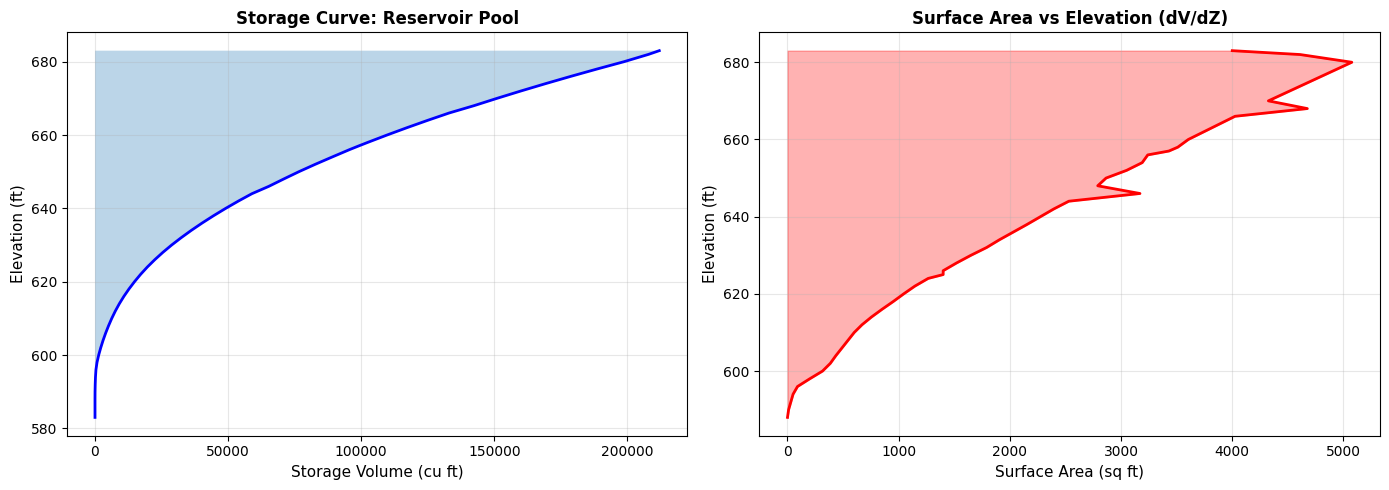
Storage Statistics:
  Total storage capacity: 212000 cu ft
  Elevation range: 100.0 ft
  Average surface area: 2213 sq ft
Section 2: SA/2D Connection Operations
Connections link storage areas to 2D flow areas for dam breach analysis. We'll extract connection properties and dam crest profiles from BaldEagleCrkMulti2D, and pull gate information from the Davis project.
2.1 List All Connections
# Extract all connections (Bald Eagle geometry)
bald_eagle_connections = GeomLateral.get_connections(dam_geom_file)

print(f"SA/2D Connections found (Bald Eagle): {len(bald_eagle_connections)}")

if len(bald_eagle_connections) > 0:
    print("")
    print("Connection inventory:")
    display_cols = ['Name', 'Type', 'From', 'To', 'NumPoints', 'HasGate']
    display_cols = [c for c in display_cols if c in bald_eagle_connections.columns]
    display.display(bald_eagle_connections[display_cols])

    print("")
    print("Connection summary by type:")
    summary_df = bald_eagle_connections.copy()
    if "HasGate" in summary_df.columns:
        summary_df["HasGate"] = pd.to_numeric(summary_df["HasGate"], errors="coerce").fillna(0)
        connection_summary = (
            summary_df.groupby("Type", dropna=False)
            .agg(Connections=("Name", "count"), Gates=("HasGate", "sum"))
            .reset_index()
        )
        connection_summary["Gates"] = connection_summary["Gates"].astype(int)
    else:
        connection_summary = (
            summary_df.groupby("Type", dropna=False)
            .agg(Connections=("Name", "count"))
            .reset_index()
        )
    display.display(connection_summary)
else:
    print("No connections found in this geometry file")
SA/2D Connections found (Bald Eagle): 1

Connection inventory:
| Name | Type | From | To | NumPoints | HasGate | |
|---|---|---|---|---|---|---|
| 0 | Dam | SA to 2D | Reservoir Pool | BaldEagleCr | 6 | True |
Connection summary by type:
| Type | Connections | Gates | |
|---|---|---|---|
| 0 | SA to 2D | 1 | 1 |
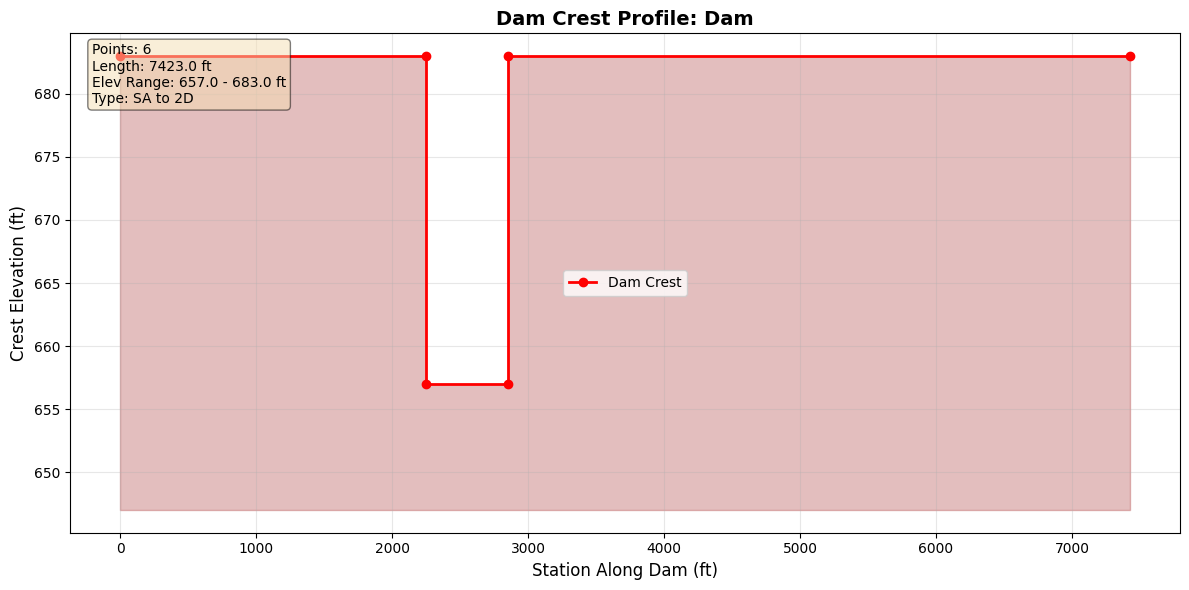
2.2 Extract Dam Crest Profile
if len(bald_eagle_connections) > 0:
    # Get weir profile for first connection
    conn_name = bald_eagle_connections.iloc[0]['Name']

    print(f"Extracting weir profile for connection: {conn_name}")
    print(f"  Upstream: {bald_eagle_connections.iloc[0]['From']}")
    print(f"  Downstream: {bald_eagle_connections.iloc[0]['To']}")

    weir_profile = GeomLateral.get_connection_profile(dam_geom_file, conn_name)

    print("")
    print("Weir/Dam Crest Profile:")
    print(f"  Points: {len(weir_profile)}")
    print(f"  Station range: {weir_profile['Station'].min():.1f} to {weir_profile['Station'].max():.1f} ft")
    print(f"  Elevation range: {weir_profile['Elevation'].min():.2f} to {weir_profile['Elevation'].max():.2f} ft")
    print(f"  Crest length: {weir_profile['Station'].max() - weir_profile['Station'].min():.1f} ft")

    print("")
    print("First 10 points:")
    display.display(weir_profile.head(10))
else:
    print("Skipping weir profile extraction - no connections found")
Extracting weir profile for connection: Dam
  Upstream: Reservoir Pool
  Downstream: BaldEagleCr

Weir/Dam Crest Profile:
  Points: 6
  Station range: 0.0 to 7423.0 ft
  Elevation range: 657.00 to 683.00 ft
  Crest length: 7423.0 ft

First 10 points:
| Station | Elevation | |
|---|---|---|
| 0 | 0.0 | 683.0 |
| 1 | 2250.0 | 683.0 |
| 2 | 2250.0 | 657.0 |
| 3 | 2850.0 | 657.0 |
| 4 | 2850.0 | 683.0 |
| 5 | 7423.0 | 683.0 |
2.3 Visualize Dam Crest Profile
if len(bald_eagle_connections) > 0:
    # Plot weir/dam crest profile
    fig, ax = plt.subplots(figsize=(12, 6))

    ax.plot(weir_profile['Station'], weir_profile['Elevation'],
            'ro-', linewidth=2, markersize=6, label='Dam Crest')
    ax.fill_between(weir_profile['Station'], weir_profile['Elevation'],
                     weir_profile['Elevation'].min() - 10,
                     alpha=0.3, color='brown')

    ax.set_xlabel('Station Along Dam (ft)', fontsize=12)
    ax.set_ylabel('Crest Elevation (ft)', fontsize=12)
    ax.set_title(f'Dam Crest Profile: {conn_name}',
                 fontsize=14, fontweight='bold')
    ax.grid(True, alpha=0.3)
    ax.legend(fontsize=10)

    # Add statistics
    stats_text = "\n".join([
        f'Points: {len(weir_profile)}',
        f'Length: {weir_profile["Station"].max() - weir_profile["Station"].min():.1f} ft',
        f'Elev Range: {weir_profile["Elevation"].min():.1f} - {weir_profile["Elevation"].max():.1f} ft',
        f'Type: {bald_eagle_connections.iloc[0]["Type"]}'
    ])
    ax.text(0.02, 0.98, stats_text,
            transform=ax.transAxes,
            verticalalignment='top',
            bbox=dict(boxstyle='round', facecolor='wheat', alpha=0.5),
            fontsize=10)

    plt.tight_layout()
    plt.show()
else:
    print("Skipping visualization - no connections")
2.4 Extract Gate Information
Gate information is pulled from the Davis project (which includes gate definitions).
if davis_gate_geom_file is not None and len(davis_gate_connections) > 0:
    # Get gates for first connection with gates (Davis)
    conn_name_with_gates = davis_gate_connections.iloc[0]['Name']

    print(f"Extracting gates for Davis connection: {conn_name_with_gates}")
    print(f"  Geometry file: {davis_gate_geom_file.name}")

    gates = GeomLateral.get_connection_gates(
        davis_gate_geom_file,
        conn_name_with_gates
    )

    print("")
    print(f"Gates found: {len(gates)}")

    if len(gates) > 0:
        print("")
        print("Gate parameters:")
        display.display(gates[['Gate_Name', 'Width', 'Height', 'Invert', 'Gate_Coefficient']])

        # Visualize gate geometry
        fig, ax = plt.subplots(figsize=(8, 6))

        for idx, gate in gates.iterrows():
            # Draw gate as rectangle
            width = gate['Width']
            height = gate['Height']
            invert = gate['Invert']

            rect = plt.Rectangle((idx * 20, invert), width, height,
                                  linewidth=2, edgecolor='blue',
                                  facecolor='lightblue', alpha=0.5)
            ax.add_patch(rect)

            # Label gate
            ax.text(idx * 20 + width/2, invert + height + 2,
                    gate['Gate_Name'],
                    ha='center', fontsize=10, fontweight='bold')
            ax.text(idx * 20 + width/2, invert + height/2,
                    f"{width}' x {height}'\nInvert: {invert}'",
                    ha='center', va='center', fontsize=9)

        ax.set_xlim(-5, len(gates) * 20 + 15)
        ax.set_ylim(invert - 10, invert + height + 20)
        ax.set_xlabel('Position', fontsize=11)
        ax.set_ylabel('Elevation (ft)', fontsize=11)
        ax.set_title(f'Gate Configuration: {conn_name_with_gates}',
                     fontsize=12, fontweight='bold')
        ax.grid(True, alpha=0.3)
        ax.set_aspect('equal')
        plt.tight_layout()
        plt.show()
else:
    print("No gates found in the Davis project connections")
No gates found in the Davis project connections
2.5 Analyze All Connections
Analyze all Davis connections to summarize weir profiles and gate settings.
if davis_gate_geom_file is not None and len(davis_connections) > 0:
    # Extract profiles for all connections (Davis)
    print("Processing all connections (Davis)...")

    for idx, conn in davis_connections.iterrows():
        conn_name = conn['Name']

        try:
            # Get weir profile
            profile = GeomLateral.get_connection_profile(
                davis_gate_geom_file,
                conn_name
            )

            # Get gates
            gates = GeomLateral.get_connection_gates(
                davis_gate_geom_file,
                conn_name
            )

            print(f"{idx+1}. {conn_name}:")
            print(f"   {conn['From']} -> {conn['To']}")
            print(
                f"   Weir profile: {len(profile)} points, "
                f"length={profile['Station'].max():.0f} ft"
            )
            print(f"   Gates: {len(gates)}")
            if len(gates) > 0:
                gate = gates.iloc[0]
                print(
                    f"     {gate['Gate_Name']}: {gate['Width']:.0f}' W x "
                    f"{gate['Height']:.0f}' H, Invert={gate['Invert']:.0f}'"
                )
            print()

        except Exception as e:
            print(f"{idx+1}. {conn_name}: ERROR - {e}")
else:
    print("No Davis connections to process")
No Davis connections to process
Section 3: Practical Application - Dam Breach Analysis Workflow
Real-world workflow combining storage areas, connections, and gate operations for dam breach analysis. Storage and connection geometry come from BaldEagleCrkMulti2D; gate inventory is illustrated with the Davis project.
print("="*70)
print("DAM BREACH ANALYSIS WORKFLOW")
print("="*70)

# Step 1: Identify storage areas (Bald Eagle)
print("")
print("Step 1: Storage Areas")
storage_areas = GeomStorage.get_storage_areas(dam_geom_file)
print(f"  Found {len(storage_areas)} storage area(s)")
if storage_areas.empty:
    print("    None")
else:
    for _, area in storage_areas.iterrows():
        print(f"    - {area['Name']}")

# Step 2: Get storage capacity (Bald Eagle)
if not storage_areas.empty:
    print("")
    print("Step 2: Storage Capacity")
    area_name = storage_areas.iloc[0]["Name"]
    elev_vol = GeomStorage.get_elevation_volume(dam_geom_file, area_name)
    print(f"  Maximum storage: {elev_vol['Volume'].max():.0f} cu ft")
    print(f"  Pool elevation range: {elev_vol['Elevation'].min():.1f} to {elev_vol['Elevation'].max():.1f} ft")

# Step 3: Identify connections (Bald Eagle)
print("")
print("Step 3: Connections")
bald_eagle_connections = GeomLateral.get_connections(dam_geom_file)
print(f"  Found {len(bald_eagle_connections)} connection(s)")
for _, conn in bald_eagle_connections.iterrows():
    print(f"    - {conn['Name']}: {conn['From']} -> {conn['To']}")

# Step 4: Analyze dam crest (Bald Eagle)
if len(bald_eagle_connections) > 0:
    dam_connections = bald_eagle_connections[
        bald_eagle_connections['Name'].str.contains('Dam', case=False, na=False)
    ]

    if len(dam_connections) > 0:
        print("")
        print("Step 4: Dam Crest Geometry")
        dam_name = dam_connections.iloc[0]['Name']
        dam_profile = GeomLateral.get_connection_profile(dam_geom_file, dam_name)

        print(f"  Dam: {dam_name}")
        print(f"  Crest length: {dam_profile['Station'].max() - dam_profile['Station'].min():.0f} ft")
        print(f"  Crest elevation range: {dam_profile['Elevation'].min():.1f} to {dam_profile['Elevation'].max():.1f} ft")
        print(f"  Min crest elevation: {dam_profile['Elevation'].min():.1f} ft")

# Step 5: Gate inventory (Davis)
print("")
print("Step 5: Gate Inventory (Davis)")
if (
    davis_gate_geom_file is not None
    and len(davis_connections) > 0
    and "HasGate" in davis_connections.columns
):
    total_gates = davis_connections['HasGate'].sum()
    print(f"  Total gates in Davis geometry: {total_gates:.0f}")

    if total_gates > 0:
        conn_with_gates = davis_connections[davis_connections['HasGate'] > 0]
        for _, conn in conn_with_gates.iterrows():
            gates = GeomLateral.get_connection_gates(
                davis_gate_geom_file,
                conn['Name']
            )
            print(f"  {conn['Name']}: {len(gates)} gate(s)")
            for _, gate in gates.iterrows():
                print(
                    f"    - {gate['Gate_Name']}: {gate['Width']:.0f}' x "
                    f"{gate['Height']:.0f}', Invert {gate['Invert']:.0f}'"
                )
else:
    print("  No gate connections found in Davis project")

print("")
print("="*70)
print("ANALYSIS COMPLETE")
print("="*70)
======================================================================
DAM BREACH ANALYSIS WORKFLOW
======================================================================

Step 1: Storage Areas
  Found 1 storage area(s)
    - Reservoir Pool

Step 2: Storage Capacity
  Maximum storage: 212000 cu ft
  Pool elevation range: 583.0 to 683.0 ft

Step 3: Connections
  Found 1 connection(s)
    - Dam: Reservoir Pool -> BaldEagleCr

Step 4: Dam Crest Geometry
  Dam: Dam
  Crest length: 7423 ft
  Crest elevation range: 657.0 to 683.0 ft
  Min crest elevation: 657.0 ft

Step 5: Gate Inventory (Davis)
  No gate connections found in Davis project

======================================================================
ANALYSIS COMPLETE
======================================================================
Summary
Methods Demonstrated
Storage Area Operations (GeomStorage):
- get_storage_areas() - List storage areas with metadata
- get_elevation_volume() - Extract elevation-volume relationships
- GeomStorage.get_storage_area_polygons() - Extract SA perimeter polygon from plain text .g##
Structure HDF Operations (HdfStruc):
- HdfStruc.get_storage_area_polygons() - Extract SA perimeter polygon from .g##.hdf or .p##.hdf
SA/2D Connection Operations (GeomLateral):
- get_connections() - List SA/2D connections
- get_connection_profile() - Extract dam crest profiles
- get_connection_gates() - Extract gate definitions (Davis project)
Manning's n Land Cover Operations (GeomLandCover):
- get_base_mannings_n() - Read base Manning's n table from geometry file
- set_base_mannings_n() - Write modified Manning's n values back to geometry file
- get_region_mannings_n() - Read regional Manning's n overrides
Multi-Project Context:
- RasPrj + init_ras_project(..., ras_object=...) to keep project data isolated
Section 4: Manning's n Land Cover Tables (GeomLandCover)
2D flow areas in HEC-RAS use land cover classifications to assign Manning's n roughness values. The GeomLandCover class provides methods to read and modify these tables directly in the geometry file.
We'll demonstrate: - Reading the base Manning's n table - Modifying roughness values (e.g., +10% sensitivity) - Writing modified values back to the geometry file - Reading regional Manning's n overrides
4.1 Read Base Manning's n Table
# Find a BaldEagle geometry file with populated Manning's n land cover data.
# Geometry 12 (used for storage/connections above) has an empty LCMann table;
# other geometries (e.g. g01) carry the full land cover classification.
lc_geom_file = None
for _, row in bald_eagle_ras.geom_df.iterrows():
    candidate = Path(row["full_path"])
    df_candidate = GeomLandCover.get_base_mannings_n(candidate)
    if len(df_candidate) > 0:
        lc_geom_file = candidate
        break

if lc_geom_file is None:
    raise RuntimeError("No geometry file with Manning's n land cover data found.")

# Read base Manning's n table from the geometry file with land cover data
mannings_df = GeomLandCover.get_base_mannings_n(lc_geom_file)

table_summary = (
    mannings_df.groupby("Table Number", dropna=False)
    .agg(
        Entries=("Land Cover Name", "count"),
        Min_Mannings_n=("Base Mannings n Value", "min"),
        Max_Mannings_n=("Base Mannings n Value", "max"),
    )
    .reset_index()
)

print(f"Geometry file: {lc_geom_file.name}")
print(f"Land cover entries: {len(mannings_df)}")
print()
print("Manning's n table summary:")
display.display(table_summary)
print()
display.display(mannings_df)
Geometry file: BaldEagleDamBrk.g06
Land cover entries: 16

Manning's n table summary:
| Table Number | Entries | Min_Mannings_n | Max_Mannings_n | |
|---|---|---|---|---|
| 0 | 16 | 16 | 0.035 | 0.15 |
| Table Number | Land Cover Name | Base Mannings n Value | |
|---|---|---|---|
| 0 | 16 | NoData | 0.060 |
| 1 | 16 | Barren Land Rock/Sand/Clay | 0.040 |
| 2 | 16 | Cultivated Crops | 0.060 |
| 3 | 16 | Deciduous Forest | 0.100 |
| 4 | 16 | Developed, High Intensity | 0.150 |
| 5 | 16 | Developed, Low Intensity | 0.100 |
| 6 | 16 | Developed, Medium Intensity | 0.080 |
| 7 | 16 | Developed, Open Space | 0.040 |
| 8 | 16 | Emergent Herbaceous Wetlands | 0.080 |
| 9 | 16 | Evergreen Forest | 0.120 |
| 10 | 16 | Grassland/Herbaceous | 0.045 |
| 11 | 16 | Mixed Forest | 0.080 |
| 12 | 16 | Open Water | 0.035 |
| 13 | 16 | Pasture/Hay | 0.060 |
| 14 | 16 | Shrub/Scrub | 0.080 |
| 15 | 16 | Woody Wetlands | 0.120 |
4.2 Modify and Write Back Manning's n Values
A common sensitivity analysis involves scaling Manning's n values (e.g., +10%). GeomLandCover.set_base_mannings_n() writes modified values back to the geometry file. It creates a .bak backup and validates that land cover names match.
# Modify Manning's n values: increase all by 10% for sensitivity analysis
modified_df = mannings_df.copy()
original_values = modified_df['Base Mannings n Value'].copy()
modified_df['Base Mannings n Value'] = modified_df['Base Mannings n Value'] * 1.1

print("Manning's n modification (+10%):")
print(f"{'Land Cover':<30} {'Original':>10} {'Modified':>10}")
print("-" * 52)
for _, row in modified_df.iterrows():
    orig = original_values[row.name]
    new = row['Base Mannings n Value']
    print(f"{row['Land Cover Name']:<30} {orig:>10.4f} {new:>10.4f}")

# Write modified values back to geometry file
success = GeomLandCover.set_base_mannings_n(lc_geom_file, modified_df)
print(f"\nWrite successful: {success}")

# Verify round-trip by re-reading
verify_df = GeomLandCover.get_base_mannings_n(lc_geom_file)
print(f"\nRound-trip verification ({len(verify_df)} entries):")
max_error = abs(verify_df['Base Mannings n Value'] - modified_df['Base Mannings n Value'].values).max()
print(f"  Max difference: {max_error:.9f}")
print(f"  Round-trip OK: {max_error < 1e-6}")

# Restore original values
GeomLandCover.set_base_mannings_n(lc_geom_file, mannings_df)
print("\nOriginal values restored.")
Manning's n modification (+10%):
Land Cover                       Original   Modified
----------------------------------------------------
NoData                             0.0600     0.0660
Barren Land Rock/Sand/Clay         0.0400     0.0440
Cultivated Crops                   0.0600     0.0660
Deciduous Forest                   0.1000     0.1100
Developed, High Intensity          0.1500     0.1650
Developed, Low Intensity           0.1000     0.1100
Developed, Medium Intensity        0.0800     0.0880
Developed, Open Space              0.0400     0.0440
Emergent Herbaceous Wetlands       0.0800     0.0880
Evergreen Forest                   0.1200     0.1320
Grassland/Herbaceous               0.0450     0.0495
Mixed Forest                       0.0800     0.0880
Open Water                         0.0350     0.0385
Pasture/Hay                        0.0600     0.0660
Shrub/Scrub                        0.0800     0.0880
Woody Wetlands                     0.1200     0.1320

Write successful: True

Round-trip verification (16 entries):
  Max difference: 0.000000000
  Round-trip OK: True

Original values restored.
4.3 Read Regional Manning's n Overrides
HEC-RAS allows region-specific Manning's n overrides that apply different roughness values within polygon regions of a 2D flow area. GeomLandCover.get_region_mannings_n() reads these regional overrides.
# Read regional Manning's n overrides
region_df = GeomLandCover.get_region_mannings_n(lc_geom_file)

if len(region_df) > 0:
    region_summary = (
        region_df.groupby("Region Name", dropna=False)
        .agg(
            Entries=("Land Cover Name", "count"),
            Min_Mannings_n=("MainChannel", "min"),
            Max_Mannings_n=("MainChannel", "max"),
        )
        .reset_index()
    )
    print(f"Regional overrides found: {len(region_df)} entries")
    print()
    print("Regional override summary:")
    display.display(region_summary)
    print()
    display.display(region_df)
else:
    print("No regional Manning's n overrides found in this geometry file.")
    print("(This is normal - region overrides are optional and only used when")
    print(" different roughness values are needed within specific polygon regions.)")
No regional Manning's n overrides found in this geometry file.
(This is normal - region overrides are optional and only used when
 different roughness values are needed within specific polygon regions.)
Section 5: Storage Area Polygon Geometry
Storage areas have a polygon perimeter that defines their spatial extent. This section demonstrates extracting that polygon from two sources:
- Plain text (
.g##):GeomStorage.get_storage_area_polygons()— parses theStorage Area Surface Line=block using 16-char fixed-width XY pairs - HDF (
.g##.hdfor.p##.hdf):HdfStruc.get_storage_area_polygons()— reads/Geometry/Storage Areas/Polygon Pointsand related datasets
Both methods return a GeoDataFrame with polygon geometry. The BaldEagleCrkMulti2D project contains one 1D storage area ("Reservoir Pool") in geometry g12 with 116 polygon vertices.
Note: CRS is not embedded in HEC-RAS geometry sources. Use
gdf.set_crs(epsg=...)after extraction to assign the project coordinate system.
5.1 Plain Text Extraction (GeomStorage)
GeomStorage.get_storage_area_polygons() parses the Storage Area Surface Line= N block in the geometry file. Each row has 16-char fixed-width XY pairs (no space separator). By default exclude_2d=True so 2D flow areas are omitted, returning only traditional 1D storage areas.
# ----- Plain text extraction from geometry file -----
print(f"Geometry file: {bald_eagle_geom_file.name}")

sa_polygons_txt = GeomStorage.get_storage_area_polygons(bald_eagle_geom_file)

print(f"\nFound {len(sa_polygons_txt)} storage area polygon(s)")
if len(sa_polygons_txt) > 0:
    display.display(sa_polygons_txt[['Name', 'centroid_x', 'centroid_y', 'is_2d']])
    for _, row in sa_polygons_txt.iterrows():
        coords = list(row.geometry.exterior.coords)
        print(f"  {row['Name']}: {len(coords)-1} vertices, "
              f"centroid=({row['centroid_x']:.1f}, {row['centroid_y']:.1f})")
Geometry file: BaldEagleDamBrk.g12

Found 1 storage area polygon(s)
| Name | centroid_x | centroid_y | is_2d | |
|---|---|---|---|---|
| 0 | Reservoir Pool | 1.987124e+06 | 305685.85565 | False |
Reservoir Pool: 116 vertices, centroid=(1987123.9, 305685.9)
5.2 HDF Extraction from Geometry HDF
HdfStruc.get_storage_area_polygons() reads the /Geometry/Storage Areas/Polygon Points, Polygon Info, and Polygon Parts datasets from the HDF file. It works on both geometry HDF (.g##.hdf) and plan HDF (.p##.hdf) files — pass a geometry number string (e.g. "12") to resolve via geom_df, or pass a full Path to any HDF directly.
Note:
avg_areaandmin_elevare read from the HDFAttributesdataset. For some SA types (e.g.,Elev Vol RCmode), HEC-RAS stores NaN in these fields — this is expected behavior from the model, not a parsing error.
# ----- HDF extraction from pre-built geometry HDF -----
# BaldEagleDamBrk.g12.hdf is included in the example project — no plan run needed.
print(f"Geometry HDF: {bald_eagle_geom_hdf.name}")
print(f"  exists: {bald_eagle_geom_hdf.exists()}")

sa_polygons_hdf = HdfStruc.get_storage_area_polygons(bald_eagle_geom_hdf)

print(f"\nFound {len(sa_polygons_hdf)} storage area polygon(s) in geometry HDF")
if len(sa_polygons_hdf) > 0:
    display.display(sa_polygons_hdf[['Name', 'avg_area', 'min_elev', 'mode']])
    for _, row in sa_polygons_hdf.iterrows():
        coords = list(row.geometry.exterior.coords)
        avg_area_str = "N/A" if pd.isna(row['avg_area']) else f"{row['avg_area']:.1f} sq ft"
        min_elev_str = "N/A" if pd.isna(row['min_elev']) else f"{row['min_elev']:.2f} ft"
        print(f"  {row['Name']}: {len(coords)-1} vertices, "
              f"avg_area={avg_area_str}, min_elev={min_elev_str}")
Geometry HDF: BaldEagleDamBrk.g12.hdf
  exists: True

Found 1 storage area polygon(s) in geometry HDF
| Name | avg_area | min_elev | mode | |
|---|---|---|---|---|
| 0 | Reservoir Pool | NaN | NaN | Elev Vol RC |
Reservoir Pool: 116 vertices, avg_area=N/A, min_elev=N/A
5.3 Run Plan p04 and Extract from Plan HDF
Plan HDF files (.p##.hdf) contain the same /Geometry/Storage Areas/ group as geometry HDFs — both sources are supported. Here we run plan p04 (SA to 2D Levee Struc) to generate a plan HDF, then extract the polygon from it.
Note: Requires HEC-RAS 6.6 installed and licensed. The cell gracefully skips if HEC-RAS is unavailable.
# ----- Run plan p04 and extract polygons from plan HDF -----
# Plan p04 ("SA to 2D Levee Struc") uses the Reservoir Pool SA.
# Requires HEC-RAS 6.6. Skip gracefully if not available.

sa_polygons_plan = None

try:
    print("Running plan p04 (SA to 2D Levee Struc) with HEC-RAS 6.6 ...")
    RasCmdr.compute_plan("04", ras_object=bald_eagle_ras, num_cores=2)

    # Get plan HDF path from plan_df (authoritative source for HDF paths)
    plan_row = bald_eagle_ras.plan_df.loc[
        bald_eagle_ras.plan_df['plan_number'] == '04', 'HDF_Results_Path'
    ]
    if plan_row.empty or not plan_row.iloc[0]:
        print("[!] Plan 04 HDF path not found in plan_df — skipping plan HDF extraction")
    else:
        plan_hdf_path = Path(plan_row.iloc[0])
        print(f"Plan HDF: {plan_hdf_path.name}")

        sa_polygons_plan = HdfStruc.get_storage_area_polygons(plan_hdf_path)
        print(f"Found {len(sa_polygons_plan)} storage area polygon(s) in plan HDF")
        if len(sa_polygons_plan) > 0:
            display.display(sa_polygons_plan[['Name', 'avg_area', 'min_elev', 'mode']])

except Exception as exc:
    print(f"[!] Plan p04 execution skipped or failed: {exc}")
    print("    HEC-RAS 6.6 must be installed and licensed to run this step.")
    print("    Geometry HDF extraction (Section 5.2) still works without running a plan.")
2026-07-07 18:18:01 - ras_commander.RasUtils - INFO - Successfully updated file: BaldEagleDamBrk.p04


Running plan p04 (SA to 2D Levee Struc) with HEC-RAS 6.6 ...


2026-07-07 18:18:01 - ras_commander.RasCmdr - INFO - Set number of cores to 2 for plan: 04


2026-07-07 18:18:01 - ras_commander.RasCmdr - INFO - Running Ras.exe with -c command line flag for plan 04


2026-07-07 18:21:38 - ras_commander.RasCmdr - INFO - HEC-RAS execution completed for plan 04 in 217.31 seconds


Plan HDF: BaldEagleDamBrk.p04.hdf
Found 1 storage area polygon(s) in plan HDF
| Name | avg_area | min_elev | mode | |
|---|---|---|---|---|
| 0 | Reservoir Pool | NaN | NaN | Elev Vol RC |
5.4 Comparison and Visualization
if len(sa_polygons_txt) > 0 and len(sa_polygons_hdf) > 0:
    # ----- Coordinate agreement check -----
    txt_name = sa_polygons_txt.iloc[0]['Name']
    hdf_name = sa_polygons_hdf.iloc[0]['Name']
    print(f"Plain-text SA: {txt_name}")
    print(f"HDF SA:        {hdf_name}")

    txt_coords = list(sa_polygons_txt.iloc[0].geometry.exterior.coords)
    hdf_coords = list(sa_polygons_hdf.iloc[0].geometry.exterior.coords)
    print(f"\nVertex count  — plain text: {len(txt_coords)-1}, HDF: {len(hdf_coords)-1}")

    if len(txt_coords) > 0 and len(hdf_coords) > 0:
        txt_x0, txt_y0 = txt_coords[0]
        hdf_x0, hdf_y0 = hdf_coords[0]
        print(f"First vertex  — txt: ({txt_x0:.3f}, {txt_y0:.3f})")
        print(f"              — hdf: ({hdf_x0:.3f}, {hdf_y0:.3f})")
        print(f"              — diff: ({abs(txt_x0-hdf_x0):.4f}, {abs(txt_y0-hdf_y0):.4f})")

    # ----- Polygon visualization -----
    fig, ax = plt.subplots(figsize=(10, 7))

    sa_polygons_txt.plot(
        ax=ax, edgecolor='blue', facecolor='lightblue', alpha=0.5,
        linewidth=2, label='Plain Text (.g##)'
    )
    sa_polygons_hdf.plot(
        ax=ax, edgecolor='red', facecolor='none',
        linewidth=2, linestyle='--', label='Geometry HDF (.g##.hdf)'
    )
    if sa_polygons_plan is not None and len(sa_polygons_plan) > 0:
        sa_polygons_plan.plot(
            ax=ax, edgecolor='green', facecolor='none',
            linewidth=1, linestyle=':', label='Plan HDF (.p##.hdf)'
        )

    # Mark centroid
    cx = sa_polygons_txt.iloc[0]['centroid_x']
    cy = sa_polygons_txt.iloc[0]['centroid_y']
    if cx is not None and cy is not None:
        ax.plot(cx, cy, 'k+', markersize=12, markeredgewidth=2, label='Centroid')

    ax.legend(fontsize=10)
    ax.set_title(
        f'Storage Area Polygon: {txt_name}\n'
        f'({len(txt_coords)-1} vertices)',
        fontsize=13, fontweight='bold'
    )
    ax.set_xlabel('Easting (ft)', fontsize=11)
    ax.set_ylabel('Northing (ft)', fontsize=11)
    ax.grid(True, alpha=0.3)
    ax.ticklabel_format(style='plain')
    plt.tight_layout()
    plt.show()

    print("\nNote: No CRS is embedded in the HEC-RAS geometry sources.")
    print("Use gdf.set_crs(epsg=...) to assign the project coordinate system.")
else:
    print("Skipping visualization — no polygon data available")
Plain-text SA: Reservoir Pool
HDF SA:        Reservoir Pool

Vertex count  — plain text: 116, HDF: 116
First vertex  — txt: (2002489.474, 323477.846)
              — hdf: (2002489.474, 323477.846)
              — diff: (0.0000, 0.0000)
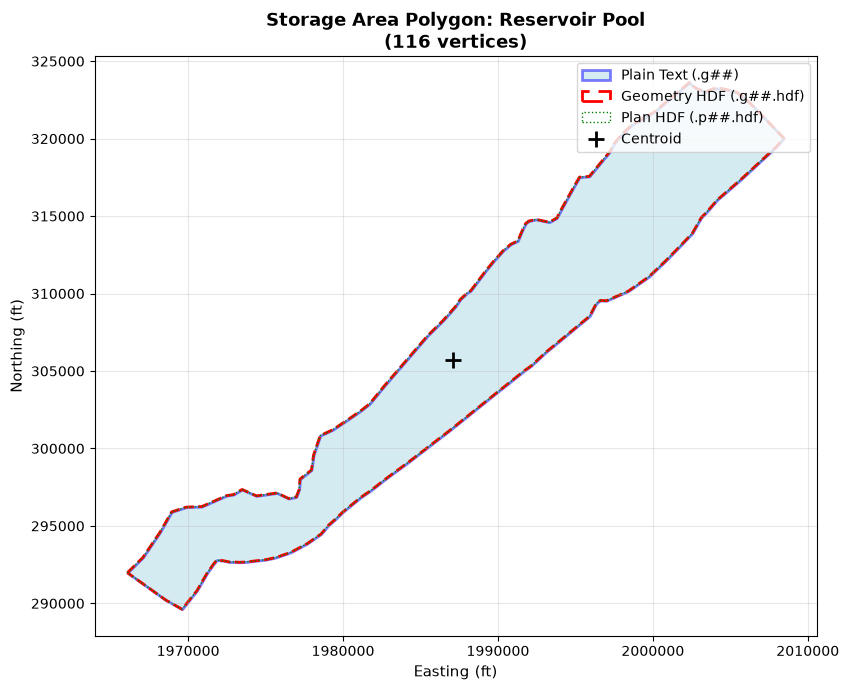
Note: No CRS is embedded in the HEC-RAS geometry sources.
Use gdf.set_crs(epsg=...) to assign the project coordinate system.