HTAB Parameter Optimization for Model Stability
This notebook demonstrates how to optimize Hydraulic Table (HTAB) parameters in HEC-RAS geometry files to improve model stability and prevent extrapolation errors.
Overview
What is HTAB?
HTAB (Hydraulic Table) parameters control how HEC-RAS pre-computes hydraulic property tables for: - Cross Sections: Starting elevation, increment, and number of points - Structures: Maximum headwater, tailwater, flow, and curve point counts
Why HTAB Optimization Matters
Extrapolation Errors: When water surface elevations exceed the HTAB range, HEC-RAS must extrapolate beyond the computed property tables. This can cause: - Warning messages in compute logs - Numerical instability - Inaccurate hydraulic calculations - Model convergence issues
Solution: Optimize HTAB parameters based on actual simulation results to ensure adequate coverage.
What You'll Learn
- Read current HTAB parameters from geometry files
- Run a baseline simulation and inspect compute messages
- Clone plan and geometry to preserve baseline for comparison
- Optimize HTAB parameters using
GeomHtab.optimize_all_htab_from_results() - Fix HTAB starting elevation issues using
RasFixit.fix_htab_starting_elevations() - Visualize before/after parameter comparisons
- Compare results using
results_dfand max WSEL analysis - Assess computational differences between baseline and optimized plans
LLM Forward Approach
- Verification: Compare compute messages before and after optimization
- Visual Outputs: Bar charts and coverage plots for HTAB parameters
- Audit Trail: Automatic backups of modified geometry files
Optimal HTAB Parameter Values
Cross Section Table Properties
| Parameter | HEC-RAS Label | Optimal Value | Notes |
|---|---|---|---|
| Starting El | Starting El | Lowest elevation (rounded up to 0.01) | Set at or just above cross section invert |
| Increment | Incr | 0.1 ft | Adjust higher for deep channels (e.g., 0.2 for 100 ft range) |
| Points | Number of Points | 500 | Does not affect computation time; provides additional stability and internal resolution |
Implied depth range: Points x Increment = depth coverage. Default 500 x 0.1 = 50 ft depth range.
Adjust increment if anticipated depths exceed 50 ft (e.g., 0.2 ft x 500 = 100 ft range).
Internal Boundary HTAB Parameters (Bridges, Culverts, Inline Weirs)
| Parameter | HEC-RAS Label | Optimal Value | Purpose |
|---|---|---|---|
| free_flow_points | #Pt FF Curve | 100 | Points on free flow rating curve |
| submerged_curves | # RC | 60 | Number of submerged rating curves |
| points_per_curve | #Pt on RC | 50 | Points per submerged curve |
| hw_max | HW Max | From results + safety factor | Max headwater elevation |
| tw_max | TW Max (Opt.) | From results + safety factor | Max tailwater elevation |
| max_flow | Max Flow (Rec.) | From results + safety factor | Max flow through structure |
These optimal values provide the best interpolation resolution for structure rating curves at no significant performance cost. The function uses these as defaults.
Setup and Imports
# =============================================================================
# DEVELOPMENT MODE TOGGLE
# =============================================================================
from pathlib import Path
import sys

USE_LOCAL_SOURCE = True  # <-- TOGGLE THIS: True for local dev, False for pip

if USE_LOCAL_SOURCE:
    local_path = str(Path.cwd().parent)
    if local_path not in sys.path:
        sys.path.insert(0, local_path)
    print(f"LOCAL SOURCE MODE: Loading from {local_path}/ras_commander")
else:
    print("PIP PACKAGE MODE: Loading installed ras-commander")

# Import ras-commander modules
from ras_commander import (
    RasExamples,
    init_ras_project,
    RasCmdr,
    RasPlan,
    GeomPreprocessor,
    ras,
    HdfHydraulicTables,
)
from ras_commander.geom import (
    GeomCrossSection,
    GeomHtab,
    GeomHtabUtils,
)
from ras_commander.hdf import HdfResultsXsec, HdfResultsPlan

# Additional imports
import pandas as pd
import numpy as np
import matplotlib.pyplot as plt
from IPython import display
import warnings
warnings.filterwarnings('ignore')

# Verify which version loaded
import ras_commander
print(f"Loaded: {ras_commander.__file__}")
print(f"Working directory: {Path.cwd()}")
LOCAL SOURCE MODE: Loading from G:\GH\ras-commander-pr-docs/ras_commander


Loaded: G:\GH\ras-commander-pr-docs\ras_commander\__init__.py
Working directory: G:\GH\ras-commander-pr-docs\examples
Parameters
Configure these values to customize the notebook.
# =============================================================================
# PARAMETERS - Edit these to customize the notebook
# =============================================================================

# Project Configuration
PROJECT_NAME = "Muncie"           # Example project with 1D cross sections
RAS_VERSION = "7.0"               # HEC-RAS version
PLAN_NUMBER = "01"                # Plan to execute and optimize

# HTAB Optimization Settings
XS_SAFETY_FACTOR = 1.3            # 30% safety margin on depth
STRUCTURE_HW_SAFETY = 2.0         # 100% safety on headwater
STRUCTURE_FLOW_SAFETY = 2.0       # 100% safety on flow
TARGET_INCREMENT = 0.1            # Target elevation increment (ft)
MAX_POINTS = 500                  # Maximum HTAB points (HEC-RAS limit)

print("Configuration:")
print(f"  Project: {PROJECT_NAME}")
print(f"  Plan: {PLAN_NUMBER}")
print(f"  XS Safety Factor: {XS_SAFETY_FACTOR} ({(XS_SAFETY_FACTOR-1)*100:.0f}% safety margin)")
print(f"  Structure Safety: {STRUCTURE_HW_SAFETY}x HW, {STRUCTURE_FLOW_SAFETY}x Flow")
Configuration:
  Project: Muncie
  Plan: 01
  XS Safety Factor: 1.3 (30% safety margin)
  Structure Safety: 2.0x HW, 2.0x Flow
Section 1: Extract Project and Initialize
# Extract example project
project_path = RasExamples.extract_project(PROJECT_NAME, suffix="203_htab")
print(f"Project extracted to: {project_path}")

# Initialize project
init_ras_project(project_path, RAS_VERSION)

# Display project structure
print(f"\nPlans found: {len(ras.plan_df)}")
print(f"Geometries found: {len(ras.geom_df)}")

# Get geometry file path
geom_row = ras.geom_df[ras.geom_df['geom_number'] == '01'].iloc[0]
geom_file = Path(geom_row['full_path'])
print(f"\nGeometry file: {geom_file.name}")
2026-07-07 18:21:46 - ras_commander.RasExamples - INFO - Successfully extracted project 'Muncie' to example_projects\Muncie_203_htab


2026-07-07 18:21:46 - ras_commander.RasPrj - INFO - ras-commander v0.98.2 | An open-source project of CLB Engineering Corporation (https://clbengineering.com/) | Docs: https://rascommander.info | GitHub: https://github.com/gpt-cmdr/ras-commander


2026-07-07 18:21:46 - ras_commander.RasPrj - INFO - Project initialized: Muncie


2026-07-07 18:21:46 - ras_commander.RasPrj - INFO - Using HEC-RAS version 7.0


2026-07-07 18:21:46 - ras_commander.RasPrj - INFO -
═══════════════════════════════════════════════════════════════════════
ras-commander | HEC-RAS Automation Library
Docs: https://rascommander.info/
Repo: https://github.com/gpt-cmdr/ras-commander
LLM agents: https://rascommander.info/llms.txt
═══════════════════════════════════════════════════════════════════════

PROJECT DATAFRAMES (single source of truth — use these, not file globbing):
  ras.plan_df        Plans, HDF paths, geometry/flow associations
  ras.geom_df        Geometry files and HDF preprocessor paths
  ras.flow_df        Steady flow files
  ras.unsteady_df    Unsteady flow files and configurations
  ras.boundaries_df  Boundary conditions (type, name, location)
  ras.results_df     Lightweight HDF results summaries
  ras.rasmap_df      RASMapper layers, terrain, land cover paths

KEY APIS (static classes — call directly, never instantiate):
  Execution:    RasCmdr.compute_plan() / compute_parallel() / compute_test_mode()
  Plan Files:   RasPlan.clone_plan() / clone_geom() / set_geom()
  Unsteady:     RasUnsteady — IC/BC management, gate openings, precipitation
  Geometry:     GeomCrossSection, GeomBridge, GeomStorage, GeomLateral, GeomMesh
  HDF Results:  HdfResultsPlan.get_wse() / get_compute_messages()
                HdfResultsMesh.get_mesh_max_ws() / get_mesh_cells_timeseries()
                HdfMesh.get_mesh_cell_points()
  QA/QC:        RasCheck.run_check() / RasFixit (geometry repair)
  DSS:          RasDss.get_timeseries() / check_pathname()
  USGS:         UsgsGaugeSpatial, GaugeMatcher, RasUsgsBoundaryGeneration
  Precipitation: StormGenerator, Atlas14Storm, PrecipAorc, Atlas14Variance
  Terrain:      RasTerrain.create_terrain_hdf() / RasTerrainMod

MULTI-PROJECT: Pass ras_object= to all API calls when using local RasPrj instances.

EXAMPLES: 100+ notebooks in examples/ (100s=execution, 200s=geometry, 300s=unsteady,
  400s=HDF results, 500s=remote, 800s=QA/QC, 900s=data integration).
  Review relevant notebooks before assembling new workflows.

PLATFORM: Most HEC-RAS operations require Windows. Linux/Wine support for
  headless execution, data access, geometry modification, and preprocessing
  is available via RasProcess (HEC-RAS 6.6+). See ras_commander/RasProcess.py.
  Remote distributed execution: ras_commander/remote/ (PsExec, Docker, SSH, cloud).
═══════════════════════════════════════════════════════════════════════


Project extracted to: G:\GH\ras-commander-pr-docs\examples\example_projects\Muncie_203_htab

Plans found: 3
Geometries found: 3

Geometry file: Muncie.g01
Section 2: Inspect Original HTAB Parameters
Before optimizing, let's examine the current HTAB parameters for cross sections.
# Get all cross sections
xs_df = GeomCrossSection.get_cross_sections(geom_file)
print(f"Total cross sections: {len(xs_df)}")

# Extract HTAB parameters for first 10 cross sections
htab_params_list = []
for idx, xs in xs_df.head(10).iterrows():
    try:
        params = GeomCrossSection.get_xs_htab_params(
            geom_file, xs['River'], xs['Reach'], xs['RS']
        )
        htab_params_list.append({
            'RS': xs['RS'],
            'Invert': params.get('invert'),
            'Starting_El': params.get('starting_el'),
            'Increment': params.get('increment'),
            'Num_Points': params.get('num_points'),
            'Max_El': (params.get('starting_el') or 0) +
                      (params.get('increment') or 0) * ((params.get('num_points') or 1) - 1)
                      if params.get('starting_el') and params.get('increment') else None
        })
    except Exception as e:
        print(f"  Warning: Could not read HTAB for RS {xs['RS']}: {e}")

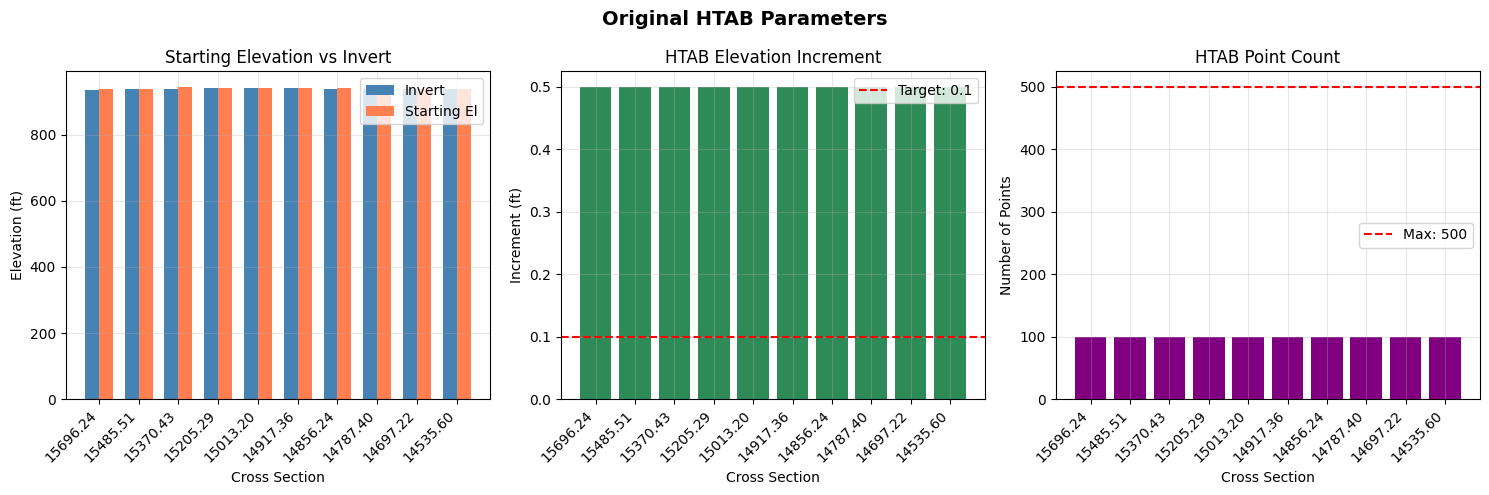
original_htab_df = pd.DataFrame(htab_params_list)
print("\nOriginal HTAB Parameters (first 10 cross sections):")
display.display(original_htab_df)
Total cross sections: 63

Original HTAB Parameters (first 10 cross sections):
| RS | Invert | Starting_El | Increment | Num_Points | Max_El | |
|---|---|---|---|---|---|---|
| 0 | 15696.24 | 936.99 | 937.99 | 0.5 | 100 | 987.49 |
| 1 | 15485.51 | 937.78 | 938.78 | 0.5 | 100 | 988.28 |
| 2 | 15370.43 | 937.78 | 945.16 | 0.5 | 100 | 994.66 |
| 3 | 15205.29 | 941.39 | 942.39 | 0.5 | 100 | 991.89 |
| 4 | 15013.20 | 940.73 | 941.73 | 0.5 | 100 | 991.23 |
| 5 | 14917.36 | 941.06 | 942.06 | 0.5 | 100 | 991.56 |
| 6 | 14856.24 | 940.18 | 941.18 | 0.5 | 100 | 990.68 |
| 7 | 14787.40 | 937.78 | 938.78 | 0.5 | 100 | 988.28 |
| 8 | 14697.22 | 938.88 | 939.88 | 0.5 | 100 | 989.38 |
| 9 | 14535.60 | 938.77 | 939.77 | 0.5 | 100 | 989.27 |
# Visualize original HTAB parameters
fig, axes = plt.subplots(1, 3, figsize=(15, 5))

# Filter out None values for plotting
plot_df = original_htab_df.dropna()
rs_labels = [str(rs)[:8] for rs in plot_df['RS']]

# Plot 1: Starting Elevation vs Invert
ax1 = axes[0]
x = np.arange(len(plot_df))
width = 0.35
ax1.bar(x - width/2, plot_df['Invert'], width, label='Invert', color='steelblue')
ax1.bar(x + width/2, plot_df['Starting_El'], width, label='Starting El', color='coral')
ax1.set_xlabel('Cross Section')
ax1.set_ylabel('Elevation (ft)')
ax1.set_title('Starting Elevation vs Invert')
ax1.set_xticks(x)
ax1.set_xticklabels(rs_labels, rotation=45, ha='right')
ax1.legend()
ax1.grid(True, alpha=0.3)

# Plot 2: Increment
ax2 = axes[1]
ax2.bar(x, plot_df['Increment'], color='seagreen')
ax2.axhline(y=TARGET_INCREMENT, color='red', linestyle='--', label=f'Target: {TARGET_INCREMENT}')
ax2.set_xlabel('Cross Section')
ax2.set_ylabel('Increment (ft)')
ax2.set_title('HTAB Elevation Increment')
ax2.set_xticks(x)
ax2.set_xticklabels(rs_labels, rotation=45, ha='right')
ax2.legend()
ax2.grid(True, alpha=0.3)

# Plot 3: Number of Points
ax3 = axes[2]
ax3.bar(x, plot_df['Num_Points'], color='purple')
ax3.axhline(y=MAX_POINTS, color='red', linestyle='--', label=f'Max: {MAX_POINTS}')
ax3.set_xlabel('Cross Section')
ax3.set_ylabel('Number of Points')
ax3.set_title('HTAB Point Count')
ax3.set_xticks(x)
ax3.set_xticklabels(rs_labels, rotation=45, ha='right')
ax3.legend()
ax3.grid(True, alpha=0.3)

fig.suptitle('Original HTAB Parameters', fontsize=14, fontweight='bold')
plt.tight_layout()
plt.show()
Section 3: Baseline Run and Compute Messages
Execute the plan with default HTAB parameters and check for extrapolation warnings.
# Execute baseline plan
print("Running baseline simulation...")
print("(This may take 1-2 minutes)\n")

result = RasCmdr.compute_plan(PLAN_NUMBER, num_cores=4, force_rerun=True)

if result:
    print("Baseline simulation completed successfully")

    # Get HDF path
    plan_row = ras.plan_df[ras.plan_df['plan_number'] == PLAN_NUMBER].iloc[0]
    hdf_path = Path(plan_row['HDF_Results_Path'])
    print(f"HDF results: {hdf_path.name}")
else:
    print("ERROR: Baseline simulation failed")
2026-07-07 18:21:46 - ras_commander.RasUtils - INFO - Successfully updated file: Muncie.p01


2026-07-07 18:21:46 - ras_commander.RasCmdr - INFO - Set number of cores to 4 for plan: 01


2026-07-07 18:21:46 - ras_commander.RasCmdr - INFO - Running Ras.exe with -c command line flag for plan 01


Running baseline simulation...
(This may take 1-2 minutes)


2026-07-07 18:22:00 - ras_commander.RasCmdr - INFO - HEC-RAS execution completed for plan 01 in 13.29 seconds


Baseline simulation completed successfully
HDF results: Muncie.p01.hdf
# Parse compute messages to check for extrapolation warnings
from ras_commander import ResultsParser
from ras_commander.hdf import HdfResultsPlan

# Get plan HDF path
plan_row = ras.plan_df[ras.plan_df['plan_number'] == PLAN_NUMBER].iloc[0]
hdf_path = Path(plan_row['HDF_Results_Path'])

# Get compute messages text from HDF
compute_msgs_text = HdfResultsPlan.get_compute_messages(hdf_path)

# Parse messages
compute_result = ResultsParser.parse_compute_messages(compute_msgs_text)

print(f"Computation completed: {compute_result['completed']}")
print(f"Has warnings: {compute_result['has_warnings']}")
print(f"Warning count: {compute_result['warning_count']}")

# Check for extrapolation warnings in raw text
extrap_count = compute_msgs_text.lower().count('extrapolat')
htab_count = compute_msgs_text.lower().count('htab') + compute_msgs_text.lower().count('property table')

print(f"\nExtrapolation mentions: {extrap_count}")
print(f"HTAB-related mentions: {htab_count}")

# Store for comparison later
baseline_extrap_count = extrap_count
baseline_warning_count = compute_result['warning_count']

if extrap_count > 0:
    print("\nNote: Model may benefit from HTAB optimization")
else:
    print("\nNo extrapolation warnings found in baseline run.")
Computation completed: True
Has warnings: False
Warning count: 0

Extrapolation mentions: 0
HTAB-related mentions: 0

No extrapolation warnings found in baseline run.
Section 4: Extract Maximum WSE from Results
Analyze the simulation results to understand the required HTAB coverage.
# Extract cross section timeseries to get maximum WSE values
try:
    xs_results = HdfResultsXsec.get_xsec_timeseries(hdf_path)

    # Extract max WSE for each cross section
    cross_sections = xs_results.coords['cross_section'].values
    max_wse_values = xs_results.coords['Maximum_Water_Surface'].values
    rivers = xs_results.coords['River'].values
    reaches = xs_results.coords['Reach'].values
    stations = xs_results.coords['Station'].values

    # Build DataFrame
    max_wse_df = pd.DataFrame({
        'cross_section': cross_sections,
        'river': rivers,
        'reach': reaches,
        'station': stations,
        'max_wse': max_wse_values
    })

    # Store baseline max WSE for later comparison with optimized plan
    baseline_max_wse_df = max_wse_df.copy()
    baseline_max_wse_df = baseline_max_wse_df.rename(columns={'max_wse': 'max_wse_baseline'})

    print(f"Extracted max WSE for {len(max_wse_df)} cross sections")
    print(f"\nBaseline Max WSE Statistics:")
    print(f"  Min: {max_wse_df['max_wse'].min():.2f} ft")
    print(f"  Max: {max_wse_df['max_wse'].max():.2f} ft")
    print(f"  Mean: {max_wse_df['max_wse'].mean():.2f} ft")

    print("\nFirst 10 cross sections:")
    display.display(max_wse_df.head(10))

except Exception as e:
    print(f"Error extracting cross section results: {e}")
    max_wse_df = None
    baseline_max_wse_df = None
Extracted max WSE for 61 cross sections

Baseline Max WSE Statistics:
  Min: 938.73 ft
  Max: 955.42 ft
  Mean: 945.88 ft

First 10 cross sections:
| cross_section | river | reach | station | max_wse | |
|---|---|---|---|---|---|
| 0 | White Muncie 15696.24 | White | Muncie | 15696.24 | 955.419312 |
| 1 | White Muncie 15485.51 | White | Muncie | 15485.51 | 955.174011 |
| 2 | White Muncie 15370.43 | White | Muncie | 15370.43 | 954.952271 |
| 3 | White Muncie 15205.29 | White | Muncie | 15205.29 | 954.893005 |
| 4 | White Muncie 15013.20 | White | Muncie | 15013.20 | 954.560486 |
| 5 | White Muncie 14917.36 | White | Muncie | 14917.36 | 953.986633 |
| 6 | White Muncie 14856.24 | White | Muncie | 14856.24 | 953.586487 |
| 7 | White Muncie 14787.40 | White | Muncie | 14787.40 | 953.695190 |
| 8 | White Muncie 14697.22 | White | Muncie | 14697.22 | 953.339478 |
| 9 | White Muncie 14535.60 | White | Muncie | 14535.60 | 953.233215 |
# Visualize HTAB coverage vs observed WSE
if max_wse_df is not None and len(original_htab_df) > 0:
    fig, ax = plt.subplots(figsize=(14, 6))

    # Merge original HTAB with max WSE
    plot_df = original_htab_df.head(10).copy()
    plot_df['RS_str'] = plot_df['RS'].astype(str)

    # Match with max WSE by station
    max_wse_subset = max_wse_df.head(10)

    x = np.arange(len(plot_df))
    rs_labels = [str(rs)[:8] for rs in plot_df['RS']]

    # Plot HTAB range (invert to max elevation)
    inverts = plot_df['Invert'].fillna(plot_df['Starting_El']).values
    # Fix: Use np.where for element-wise conditional fill
    max_el_raw = plot_df['Max_El'].values
    max_els = np.where(pd.isna(max_el_raw), inverts + 50, max_el_raw)

    # HTAB coverage bars
    ax.bar(x, max_els - inverts, bottom=inverts, alpha=0.6, color='lightblue',
           label='HTAB Coverage', edgecolor='steelblue', linewidth=1.5)

    # Max WSE line
    if len(max_wse_subset) >= len(x):
        max_wse_vals = max_wse_subset['max_wse'].values[:len(x)]
        ax.plot(x, max_wse_vals, 'ro-', markersize=8, linewidth=2, label='Max WSE (Observed)')

        # Target WSE with safety factor
        target_wse = inverts + (max_wse_vals - inverts) * XS_SAFETY_FACTOR
        ax.plot(x, target_wse, 'g^--', markersize=6, linewidth=1.5,
                label=f'Target WSE ({XS_SAFETY_FACTOR}x safety)')

    # Invert line
    ax.plot(x, inverts, 'k-', linewidth=2, label='Invert')

    ax.set_xlabel('Cross Section', fontsize=12)
    ax.set_ylabel('Elevation (ft)', fontsize=12)
    ax.set_title('HTAB Coverage vs Observed Maximum WSE', fontsize=14, fontweight='bold')
    ax.set_xticks(x)
    ax.set_xticklabels(rs_labels, rotation=45, ha='right')
    ax.legend(loc='upper right')
    ax.grid(True, alpha=0.3)

    plt.tight_layout()
    plt.show()

    print("\nCoverage Analysis:")
    print("- Blue bars: Current HTAB elevation range")
    print("- Red dots: Maximum observed water surface elevation")
    print("- Green triangles: Target WSE with safety factor")
    print("\nIf red dots approach or exceed the blue bars, HTAB optimization is needed.")
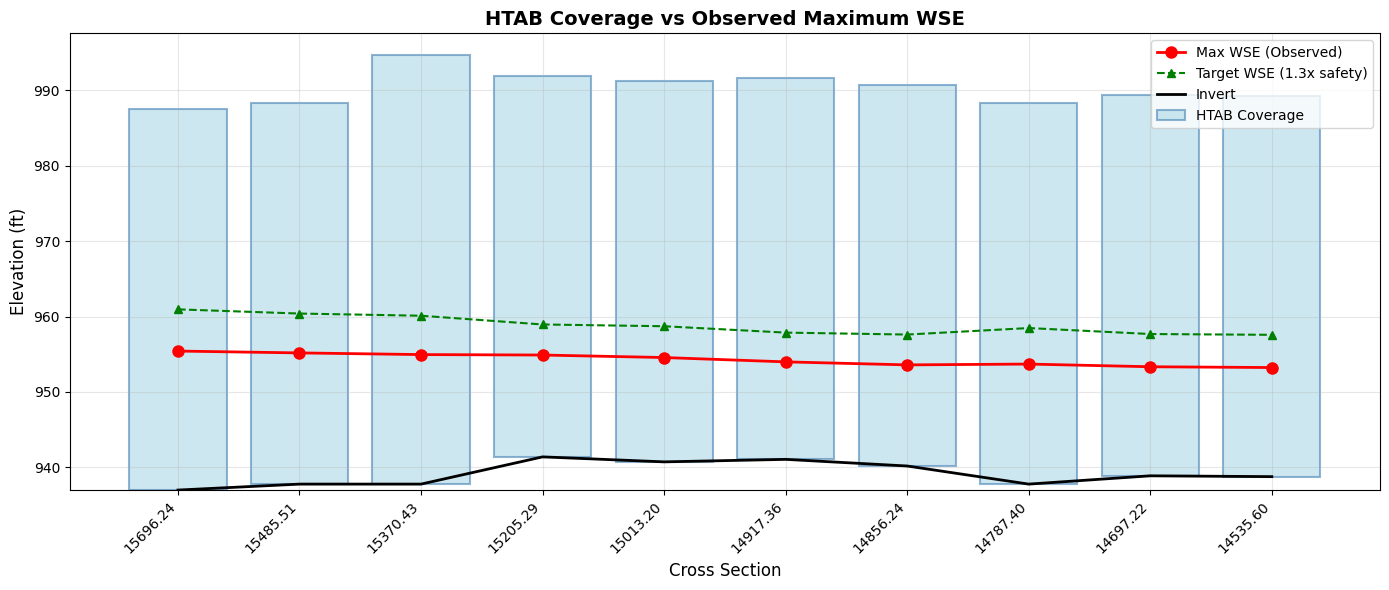
Coverage Analysis:
- Blue bars: Current HTAB elevation range
- Red dots: Maximum observed water surface elevation
- Green triangles: Target WSE with safety factor

If red dots approach or exceed the blue bars, HTAB optimization is needed.
Section 5: Clone Plan/Geometry and Optimize HTAB Parameters
Instead of modifying the original plan in place, we'll clone the plan and geometry to preserve the baseline for comparison. This allows us to:
1. Compare results between baseline and optimized plans using results_df
2. Analyze max WSEL differences to assess computational impacts
3. Maintain a clean baseline for reference
Workflow: - Clone the geometry file → Apply HTAB optimization to the clone - Clone the plan file → Associate it with the optimized geometry - Run both plans and compare results
# Generate optimization report (preview without modifying)
print("Generating HTAB optimization report...\n")

report = GeomHtab.get_optimization_report(
    geom_file=geom_file,
    hdf_results_path=hdf_path,
    xs_safety_factor=XS_SAFETY_FACTOR,
    structure_hw_safety=STRUCTURE_HW_SAFETY
)

# Display report (first 60 lines)
report_lines = report.split('\n')
print('\n'.join(report_lines[:60]))
if len(report_lines) > 60:
    print(f"\n... ({len(report_lines) - 60} more lines)")
Generating HTAB optimization report...

# HTAB Optimization Report

**Geometry File**: Muncie.g01
**HDF Results**: Muncie.p01.hdf
**Generated**: 2026-07-07 18:22:00

## Analysis Parameters

- XS Safety Factor: 1.3 (30% safety)
- Structure HW Safety Factor: 2.0 (100% safety)

---

## Cross Section HTAB Analysis

Found 61 cross sections with results.

| Cross Section | Current Start El | Recommended | Current Inc | Recommended | Change |
|---------------|------------------|-------------|-------------|-------------|--------|
| White            Muncie        | 937.99 | 936.99 | 0.5000 | 0.1000 | YES |
| White            Muncie        | 938.78 | 937.78 | 0.5000 | 0.1000 | YES |
| White            Muncie        | 945.16 | 937.78 | 0.5000 | 0.1000 | YES |
| White            Muncie        | 942.39 | 941.39 | 0.5000 | 0.1000 | YES |
| White            Muncie        | 941.73 | 940.73 | 0.5000 | 0.1000 | YES |
| White            Muncie        | 942.06 | 941.06 | 0.5000 | 0.1000 | YES |
| White            Muncie        | 941.18 | 940.18 | 0.5000 | 0.1000 | YES |
| White            Muncie        | 938.78 | 937.78 | 0.5000 | 0.1000 | YES |
| White            Muncie        | 939.88 | 938.88 | 0.5000 | 0.1000 | YES |
| White            Muncie        | 939.77 | 938.77 | 0.5000 | 0.1000 | YES |
| White            Muncie        | 939.59 | 938.59 | 0.5000 | 0.1000 | YES |
| White            Muncie        | 939.87 | 938.87 | 0.5000 | 0.1000 | YES |
| White            Muncie        | 936.76 | 935.76 | 0.5000 | 0.1000 | YES |
| White            Muncie        | 938.86 | 937.86 | 0.5000 | 0.1000 | YES |
| White            Muncie        | 935.61 | 934.61 | 0.5000 | 0.1000 | YES |
| White            Muncie        | 934.86 | 933.86 | 0.5000 | 0.1000 | YES |
| White            Muncie        | 940.65 | 939.11 | 0.5000 | 0.1000 | YES |
| White            Muncie        | 935.98 | 934.98 | 0.5000 | 0.1000 | YES |
| White            Muncie        | 934.86 | 933.86 | 0.5000 | 0.1000 | YES |
| White            Muncie        | 936.83 | 935.83 | 0.5000 | 0.1000 | YES |
| ... | | | | | |
| (41 more) | | | | | |

**Cross sections needing optimization**: 20

---

## Recommendations

1. Run `GeomHtab.optimize_all_htab_from_results()` to apply optimizations
2. After optimization, run geometric preprocessor (`clear_geompre=True`)
3. Verify model opens correctly in HEC-RAS GUI
4. Compare before/after results for stability

---

*Report generated by ras-commander GeomHtab*
# =============================================================================
# Step 1: Clone geometry for HTAB optimization
# =============================================================================
print("Step 1: Clone geometry file...")
new_geom_number = RasPlan.clone_geom("01")
print(f"  Created new geometry: g{new_geom_number}")

# Get path to the cloned geometry file
cloned_geom_row = ras.geom_df[ras.geom_df['geom_number'] == new_geom_number].iloc[0]
cloned_geom_file = Path(cloned_geom_row['full_path'])
print(f"  Cloned geometry file: {cloned_geom_file.name}")

# =============================================================================
# Step 2: Clone plan and associate with cloned geometry
# =============================================================================
print("\nStep 2: Clone plan and associate with optimized geometry...")
optimized_plan_number = RasPlan.clone_plan(PLAN_NUMBER, new_shortid="HTAB Optimized")
print(f"  Created new plan: p{optimized_plan_number}")

# Associate the cloned plan with the cloned geometry
RasPlan.set_geom(optimized_plan_number, new_geom_number)
print(f"  Associated plan {optimized_plan_number} with geometry {new_geom_number}")

# Update plan title for clarity
RasPlan.set_plan_title(optimized_plan_number, "HTAB Optimized Plan")
print(f"  Updated plan title")

# Clear geometry preprocessor files for the new plan
plan_path = RasPlan.get_plan_path(optimized_plan_number)
GeomPreprocessor.clear_geompre_files(plan_path)
print(f"  Cleared geometry preprocessor files")

# =============================================================================
# Step 3: Apply HTAB optimization to the CLONED geometry only
# =============================================================================
print("\nStep 3: Optimizing HTAB parameters on cloned geometry...")
print(f"  Safety Factor: {XS_SAFETY_FACTOR}")
print(f"  Target Increment: {TARGET_INCREMENT} ft")
print(f"  Max Points: {MAX_POINTS}")
print("")

optimization_result = GeomHtab.optimize_all_htab_from_results(
    geom_file=cloned_geom_file,  # Apply to CLONED geometry only
    hdf_results_path=hdf_path,   # Use baseline results for optimization targets
    xs_safety_factor=XS_SAFETY_FACTOR,
    structure_hw_safety=STRUCTURE_HW_SAFETY,
    structure_flow_safety=STRUCTURE_FLOW_SAFETY,
    xs_target_increment=TARGET_INCREMENT,
    xs_max_points=MAX_POINTS,
    create_backup=True
)

print("\nOptimization Results:")
print(f"  Cross sections modified: {optimization_result['xs_modified']}")
print(f"  Structures modified: {optimization_result['structures_modified']}")
print(f"  Total changes: {optimization_result['total_changes']}")
print(f"  Success: {optimization_result['success']}")

if optimization_result['backup']:
    print(f"\nBackup created: {optimization_result['backup']}")

if optimization_result['errors']:
    print(f"\nErrors: {optimization_result['errors']}")

if optimization_result['warnings']:
    print(f"\nWarnings: {optimization_result['warnings']}")

print("\n" + "="*60)
print("SUMMARY: Plan/Geometry Configuration")
print("="*60)
print(f"  Baseline Plan: {PLAN_NUMBER} → Geometry: 01 (original HTAB)")
print(f"  Optimized Plan: {optimized_plan_number} → Geometry: {new_geom_number} (optimized HTAB)")
2026-07-07 18:22:00 - ras_commander.RasUtils - INFO - File cloned: Muncie.g01 -> Muncie.g03


2026-07-07 18:22:00 - ras_commander.RasUtils - INFO - File cloned: Muncie.g01.hdf -> Muncie.g03.hdf


2026-07-07 18:22:00 - ras_commander.RasUtils - INFO - Project file updated with new Geom entry: 03


Step 1: Clone geometry file...


2026-07-07 18:22:00 - ras_commander.RasUtils - INFO - File cloned: Muncie.p01 -> Muncie.p02


2026-07-07 18:22:00 - ras_commander.RasUtils - INFO - Successfully updated file: Muncie.p02


2026-07-07 18:22:00 - ras_commander.RasUtils - INFO - Project file updated with new Plan entry: 02


  Created new geometry: g03
  Cloned geometry file: Muncie.g03

Step 2: Clone plan and associate with optimized geometry...


  Created new plan: p02


2026-07-07 18:22:00 - ras_commander.RasPlan - INFO - Set geometry for plan p02 to g03


2026-07-07 18:22:00 - ras_commander.RasPlan - INFO - Updated Plan Title in plan file to: HTAB Optimized Plan


2026-07-07 18:22:00 - ras_commander.geom.GeomPreprocessor - INFO - Clearing geometry preprocessor file for single plan: Muncie.p02


2026-07-07 18:22:00 - ras_commander.geom.GeomPreprocessor - INFO - Cleared 4 geometry-preprocessor path(s) from Muncie.g03.hdf


2026-07-07 18:22:01 - ras_commander.geom.GeomCrossSection - INFO - Optimizing XS HTAB from results: geom=Muncie.g03, hdf=Muncie.p01.hdf, safety=1.3, increment=0.1, num_points=500


2026-07-07 18:22:01 - ras_commander.geom.GeomCrossSection - INFO - HTAB optimization complete: 61 of 61 XS modified, increment range 0.1-0.1, 0.05 seconds


2026-07-07 18:22:01 - ras_commander.geom.GeomHtab - INFO - HTAB optimization complete: 61 XS, 0 structures modified


  Associated plan 02 with geometry 03
  Updated plan title
  Cleared geometry preprocessor files

Step 3: Optimizing HTAB parameters on cloned geometry...
  Safety Factor: 1.3
  Target Increment: 0.1 ft
  Max Points: 500


Optimization Results:
  Cross sections modified: 61
  Structures modified: 0
  Total changes: 61
  Success: True

Backup created: G:\GH\ras-commander-pr-docs\examples\example_projects\Muncie_203_htab\Muncie.g03.bak

============================================================
SUMMARY: Plan/Geometry Configuration
============================================================
  Baseline Plan: 01 → Geometry: 01 (original HTAB)
  Optimized Plan: 02 → Geometry: 03 (optimized HTAB)
Section 5.5: Fix HTAB Starting Elevation Issues (RasFixit)
After optimization, HTAB starting elevations may fall below the cross section invert elevation. This is invalid in HEC-RAS and will cause the model to fail during geometry preprocessing.
When This Happens: - Upgrading models from older HEC-RAS versions (4.x -> 6.x) - Importing geometry from external sources - Manual editing errors in geometry files - Some edge cases in HTAB optimization
The Solution: RasFixit.fix_htab_starting_elevations()
This method automatically: 1. Scans all cross sections for HTAB starting_el < invert issues 2. Corrects starting elevations to be at or above the invert 3. Creates a timestamped backup of the original geometry file 4. Returns detailed results showing what was fixed
# =============================================================================
# Detect HTAB Starting Elevation Issues (Dry-Run)
# =============================================================================
# Import RasFixit for geometry repair
from ras_commander.fixit import RasFixit

# First, detect issues WITHOUT modifying the file (dry_run=True)
print("Scanning for HTAB starting elevation issues...\n")

issues = RasFixit.fix_htab_starting_elevations(
    geom_path=cloned_geom_file,
    dry_run=True  # Detection only - no modifications
)

print(f"Cross sections checked: {issues.total_xs_checked}")
print(f"Issues found: {issues.total_xs_fixed}")

# Show details of detected issues
if issues.messages:
    print("\nDetected Issues:")
    for msg in issues.messages[:10]:  # Show first 10
        print(f"  {msg.river}/{msg.reach}/RS {msg.station}: {msg.message}")
    if len(issues.messages) > 10:
        print(f"  ... and {len(issues.messages) - 10} more")
else:
    print("\nNo HTAB starting elevation issues detected.")
2026-07-07 18:22:01 - ras_commander.fixit.RasFixit - INFO - Checking HTAB starting elevations for 61 cross sections


Scanning for HTAB starting elevation issues...


Cross sections checked: 61
Issues found: 0

No HTAB starting elevation issues detected.
# =============================================================================
# Fix HTAB Starting Elevation Issues
# =============================================================================
# Only run this if issues were detected above

if issues.total_xs_fixed > 0:
    print(f"Fixing {issues.total_xs_fixed} cross sections with HTAB starting elevation issues...\n")

    # Apply fixes with backup and optional safety margin
    fix_results = RasFixit.fix_htab_starting_elevations(
        geom_path=cloned_geom_file,
        backup=True,    # Create timestamped backup
        dry_run=False,  # Actually modify the file
        margin=0.01     # Add 0.01 ft safety margin above invert
    )

    # Report results
    print(f"Fixed {fix_results.total_xs_fixed} cross sections")
    if fix_results.backup_path:
        print(f"Backup created: {fix_results.backup_path}")

    # Show what was fixed
    print("\nFix Details:")
    for msg in fix_results.messages[:10]:  # Show first 10
        print(f"  {msg.river}/{msg.reach}/RS {msg.station}:")
        print(f"    {msg.message}")
    if len(fix_results.messages) > 10:
        print(f"  ... and {len(fix_results.messages) - 10} more")
else:
    print("No HTAB starting elevation issues to fix.")
    fix_results = issues  # Use detection results for later cells
No HTAB starting elevation issues to fix.
# =============================================================================
# View Fix Results as DataFrame
# =============================================================================
# Convert results to DataFrame for detailed analysis

if fix_results.messages:
    fix_df = fix_results.to_dataframe()

    # Display relevant columns
    display_cols = ['river', 'reach', 'station', 'message']
    available_cols = [c for c in display_cols if c in fix_df.columns]

    print("HTAB Starting Elevation Fixes Applied:")
    print(fix_df[available_cols].to_string(index=False))

    # Summary statistics
    print(f"\nSummary:")
    print(f"  Total cross sections checked: {fix_results.total_xs_checked}")
    print(f"  Total cross sections fixed: {fix_results.total_xs_fixed}")
    print(f"  Fix rate: {100 * fix_results.total_xs_fixed / max(fix_results.total_xs_checked, 1):.1f}%")
else:
    print("No fixes applied - HTAB parameters are valid.")
No fixes applied - HTAB parameters are valid.
Section 6: Inspect Optimized Parameters
Compare the original and optimized HTAB parameters.
# Extract optimized HTAB parameters from the CLONED geometry
optimized_htab_list = []
for idx, xs in xs_df.head(10).iterrows():
    try:
        params = GeomCrossSection.get_xs_htab_params(
            cloned_geom_file, xs['River'], xs['Reach'], xs['RS']  # Read from cloned geometry
        )
        optimized_htab_list.append({
            'RS': xs['RS'],
            'Invert': params.get('invert'),
            'Starting_El': params.get('starting_el'),
            'Increment': params.get('increment'),
            'Num_Points': params.get('num_points'),
            'Max_El': (params.get('starting_el') or 0) +
                      (params.get('increment') or 0) * ((params.get('num_points') or 1) - 1)
                      if params.get('starting_el') and params.get('increment') else None
        })
    except Exception as e:
        print(f"  Warning: Could not read HTAB for RS {xs['RS']}: {e}")

optimized_htab_df = pd.DataFrame(optimized_htab_list)
print(f"Optimized HTAB Parameters from cloned geometry (g{new_geom_number}):")
print("(first 10 cross sections)")
display.display(optimized_htab_df)
Optimized HTAB Parameters from cloned geometry (g03):
(first 10 cross sections)
| RS | Invert | Starting_El | Increment | Num_Points | Max_El | |
|---|---|---|---|---|---|---|
| 0 | 15696.24 | 936.99 | 936.99 | 0.1 | 500 | 986.89 |
| 1 | 15485.51 | 937.78 | 937.78 | 0.1 | 500 | 987.68 |
| 2 | 15370.43 | 937.78 | 937.78 | 0.1 | 500 | 987.68 |
| 3 | 15205.29 | 941.39 | 941.39 | 0.1 | 500 | 991.29 |
| 4 | 15013.20 | 940.73 | 940.73 | 0.1 | 500 | 990.63 |
| 5 | 14917.36 | 941.06 | 941.06 | 0.1 | 500 | 990.96 |
| 6 | 14856.24 | 940.18 | 940.18 | 0.1 | 500 | 990.08 |
| 7 | 14787.40 | 937.78 | 937.78 | 0.1 | 500 | 987.68 |
| 8 | 14697.22 | 938.88 | 938.88 | 0.1 | 500 | 988.78 |
| 9 | 14535.60 | 938.77 | 938.77 | 0.1 | 500 | 988.67 |
# Create before/after comparison
comparison_df = pd.merge(
    original_htab_df.add_suffix('_Original'),
    optimized_htab_df.add_suffix('_Optimized'),
    left_on='RS_Original',
    right_on='RS_Optimized'
)

# Calculate changes
comparison_df['Increment_Change'] = comparison_df['Increment_Optimized'] - comparison_df['Increment_Original']
comparison_df['Points_Change'] = comparison_df['Num_Points_Optimized'] - comparison_df['Num_Points_Original']
comparison_df['Coverage_Change'] = comparison_df['Max_El_Optimized'] - comparison_df['Max_El_Original']

print("Before/After Comparison:")
summary_df = comparison_df[['RS_Original',
                            'Increment_Original', 'Increment_Optimized', 'Increment_Change',
                            'Num_Points_Original', 'Num_Points_Optimized', 'Points_Change']].copy()
summary_df.columns = ['RS', 'Inc_Before', 'Inc_After', 'Inc_Change',
                      'Pts_Before', 'Pts_After', 'Pts_Change']
display.display(summary_df)
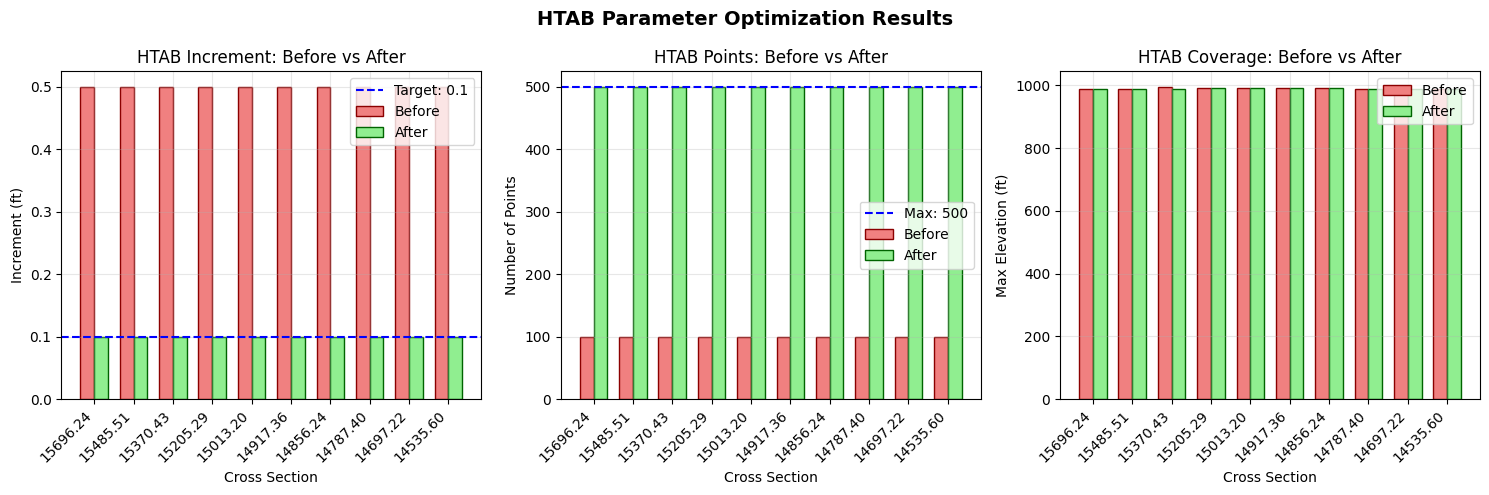
Before/After Comparison:
| RS | Inc_Before | Inc_After | Inc_Change | Pts_Before | Pts_After | Pts_Change | |
|---|---|---|---|---|---|---|---|
| 0 | 15696.24 | 0.5 | 0.1 | -0.4 | 100 | 500 | 400 |
| 1 | 15485.51 | 0.5 | 0.1 | -0.4 | 100 | 500 | 400 |
| 2 | 15370.43 | 0.5 | 0.1 | -0.4 | 100 | 500 | 400 |
| 3 | 15205.29 | 0.5 | 0.1 | -0.4 | 100 | 500 | 400 |
| 4 | 15013.20 | 0.5 | 0.1 | -0.4 | 100 | 500 | 400 |
| 5 | 14917.36 | 0.5 | 0.1 | -0.4 | 100 | 500 | 400 |
| 6 | 14856.24 | 0.5 | 0.1 | -0.4 | 100 | 500 | 400 |
| 7 | 14787.40 | 0.5 | 0.1 | -0.4 | 100 | 500 | 400 |
| 8 | 14697.22 | 0.5 | 0.1 | -0.4 | 100 | 500 | 400 |
| 9 | 14535.60 | 0.5 | 0.1 | -0.4 | 100 | 500 | 400 |
# Visualize before/after comparison
fig, axes = plt.subplots(1, 3, figsize=(15, 5))

x = np.arange(len(comparison_df))
width = 0.35
rs_labels = [str(rs)[:8] for rs in comparison_df['RS_Original']]

# Plot 1: Increment comparison
ax1 = axes[0]
ax1.bar(x - width/2, comparison_df['Increment_Original'], width,
        label='Before', color='lightcoral', edgecolor='darkred')
ax1.bar(x + width/2, comparison_df['Increment_Optimized'], width,
        label='After', color='lightgreen', edgecolor='darkgreen')
ax1.axhline(y=TARGET_INCREMENT, color='blue', linestyle='--', label=f'Target: {TARGET_INCREMENT}')
ax1.set_xlabel('Cross Section')
ax1.set_ylabel('Increment (ft)')
ax1.set_title('HTAB Increment: Before vs After')
ax1.set_xticks(x)
ax1.set_xticklabels(rs_labels, rotation=45, ha='right')
ax1.legend()
ax1.grid(True, alpha=0.3)

# Plot 2: Number of points comparison
ax2 = axes[1]
ax2.bar(x - width/2, comparison_df['Num_Points_Original'], width,
        label='Before', color='lightcoral', edgecolor='darkred')
ax2.bar(x + width/2, comparison_df['Num_Points_Optimized'], width,
        label='After', color='lightgreen', edgecolor='darkgreen')
ax2.axhline(y=MAX_POINTS, color='blue', linestyle='--', label=f'Max: {MAX_POINTS}')
ax2.set_xlabel('Cross Section')
ax2.set_ylabel('Number of Points')
ax2.set_title('HTAB Points: Before vs After')
ax2.set_xticks(x)
ax2.set_xticklabels(rs_labels, rotation=45, ha='right')
ax2.legend()
ax2.grid(True, alpha=0.3)

# Plot 3: Coverage (max elevation)
ax3 = axes[2]
ax3.bar(x - width/2, comparison_df['Max_El_Original'], width,
        label='Before', color='lightcoral', edgecolor='darkred')
ax3.bar(x + width/2, comparison_df['Max_El_Optimized'], width,
        label='After', color='lightgreen', edgecolor='darkgreen')
ax3.set_xlabel('Cross Section')
ax3.set_ylabel('Max Elevation (ft)')
ax3.set_title('HTAB Coverage: Before vs After')
ax3.set_xticks(x)
ax3.set_xticklabels(rs_labels, rotation=45, ha='right')
ax3.legend()
ax3.grid(True, alpha=0.3)

fig.suptitle('HTAB Parameter Optimization Results', fontsize=14, fontweight='bold')
plt.tight_layout()
plt.show()
Section 7: Run Optimized Plan
Execute the cloned plan with optimized HTAB parameters. The original baseline plan remains unchanged for comparison.
# Run the CLONED plan with optimized HTAB parameters
print(f"Running optimized plan (p{optimized_plan_number}) with optimized HTAB parameters...")
print("(Using force_geompre=True to rebuild hydraulic tables)\n")

result = RasCmdr.compute_plan(
    optimized_plan_number,  # Run the CLONED plan
    num_cores=4,
    force_geompre=True,  # Force geometry preprocessing to use new HTAB
    force_rerun=True
)

if result:
    print(f"Optimized simulation (plan {optimized_plan_number}) completed successfully")
else:
    print(f"ERROR: Optimized simulation (plan {optimized_plan_number}) failed")
2026-07-07 18:22:01 - ras_commander.geom.GeomPreprocessor - INFO - Clearing geometry preprocessor file for single plan: Muncie.p02


2026-07-07 18:22:01 - ras_commander.geom.GeomPreprocessor - WARNING - No geometry preprocessor file found for: G:\GH\ras-commander-pr-docs\examples\example_projects\Muncie_203_htab\Muncie.p02


2026-07-07 18:22:01 - ras_commander.RasCmdr - INFO - Force-cleared all geometry preprocessor files for plan: 02


2026-07-07 18:22:01 - ras_commander.RasUtils - INFO - Successfully updated file: Muncie.p02


2026-07-07 18:22:01 - ras_commander.RasCmdr - INFO - Set number of cores to 4 for plan: 02


2026-07-07 18:22:01 - ras_commander.RasCmdr - INFO - Running Ras.exe with -c command line flag for plan 02


Running optimized plan (p02) with optimized HTAB parameters...
(Using force_geompre=True to rebuild hydraulic tables)


2026-07-07 18:22:16 - ras_commander.RasCmdr - INFO - HEC-RAS execution completed for plan 02 in 14.79 seconds


Optimized simulation (plan 02) completed successfully
# Parse optimized compute messages
# Refresh plan_df to get updated HDF path for the OPTIMIZED plan
ras.plan_df = ras.get_plan_entries()  # Refresh to get updated HDF paths
optimized_plan_row = ras.plan_df[ras.plan_df['plan_number'] == optimized_plan_number].iloc[0]
hdf_path_optimized = Path(optimized_plan_row['HDF_Results_Path'])

print(f"Optimized plan HDF: {hdf_path_optimized.name}")

# Get compute messages text from HDF
compute_msgs_optimized = HdfResultsPlan.get_compute_messages(hdf_path_optimized)

# Parse messages
compute_result_optimized = ResultsParser.parse_compute_messages(compute_msgs_optimized)

# Check for extrapolation mentions
optimized_extrap_count = compute_msgs_optimized.lower().count('extrapolat')

print("\nCompute Messages Comparison:")
print(f"  Baseline (plan {PLAN_NUMBER}): {baseline_extrap_count} extrapolation mentions")
print(f"  Optimized (plan {optimized_plan_number}): {optimized_extrap_count} extrapolation mentions")

if optimized_extrap_count < baseline_extrap_count:
    reduction = ((baseline_extrap_count - optimized_extrap_count) / max(baseline_extrap_count, 1)) * 100
    print(f"\n  Improvement: {reduction:.1f}% reduction in extrapolation warnings")
elif optimized_extrap_count == 0 and baseline_extrap_count == 0:
    print("\n  No extrapolation warnings in either run (model was already well-configured)")
else:
    print("\n  Note: Additional optimization may be needed")
Optimized plan HDF: Muncie.p02.hdf

Compute Messages Comparison:
  Baseline (plan 01): 0 extrapolation mentions
  Optimized (plan 02): 1 extrapolation mentions

  Note: Additional optimization may be needed
# Create summary table
print("\n" + "="*60)
print("HTAB OPTIMIZATION SUMMARY")
print("="*60)

summary_data = {
    'Metric': [
        'Baseline Plan',
        'Optimized Plan',
        'Baseline Geometry',
        'Optimized Geometry',
        'Cross Sections Modified',
        'Structures Modified',
        'Extrapolation Warnings (Baseline)',
        'Extrapolation Warnings (Optimized)',
        'Warning Reduction',
        'Safety Factor Applied',
        'Backup Created'
    ],
    'Value': [
        f"p{PLAN_NUMBER}",
        f"p{optimized_plan_number}",
        "g01 (original HTAB)",
        f"g{new_geom_number} (optimized HTAB)",
        optimization_result['xs_modified'],
        optimization_result['structures_modified'],
        baseline_extrap_count,
        optimized_extrap_count,
        f"{max(0, baseline_extrap_count - optimized_extrap_count)} ({((max(0, baseline_extrap_count - optimized_extrap_count) / max(baseline_extrap_count, 1)) * 100):.0f}%)",
        f"{XS_SAFETY_FACTOR}x ({(XS_SAFETY_FACTOR-1)*100:.0f}%)",
        'Yes' if optimization_result['backup'] else 'No'
    ]
}

summary_table = pd.DataFrame(summary_data)
display.display(summary_table)
============================================================
HTAB OPTIMIZATION SUMMARY
============================================================
| Metric | Value | |
|---|---|---|
| 0 | Baseline Plan | p01 |
| 1 | Optimized Plan | p02 |
| 2 | Baseline Geometry | g01 (original HTAB) |
| 3 | Optimized Geometry | g03 (optimized HTAB) |
| 4 | Cross Sections Modified | 61 |
| 5 | Structures Modified | 0 |
| 6 | Extrapolation Warnings (Baseline) | 0 |
| 7 | Extrapolation Warnings (Optimized) | 1 |
| 8 | Warning Reduction | 0 (0%) |
| 9 | Safety Factor Applied | 1.3x (30%) |
| 10 | Backup Created | Yes |
Section 8: Compare Results Using results_df and Max WSEL
Now that we have both baseline and optimized plans executed, we can compare their results using: 1. results_df: Compare execution metadata, runtime, and volume accounting 2. Max WSEL comparison: Assess computational differences between HTAB configurations
# Compare results using results_df
print("="*60)
print("RESULTS COMPARISON: results_df")
print("="*60)

# Display results_df for comparison
print("\nExecution Summary (results_df transposed for readability):")
display.display(ras.results_df.T)

# Extract key metrics for comparison
baseline_results = ras.results_df[ras.results_df['plan_number'] == PLAN_NUMBER]
optimized_results = ras.results_df[ras.results_df['plan_number'] == optimized_plan_number]

if not baseline_results.empty and not optimized_results.empty:
    print("\n" + "-"*60)
    print("KEY METRICS COMPARISON")
    print("-"*60)

    # Runtime comparison
    baseline_runtime = baseline_results['runtime_complete_process_hours'].values[0]
    optimized_runtime = optimized_results['runtime_complete_process_hours'].values[0]

    print(f"\nCompute Time (hours):")
    print(f"  Baseline (p{PLAN_NUMBER}):  {baseline_runtime:.6f}")
    print(f"  Optimized (p{optimized_plan_number}): {optimized_runtime:.6f}")
    if baseline_runtime and optimized_runtime:
        runtime_diff = ((optimized_runtime - baseline_runtime) / baseline_runtime) * 100
        print(f"  Difference: {runtime_diff:+.1f}%")

    # Volume accounting comparison
    baseline_vol_err = baseline_results['vol_error_percent'].values[0]
    optimized_vol_err = optimized_results['vol_error_percent'].values[0]

    print(f"\nVolume Error (%):")
    print(f"  Baseline (p{PLAN_NUMBER}):  {baseline_vol_err:.6f}")
    print(f"  Optimized (p{optimized_plan_number}): {optimized_vol_err:.6f}")

    # Completion status
    baseline_completed = baseline_results['completed'].values[0]
    optimized_completed = optimized_results['completed'].values[0]

    print(f"\nCompletion Status:")
    print(f"  Baseline (p{PLAN_NUMBER}):  {'✓ Completed' if baseline_completed else '✗ Failed'}")
    print(f"  Optimized (p{optimized_plan_number}): {'✓ Completed' if optimized_completed else '✗ Failed'}")
============================================================
RESULTS COMPARISON: results_df
============================================================

Execution Summary (results_df transposed for readability):
| 0 | 1 | 2 | 3 | |
|---|---|---|---|---|
| plan_number | 01 | 03 | 04 | 02 |
| plan_title | Unsteady Multi 9-SA run | Unsteady Run with 2D 50ft Grid | Unsteady Run with 2D 50ft User n Value R | HTAB Optimized Plan |
| flow_type | Unsteady | Unsteady | Unsteady | Unsteady |
| hdf_path | G:\GH\ras-commander-pr-docs\examples\example_p... | G:\GH\ras-commander-pr-docs\examples\example_p... | G:\GH\ras-commander-pr-docs\examples\example_p... | G:\GH\ras-commander-pr-docs\examples\example_p... |
| hdf_exists | True | False | False | True |
| hdf_file_modified | 2026-07-07 18:21:59.874736 | NaT | NaT | 2026-07-07 18:22:16.215970 |
| ras_version | 5.00 | 5.10 | 5.10 | 5.00 |
| completed | True | False | False | True |
| has_errors | False | False | False | False |
| has_warnings | False | False | False | True |
| error_count | 0 | 0 | 0 | 0 |
| warning_count | 0 | 0 | 0 | 2 |
| runtime_simulation_start | 1900-01-02 00:00:00 | NaT | NaT | 1900-01-02 00:00:00 |
| runtime_simulation_end | 1900-01-03 00:00:00 | NaT | NaT | 1900-01-03 00:00:00 |
| runtime_simulation_hours | 24.0 | NaN | NaN | 24.0 |
| runtime_complete_process_hours | 0.00332 | NaN | NaN | 0.003668 |
| runtime_unsteady_compute_hours | 0.0025 | NaN | NaN | 0.002556 |
| runtime_complete_process_speed | 7228.310884 | NaN | NaN | 6543.96728 |
| runtime_source | hdf | NaN | NaN | hdf |
| vol_error | -0.277472 | NaN | NaN | 1.519081 |
| vol_accounting_units | Acre Feet | NaN | NaN | Acre Feet |
| vol_error_percent | 0.00075 | NaN | NaN | 0.004106 |
| vol_flux_in | 36674.503906 | NaN | NaN | 36674.503906 |
| vol_flux_out | 33463.007812 | NaN | NaN | 33463.175781 |
| vol_starting | 322.244659 | NaN | NaN | 322.053223 |
| vol_ending | 3533.462646 | NaN | NaN | 3534.901367 |
------------------------------------------------------------
KEY METRICS COMPARISON
------------------------------------------------------------

Compute Time (hours):
  Baseline (p01):  0.003320
  Optimized (p02): 0.003668
  Difference: +10.5%

Volume Error (%):
  Baseline (p01):  0.000750
  Optimized (p02): 0.004106

Completion Status:
  Baseline (p01):  ✓ Completed
  Optimized (p02): ✓ Completed
# Extract max WSEL from optimized plan and compare with baseline
print("="*60)
print("MAX WSEL COMPARISON: Baseline vs Optimized")
print("="*60)

try:
    # Extract max WSE from optimized plan results
    xs_results_optimized = HdfResultsXsec.get_xsec_timeseries(hdf_path_optimized)

    optimized_max_wse_df = pd.DataFrame({
        'cross_section': xs_results_optimized.coords['cross_section'].values,
        'river': xs_results_optimized.coords['River'].values,
        'reach': xs_results_optimized.coords['Reach'].values,
        'station': xs_results_optimized.coords['Station'].values,
        'max_wse_optimized': xs_results_optimized.coords['Maximum_Water_Surface'].values
    })

    # Merge baseline and optimized max WSE
    if baseline_max_wse_df is not None:
        comparison_wse_df = pd.merge(
            baseline_max_wse_df,
            optimized_max_wse_df,
            on=['cross_section', 'river', 'reach', 'station'],
            how='inner'
        )

        # Calculate differences
        comparison_wse_df['wse_diff'] = comparison_wse_df['max_wse_optimized'] - comparison_wse_df['max_wse_baseline']
        comparison_wse_df['wse_diff_abs'] = comparison_wse_df['wse_diff'].abs()

        # Summary statistics
        print(f"\nCross sections compared: {len(comparison_wse_df)}")
        print(f"\nMax WSEL Difference Statistics:")
        print(f"  Min difference:  {comparison_wse_df['wse_diff'].min():.4f} ft")
        print(f"  Max difference:  {comparison_wse_df['wse_diff'].max():.4f} ft")
        print(f"  Mean difference: {comparison_wse_df['wse_diff'].mean():.4f} ft")
        print(f"  Std deviation:   {comparison_wse_df['wse_diff'].std():.4f} ft")
        print(f"  Max absolute:    {comparison_wse_df['wse_diff_abs'].max():.4f} ft")

        # Display first 15 rows of comparison
        print("\nDetailed Comparison (first 15 cross sections):")
        display_cols = ['cross_section', 'max_wse_baseline', 'max_wse_optimized', 'wse_diff']
        display.display(comparison_wse_df[display_cols].head(15))

        # Identify cross sections with significant differences
        threshold = 0.01  # ft
        significant_diff = comparison_wse_df[comparison_wse_df['wse_diff_abs'] > threshold]

        if len(significant_diff) > 0:
            print(f"\nCross sections with |WSEL diff| > {threshold} ft: {len(significant_diff)}")
            display.display(significant_diff[display_cols])
        else:
            print(f"\n✓ All cross sections have WSEL differences ≤ {threshold} ft")
            print("  HTAB optimization has negligible impact on computed water surface elevations.")
    else:
        print("Baseline max WSE data not available for comparison.")

except Exception as e:
    print(f"Error comparing max WSE: {e}")
============================================================
MAX WSEL COMPARISON: Baseline vs Optimized
============================================================

Cross sections compared: 61

Max WSEL Difference Statistics:
  Min difference:  0.0026 ft
  Max difference:  0.2300 ft
  Mean difference: 0.0177 ft
  Std deviation:   0.0484 ft
  Max absolute:    0.2300 ft

Detailed Comparison (first 15 cross sections):
| cross_section | max_wse_baseline | max_wse_optimized | wse_diff | |
|---|---|---|---|---|
| 0 | White Muncie 15696.24 | 955.419312 | 955.625916 | 0.206604 |
| 1 | White Muncie 15485.51 | 955.174011 | 955.392578 | 0.218567 |
| 2 | White Muncie 15370.43 | 954.952271 | 955.182251 | 0.229980 |
| 3 | White Muncie 15205.29 | 954.893005 | 955.013062 | 0.120056 |
| 4 | White Muncie 15013.20 | 954.560486 | 954.564758 | 0.004272 |
| 5 | White Muncie 14917.36 | 953.986633 | 953.990967 | 0.004333 |
| 6 | White Muncie 14856.24 | 953.586487 | 953.590881 | 0.004395 |
| 7 | White Muncie 14787.40 | 953.695190 | 953.699402 | 0.004211 |
| 8 | White Muncie 14697.22 | 953.339478 | 953.343750 | 0.004272 |
| 9 | White Muncie 14535.60 | 953.233215 | 953.237549 | 0.004333 |
| 10 | White Muncie 14443.72 | 952.320557 | 952.324463 | 0.003906 |
| 11 | White Muncie 14305.48 | 950.106873 | 950.109680 | 0.002808 |
| 12 | White Muncie 14166.05 | 950.799561 | 950.802124 | 0.002563 |
| 13 | White Muncie 14039.64 | 947.922302 | 947.925964 | 0.003662 |
| 14 | White Muncie 13859.04 | 948.718323 | 948.721191 | 0.002869 |
Cross sections with |WSEL diff| > 0.01 ft: 4
| cross_section | max_wse_baseline | max_wse_optimized | wse_diff | |
|---|---|---|---|---|
| 0 | White Muncie 15696.24 | 955.419312 | 955.625916 | 0.206604 |
| 1 | White Muncie 15485.51 | 955.174011 | 955.392578 | 0.218567 |
| 2 | White Muncie 15370.43 | 954.952271 | 955.182251 | 0.229980 |
| 3 | White Muncie 15205.29 | 954.893005 | 955.013062 | 0.120056 |
# Visualize max WSEL comparison
if 'comparison_wse_df' in dir() and comparison_wse_df is not None and len(comparison_wse_df) > 0:
    fig, axes = plt.subplots(2, 2, figsize=(14, 10))

    # Plot 1: Baseline vs Optimized Max WSEL scatter plot
    ax1 = axes[0, 0]
    ax1.scatter(comparison_wse_df['max_wse_baseline'],
                comparison_wse_df['max_wse_optimized'],
                alpha=0.6, s=50, c='steelblue')

    # Add 1:1 line
    min_val = min(comparison_wse_df['max_wse_baseline'].min(),
                  comparison_wse_df['max_wse_optimized'].min())
    max_val = max(comparison_wse_df['max_wse_baseline'].max(),
                  comparison_wse_df['max_wse_optimized'].max())
    ax1.plot([min_val, max_val], [min_val, max_val], 'r--', linewidth=2, label='1:1 Line')

    ax1.set_xlabel('Baseline Max WSEL (ft)', fontsize=11)
    ax1.set_ylabel('Optimized Max WSEL (ft)', fontsize=11)
    ax1.set_title('Max WSEL: Baseline vs Optimized', fontsize=12, fontweight='bold')
    ax1.legend()
    ax1.grid(True, alpha=0.3)

    # Plot 2: WSEL Difference histogram
    ax2 = axes[0, 1]
    ax2.hist(comparison_wse_df['wse_diff'], bins=30, color='coral', edgecolor='darkred', alpha=0.7)
    ax2.axvline(x=0, color='black', linestyle='--', linewidth=2, label='Zero Difference')
    ax2.axvline(x=comparison_wse_df['wse_diff'].mean(), color='blue', linestyle='-',
                linewidth=2, label=f"Mean: {comparison_wse_df['wse_diff'].mean():.4f} ft")
    ax2.set_xlabel('WSEL Difference (Optimized - Baseline) (ft)', fontsize=11)
    ax2.set_ylabel('Frequency', fontsize=11)
    ax2.set_title('Distribution of Max WSEL Differences', fontsize=12, fontweight='bold')
    ax2.legend()
    ax2.grid(True, alpha=0.3)

    # Plot 3: WSEL difference along river station
    ax3 = axes[1, 0]
    # Sort by station for profile view
    sorted_df = comparison_wse_df.sort_values('station', ascending=False)
    ax3.plot(range(len(sorted_df)), sorted_df['wse_diff'].values, 'b-o',
             markersize=4, linewidth=1, label='WSEL Difference')
    ax3.axhline(y=0, color='red', linestyle='--', linewidth=1.5)
    ax3.fill_between(range(len(sorted_df)), 0, sorted_df['wse_diff'].values,
                     alpha=0.3, color='steelblue')
    ax3.set_xlabel('Cross Section Index (US → DS)', fontsize=11)
    ax3.set_ylabel('WSEL Difference (ft)', fontsize=11)
    ax3.set_title('WSEL Difference Profile Along River', fontsize=12, fontweight='bold')
    ax3.grid(True, alpha=0.3)

    # Plot 4: Max WSEL profile comparison
    ax4 = axes[1, 1]
    ax4.plot(range(len(sorted_df)), sorted_df['max_wse_baseline'].values,
             'b-o', markersize=3, linewidth=1.5, label=f'Baseline (p{PLAN_NUMBER})', alpha=0.8)
    ax4.plot(range(len(sorted_df)), sorted_df['max_wse_optimized'].values,
             'g-s', markersize=3, linewidth=1.5, label=f'Optimized (p{optimized_plan_number})', alpha=0.8)
    ax4.set_xlabel('Cross Section Index (US → DS)', fontsize=11)
    ax4.set_ylabel('Max WSEL (ft)', fontsize=11)
    ax4.set_title('Max WSEL Profile: Baseline vs Optimized', fontsize=12, fontweight='bold')
    ax4.legend()
    ax4.grid(True, alpha=0.3)

    fig.suptitle('Max WSEL Comparison: HTAB Optimization Impact', fontsize=14, fontweight='bold')
    plt.tight_layout()
    plt.show()

    print("\nInterpretation:")
    print("- Top-left: Points on the 1:1 line indicate identical results")
    print("- Top-right: Histogram shows distribution of differences (centered at 0 = no impact)")
    print("- Bottom-left: Profile view shows where differences occur along the river")
    print("- Bottom-right: Direct comparison of water surface profiles")
else:
    print("WSEL comparison data not available for visualization.")
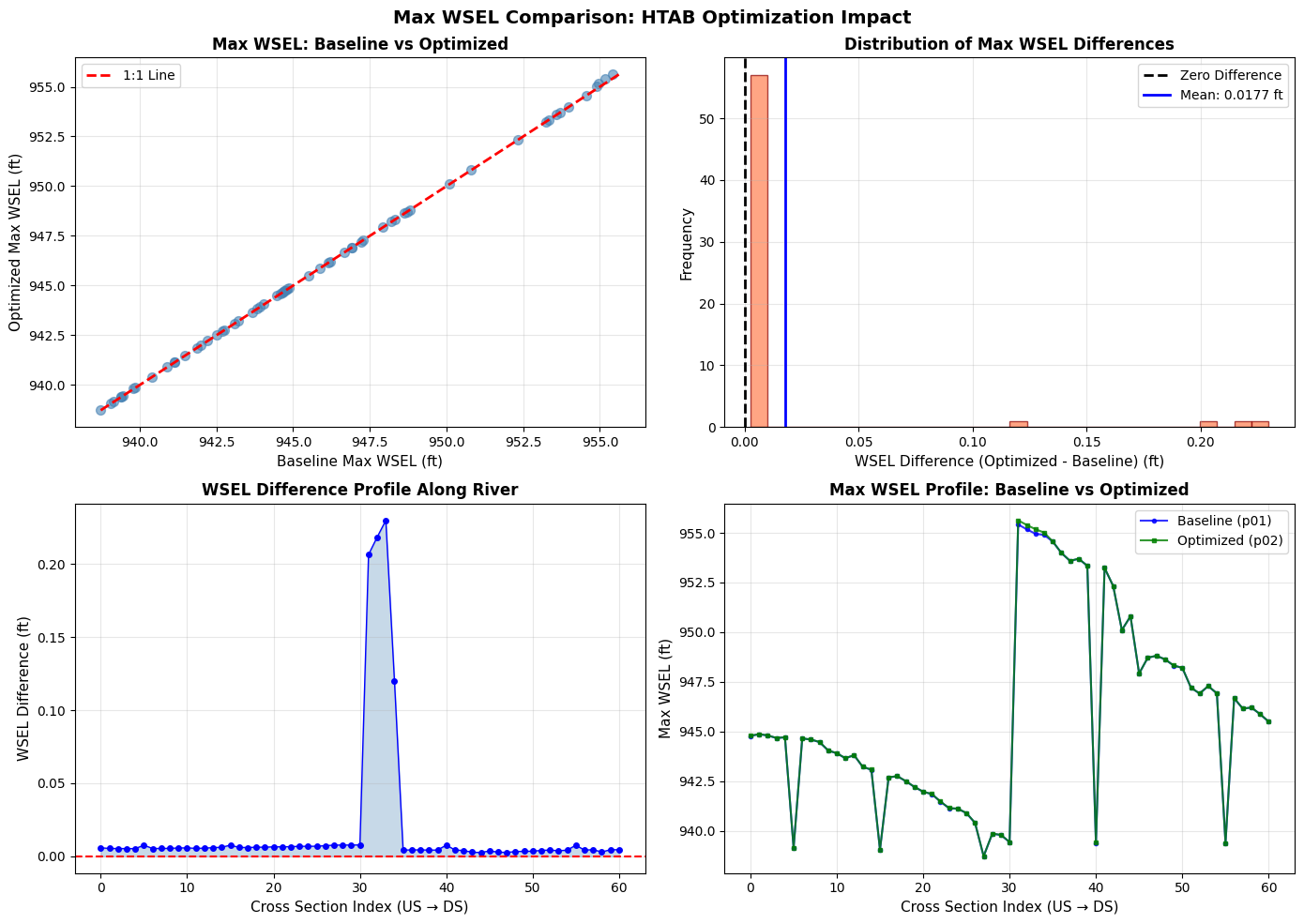
Interpretation:
- Top-left: Points on the 1:1 line indicate identical results
- Top-right: Histogram shows distribution of differences (centered at 0 = no impact)
- Bottom-left: Profile view shows where differences occur along the river
- Bottom-right: Direct comparison of water surface profiles
Section 9: Advanced Examples
Demonstrate additional HTAB optimization scenarios.
# Example 1: XS-only optimization with custom safety factor
print("Example 1: XS-Only Optimization")
print("-" * 40)

# Calculate optimal parameters for a single cross section
sample_xs = xs_df.iloc[0]
params = GeomCrossSection.get_xs_htab_params(
    geom_file, sample_xs['River'], sample_xs['Reach'], sample_xs['RS']
)

# Get max WSE for this XS
if max_wse_df is not None:
    sample_max_wse = max_wse_df.iloc[0]['max_wse']
    invert = params.get('invert') or sample_max_wse - 20

    # Calculate optimal parameters with different safety factors
    for sf in [1.2, 1.3, 1.5, 2.0]:
        optimal = GeomHtabUtils.calculate_optimal_xs_htab(
            invert=invert,
            max_wse=sample_max_wse,
            safety_factor=sf,
            target_increment=0.1,
            max_points=500
        )
        print(f"  Safety {sf}x: Inc={optimal['increment']:.3f}, "
              f"Points={optimal['num_points']}, "
              f"Max El={optimal['actual_max_el']:.1f}")
Example 1: XS-Only Optimization
----------------------------------------
  Safety 1.2x: Inc=0.100, Points=500, Max El=986.9
  Safety 1.3x: Inc=0.100, Points=500, Max El=986.9
  Safety 1.5x: Inc=0.100, Points=500, Max El=986.9
  Safety 2.0x: Inc=0.100, Points=500, Max El=986.9
# Quick reference: View results_df for all plans
# (Detailed comparison is in Section 8 above)
# Uncomment to display:
# ras.results_df.T
# Example 2: Structure HTAB calculation
print("\nExample 2: Structure HTAB Calculation")
print("-" * 40)

# Demonstrate structure HTAB calculation
struct_invert = 580.0
max_hw = 605.0
max_tw = 600.0
max_flow = 25000.0

struct_optimal = GeomHtabUtils.calculate_optimal_structure_htab(
    struct_invert=struct_invert,
    max_hw=max_hw,
    max_tw=max_tw,
    max_flow=max_flow,
    hw_safety=2.0,
    flow_safety=2.0,
    tw_safety=2.0
)

print(f"  Input: Invert={struct_invert}, Max HW={max_hw}, Max Flow={max_flow:,.0f}")
print(f"  Output:")
print(f"    HW Max: {struct_optimal['hw_max']:.1f} ft (safety applied to range above invert)")
print(f"    TW Max: {struct_optimal['tw_max']:.1f} ft")
print(f"    Max Flow: {struct_optimal['max_flow']:,.0f} cfs")
print(f"    Free Flow Points: {struct_optimal['free_flow_points']}")
print(f"    Submerged Curves: {struct_optimal['submerged_curves']}")
Example 2: Structure HTAB Calculation
----------------------------------------
  Input: Invert=580.0, Max HW=605.0, Max Flow=25,000
  Output:
    HW Max: 630.0 ft (safety applied to range above invert)
    TW Max: 620.0 ft
    Max Flow: 50,000 cfs
    Free Flow Points: 100
    Submerged Curves: 60
# Example 3: HTAB defaults reference
print("\nExample 3: HTAB Parameter Defaults")
print("-" * 40)

xs_defaults = GeomHtabUtils.get_xs_htab_defaults()
print("\nCross Section HTAB Defaults:")
for key, value in xs_defaults.items():
    print(f"  {key}: {value}")

struct_defaults = GeomHtabUtils.get_structure_htab_defaults()
print("\nStructure HTAB Defaults:")
for key, value in struct_defaults.items():
    print(f"  {key}: {value}")
Example 3: HTAB Parameter Defaults
----------------------------------------

Cross Section HTAB Defaults:
  increment: 0.1
  num_points: 500
  safety_factor: 1.3
  min_points: 20
  max_points: 500
  min_increment: 0.01
  max_increment: 2.0

Structure HTAB Defaults:
  hw_safety: 2.0
  tw_safety: 2.0
  flow_safety: 2.0
  free_flow_points: 100
  submerged_curves: 60
  points_per_curve: 50
  min_free_flow_points: 10
  max_free_flow_points: 100
  min_submerged_curves: 10
  max_submerged_curves: 60
  min_points_per_curve: 10
  max_points_per_curve: 50
Cleanup
# Optional: Remove extracted project
# Uncomment to clean up

# import shutil
# if project_path.exists():
#     shutil.rmtree(project_path)
#     print(f"Removed: {project_path}")

print("Notebook complete. Project files retained for inspection.")
print(f"\nProject location: {project_path}")
if optimization_result.get('backup'):
    print(f"Backup file: {optimization_result['backup']}")
Notebook complete. Project files retained for inspection.

Project location: G:\GH\ras-commander-pr-docs\examples\example_projects\Muncie_203_htab
Backup file: G:\GH\ras-commander-pr-docs\examples\example_projects\Muncie_203_htab\Muncie.g03.bak
Summary
What We Demonstrated
- Inspected Original HTAB: Read current XS and structure HTAB parameters from geometry file
- Baseline Execution: Ran simulation with default parameters and checked for warnings
- Results Analysis: Extracted maximum WSE values to understand required coverage
- Plan/Geometry Cloning: Used
RasPlan.clone_plan()andRasPlan.clone_geom()to preserve baseline - HTAB Optimization: Applied
GeomHtab.optimize_all_htab_from_results()to cloned geometry only - Optimized Plan Execution: Ran cloned plan with optimized HTAB parameters
- Results Comparison: Used
results_dfand max WSEL comparison to assess computational differences - Verification: Confirmed optimization impact (or lack thereof) on water surface elevations
Key Functions
| Function | Purpose |
|---|---|
RasPlan.clone_plan() |
Clone a plan to preserve baseline for comparison |
RasPlan.clone_geom() |
Clone a geometry for isolated modifications |
RasPlan.set_geom() |
Associate cloned plan with cloned geometry |
GeomHtab.optimize_all_htab_from_results() |
One-call optimization of all HTAB parameters |
GeomHtab.get_optimization_report() |
Preview optimization without modifying |
GeomCrossSection.get_xs_htab_params() |
Read current XS HTAB parameters |
GeomHtabUtils.calculate_optimal_xs_htab() |
Calculate optimal XS parameters |
HdfResultsXsec.get_xsec_timeseries() |
Extract cross section results for comparison |
Plan Cloning Pattern
Why Clone?: Cloning allows side-by-side comparison without modifying the original baseline:
# Clone geometry and apply modifications
new_geom = RasPlan.clone_geom("01")
GeomHtab.optimize_all_htab_from_results(cloned_geom_file, ...)

# Clone plan and associate with modified geometry
new_plan = RasPlan.clone_plan("01", new_shortid="Optimized")
RasPlan.set_geom(new_plan, new_geom)

# Run both and compare
RasCmdr.compute_plan("01")  # Baseline
RasCmdr.compute_plan(new_plan)  # Optimized

# Compare using results_df
ras.results_df.T  # View all plan results side-by-side
Best Practices
- Clone before modifying: Preserve baseline for comparison
- Use results_df: Compare runtime, volume error, and completion status
- Compare max WSEL: Quantify computational impact of HTAB changes
- Always create backups: Use
create_backup=True(default) - Force geometry preprocessing: After HTAB changes, run with
force_geompre=True - Use appropriate safety factors:
- Typical floods: 1.3x (30% safety)
- Dam break/extreme events: 2.0x (100% safety)
Known Issues / Roadmap
⚠️ HTAB Starting Elevation Bug (See DEV NOTE in Section 5):
- Current implementation may set starting_el below XS invert
- HEC-RAS GUI will display warning and reset values
- Fix Required: Validate starting_el >= invert and round up to nearest 0.01 ft
- Tracked in: ras_commander/geom/GeomHtabUtils.py
See Also
103_plan_and_geometry_operations.ipynb- Plan and geometry cloning patterns201_1d_plaintext_geometry.ipynb- Cross section and HTAB basics400_1d_hdf_data_extraction.ipynb- Extracting results dataras_commander/geom/GeomHtab.py- Complete HTAB optimization API