AORC Precipitation Catalog for HEC-RAS Rain-on-Grid Models
This notebook demonstrates a complete workflow for using NOAA's Analysis of Record for Calibration (AORC) gridded precipitation data with HEC-RAS 2D rain-on-grid models.
Example Project: BaldEagleCrkMulti2D
Workflow
- Extract example project and create a labeled working copy
- Get project bounds from geometry HDF (with buffer)
- Generate a storm catalog from historical AORC data
- Download precipitation, export hyetographs, and create HEC-RAS plans
- Execute all plans in parallel (2 cores, 3 workers)
- Extract and compare results
Data Export
All precipitation data is exported to the Precipitation/ subfolder:
- storm_catalog.csv - Complete storm catalog with metadata
- storm_YYYYMMDD.nc - NetCDF precipitation files
- hyetographs/ - PNG plots of each storm's precipitation
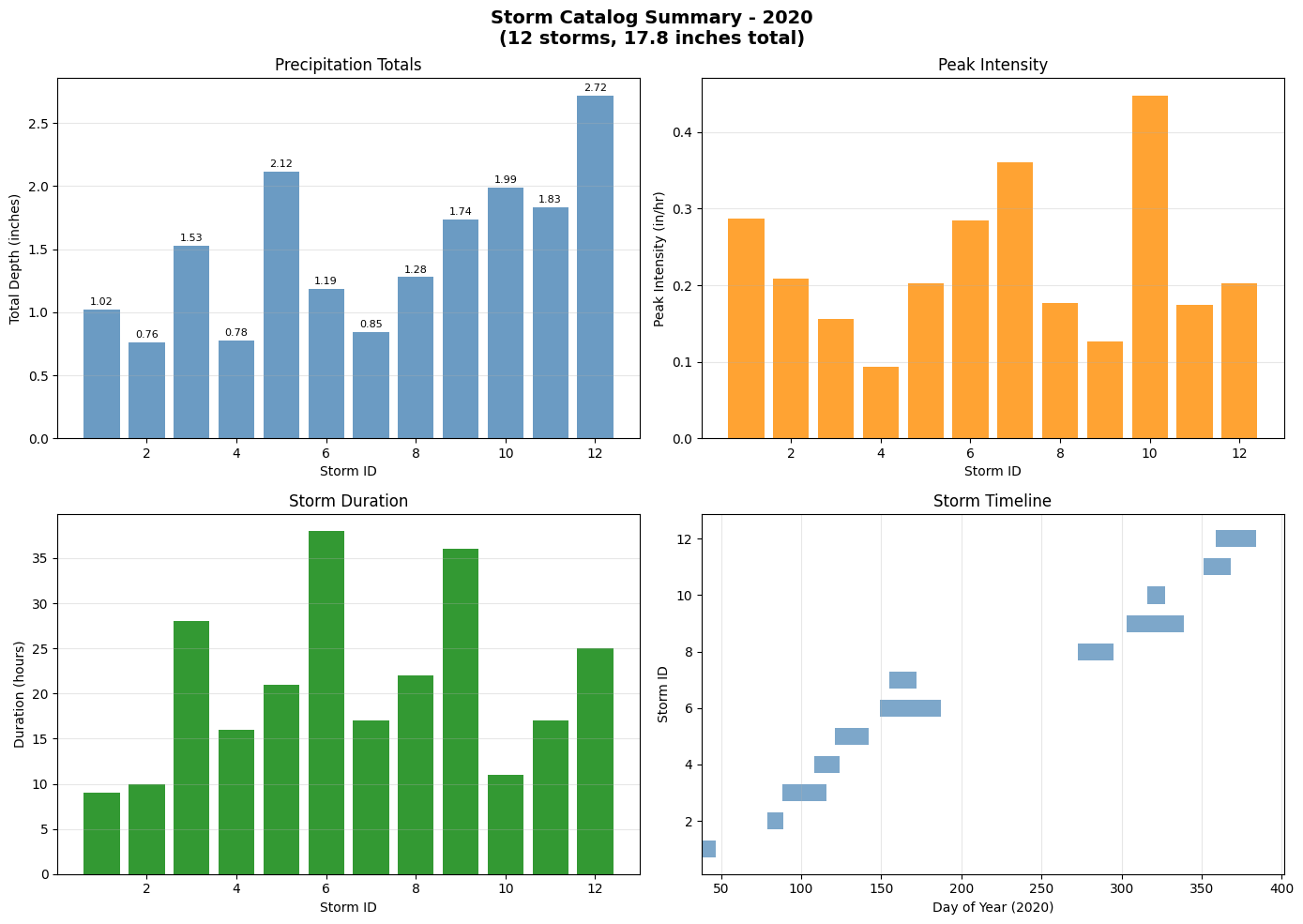
- storm_catalog_summary.png - Overview plot of all storms
AORC Dataset Overview
- Coverage: CONUS (1979-present), Alaska (1981-present)
- Resolution: ~800 meters, hourly timesteps
- Format: Cloud-optimized Zarr on AWS S3
- Access: Anonymous (no authentication required)
# Install dependencies (uncomment if needed)
# !pip install ras-commander[precip]  # Includes xarray, zarr, s3fs, netCDF4, rioxarray
# =============================================================================
# DEVELOPMENT MODE TOGGLE
# =============================================================================
USE_LOCAL_SOURCE = False  # <-- TOGGLE THIS

if USE_LOCAL_SOURCE:
    import sys
    from pathlib import Path
    local_path = str(Path.cwd().parent)
    if local_path not in sys.path:
        sys.path.insert(0, local_path)
    print(f"📁 LOCAL SOURCE MODE: Loading from {local_path}/ras_commander")
else:
    print("📦 PIP PACKAGE MODE: Loading installed ras-commander")

# Import ras-commander
from ras_commander import init_ras_project, RasExamples, RasPlan, RasUnsteady, RasCmdr, RasUtils
from ras_commander.precip import PrecipAorc
from ras_commander.hdf.HdfProject import HdfProject

# Additional imports
import os
import shutil
import glob
import pandas as pd
import numpy as np
import matplotlib.pyplot as plt
import xarray as xr

# Verify which version loaded
import ras_commander
print(f"✓ Loaded: {ras_commander.__file__}")
📦 PIP PACKAGE MODE: Loading installed ras-commander


✓ Loaded: C:\Users\bill\.config\superpowers\worktrees\ras-commander-pr-docs\codex-pr251-timeseries-alignment\ras_commander\__init__.py
Parameters
Configure these values to customize the notebook for your project.
# =============================================================================
# PARAMETERS - Edit these to customize the notebook
# =============================================================================
from pathlib import Path

# Project Configuration
PROJECT_NAME = "BaldEagleCrkMulti2D"  # Example project to extract
RAS_VERSION = "7.0"               # HEC-RAS version (6.3, 6.5, 6.6, etc.)
SUFFIX = "901"                    # Notebook identifier for project folder

# AORC Settings
ONLINE = True                     # Enable network requests

print(f"Project: {PROJECT_NAME}, Version: {RAS_VERSION}")
Project: BaldEagleCrkMulti2D, Version: 7.0
AORC Catalog Verification
After generating precipitation catalog:
- [ ] Storm events span simulation period + warmup time
- [ ] Total depths comparable to Atlas 14 estimates (within 20%)
- [ ] Inter-event separation prevents storm merging (8+ hours typical)
- [ ] Spatial coverage includes entire watershed (50% buffer minimum)
Data Quality Checks:
# Example: Compare catalog storms to Atlas 14
# (See NOAA Atlas 14: https://hdsc.nws.noaa.gov/hdsc/pfds/)
for storm in storm_catalog.iterrows():
    total_depth = storm['total_depth_in']
    duration = storm['duration_hours']
    # Compare to Atlas 14 for this duration/return period
    # Document if >20% different (grid vs point)
References: - NOAA Atlas 14: Precipitation-Frequency Atlas - AORC Documentation
Step 1: Extract Example Project and Create Working Copy
We extract the example project into a notebook-specific work root and create a labeled copy for our AORC analysis. Note: Existing notebook 901 AORC folders are removed with retry cleanup to ensure repeatability without touching notebook 900 worker folders.
# Configuration
YEAR = 2020  # Year to analyze
TEMPLATE_PLAN = "06"  # Template plan with gridded precipitation and infiltration enabled
NUM_CORES = 2  # Cores per HEC-RAS instance
MAX_WORKERS = 3  # Parallel worker processes

# Keep this notebook isolated from notebook 900 parallel worker folders.
notebook_work_root = Path.cwd() / "working" / "example_projects_901_aorc_catalog"
notebook_work_root.mkdir(parents=True, exist_ok=True)
print(f"Notebook work root: {notebook_work_root}")

# Extract base example project into the notebook-specific work root.
base_project = RasExamples.extract_project(
    PROJECT_NAME,
    output_path=notebook_work_root,
    suffix=SUFFIX,
)
print(f"Base project extracted to: {base_project}")

# Clean up any existing AORC folders (for repeatability)
print("\nCleaning up existing AORC folders...")
aorc_pattern = f"{PROJECT_NAME}_AORC_*_{SUFFIX}*"
existing_folders = list(base_project.parent.glob(aorc_pattern))
removed_folders = 0
for folder in existing_folders:
    if folder.is_dir():
        print(f"  Removing: {folder.name}")
        if RasUtils.remove_with_retry(folder, ras_object=None):
            removed_folders += 1
        else:
            raise PermissionError(f"Unable to remove stale notebook 901 folder: {folder}")
print(f"  Removed {removed_folders} existing folders")

# Create labeled working copy (include SUFFIX for concurrent testing)
working_folder = base_project.parent / f"{PROJECT_NAME}_AORC_{YEAR}_{SUFFIX}"
print(f"\nCreating working copy: {working_folder}")
shutil.copytree(base_project, working_folder)

# Initialize project
ras = init_ras_project(working_folder, RAS_VERSION)
print(f"\nProject: {ras.project_name}")
print(f"Location: {ras.project_folder}")
print(f"Plans: {len(ras.plan_df)}")
Notebook work root: C:\Users\bill\.config\superpowers\worktrees\ras-commander-pr-docs\codex-pr251-timeseries-alignment\examples\working\example_projects_901_aorc_catalog


2026-07-08 23:17:36 - ras_commander.RasExamples - INFO - Successfully extracted project 'BaldEagleCrkMulti2D' to working\example_projects_901_aorc_catalog\BaldEagleCrkMulti2D_901


Base project extracted to: C:\Users\bill\.config\superpowers\worktrees\ras-commander-pr-docs\codex-pr251-timeseries-alignment\examples\working\example_projects_901_aorc_catalog\BaldEagleCrkMulti2D_901

Cleaning up existing AORC folders...
  Removing: BaldEagleCrkMulti2D_AORC_2020_901


  Removed 1 existing folders

Creating working copy: C:\Users\bill\.config\superpowers\worktrees\ras-commander-pr-docs\codex-pr251-timeseries-alignment\examples\working\example_projects_901_aorc_catalog\BaldEagleCrkMulti2D_AORC_2020_901


2026-07-08 23:17:40 - ras_commander.RasPrj - INFO - ras-commander v0.98.2 | An open-source project of CLB Engineering Corporation (https://clbengineering.com/) | Docs: https://rascommander.info | GitHub: https://github.com/gpt-cmdr/ras-commander


2026-07-08 23:17:40 - ras_commander.RasPrj - INFO - Project initialized: BaldEagleDamBrk


2026-07-08 23:17:40 - ras_commander.RasPrj - INFO - Using HEC-RAS version 7.0


2026-07-08 23:17:40 - ras_commander.RasPrj - INFO -
═══════════════════════════════════════════════════════════════════════
ras-commander | HEC-RAS Automation Library
Docs: https://rascommander.info/
Repo: https://github.com/gpt-cmdr/ras-commander
LLM agents: https://rascommander.info/llms.txt
═══════════════════════════════════════════════════════════════════════

PROJECT DATAFRAMES (single source of truth — use these, not file globbing):
  ras.plan_df        Plans, HDF paths, geometry/flow associations
  ras.geom_df        Geometry files and HDF preprocessor paths
  ras.flow_df        Steady flow files
  ras.unsteady_df    Unsteady flow files and configurations
  ras.boundaries_df  Boundary conditions (type, name, location)
  ras.results_df     Lightweight HDF results summaries
  ras.rasmap_df      RASMapper layers, terrain, land cover paths

KEY APIS (static classes — call directly, never instantiate):
  Execution:    RasCmdr.compute_plan() / compute_parallel() / compute_test_mode()
  Plan Files:   RasPlan.clone_plan() / clone_geom() / set_geom()
  Unsteady:     RasUnsteady — IC/BC management, gate openings, precipitation
  Geometry:     GeomCrossSection, GeomBridge, GeomStorage, GeomLateral, GeomMesh
  HDF Results:  HdfResultsPlan.get_wse() / get_compute_messages()
                HdfResultsMesh.get_mesh_max_ws() / get_mesh_cells_timeseries()
                HdfMesh.get_mesh_cell_points()
  QA/QC:        RasCheck.run_check() / RasFixit (geometry repair)
  DSS:          RasDss.get_timeseries() / check_pathname()
  USGS:         UsgsGaugeSpatial, GaugeMatcher, RasUsgsBoundaryGeneration
  Precipitation: StormGenerator, Atlas14Storm, PrecipAorc, Atlas14Variance
  Terrain:      RasTerrain.create_terrain_hdf() / RasTerrainMod

MULTI-PROJECT: Pass ras_object= to all API calls when using local RasPrj instances.

EXAMPLES: 100+ notebooks in examples/ (100s=execution, 200s=geometry, 300s=unsteady,
  400s=HDF results, 500s=remote, 800s=QA/QC, 900s=data integration).
  Review relevant notebooks before assembling new workflows.

PLATFORM: Most HEC-RAS operations require Windows. Linux/Wine support for
  headless execution, data access, geometry modification, and preprocessing
  is available via RasProcess (HEC-RAS 6.6+). See ras_commander/RasProcess.py.
  Remote distributed execution: ras_commander/remote/ (PsExec, Docker, SSH, cloud).
═══════════════════════════════════════════════════════════════════════


Project: BaldEagleDamBrk
Location: C:\Users\bill\.config\superpowers\worktrees\ras-commander-pr-docs\codex-pr251-timeseries-alignment\examples\working\example_projects_901_aorc_catalog\BaldEagleCrkMulti2D_AORC_2020_901
Plans: 11
Step 2: Get Project Bounds from Geometry HDF
Use HdfProject.get_project_bounds_latlon() to extract proper bounds with buffering.
This handles CRS transformation and ensures precipitation coverage.
# Get geometry HDF path from template plan
# The 'Geom File' column contains just the number (e.g., "09"),
# so we need to add the "g" prefix for the geometry file extension
_matched = ras.plan_df[ras.plan_df['plan_number'] == TEMPLATE_PLAN]
if _matched.empty:
    available = ras.plan_df['plan_number'].tolist()
    raise ValueError(f"TEMPLATE_PLAN '{TEMPLATE_PLAN}' not found in project. "
                     f"Available plan numbers: {available}")
template_row = _matched.iloc[0]
geom_number = template_row['Geom File']
geom_hdf = ras.project_folder / f"{ras.project_name}.g{geom_number}.hdf"

print(f"Template plan {TEMPLATE_PLAN} uses geometry: g{geom_number}")
print(f"Geometry HDF: {geom_hdf}")
print(f"Exists: {geom_hdf.exists()}")

# Get bounds with 50% buffer (default)
# This properly handles CRS transformation and includes 2D mesh, 1D elements, and storage areas
bounds = HdfProject.get_project_bounds_latlon(
    geom_hdf,
    buffer_percent=50.0,  # 50% buffer ensures full coverage after reprojection
    include_1d=True,
    include_2d=True,
    include_storage=True
)

west, south, east, north = bounds
print(f"\nProject Bounds (WGS84 with 50% buffer):")
print(f"  West:  {west:.4f}")
print(f"  South: {south:.4f}")
print(f"  East:  {east:.4f}")
print(f"  North: {north:.4f}")
print(f"  Size:  {east-west:.4f} x {north-south:.4f} degrees")
Template plan 06 uses geometry: g09
Geometry HDF: C:\Users\bill\.config\superpowers\worktrees\ras-commander-pr-docs\codex-pr251-timeseries-alignment\examples\working\example_projects_901_aorc_catalog\BaldEagleCrkMulti2D_AORC_2020_901\BaldEagleDamBrk.g09.hdf
Exists: True

Project Bounds (WGS84 with 50% buffer):
  West:  -77.8672
  South: 40.9044
  East:  -77.2192
  North: 41.2408
  Size:  0.6480 x 0.3364 degrees
Step 3: Generate Storm Catalog
Analyze AORC data to identify all significant precipitation events for the year.
# Generate storm catalog
storm_catalog = PrecipAorc.get_storm_catalog(
    bounds=bounds,
    year=YEAR,
    inter_event_hours=8.0,      # USGS standard for storm separation
    min_depth_inches=0.75,      # Minimum significant precipitation
    buffer_hours=48             # Simulation warmup buffer
)

print(f"\nStorm Catalog: {len(storm_catalog)} events for {YEAR}")
print("="*90)
print(storm_catalog[['storm_id', 'start_time', 'end_time', 'total_depth_in',
                     'peak_intensity_in_hr', 'duration_hours', 'rank']].to_string(index=False))
2026-07-08 23:17:40 - ras_commander.precip.PrecipAorc - INFO - Generating AORC storm catalog for 2020: bounds W=-77.8672, S=40.9044, E=-77.2192, N=41.2408; inter_event=8.0h, min_depth=0.75in, buffer=48h


2026-07-08 23:17:48 - ras_commander.precip.PrecipAorc - INFO - Storm catalog complete: 12 storms; depth 0.76-2.72 in; largest 2020-12-24 12:00 (2.72 in)


Storm Catalog: 12 events for 2020
==========================================================================================
 storm_id          start_time            end_time  total_depth_in  peak_intensity_in_hr  duration_hours  rank
        1 2020-02-07 09:00:00 2020-02-07 17:00:00           1.023                 0.287               9     9
        2 2020-03-19 01:00:00 2020-03-19 10:00:00           0.763                 0.209              10    12
        3 2020-03-28 08:00:00 2020-03-29 11:00:00           1.530                 0.156              28     6
        4 2020-04-17 17:00:00 2020-04-18 08:00:00           0.777                 0.093              16    11
        5 2020-04-30 04:00:00 2020-05-01 00:00:00           2.115                 0.203              21     2
        6 2020-05-28 12:00:00 2020-05-30 01:00:00           1.188                 0.284              38     8
        7 2020-06-03 06:00:00 2020-06-03 22:00:00           0.846                 0.360              17    10
        8 2020-09-29 11:00:00 2020-09-30 08:00:00           1.278                 0.177              22     7
        9 2020-10-29 07:00:00 2020-10-30 18:00:00           1.735                 0.127              36     5
       10 2020-11-11 12:00:00 2020-11-11 22:00:00           1.989                 0.448              11     3
       11 2020-12-16 17:00:00 2020-12-17 09:00:00           1.834                 0.174              17     4
       12 2020-12-24 12:00:00 2020-12-25 12:00:00           2.720                 0.202              25     1
Step 4: Download AORC Data and Export Precipitation Records
Download precipitation data, export storm catalog CSV, and generate hyetograph plots for documentation.
# Create precipitation folder structure
precip_folder = ras.project_folder / "Precipitation"
precip_folder.mkdir(exist_ok=True)
hyetograph_folder = precip_folder / "hyetographs"
hyetograph_folder.mkdir(exist_ok=True)

# Export storm catalog to CSV
catalog_csv = precip_folder / "storm_catalog.csv"
storm_catalog.to_csv(catalog_csv, index=False)
print(f"Storm catalog exported to: {catalog_csv}")

# Download AORC data for all storms
print(f"\nDownloading AORC precipitation data for {len(storm_catalog)} storms...")
print("="*70)

precip_files = {}
for idx, storm in storm_catalog.iterrows():
    storm_id = storm['storm_id']
    date_str = storm['start_time'].strftime('%Y%m%d')
    precip_file = precip_folder / f"storm_{date_str}.nc"

    if not precip_file.exists():
        print(f"  Storm {storm_id:2d}: {storm['start_time'].strftime('%b %d')} - Downloading...")
        PrecipAorc.download(
            bounds=bounds,
            start_time=storm['sim_start'],
            end_time=storm['sim_end'],
            output_path=precip_file,
            target_crs="EPSG:5070",
            resolution=2000.0
        )
    else:
        print(f"  Storm {storm_id:2d}: {storm['start_time'].strftime('%b %d')} - Already downloaded")

    precip_files[storm_id] = precip_file

print(f"\nDownloaded {len(precip_files)} precipitation files to {precip_folder}")
2026-07-08 23:17:48 - ras_commander.precip.PrecipAorc - INFO - Downloading AORC APCP_surface: 2020-02-05 09:00:00 to 2020-02-09 17:00:00, bounds W=-77.8672, S=40.9044, E=-77.2192, N=41.2408


Storm catalog exported to: C:\Users\bill\.config\superpowers\worktrees\ras-commander-pr-docs\codex-pr251-timeseries-alignment\examples\working\example_projects_901_aorc_catalog\BaldEagleCrkMulti2D_AORC_2020_901\Precipitation\storm_catalog.csv

Downloading AORC precipitation data for 12 storms...
======================================================================
  Storm  1: Feb 07 - Downloading...


2026-07-08 23:17:52 - ras_commander.precip.PrecipAorc - INFO - AORC download complete: storm_20200207.nc (0.2 MB, 120 timesteps)


2026-07-08 23:17:52 - ras_commander.precip.PrecipAorc - INFO - Downloading AORC APCP_surface: 2020-03-17 01:00:00 to 2020-03-21 10:00:00, bounds W=-77.8672, S=40.9044, E=-77.2192, N=41.2408


  Storm  2: Mar 19 - Downloading...


2026-07-08 23:17:56 - ras_commander.precip.PrecipAorc - INFO - AORC download complete: storm_20200319.nc (0.2 MB, 120 timesteps)


2026-07-08 23:17:56 - ras_commander.precip.PrecipAorc - INFO - Downloading AORC APCP_surface: 2020-03-26 08:00:00 to 2020-03-31 11:00:00, bounds W=-77.8672, S=40.9044, E=-77.2192, N=41.2408


  Storm  3: Mar 28 - Downloading...


2026-07-08 23:18:00 - ras_commander.precip.PrecipAorc - INFO - AORC download complete: storm_20200328.nc (0.2 MB, 144 timesteps)


2026-07-08 23:18:00 - ras_commander.precip.PrecipAorc - INFO - Downloading AORC APCP_surface: 2020-04-15 17:00:00 to 2020-04-20 08:00:00, bounds W=-77.8672, S=40.9044, E=-77.2192, N=41.2408


  Storm  4: Apr 17 - Downloading...


2026-07-08 23:18:04 - ras_commander.precip.PrecipAorc - INFO - AORC download complete: storm_20200417.nc (0.2 MB, 144 timesteps)


2026-07-08 23:18:04 - ras_commander.precip.PrecipAorc - INFO - Downloading AORC APCP_surface: 2020-04-28 04:00:00 to 2020-05-03 00:00:00, bounds W=-77.8672, S=40.9044, E=-77.2192, N=41.2408


  Storm  5: Apr 30 - Downloading...


2026-07-08 23:18:09 - ras_commander.precip.PrecipAorc - INFO - AORC download complete: storm_20200430.nc (0.2 MB, 144 timesteps)


2026-07-08 23:18:09 - ras_commander.precip.PrecipAorc - INFO - Downloading AORC APCP_surface: 2020-05-26 12:00:00 to 2020-06-01 01:00:00, bounds W=-77.8672, S=40.9044, E=-77.2192, N=41.2408


  Storm  6: May 28 - Downloading...


2026-07-08 23:18:13 - ras_commander.precip.PrecipAorc - INFO - AORC download complete: storm_20200528.nc (0.3 MB, 168 timesteps)


2026-07-08 23:18:13 - ras_commander.precip.PrecipAorc - INFO - Downloading AORC APCP_surface: 2020-06-01 06:00:00 to 2020-06-05 22:00:00, bounds W=-77.8672, S=40.9044, E=-77.2192, N=41.2408


  Storm  7: Jun 03 - Downloading...


2026-07-08 23:18:17 - ras_commander.precip.PrecipAorc - INFO - AORC download complete: storm_20200603.nc (0.2 MB, 120 timesteps)


2026-07-08 23:18:17 - ras_commander.precip.PrecipAorc - INFO - Downloading AORC APCP_surface: 2020-09-27 11:00:00 to 2020-10-02 08:00:00, bounds W=-77.8672, S=40.9044, E=-77.2192, N=41.2408


  Storm  8: Sep 29 - Downloading...


2026-07-08 23:18:21 - ras_commander.precip.PrecipAorc - INFO - AORC download complete: storm_20200929.nc (0.2 MB, 144 timesteps)


2026-07-08 23:18:21 - ras_commander.precip.PrecipAorc - INFO - Downloading AORC APCP_surface: 2020-10-27 07:00:00 to 2020-11-01 18:00:00, bounds W=-77.8672, S=40.9044, E=-77.2192, N=41.2408


  Storm  9: Oct 29 - Downloading...


2026-07-08 23:18:26 - ras_commander.precip.PrecipAorc - INFO - AORC download complete: storm_20201029.nc (0.2 MB, 144 timesteps)


2026-07-08 23:18:26 - ras_commander.precip.PrecipAorc - INFO - Downloading AORC APCP_surface: 2020-11-09 12:00:00 to 2020-11-13 22:00:00, bounds W=-77.8672, S=40.9044, E=-77.2192, N=41.2408


  Storm 10: Nov 11 - Downloading...


2026-07-08 23:18:32 - ras_commander.precip.PrecipAorc - INFO - AORC download complete: storm_20201111.nc (0.2 MB, 120 timesteps)


2026-07-08 23:18:32 - ras_commander.precip.PrecipAorc - INFO - Downloading AORC APCP_surface: 2020-12-14 17:00:00 to 2020-12-19 09:00:00, bounds W=-77.8672, S=40.9044, E=-77.2192, N=41.2408


  Storm 11: Dec 16 - Downloading...


2026-07-08 23:18:37 - ras_commander.precip.PrecipAorc - INFO - AORC download complete: storm_20201216.nc (0.2 MB, 144 timesteps)


2026-07-08 23:18:37 - ras_commander.precip.PrecipAorc - INFO - Downloading AORC APCP_surface: 2020-12-22 12:00:00 to 2020-12-27 12:00:00, bounds W=-77.8672, S=40.9044, E=-77.2192, N=41.2408


  Storm 12: Dec 24 - Downloading...


2026-07-08 23:18:42 - ras_commander.precip.PrecipAorc - INFO - AORC download complete: storm_20201224.nc (0.2 MB, 144 timesteps)


Downloaded 12 precipitation files to C:\Users\bill\.config\superpowers\worktrees\ras-commander-pr-docs\codex-pr251-timeseries-alignment\examples\working\example_projects_901_aorc_catalog\BaldEagleCrkMulti2D_AORC_2020_901\Precipitation
# Generate and save individual hyetograph plots for each storm
print(f"Generating hyetograph plots for {len(storm_catalog)} storms...")
print("="*70)

for idx, storm in storm_catalog.iterrows():
    storm_id = storm['storm_id']
    date_str = storm['start_time'].strftime('%Y%m%d')
    precip_file = precip_files[storm_id]

    # Load precipitation data
    ds = xr.open_dataset(precip_file)
    da = ds['APCP_surface']
    hourly_mean = da.mean(dim=['x', 'y']).values
    times = pd.to_datetime(da.time.values)

    # Create figure
    fig, ax = plt.subplots(figsize=(12, 5))
    ax.bar(times, hourly_mean, width=0.03, color='steelblue', alpha=0.8, edgecolor='darkblue', linewidth=0.5)

    # Add storm info
    ax.set_title(f"Storm {storm_id}: {storm['start_time'].strftime('%B %d, %Y')}\n"
                 f"Total: {storm['total_depth_in']:.2f} in | Peak: {storm['peak_intensity_in_hr']:.3f} in/hr | "
                 f"Duration: {storm['duration_hours']:.0f} hours", fontsize=12, fontweight='bold')
    ax.set_xlabel('Date/Time', fontsize=11)
    ax.set_ylabel('Precipitation Rate (mm/hr)', fontsize=11)
    ax.tick_params(axis='x', rotation=45)
    ax.grid(True, alpha=0.3)

    # Add statistics box
    stats_text = (f"Max Rate: {hourly_mean.max():.2f} mm/hr\n"
                  f"Total: {hourly_mean.sum():.1f} mm\n"
                  f"Timesteps: {len(hourly_mean)}")
    ax.text(0.98, 0.95, stats_text, transform=ax.transAxes, fontsize=9,
            verticalalignment='top', horizontalalignment='right',
            bbox=dict(boxstyle='round', facecolor='wheat', alpha=0.8))

    plt.tight_layout()

    # Save plot
    plot_path = hyetograph_folder / f"storm_{date_str}_hyetograph.png"
    plt.savefig(plot_path, dpi=150, bbox_inches='tight')
    plt.close()

    ds.close()
    print(f"  Storm {storm_id:2d}: {storm['start_time'].strftime('%b %d')} - Saved to {plot_path.name}")

print(f"\nHyetographs saved to: {hyetograph_folder}")
Generating hyetograph plots for 12 storms...
======================================================================


  Storm  1: Feb 07 - Saved to storm_20200207_hyetograph.png


  Storm  2: Mar 19 - Saved to storm_20200319_hyetograph.png


  Storm  3: Mar 28 - Saved to storm_20200328_hyetograph.png


  Storm  4: Apr 17 - Saved to storm_20200417_hyetograph.png


  Storm  5: Apr 30 - Saved to storm_20200430_hyetograph.png


  Storm  6: May 28 - Saved to storm_20200528_hyetograph.png


  Storm  7: Jun 03 - Saved to storm_20200603_hyetograph.png


  Storm  8: Sep 29 - Saved to storm_20200929_hyetograph.png


  Storm  9: Oct 29 - Saved to storm_20201029_hyetograph.png


  Storm 10: Nov 11 - Saved to storm_20201111_hyetograph.png


  Storm 11: Dec 16 - Saved to storm_20201216_hyetograph.png


  Storm 12: Dec 24 - Saved to storm_20201224_hyetograph.png

Hyetographs saved to: C:\Users\bill\.config\superpowers\worktrees\ras-commander-pr-docs\codex-pr251-timeseries-alignment\examples\working\example_projects_901_aorc_catalog\BaldEagleCrkMulti2D_AORC_2020_901\Precipitation\hyetographs
# Create storm catalog summary plot
fig, axes = plt.subplots(2, 2, figsize=(14, 10))

# 1. Total depth by storm
ax1 = axes[0, 0]
bars1 = ax1.bar(storm_catalog['storm_id'], storm_catalog['total_depth_in'], color='steelblue', alpha=0.8)
ax1.set_xlabel('Storm ID')
ax1.set_ylabel('Total Depth (inches)')
ax1.set_title('Precipitation Totals')
ax1.grid(True, alpha=0.3, axis='y')
# Add value labels
for bar, val in zip(bars1, storm_catalog['total_depth_in']):
    ax1.text(bar.get_x() + bar.get_width()/2, bar.get_height() + 0.02, f'{val:.2f}',
             ha='center', va='bottom', fontsize=8)

# 2. Peak intensity
ax2 = axes[0, 1]
bars2 = ax2.bar(storm_catalog['storm_id'], storm_catalog['peak_intensity_in_hr'], color='darkorange', alpha=0.8)
ax2.set_xlabel('Storm ID')
ax2.set_ylabel('Peak Intensity (in/hr)')
ax2.set_title('Peak Intensity')
ax2.grid(True, alpha=0.3, axis='y')

# 3. Duration
ax3 = axes[1, 0]
bars3 = ax3.bar(storm_catalog['storm_id'], storm_catalog['duration_hours'], color='green', alpha=0.8)
ax3.set_xlabel('Storm ID')
ax3.set_ylabel('Duration (hours)')
ax3.set_title('Storm Duration')
ax3.grid(True, alpha=0.3, axis='y')

# 4. Timeline
ax4 = axes[1, 1]
for idx, storm in storm_catalog.iterrows():
    ax4.barh(storm['storm_id'], storm['duration_hours'], left=storm['start_time'].dayofyear,
             color='steelblue', alpha=0.7, height=0.6)
ax4.set_xlabel(f'Day of Year ({YEAR})')
ax4.set_ylabel('Storm ID')
ax4.set_title('Storm Timeline')
ax4.grid(True, alpha=0.3, axis='x')

plt.suptitle(f'Storm Catalog Summary - {YEAR}\n({len(storm_catalog)} storms, '
             f'{storm_catalog["total_depth_in"].sum():.1f} inches total)',
             fontsize=14, fontweight='bold')
plt.tight_layout()

# Save summary plot
summary_path = precip_folder / "storm_catalog_summary.png"
plt.savefig(summary_path, dpi=150, bbox_inches='tight')
print(f"Summary plot saved to: {summary_path}")
plt.show()
Summary plot saved to: C:\Users\bill\.config\superpowers\worktrees\ras-commander-pr-docs\codex-pr251-timeseries-alignment\examples\working\example_projects_901_aorc_catalog\BaldEagleCrkMulti2D_AORC_2020_901\Precipitation\storm_catalog_summary.png
# Create storm plans with precipitation data written to HDF
print(f"Creating HEC-RAS plans for {len(storm_catalog)} storms...")
print("="*70)

# Use create_storm_plans which calls set_gridded_precipitation
# This writes precipitation data directly to the .u##.hdf file
results = PrecipAorc.create_storm_plans(
    storm_catalog=storm_catalog,
    bounds=bounds,
    template_plan=TEMPLATE_PLAN,
    precip_folder="Precipitation",
    ras_object=ras,
    download_data=False  # Already downloaded above
)

# Show results
print(f"\nPlan Creation Results:")
print(results[['storm_id', 'start_time', 'total_depth_in', 'plan_number', 'status']].to_string(index=False))

# Refresh plan list
ras.plan_df = ras.get_plan_entries()
print(f"\nTotal plans in project: {len(ras.plan_df)}")
2026-07-08 23:18:49 - ras_commander.precip.PrecipAorc - INFO - Creating storm plans from template plan 06 (unsteady 03); processing 12 storms


Creating HEC-RAS plans for 12 storms...
======================================================================


2026-07-08 23:18:49 - ras_commander.RasUnsteady - INFO - Configured gridded precipitation in BaldEagleDamBrk.u04: source=.\Precipitation\storm_20200207.nc, interpolation=Bilinear, dataset=APCP_surface


2026-07-08 23:18:50 - ras_commander.RasUnsteady - INFO - Imported gridded precipitation into BaldEagleDamBrk.u04.hdf: 120 timesteps, 720 cells, range=0.0-40.7 mm


2026-07-08 23:18:50 - ras_commander.RasPlan - INFO - Updated simulation date in plan file: BaldEagleDamBrk.p07


2026-07-08 23:18:51 - ras_commander.precip.PrecipAorc - INFO - Created storm 1: 2020-02-07 (1.02 in) -> plan 07, unsteady 04, with HDF time series


2026-07-08 23:18:51 - ras_commander.RasUnsteady - INFO - Configured gridded precipitation in BaldEagleDamBrk.u05: source=.\Precipitation\storm_20200319.nc, interpolation=Bilinear, dataset=APCP_surface


2026-07-08 23:18:51 - ras_commander.RasUnsteady - INFO - Imported gridded precipitation into BaldEagleDamBrk.u05.hdf: 120 timesteps, 720 cells, range=0.0-45.9 mm


2026-07-08 23:18:52 - ras_commander.RasPlan - INFO - Updated simulation date in plan file: BaldEagleDamBrk.p08


2026-07-08 23:18:52 - ras_commander.precip.PrecipAorc - INFO - Created storm 2: 2020-03-19 (0.76 in) -> plan 08, unsteady 05, with HDF time series


2026-07-08 23:18:53 - ras_commander.RasUnsteady - INFO - Configured gridded precipitation in BaldEagleDamBrk.u06: source=.\Precipitation\storm_20200328.nc, interpolation=Bilinear, dataset=APCP_surface


2026-07-08 23:18:53 - ras_commander.RasUnsteady - INFO - Imported gridded precipitation into BaldEagleDamBrk.u06.hdf: 144 timesteps, 720 cells, range=0.0-62.8 mm


2026-07-08 23:18:54 - ras_commander.RasPlan - INFO - Updated simulation date in plan file: BaldEagleDamBrk.p09


2026-07-08 23:18:54 - ras_commander.precip.PrecipAorc - INFO - Created storm 3: 2020-03-28 (1.53 in) -> plan 09, unsteady 06, with HDF time series


2026-07-08 23:18:55 - ras_commander.RasUnsteady - INFO - Configured gridded precipitation in BaldEagleDamBrk.u14: source=.\Precipitation\storm_20200417.nc, interpolation=Bilinear, dataset=APCP_surface


2026-07-08 23:18:55 - ras_commander.RasUnsteady - INFO - Imported gridded precipitation into BaldEagleDamBrk.u14.hdf: 144 timesteps, 720 cells, range=0.0-30.2 mm


2026-07-08 23:18:56 - ras_commander.RasPlan - INFO - Updated simulation date in plan file: BaldEagleDamBrk.p10


2026-07-08 23:18:56 - ras_commander.precip.PrecipAorc - INFO - Created storm 4: 2020-04-17 (0.78 in) -> plan 10, unsteady 14, with HDF time series


2026-07-08 23:18:56 - ras_commander.RasUnsteady - INFO - Configured gridded precipitation in BaldEagleDamBrk.u15: source=.\Precipitation\storm_20200430.nc, interpolation=Bilinear, dataset=APCP_surface


2026-07-08 23:18:57 - ras_commander.RasUnsteady - INFO - Imported gridded precipitation into BaldEagleDamBrk.u15.hdf: 144 timesteps, 720 cells, range=0.0-69.2 mm


2026-07-08 23:18:57 - ras_commander.RasPlan - INFO - Updated simulation date in plan file: BaldEagleDamBrk.p11


2026-07-08 23:18:57 - ras_commander.precip.PrecipAorc - INFO - Created storm 5: 2020-04-30 (2.12 in) -> plan 11, unsteady 15, with HDF time series


2026-07-08 23:18:58 - ras_commander.RasUnsteady - INFO - Configured gridded precipitation in BaldEagleDamBrk.u16: source=.\Precipitation\storm_20200528.nc, interpolation=Bilinear, dataset=APCP_surface


2026-07-08 23:18:58 - ras_commander.RasUnsteady - INFO - Imported gridded precipitation into BaldEagleDamBrk.u16.hdf: 168 timesteps, 720 cells, range=0.0-61.2 mm


2026-07-08 23:18:59 - ras_commander.RasPlan - INFO - Updated simulation date in plan file: BaldEagleDamBrk.p12


2026-07-08 23:18:59 - ras_commander.precip.PrecipAorc - INFO - Created storm 6: 2020-05-28 (1.19 in) -> plan 12, unsteady 16, with HDF time series


2026-07-08 23:19:00 - ras_commander.RasUnsteady - INFO - Configured gridded precipitation in BaldEagleDamBrk.u17: source=.\Precipitation\storm_20200603.nc, interpolation=Bilinear, dataset=APCP_surface


2026-07-08 23:19:00 - ras_commander.RasUnsteady - INFO - Imported gridded precipitation into BaldEagleDamBrk.u17.hdf: 120 timesteps, 720 cells, range=0.0-47.1 mm


2026-07-08 23:19:01 - ras_commander.RasPlan - INFO - Updated simulation date in plan file: BaldEagleDamBrk.p14


2026-07-08 23:19:01 - ras_commander.precip.PrecipAorc - INFO - Created storm 7: 2020-06-03 (0.85 in) -> plan 14, unsteady 17, with HDF time series


2026-07-08 23:19:02 - ras_commander.RasUnsteady - INFO - Configured gridded precipitation in BaldEagleDamBrk.u18: source=.\Precipitation\storm_20200929.nc, interpolation=Bilinear, dataset=APCP_surface


2026-07-08 23:19:02 - ras_commander.RasUnsteady - INFO - Imported gridded precipitation into BaldEagleDamBrk.u18.hdf: 144 timesteps, 720 cells, range=0.0-39.5 mm


2026-07-08 23:19:03 - ras_commander.RasPlan - INFO - Updated simulation date in plan file: BaldEagleDamBrk.p16


2026-07-08 23:19:03 - ras_commander.precip.PrecipAorc - INFO - Created storm 8: 2020-09-29 (1.28 in) -> plan 16, unsteady 18, with HDF time series


2026-07-08 23:19:04 - ras_commander.RasUnsteady - INFO - Configured gridded precipitation in BaldEagleDamBrk.u19: source=.\Precipitation\storm_20201029.nc, interpolation=Bilinear, dataset=APCP_surface


2026-07-08 23:19:04 - ras_commander.RasUnsteady - INFO - Imported gridded precipitation into BaldEagleDamBrk.u19.hdf: 144 timesteps, 720 cells, range=0.0-60.8 mm


2026-07-08 23:19:05 - ras_commander.RasPlan - INFO - Updated simulation date in plan file: BaldEagleDamBrk.p20


2026-07-08 23:19:05 - ras_commander.precip.PrecipAorc - INFO - Created storm 9: 2020-10-29 (1.74 in) -> plan 20, unsteady 19, with HDF time series


2026-07-08 23:19:05 - ras_commander.RasUnsteady - INFO - Configured gridded precipitation in BaldEagleDamBrk.u20: source=.\Precipitation\storm_20201111.nc, interpolation=Bilinear, dataset=APCP_surface


2026-07-08 23:19:06 - ras_commander.RasUnsteady - INFO - Imported gridded precipitation into BaldEagleDamBrk.u20.hdf: 120 timesteps, 720 cells, range=0.0-77.9 mm


2026-07-08 23:19:06 - ras_commander.RasPlan - INFO - Updated simulation date in plan file: BaldEagleDamBrk.p21


2026-07-08 23:19:06 - ras_commander.precip.PrecipAorc - INFO - Created storm 10: 2020-11-11 (1.99 in) -> plan 21, unsteady 20, with HDF time series


2026-07-08 23:19:07 - ras_commander.RasUnsteady - INFO - Configured gridded precipitation in BaldEagleDamBrk.u21: source=.\Precipitation\storm_20201216.nc, interpolation=Bilinear, dataset=APCP_surface


2026-07-08 23:19:07 - ras_commander.RasUnsteady - INFO - Imported gridded precipitation into BaldEagleDamBrk.u21.hdf: 144 timesteps, 720 cells, range=0.0-63.2 mm


2026-07-08 23:19:08 - ras_commander.RasPlan - INFO - Updated simulation date in plan file: BaldEagleDamBrk.p22


2026-07-08 23:19:08 - ras_commander.precip.PrecipAorc - INFO - Created storm 11: 2020-12-16 (1.83 in) -> plan 22, unsteady 21, with HDF time series


2026-07-08 23:19:09 - ras_commander.RasUnsteady - INFO - Configured gridded precipitation in BaldEagleDamBrk.u22: source=.\Precipitation\storm_20201224.nc, interpolation=Bilinear, dataset=APCP_surface


2026-07-08 23:19:09 - ras_commander.RasUnsteady - INFO - Imported gridded precipitation into BaldEagleDamBrk.u22.hdf: 144 timesteps, 720 cells, range=0.0-89.5 mm


2026-07-08 23:19:10 - ras_commander.RasPlan - INFO - Updated simulation date in plan file: BaldEagleDamBrk.p23


2026-07-08 23:19:10 - ras_commander.precip.PrecipAorc - INFO - Created storm 12: 2020-12-24 (2.72 in) -> plan 23, unsteady 22, with HDF time series


2026-07-08 23:19:10 - ras_commander.precip.PrecipAorc - INFO - Storm plan creation complete: 12/12 successful


Plan Creation Results:
 storm_id          start_time  total_depth_in plan_number  status
        1 2020-02-07 09:00:00           1.023          07 success
        2 2020-03-19 01:00:00           0.763          08 success
        3 2020-03-28 08:00:00           1.530          09 success
        4 2020-04-17 17:00:00           0.777          10 success
        5 2020-04-30 04:00:00           2.115          11 success
        6 2020-05-28 12:00:00           1.188          12 success
        7 2020-06-03 06:00:00           0.846          14 success
        8 2020-09-29 11:00:00           1.278          16 success
        9 2020-10-29 07:00:00           1.735          20 success
       10 2020-11-11 12:00:00           1.989          21 success
       11 2020-12-16 17:00:00           1.834          22 success
       12 2020-12-24 12:00:00           2.720          23 success

Total plans in project: 23
Rectify Sayers Dam Gate Schedule
The template plan includes Sayers Dam, an SA/2D connection with a low-level Gate #1 and a spillway/weir profile. The source gridded-precipitation example uses a constant 2.0 ft opening for this gate at its native gate-control interval.
Because observed Sayers Dam gate-operation data are not included in this example project, this notebook preserves the source model assumption (2.0 ft constant opening) and confirms that each cloned storm simulation has enough gate-opening values to cover its simulation window. This avoids changing the example hydraulics while making the time-series boundary condition consistent with the cloned plan windows.
# Confirm Sayers Dam / Gate #1 operation schedule covers every storm plan.
# The example project uses a constant 2.0 ft opening; preserve that source-model assumption.
GATE_BOUNDARY_INDEX = 0  # only gate-bearing boundary in these cloned unsteady files
GATE_NAME = "Gate #1"
SAYERS_DAM_GATE_OPENING_FT = 2.0


def _parse_ras_simulation_date(sim_date_text):
    """Parse HEC-RAS Simulation Date text into pandas timestamps."""
    start_date, start_time, end_date, end_time = [part.strip() for part in str(sim_date_text).split(",")]
    start = pd.to_datetime(f"{start_date} {start_time}", format="%d%b%Y %H%M")
    end = pd.to_datetime(f"{end_date} {end_time}", format="%d%b%Y %H%M")
    return start, end


def _ras_interval_hours(interval_text):
    """Convert common HEC-RAS interval text to hours."""
    text = str(interval_text).strip().upper()
    if text.endswith("HOUR"):
        return float(text.replace("HOUR", "") or 1)
    if text.endswith("MIN"):
        return float(text.replace("MIN", "")) / 60.0
    raise ValueError(f"Unsupported gate interval: {interval_text!r}")


rectified_gate_rows = []
for _, storm in results[results["status"].eq("success")].iterrows():
    plan_num = str(storm["plan_number"]).zfill(2)
    plan_match = ras.plan_df[ras.plan_df["plan_number"].astype(str).str.zfill(2).eq(plan_num)]
    if plan_match.empty:
        raise ValueError(f"Plan {plan_num} not found in ras.plan_df")
    plan_row = plan_match.iloc[0]
    unsteady_num = str(storm.get("unsteady_number") or plan_row.get("unsteady_number")).zfill(2)

    if "sim_start" in storm.index and "sim_end" in storm.index:
        sim_start = pd.to_datetime(storm["sim_start"])
        sim_end = pd.to_datetime(storm["sim_end"])
    else:
        sim_start, sim_end = _parse_ras_simulation_date(plan_row["Simulation Date"])

    gate_before = RasUnsteady.get_gate_openings(
        unsteady_num,
        boundary_index=GATE_BOUNDARY_INDEX,
        ras_object=ras,
    )
    interval = gate_before["interval"]
    interval_hours = _ras_interval_hours(interval)
    duration_hours = (sim_end - sim_start) / pd.Timedelta(hours=1)
    required_values = int(np.ceil(duration_hours / interval_hours)) + 1
    existing_values = list(gate_before["values"])
    values_written = gate_before["count"]
    action = "already covered"

    if len(existing_values) < required_values:
        gate_values = [SAYERS_DAM_GATE_OPENING_FT] * required_values
        RasUnsteady.set_gate_openings(
            unsteady_num,
            values=gate_values,
            boundary_index=GATE_BOUNDARY_INDEX,
            gate_name=GATE_NAME,
            interval=interval,
            ras_object=ras,
        )
        gate_after = RasUnsteady.get_gate_openings(
            unsteady_num,
            boundary_index=GATE_BOUNDARY_INDEX,
            ras_object=ras,
        )
        values_written = gate_after["count"]
        action = "extended"

    rectified_gate_rows.append({
        "storm_id": storm["storm_id"],
        "plan_number": plan_num,
        "unsteady_number": unsteady_num,
        "sim_start": sim_start,
        "sim_end": sim_end,
        "duration_hours": duration_hours,
        "gate_name": gate_before["gate_name"],
        "gate_opening_ft": SAYERS_DAM_GATE_OPENING_FT,
        "required_values": required_values,
        "values_written": values_written,
        "interval": interval,
        "action": action,
    })

# Refresh boundary metadata after checking cloned unsteady files.
ras.boundaries_df = ras.get_boundary_conditions()
gate_rectification_df = pd.DataFrame(rectified_gate_rows)
print("Sayers Dam gate schedules checked using the source model's constant 2.0 ft opening:")
display(gate_rectification_df[[
    "storm_id", "plan_number", "unsteady_number", "duration_hours",
    "required_values", "values_written", "gate_opening_ft", "interval", "action"
]])
Sayers Dam gate schedules checked using the source model's constant 2.0 ft opening:
| storm_id | plan_number | unsteady_number | duration_hours | required_values | values_written | gate_opening_ft | interval | action | |
|---|---|---|---|---|---|---|---|---|---|
| 0 | 1 | 07 | 04 | 104.0 | 19 | 100 | 2.0 | 6HOUR | already covered |
| 1 | 2 | 08 | 05 | 105.0 | 19 | 100 | 2.0 | 6HOUR | already covered |
| 2 | 3 | 09 | 06 | 123.0 | 22 | 100 | 2.0 | 6HOUR | already covered |
| 3 | 4 | 10 | 14 | 111.0 | 20 | 100 | 2.0 | 6HOUR | already covered |
| 4 | 5 | 11 | 15 | 116.0 | 21 | 100 | 2.0 | 6HOUR | already covered |
| 5 | 6 | 12 | 16 | 133.0 | 24 | 100 | 2.0 | 6HOUR | already covered |
| 6 | 7 | 14 | 17 | 112.0 | 20 | 100 | 2.0 | 6HOUR | already covered |
| 7 | 8 | 16 | 18 | 117.0 | 21 | 100 | 2.0 | 6HOUR | already covered |
| 8 | 9 | 20 | 19 | 131.0 | 23 | 100 | 2.0 | 6HOUR | already covered |
| 9 | 10 | 21 | 20 | 106.0 | 19 | 100 | 2.0 | 6HOUR | already covered |
| 10 | 11 | 22 | 21 | 112.0 | 20 | 100 | 2.0 | 6HOUR | already covered |
| 11 | 12 | 23 | 22 | 120.0 | 21 | 100 | 2.0 | 6HOUR | already covered |
Step 5: Execute Storm Plans in Parallel
Run all storm plans using parallel execution with 2 cores per instance and 3 workers.
# Get list of storm plan numbers
storm_plan_numbers = results[results['status'] == 'success']['plan_number'].tolist()
print(f"Plans to execute: {storm_plan_numbers}")
print(f"Execution config: {NUM_CORES} cores x {MAX_WORKERS} workers")
print("="*70)
Plans to execute: ['07', '08', '09', '10', '11', '12', '14', '16', '20', '21', '22', '23']
Execution config: 2 cores x 3 workers
======================================================================
# Execute plans in parallel
import time

print(f"Starting parallel execution of {len(storm_plan_numbers)} plans...")
start_time = time.time()

execution_results = RasCmdr.compute_parallel(
    plan_number=storm_plan_numbers,
    max_workers=MAX_WORKERS,
    num_cores=NUM_CORES,
    ras_object=ras,
    overwrite_dest=True
)

elapsed = time.time() - start_time

# Results summary
success_count = sum(1 for success in execution_results.values() if success)
fail_count = len(execution_results) - success_count

print(f"\nExecution complete in {elapsed/60:.1f} minutes")
print(f"  Successful: {success_count}")
print(f"  Failed: {fail_count}")
print(f"\nResults copied to: {ras.project_folder.parent / (ras.project_folder.name + ' [Computed]')}")
2026-07-08 23:19:10 - ras_commander.RasCmdr - INFO - Filtered plans to execute: 12 plan(s) (07, 08, 09, 10, 11 ... 21, 22, 23)


2026-07-08 23:19:10 - ras_commander.RasCmdr - INFO - Adjusted max_workers to 3 based on the number of plans to compute: 12


Starting parallel execution of 12 plans...


2026-07-08 23:19:13 - ras_commander.RasCmdr - INFO - Prepared 3 worker folder(s) for parallel execution


2026-07-09 00:31:29 - ras_commander.RasCmdr - INFO - Consolidating worker artifacts back to original project folder: BaldEagleCrkMulti2D_AORC_2020_901


2026-07-09 00:40:06 - ras_commander.RasCmdr - INFO - Consolidated 39 worker artifact(s) to BaldEagleCrkMulti2D_AORC_2020_901


2026-07-09 00:40:06 - ras_commander.RasCmdr - INFO - Execution results: 12/12 plan(s) successful


Execution complete in 80.9 minutes
  Successful: 12
  Failed: 0

Results copied to: C:\Users\bill\.config\superpowers\worktrees\ras-commander-pr-docs\codex-pr251-timeseries-alignment\examples\working\example_projects_901_aorc_catalog\BaldEagleCrkMulti2D_AORC_2020_901 [Computed]
Step 6: Extract and Compare Results
Re-initialize from the computed folder and extract results summary.
# Results are already in original folder (v0.88.1+) - no re-initialization needed

# Extract results summary
import h5py
import pathlib
from ras_commander.results.ResultsParser import ResultsParser

print("\nStorm Execution Results")
print("="*80)

parallel_results_df = getattr(execution_results, 'results_df', pd.DataFrame())
if parallel_results_df is None or parallel_results_df.empty:
    parallel_results_df = getattr(ras, 'results_df', pd.DataFrame())


def _existing_plan_hdf_path(plan_num, plan_row, results_df):
    """Return the first existing plan HDF path from ras-commander metadata."""
    plan_num_text = str(plan_num).zfill(2)
    candidates = []

    if results_df is not None and not results_df.empty and 'plan_number' in results_df.columns:
        result_rows = results_df.copy()
        result_rows['_plan_number_text'] = result_rows['plan_number'].astype(str).str.zfill(2)
        result_rows = result_rows[result_rows['_plan_number_text'] == plan_num_text]
        if not result_rows.empty:
            result_row = result_rows.iloc[0]
            for column in ('hdf_path', 'HDF_Results_Path'):
                if column in result_row.index:
                    value = result_row.get(column)
                    if pd.notna(value) and str(value).strip():
                        candidates.append(pathlib.Path(value))

    if len(plan_row) > 0:
        row = plan_row.iloc[0]
        if 'HDF_Results_Path' in row.index:
            value = row.get('HDF_Results_Path')
            if pd.notna(value) and str(value).strip():
                candidates.append(pathlib.Path(value))
        plan_path = pathlib.Path(row['full_path'])
        candidates.append(pathlib.Path(f"{plan_path}.hdf"))

    candidates.append(ras.project_folder / f"{ras.project_name}.p{plan_num_text}.hdf")
    legacy_computed_folder = ras.project_folder.parent / f"{ras.project_folder.name} [Computed]"
    candidates.append(legacy_computed_folder / f"{ras.project_name}.p{plan_num_text}.hdf")

    seen = set()
    for candidate in candidates:
        candidate = pathlib.Path(candidate)
        key = str(candidate).lower()
        if key in seen:
            continue
        seen.add(key)
        if candidate.exists():
            return candidate

    return None


def _read_compute_status(hdf_path):
    """Read concise compute status from a plan HDF."""
    status = {"compute_time": None, "has_errors": False, "has_warnings": False, "message_tail": ""}
    if hdf_path is None:
        return status
    try:
        with h5py.File(hdf_path, 'r') as f:
            if 'Results/Summary/Compute Processes' in f:
                cp = f['Results/Summary/Compute Processes'][:]
                if len(cp) > 0:
                    status['compute_time'] = cp[0]['Compute Time'].decode('utf-8').strip()
            if 'Results/Summary/Compute Messages (text)' in f:
                raw = f['Results/Summary/Compute Messages (text)'][0]
                text = raw.decode('utf-8', errors='replace') if isinstance(raw, bytes) else str(raw)
                parsed = ResultsParser.parse_compute_messages(text)
                status['has_errors'] = parsed['has_errors']
                status['has_warnings'] = parsed['has_warnings']
                lines = [line.strip() for line in text.replace('\r', '\n').split('\n') if line.strip()]
                status['message_tail'] = ' | '.join(lines[-3:])
    except Exception as exc:
        status['has_errors'] = True
        status['message_tail'] = f"Unable to read compute status: {exc}"
    return status


storm_results = []
for idx, row in results[results['status'] == 'success'].iterrows():
    storm_id = row['storm_id']
    plan_num = str(row['plan_number']).zfill(2)
    exec_success = execution_results.get(plan_num, execution_results.get(row['plan_number'], False))

    plan_row = ras.plan_df[ras.plan_df['plan_number'].astype(str).str.zfill(2) == plan_num]
    if len(plan_row) == 0:
        continue

    hdf_path = _existing_plan_hdf_path(plan_num, plan_row, parallel_results_df)
    hdf_exists = hdf_path is not None
    compute_status = _read_compute_status(hdf_path)
    hydraulics_complete = bool(exec_success and hdf_exists and not compute_status['has_errors'])

    result = {
        'storm_id': storm_id,
        'plan_number': plan_num,
        'start_time': row['start_time'],
        'total_depth_in': row['total_depth_in'],
        'exec_success': exec_success,
        'hydraulics_complete': hydraulics_complete,
        'hdf_exists': hdf_exists,
        'has_errors': compute_status['has_errors'],
        'has_warnings': compute_status['has_warnings'],
        'compute_time': compute_status['compute_time'],
        'message_tail': compute_status['message_tail'],
        'hdf_path': str(hdf_path) if hdf_path else None,
        'hdf_size_mb': hdf_path.stat().st_size / 1e6 if hdf_exists else 0,
    }

    storm_results.append(result)
    if hydraulics_complete:
        status = 'HYDRAULICS COMPLETE'
    elif hdf_exists and compute_status['has_errors']:
        status = 'COMPUTE ERROR'
    elif exec_success:
        status = 'COMPUTE OK - HDF NOT FOUND'
    else:
        status = 'FAILED'
    print(f"Storm {storm_id:2d} ({row['start_time'].strftime('%b %d')}): Plan {plan_num} - {status} - {result['hdf_size_mb']:.1f} MB")
    if compute_status['has_errors'] and compute_status['message_tail']:
        print(f"  Last compute messages: {compute_status['message_tail']}")

storm_results_df = pd.DataFrame(storm_results)
print(f"\nHydraulic results complete: {int(storm_results_df['hydraulics_complete'].sum())} of {len(storm_results_df)} storms")
print(f"Plan HDF files found: {int(storm_results_df['hdf_exists'].sum())} of {len(storm_results_df)} storms")
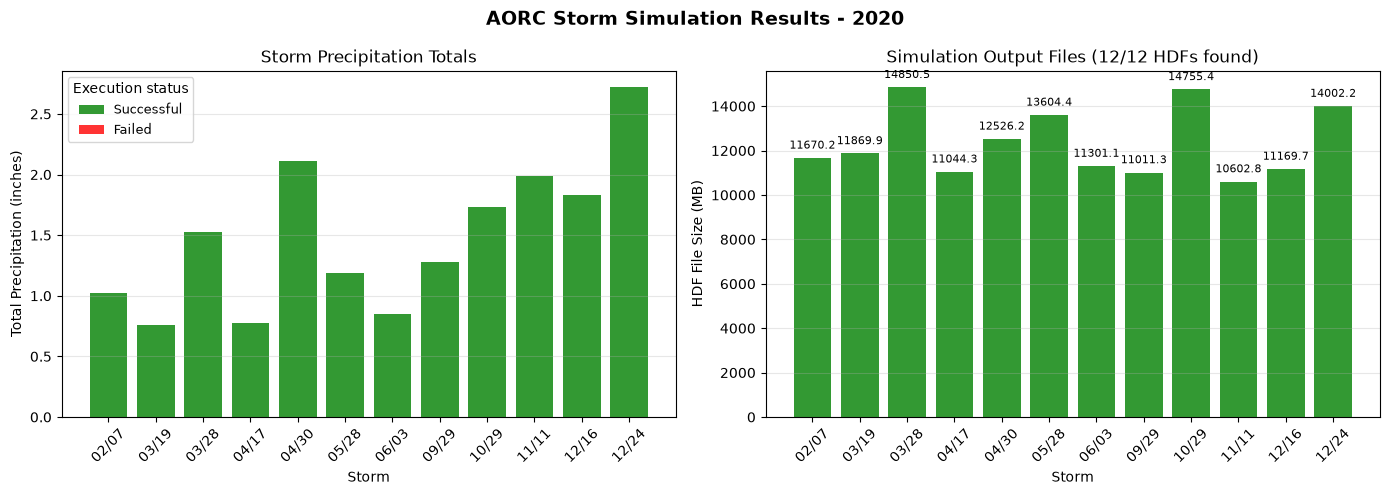
Storm Execution Results
================================================================================
Storm  1 (Feb 07): Plan 07 - HYDRAULICS COMPLETE - 11670.2 MB
Storm  2 (Mar 19): Plan 08 - HYDRAULICS COMPLETE - 11869.9 MB
Storm  3 (Mar 28): Plan 09 - HYDRAULICS COMPLETE - 14850.5 MB
Storm  4 (Apr 17): Plan 10 - HYDRAULICS COMPLETE - 11044.3 MB
Storm  5 (Apr 30): Plan 11 - HYDRAULICS COMPLETE - 12526.2 MB
Storm  6 (May 28): Plan 12 - HYDRAULICS COMPLETE - 13604.4 MB
Storm  7 (Jun 03): Plan 14 - HYDRAULICS COMPLETE - 11301.1 MB
Storm  8 (Sep 29): Plan 16 - HYDRAULICS COMPLETE - 11011.3 MB
Storm  9 (Oct 29): Plan 20 - HYDRAULICS COMPLETE - 14755.4 MB
Storm 10 (Nov 11): Plan 21 - HYDRAULICS COMPLETE - 10602.8 MB
Storm 11 (Dec 16): Plan 22 - HYDRAULICS COMPLETE - 11169.7 MB
Storm 12 (Dec 24): Plan 23 - HYDRAULICS COMPLETE - 14002.2 MB

Hydraulic results complete: 12 of 12 storms
Plan HDF files found: 12 of 12 storms
# Display concise execution status for all generated storm plans.
_display_cols = [
    'plan_number', 'start_time', 'total_depth_in', 'hydraulics_complete',
    'has_errors', 'has_warnings', 'compute_time', 'hdf_size_mb'
]
storm_results_df[_display_cols]
| plan_number | start_time | total_depth_in | hydraulics_complete | has_errors | has_warnings | compute_time | hdf_size_mb | |
|---|---|---|---|---|---|---|---|---|
| 0 | 07 | 2020-02-07 09:00:00 | 1.023 | True | False | False | 11670.151944 | |
| 1 | 08 | 2020-03-19 01:00:00 | 0.763 | True | False | False | 11869.876277 | |
| 2 | 09 | 2020-03-28 08:00:00 | 1.530 | True | False | False | 14850.520406 | |
| 3 | 10 | 2020-04-17 17:00:00 | 0.777 | True | False | False | 11044.261680 | |
| 4 | 11 | 2020-04-30 04:00:00 | 2.115 | True | False | False | 12526.177605 | |
| 5 | 12 | 2020-05-28 12:00:00 | 1.188 | True | False | False | 13604.426073 | |
| 6 | 14 | 2020-06-03 06:00:00 | 0.846 | True | False | False | 11301.050709 | |
| 7 | 16 | 2020-09-29 11:00:00 | 1.278 | True | False | False | 11011.269451 | |
| 8 | 20 | 2020-10-29 07:00:00 | 1.735 | True | False | False | 14755.350674 | |
| 9 | 21 | 2020-11-11 12:00:00 | 1.989 | True | False | False | 10602.846230 | |
| 10 | 22 | 2020-12-16 17:00:00 | 1.834 | True | False | False | 11169.743784 | |
| 11 | 23 | 2020-12-24 12:00:00 | 2.720 | True | False | False | 14002.194917 |
# Summary visualization
if storm_results:
    fig, axes = plt.subplots(1, 2, figsize=(14, 5))

    # Precipitation totals
    ax1 = axes[0]
    storm_dates = [r['start_time'].strftime('%m/%d') for r in storm_results]
    precip_totals = [r['total_depth_in'] for r in storm_results]
    colors = ['green' if r['exec_success'] else 'red' for r in storm_results]
    from matplotlib.patches import Patch
    status_legend = [
        Patch(facecolor='green', alpha=0.8, label='Successful'),
        Patch(facecolor='red', alpha=0.8, label='Failed'),
    ]

    bars = ax1.bar(range(len(storm_results)), precip_totals, color=colors, alpha=0.8)
    ax1.set_xlabel('Storm')
    ax1.set_ylabel('Total Precipitation (inches)')
    ax1.set_title('Storm Precipitation Totals')
    ax1.set_xticks(range(len(storm_results)))
    ax1.set_xticklabels(storm_dates, rotation=45)
    ax1.legend(handles=status_legend, title='Execution status', fontsize=9)
    ax1.grid(True, alpha=0.3, axis='y')

    # HDF sizes
    ax2 = axes[1]
    hdf_sizes = [r.get('hdf_size_mb', 0) for r in storm_results]
    hdf_count = sum(1 for r in storm_results if r.get('hdf_exists'))
    ax2.set_xlabel('Storm')
    ax2.set_ylabel('HDF File Size (MB)')
    ax2.set_title(f'Simulation Output Files ({hdf_count}/{len(storm_results)} HDFs found)')
    ax2.set_xticks(range(len(storm_results)))
    ax2.set_xticklabels(storm_dates, rotation=45)
    ax2.grid(True, alpha=0.3, axis='y')

    if any(size > 0 for size in hdf_sizes):
        hdf_bars = ax2.bar(range(len(storm_results)), hdf_sizes, color=colors, alpha=0.8)
        y_offset = max(hdf_sizes) * 0.02
        for bar, result in zip(hdf_bars, storm_results):
            if result.get('hdf_exists'):
                ax2.text(bar.get_x() + bar.get_width()/2, bar.get_height() + y_offset,
                         f"{result['hdf_size_mb']:.1f}", ha='center', va='bottom', fontsize=8)
            else:
                ax2.text(bar.get_x() + bar.get_width()/2, y_offset, 'No HDF',
                         ha='center', va='bottom', fontsize=8, rotation=90, color='dimgray')
    else:
        ax2.bar(range(len(storm_results)), [0] * len(storm_results), color='lightgray', alpha=0.25)
        ax2.set_ylim(0, 1)
        ax2.set_yticks([])
        ax2.set_ylabel('HDF File Size (MB)\n(no HDF results found)')
        ax2.grid(False)
        ax2.spines['left'].set_visible(False)
        ax2.text(0.5, 0.55,
                 'No plan HDF result files were found\n'
                 'Storms were cataloged and plans were created, but file sizes are unavailable.\n'
                 'Run or verify HEC-RAS execution to populate this panel.',
                 transform=ax2.transAxes, ha='center', va='center', fontsize=10,
                 bbox=dict(boxstyle='round,pad=0.5', facecolor='white', edgecolor='gray', alpha=0.9))

    plt.suptitle(f'AORC Storm Simulation Results - {YEAR}', fontsize=14, fontweight='bold')
    plt.tight_layout()
    plt.show()
Data Export Summary
All precipitation data has been exported to the project's Precipitation/ folder:
# List all exported files
print(f"Precipitation Data Export Summary")
print(f"Location: {precip_folder}")
print("="*70)

# Count files
nc_files = list(precip_folder.glob("storm_*.nc"))
png_files = list(hyetograph_folder.glob("*.png"))
csv_files = list(precip_folder.glob("*.csv"))
summary_files = list(precip_folder.glob("storm_catalog_summary.png"))

print(f"\nExported Files:")
print(f"  Storm Catalog CSV:    {len(csv_files)} file(s)")
print(f"  NetCDF Precip Files:  {len(nc_files)} file(s)")
print(f"  Hyetograph PNGs:      {len(png_files)} file(s)")
print(f"  Summary Plot:         {len(summary_files)} file(s)")

# Calculate total size
total_size = sum(f.stat().st_size for f in nc_files + png_files + csv_files + summary_files)
print(f"\nTotal Size: {total_size / 1e6:.1f} MB")

print(f"\nFolder Structure:")
print(f"  Precipitation/")
print(f"    storm_catalog.csv")
print(f"    storm_catalog_summary.png")
print(f"    storm_YYYYMMDD.nc  (x{len(nc_files)})")
print(f"    hyetographs/")
print(f"      storm_YYYYMMDD_hyetograph.png  (x{len(png_files)})")
Precipitation Data Export Summary
Location: C:\Users\bill\.config\superpowers\worktrees\ras-commander-pr-docs\codex-pr251-timeseries-alignment\examples\working\example_projects_901_aorc_catalog\BaldEagleCrkMulti2D_AORC_2020_901\Precipitation
======================================================================

Exported Files:
  Storm Catalog CSV:    1 file(s)
  NetCDF Precip Files:  12 file(s)
  Hyetograph PNGs:      12 file(s)
  Summary Plot:         1 file(s)

Total Size: 3.6 MB

Folder Structure:
  Precipitation/
    storm_catalog.csv
    storm_catalog_summary.png
    storm_YYYYMMDD.nc  (x12)
    hyetographs/
      storm_YYYYMMDD_hyetograph.png  (x12)
Summary
This notebook demonstrated a complete AORC precipitation workflow:
- Project Setup - Extracted example and created labeled working copy (with cleanup)
- Bounds Calculation - Used
HdfProject.get_project_bounds_latlon()with 50% buffer - Storm Catalog - Generated catalog using USGS standard parameters
- Precipitation Export - Downloaded AORC data, exported CSV catalog and hyetograph plots
- Plan Creation - Created HEC-RAS plans with precipitation written to HDF
- Parallel Execution - Ran all plans with 2 cores and 3 workers and checked compute-message status
Key Functions
| Function | Description |
|---|---|
HdfProject.get_project_bounds_latlon() |
Get buffered bounds from geometry HDF |
PrecipAorc.get_storm_catalog() |
Generate catalog of precipitation events |
PrecipAorc.download() |
Download AORC data to NetCDF |
PrecipAorc.create_storm_plans() |
Create plans with precipitation in HDF |
RasCmdr.compute_parallel() |
Execute plans in parallel |
Optional: Process All Available AORC Years (1979-2024)
The following cell processes storm catalogs for all available years in the AORC dataset. Each year gets its own project folder with full precipitation data export.
Warning: This can take a very long time and generate many files!
# OPTIONAL: Process all AORC years
# Set PROCESS_ALL_YEARS = True to run

PROCESS_ALL_YEARS = False  # Set to True to run

if PROCESS_ALL_YEARS:
    import time

    # AORC is available from 1979-present for CONUS
    ALL_YEARS = list(range(1979, 2025))  # 1979-2024

    print(f"Processing {len(ALL_YEARS)} years of AORC data")
    print(f"Configuration: {NUM_CORES} cores x {MAX_WORKERS} workers per year")
    print("="*80)

    # Clean up this notebook's existing AORC folders first
    print("\nCleaning up existing AORC folders...")
    existing_folders = list(base_project.parent.glob(f"{PROJECT_NAME}_AORC_*_{SUFFIX}*"))
    removed_folders = 0
    for folder in existing_folders:
        if folder.is_dir():
            print(f"  Removing: {folder.name}")
            if RasUtils.remove_with_retry(folder, ras_object=None):
                removed_folders += 1
            else:
                raise PermissionError(f"Unable to remove stale notebook 901 folder: {folder}")
    print(f"  Removed {removed_folders} existing folders")

    all_year_results = {}

    for year in ALL_YEARS:
        try:
            print(f"\n{'='*80}")
            print(f"PROCESSING YEAR: {year}")
            print(f"{'='*80}")

            # Create year-specific working folder
            year_folder = base_project.parent / f"{PROJECT_NAME}_AORC_{year}_{SUFFIX}"
            print(f"  Creating: {year_folder.name}")
            shutil.copytree(base_project, year_folder)

            # Initialize
            ras_year = init_ras_project(year_folder, RAS_VERSION)

            # Generate storm catalog
            print(f"  Generating storm catalog for {year}...")
            catalog = PrecipAorc.get_storm_catalog(
                bounds=bounds,
                year=year,
                inter_event_hours=8.0,
                min_depth_inches=0.75,
                buffer_hours=48
            )
            print(f"  Found {len(catalog)} storms")

            if len(catalog) == 0:
                print(f"  No storms found for {year}, skipping")
                all_year_results[year] = {'storms': 0, 'plans': 0, 'success': 0, 'elapsed_min': 0}
                continue

            # Create precipitation folder structure
            year_precip_folder = year_folder / "Precipitation"
            year_precip_folder.mkdir(exist_ok=True)
            year_hyetograph_folder = year_precip_folder / "hyetographs"
            year_hyetograph_folder.mkdir(exist_ok=True)

            # Export storm catalog to CSV
            catalog.to_csv(year_precip_folder / "storm_catalog.csv", index=False)
            print(f"  Exported storm catalog CSV")

            # Download precipitation and create plans
            print(f"  Downloading precipitation and creating plans...")
            year_plan_results = PrecipAorc.create_storm_plans(
                storm_catalog=catalog,
                bounds=bounds,
                template_plan=TEMPLATE_PLAN,
                precip_folder="Precipitation",
                ras_object=ras_year,
                download_data=True
            )

            # Generate hyetographs for each storm
            print(f"  Generating hyetograph plots...")
            for idx, storm in catalog.iterrows():
                storm_id = storm['storm_id']
                date_str = storm['start_time'].strftime('%Y%m%d')
                precip_file = year_precip_folder / f"storm_{date_str}.nc"

                if precip_file.exists():
                    ds = xr.open_dataset(precip_file)
                    da = ds['APCP_surface']
                    hourly_mean = da.mean(dim=['x', 'y']).values
                    times = pd.to_datetime(da.time.values)

                    fig, ax = plt.subplots(figsize=(12, 5))
                    ax.bar(times, hourly_mean, width=0.03, color='steelblue', alpha=0.8)
                    ax.set_title(f"Storm {storm_id}: {storm['start_time'].strftime('%B %d, %Y')}\n"
                                 f"Total: {storm['total_depth_in']:.2f} in | Peak: {storm['peak_intensity_in_hr']:.3f} in/hr",
                                 fontsize=12, fontweight='bold')
                    ax.set_xlabel('Date/Time')
                    ax.set_ylabel('Precipitation Rate (mm/hr)')
                    ax.tick_params(axis='x', rotation=45)
                    ax.grid(True, alpha=0.3)
                    plt.tight_layout()
                    plt.savefig(year_hyetograph_folder / f"storm_{date_str}_hyetograph.png", dpi=150, bbox_inches='tight')
                    plt.close()
                    ds.close()

            # Create summary plot
            fig, axes = plt.subplots(1, 3, figsize=(15, 4))
            axes[0].bar(catalog['storm_id'], catalog['total_depth_in'], color='steelblue', alpha=0.8)
            axes[0].set_xlabel('Storm ID')
            axes[0].set_ylabel('Total Depth (in)')
            axes[0].set_title('Precipitation Totals')
            axes[1].bar(catalog['storm_id'], catalog['peak_intensity_in_hr'], color='darkorange', alpha=0.8)
            axes[1].set_xlabel('Storm ID')
            axes[1].set_ylabel('Peak Intensity (in/hr)')
            axes[1].set_title('Peak Intensity')
            axes[2].bar(catalog['storm_id'], catalog['duration_hours'], color='green', alpha=0.8)
            axes[2].set_xlabel('Storm ID')
            axes[2].set_ylabel('Duration (hours)')
            axes[2].set_title('Storm Duration')
            plt.suptitle(f'Storm Catalog Summary - {year}', fontsize=14, fontweight='bold')
            plt.tight_layout()
            plt.savefig(year_precip_folder / "storm_catalog_summary.png", dpi=150, bbox_inches='tight')
            plt.close()

            # Get plan numbers and execute
            plan_numbers = year_plan_results[year_plan_results['status'] == 'success']['plan_number'].tolist()
            print(f"  Created {len(plan_numbers)} plans")

            if len(plan_numbers) == 0:
                print(f"  No successful plans for {year}, skipping execution")
                all_year_results[year] = {'storms': len(catalog), 'plans': 0, 'success': 0, 'elapsed_min': 0}
                continue

            # Execute in parallel
            print(f"  Executing {len(plan_numbers)} plans ({NUM_CORES} cores x {MAX_WORKERS} workers)...")
            start_time = time.time()

            exec_results = RasCmdr.compute_parallel(
                plan_number=plan_numbers,
                max_workers=MAX_WORKERS,
                num_cores=NUM_CORES,
                ras_object=ras_year,
                overwrite_dest=True
            )

            elapsed = time.time() - start_time
            success = sum(1 for v in exec_results.values() if v)

            all_year_results[year] = {
                'storms': len(catalog),
                'plans': len(plan_numbers),
                'success': success,
                'elapsed_min': elapsed / 60
            }

            print(f"  Completed: {success}/{len(plan_numbers)} in {elapsed/60:.1f} minutes")

        except Exception as e:
            print(f"  ERROR processing {year}: {e}")
            all_year_results[year] = {'error': str(e)}

    # Final summary
    print("\n" + "="*80)
    print("ALL YEARS SUMMARY")
    print("="*80)

    total_storms = 0
    total_success = 0
    for year, res in sorted(all_year_results.items()):
        if 'error' in res:
            print(f"{year}: ERROR - {res['error']}")
        else:
            total_storms += res['storms']
            total_success += res['success']
            print(f"{year}: {res['storms']} storms, {res['success']}/{res['plans']} success, {res['elapsed_min']:.1f} min")

    print(f"\nTOTAL: {total_storms} storms, {total_success} successful simulations")
else:
    print("Set PROCESS_ALL_YEARS = True to process all AORC years (1979-2024)")
    print("Warning: This will take many hours and create ~50 project folders!")
    print("\nEach year will include:")
    print("  - Precipitation/storm_catalog.csv")
    print("  - Precipitation/storm_catalog_summary.png")
    print("  - Precipitation/storm_YYYYMMDD.nc (per storm)")
    print("  - Precipitation/hyetographs/storm_YYYYMMDD_hyetograph.png (per storm)")
Set PROCESS_ALL_YEARS = True to process all AORC years (1979-2024)
Warning: This will take many hours and create ~50 project folders!

Each year will include:
  - Precipitation/storm_catalog.csv
  - Precipitation/storm_catalog_summary.png
  - Precipitation/storm_YYYYMMDD.nc (per storm)
  - Precipitation/hyetographs/storm_YYYYMMDD_hyetograph.png (per storm)